

Description
- A-B 2711PC-T10C4D8 | Original PanelView Plus Spare
Unboxing & Physical Snapshot
- Brand & Model: Allen-Bradley (A-B) 2711PC-T10C4D8
- Manufacturer: Rockwell Automation
- Product Family: PanelView Plus 6 Compact Terminals
- Product Type: Operator interface terminal (HMI) with color touch display for industrial machine control applications. The unit supports Ethernet and serial communication and operates from 24V DC power.
- Primary Application: Machine operator interfaces, PLC visualization, production equipment monitoring, packaging systems, and industrial control panels.
- Physical Dimensions (Approximate W × H × D):
- Front bezel: approximately 329 × 248 × 55 mm
- Cutout requirement: approximately 305 × 224 mm
- Display area: 211 × 158 mm
- Estimated Shipping Weight: Approximately 2.5–3 kg with protective packaging.
- What’s in the Box:
- Allen-Bradley PanelView Plus 6 Compact terminal
- Mounting clips
- Power connection interface
- Communication ports (Ethernet / serial)
- Product identification label
- Protective ESD packaging
- Export shipping carton
Product Introduction
Structure B — Architecture Hook
The Allen-Bradley 2711PC-T10C4D8 is installed as the operator-facing layer of a machine control architecture, providing graphical interaction between personnel and PLC-based automation systems. It connects with industrial controllers through Ethernet and serial communication interfaces while running FactoryTalk View Machine Edition applications.
This PanelView Plus 6 Compact terminal is a configured automation asset, not simply a display replacement. Verify the application runtime file, firmware revision, communication driver settings, and controller addressing before installation (—which is critical when replacing HMIs on production equipment with validated operating procedures). Inspect the touchscreen surface, mounting gasket, and rear connectors before energizing.
Core Technical Specifications
| Parameter | Value |
|---|---|
| Manufacturer | Allen-Bradley / Rockwell Automation |
| Model Number | 2711PC-T10C4D8 |
| Product Family | PanelView Plus 6 Compact |
| Display Size | 10.4 inch |
| Display Type | Color active-matrix TFT |
| Touch Input | Analog resistive touchscreen |
| Resolution | 640 × 480 pixels |
| Brightness | Approx. 300 cd/m² |
| Operating System | Windows CE 6.0 |
| Application Software | FactoryTalk View Machine Edition |
| User Memory | 512 MB RAM / 512 MB nonvolatile memory |
| External Storage | SD card, USB storage support |
| Communication Ports | Ethernet, RS-232, USB |
| Input Voltage | 24 VDC nominal |
| Power Consumption | Approx. 39 W typical / 70 W maximum |
| Heat Dissipation | Approx. 240 BTU/hr |
| Front Protection Rating | IP66 / NEMA Type 4X |
| Operating Temperature | 0°C to 55°C range |
| Storage Temperature | Down to -25°C |
| Mounting Method | Panel cutout mounting |
| Weight | Approx. 2.5 kg |
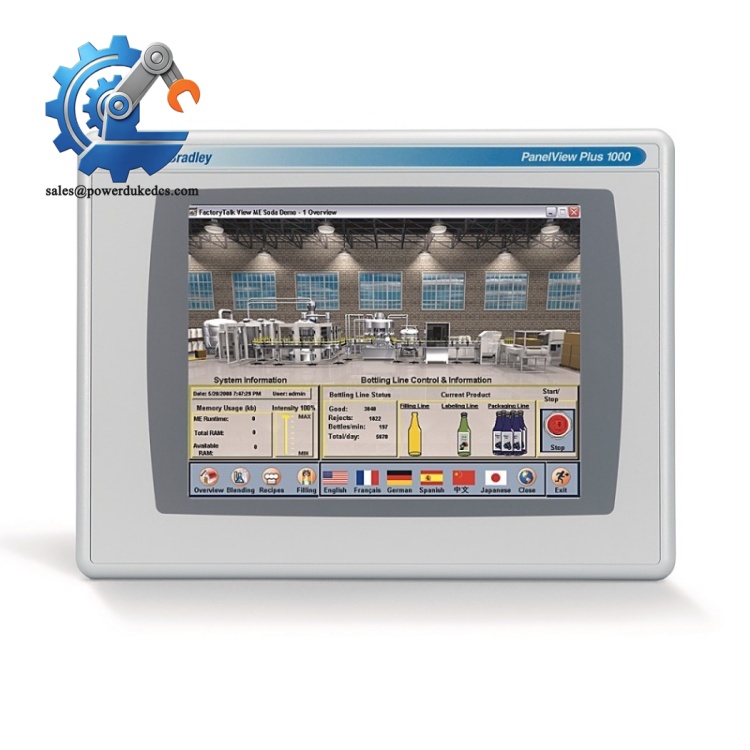
A-B 2711PC-T10C4D8
The 2711PC-T10C4D8 relies on application software and communication configuration stored separately from the physical terminal hardware. Preserve the FactoryTalk View project backup before replacing the unit.
? Global Compliance & Industry Certifications
Expected regulatory considerations for the Allen-Bradley 2711PC-T10C4D8 include:
- CE Mark — applicable for compliant industrial machine installations.
- UL/cUL Listed / Recognized — associated with industrial control panel approval requirements.
- NEMA Type 4X / IP66 Front Protection — provides protection against dust and water exposure on the operator-facing surface.
- RoHS Compliance — dependent on production revision and regional requirements.
- ATEX/IECEx — not a standalone hazardous-area HMI; suitability depends on the complete certified enclosure and installation.
- Marine Approvals (DNV GL) — not standard unless supplied as part of an approved marine automation package.
For operator interface equipment, enclosure certification matters because the front panel is exposed to cleaning procedures, dust, moisture, and industrial contaminants.
Verify specific lot certifications with OEM.
? Long-Term Storage & Asset Preservation Guide
Store the 2711PC- inside the original protective packaging with the display surface covered. The touchscreen layer and LCD assembly should not be exposed to pressure during storage.
Maintain warehouse humidity below 60% RH. Moisture can affect connector contacts, internal boards, and display electronics over extended periods.
Before installation:
- Inspect the touchscreen overlay for scratches, cracks, or pressure marks.
- Check Ethernet, USB, and serial ports for contamination.
- Verify firmware revision and FactoryTalk View compatibility.
- Confirm internal battery condition if stored for extended periods.
- Power up gradually after long storage to confirm display and communication functions.
Keep the original configuration files with the physical spare. A powered HMI without the correct application file will not restore machine operation.
Physical Installation Prerequisites
- Install in the approved panel cutout dimensions.
- Secure using the supplied mounting clips.
- Verify gasket compression for maintaining IP/NEMA protection.
- Connect protective earth where required by panel design.
- Use a regulated 24 VDC power supply.
- Confirm Ethernet shielding and grounding practices.
- Maintain cabinet ventilation around the rear electronics.
- Leave sufficient clearance behind the terminal for cable routing and heat removal.
Do not mount the terminal near high-temperature components or heavy electromagnetic noise sources without proper separation.
Buyer’s FAQ (Logistics & Compliance Focus)
Q1. What HS Tariff Code is commonly used for Allen-Bradley 2711PC-?
A: The final Harmonized System classification depends on customs interpretation and the declared function of the HMI terminal. Industrial operator panels may fall under electrical control equipment categories. Confirm the final HS code with your customs broker.
Q2. Does Country of Origin affect 2711PC- import documentation?
A: Yes. COO information supports customs clearance, customer asset records, and equipment traceability. Keep the OEM label, commercial invoice, packing list, and receiving inspection documents together.
Q3. Is shipping insurance recommended for this PanelView terminal?
A: Recommended. The LCD display, touchscreen layer, and internal electronics can suffer hidden damage from impact, vibration, or moisture during transportation.
Q4. Does the 2711PC- include the latest firmware pre-loaded?
A: The terminal contains operating firmware, but the installed revision depends on the production date. Verify firmware compatibility and FactoryTalk View ME application requirements before commissioning.
Lifecycle Note: The Allen-Bradley 2711PC- has been discontinued by Rockwell Automation. The listed replacement category includes newer PanelView Plus models; verify application migration requirements before replacement.



 Start Chat


