

Description
- Model: CI627A
- Brand: ABB
- Series: Advant / AC 800M Communication Interface
- Core Function: Connects the controller to AF100 communication networks
- Type: AF100 Communication Interface Module
- Key Specs: AF100 interface; ABB AC 800M/Advant system application; product ID 3BSE017457R1
- Condition: New Original (New Surplus), if supplied as new surplus
Product Introduction
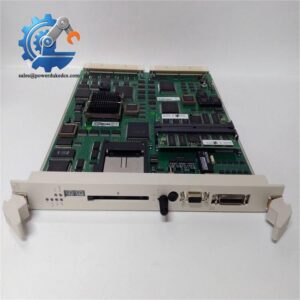
ABB CI627A 3BSE017457R1 is an AF100 Communication Interface used in ABB industrial control systems. ABB’s product page identifies the exact product ID as 3BSE017457R1 and the type designation as CI627A.
For maintenance teams, this is a communication-path spare rather than a general-purpose I/O card. The module is associated with ABB Advant/AC 800M control environments, and third-party technical listings identify it as a communication interface for AF100 networks. Exact firmware, rack position, bus configuration, and system compatibility should be checked against the installed controller documentation before replacement.
Key Technical Specifications
| Parameter | Specification |
|---|---|
| Manufacturer | ABB |
| Model | CI627A |
| Product ID | 3BSE017457R1 |
| Product Type | AF100 Communication Interface |
| Communication Function | network interface |
| Application | ABB Advant / AC 800M control systems |
| System Role | Controller communication interface |
| Mounting | ABB controller/rack system |
| Configuration | System-specific |
| Firmware | Verify installed revision |
| Operating Environment | Refer to applicable ABB hardware manual |
| Weight | Verify from current ABB documentation |
| Replacement Reference | 3BSE017457R1 |
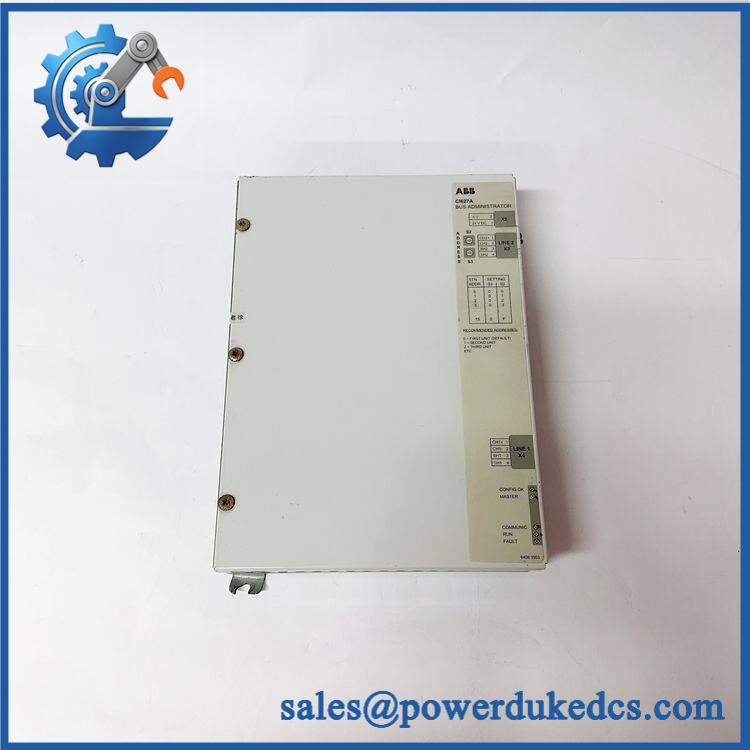
ABB CI627A 3BSE017457R1
ABB’s own product page confirms the product identity, while available supplier records describe it as an Communication Interface. Some third-party listings publish conflicting electrical and communications specifications, so unsupported figures should not be used for engineering selection.
Installation & Configuration Guide
Estimated replacement time: 30–45 minutes, assuming the replacement is an exact hardware match and the configuration backup is available.
Stage 1: Pre-Installation — About 10 minutes
⚠️ Safety first.
- Notify the production team of the planned shutdown.
- Put the control system into its approved safe state.
- Disconnect control-system power according to the site’s LOTO procedure.
- Verify that hazardous voltage is absent.
- Wear an ESD wrist strap before handling the module.
Prepare:
- ESD wrist strap and ESD mat
- Suitable screwdriver
- Calibrated multimeter
- Cable labels
- Marker
- Phone or camera
- Configuration backup
Before removal, photograph the old module.
Capture:
- Module front panel
- Slot position
- Communication cable
- Terminal or connector arrangement
- Address/configuration switches, if present
- Rack layout
- Nameplate and serial number
Stage 2: Remove Existing Module — About 8 minutes
- Record the existing CI627A identification.
- Label connected cables.
- Disconnect the communication connection.
- Release the module’s mechanical retaining mechanism.
- Remove the module vertically and carefully.
- Inspect the backplane connector.
- Check for bent pins, contamination, or physical damage.
Do not touch connector contacts unnecessarily.
A communication module can look physically perfect while a damaged connector causes intermittent bus faults.
Stage 3: Install Replacement — About 10 minutes
- Verify 3BSE017457R1 against the old nameplate.
- Confirm that the replacement type designation is CI627A.
- Check the connector and module housing.
- Insert the module into the correct rack position.
- Secure the module according to the ABB rack procedure.
- Reconnect the communication cable.
- Check cable shielding and grounding.
- Compare the installation with the photographs taken before removal.
Do not change rack position casually. The actual slot and system configuration must match the installed AC 800M/Advant architecture.
Stage 4: Power-On & Communication Test — About 10–15 minutes
- Recheck all connections.
- Restore power following the approved startup sequence.
- Observe module status indications.
- Confirm that the controller recognizes the communication interface.
- Check the communication status.
- Review diagnostic messages.
- Verify communication with connected nodes.
- Confirm that the control application returns to normal operation.
- Monitor the system for at least 30 minutes.
Record:
- Replacement date
- Module serial number
- Firmware revision
- Rack/slot position
- Communication configuration
- Diagnostic status
- Test result
If communication does not return, stop before changing configuration. First compare the replacement firmware and configuration with the original module.
FAQ
1. What is ABB 3BSE017457R1?
It is an ABB Communication Interface. ABB’s product record identifies 3BSE017457R1 as and describes the catalog item as an Communication Interface.
2. Is an I/O module?
No. Treat it as a communication interface, not a standard analog or digital I/O module. Its job is to provide the applicable communication path within the ABB control architecture.
3. Can I replace CI627 with directly?
Not without checking the installed system.
Some supplier documentation identifies as a newer version associated with the older CI627 family, but hardware, firmware, and configuration compatibility must be confirmed for the specific controller and software revision.
4. My replacement powers up but communication fails. What should I check?
Use this order:
- Confirm the exact product number.
- Check rack/slot position.
- Compare firmware revisions.
- Check communication cable and connector.
- Verify network configuration.
- Check controller diagnostics.
- Compare the old configuration backup with the replacement.
Do not immediately assume the new module is defective. Configuration mismatch is often easier to overlook than a hardware fault.
5. Can I keep one as a spare?
Yes, if a failed communication interface can stop a production controller.
Recommended starting inventory:
- Critical system: Min 1 / Max 1–2
- Reliable supplier with short lead time: Min 0–1 / Max 1
- Long lead time: Keep 1 on-site
- EOL or aging system: Evaluate a last-time-buy
For this type of slow-moving spare, one insurance unit is often more economical than carrying several pieces.
6. What information should I send when requesting a quotation?
Send:
- ABB:
- Product ID: 3BSE017457R1
- Quantity
- Nameplate photograph
- Existing controller/system model
- Firmware revision, if available
- Required condition
- Required delivery date
Ask the supplier for actual stock photographs, serial-number information, test evidence, warranty terms, and packing details. A generic catalog photograph is not enough for a high-value communication spare.
7. Is the part available as new original stock?
Current supplier listings show 3BSE017457R1 / offered as new stock, including listings that state a 12-month warranty. That is supplier inventory information, not an ABB factory-stock guarantee. Confirm actual stock, condition, serial number, and warranty before purchase.



 Start Chat


