

Description
- Brand: ABB
- Full Model Number: CI858K01
- Part Number: 3BSE018135R1
- Product Family: AC 800M
- Product Type: DriveBus Communication Interface Package
- Lifecycle Status: Legacy installed-base communication component
- Core Function in System: Connects AC 800M controllers with ABB Drives and compatible DriveBus devices
- Top 3 Hardcore Specs: CI858 communication interface; TP858 baseplate; 3 optical interfaces
- DriveBus Interface: Optical connection to ABB Drives
- CEX-Bus: Controller-side connection through the AC 800M CEX-Bus
- Power: Supplied from the processor unit through CEX-Bus; no separate external power supply required
- Tool Interface: Dedicated connection for firmware servicing with ABB drive tools
- Package Contents: CI858 communication interface + TP858 baseplate
- Approx. Size: 127.5 × 185–186 × 59 mm
- Approx. Net Weight: 0.55–0.70 kg, depending on whether package/baseplate is included
- Condition & Lead Time: Tested inventory or factory-sealed stock; emergency dispatch subject to confirmed availability
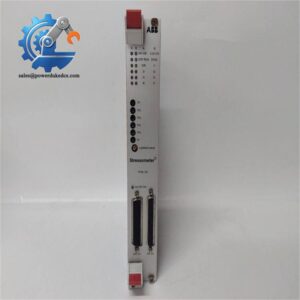
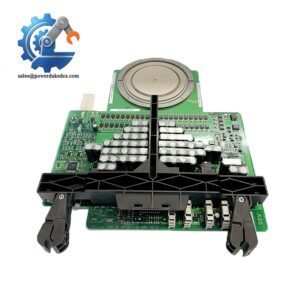
ABB’s product catalog identifies CI858K01 / 3BSE018135R1 as a DriveBus Interface package containing the CI858 communication interface and TP858 baseplate. ABB lists it under AC 800M communication interfaces for DriveBus.
Module 3: Technical Intro & Downtime Impact
A failed DriveBus interface can disconnect an AC 800M controller from multiple ABB drives at once. The resulting fault may appear as missing drive communications, stale status data, lost commands, or multiple downstream communication alarms, extending troubleshooting well beyond a single drive. ABB CI858K01 3BSE018135R1 is specifically designed as the DriveBus interface between the AC 800M control environment and ABB DriveBus devices.
The hardware architecture is straightforward but important during an outage. The package contains the CI858 communication interface and TP858 baseplate; the CI858 has three optical connectors, including the DriveBus connection, while the controller-side power is provided through the CEX-Bus from the processor unit, so no separate external power supply is required. A dedicated tool connection is provided for firmware servicing with ABB DriveDebug or DriveWindow. That makes connector integrity, baseplate compatibility, optical-link cleanliness, and correct CEX-Bus installation the primary MTTR concerns.
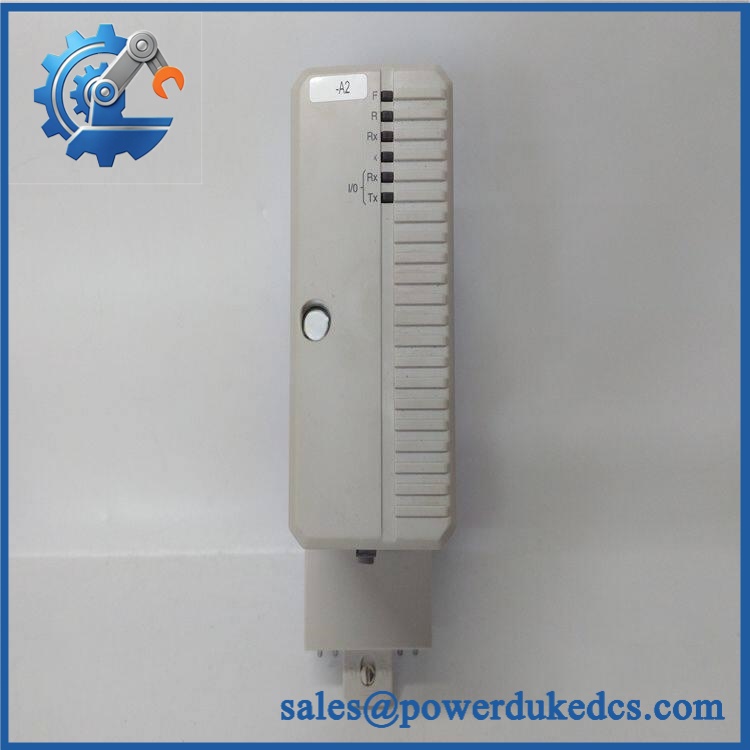
ABB CI858K01 3BSE018135R1
Module 4: Dynamic Emergency Swap & Configuration Guide
1. Pre-Swap Prep — map the DriveBus topology before isolation
Put the affected AC 800M control section and connected drives into the plant-approved maintenance state. Follow the site’s LOTO procedure where required. Record the CI858K01 / 3BSE018135R1 identification, controller slot, TP858 baseplate, all optical connections, CEX-Bus arrangement, and current diagnostic indications. Photograph each fiber connection before removal. Confirm the replacement includes the appropriate CI858 + TP858 package if the complete K01 assembly is being replaced. ABB identifies TP858 as the 60 mm-wide baseplate supplied with CI858K01.
2. Removal — protect the optical interfaces and CEX-Bus connection
After the approved isolation procedure, disconnect the optical DriveBus cables without bending or contaminating the fiber ends. Label each connector by drive or network segment. Release the from the baseplate and disconnect the controller-side interface according to the AC 800M hardware procedure. Inspect the baseplate contacts and fiber interfaces for contamination, scratches, or mechanical damage. Do not expose unused optical connectors unnecessarily.
3. Installation & Configuration — reproduce the original DriveBus topology
Install the replacement onto the original baseplate, or replace the complete K01 package when the baseplate itself is being changed. Verify that the controller-side CEX-Bus connection is seated correctly. Reconnect the optical DriveBus segments to their original ports and preserve the original network topology. Because the receives its operating power through the processor unit via CEX-Bus, investigate the CEX-Bus and processor-side power path before condemning a replacement interface for a no-power condition. The also uses a dedicated tool interface for firmware servicing; ABB states that firmware cannot be downloaded to the through Ethernet.
4. Power-On Self-Test (POST) — verify every drive segment
Restore power and observe the and AC 800M diagnostic indications. Confirm that the communication interface initializes correctly and that all expected DriveBus nodes return to normal communication. Check drive status, control commands, feedback values, alarms, and diagnostic information at the controller level. Where the installation uses multiple optical DriveBus connections, test each segment individually rather than accepting a single healthy link as proof that the complete communication path has recovered.
Module 5: Quality Assurance & Testing SOP
The CI858K01 should be tested as a network-interface assembly, with particular attention to optical communications and CEX-Bus power.
- OEM Anti-Counterfeit Visual Inspection: Verify ABB markings, , 3BSE018135R1, identification, baseplate markings, connector layout, and hardware revision.
- Serial and Identity Traceability: Record the and package identification and photograph the complete nameplate.
- Mechanical Inspection: Check the baseplate, mounting hardware, card guides, connector interfaces, and locking mechanism.
- Optical-Port Inspection: Examine all three optical connectors for contamination, cracked housings, damaged ferrules, or abnormal wear.
- CEX-Bus Interface Check: Inspect the controller-side connection for bent, contaminated, or damaged contacts.
- Power-On Self-Test (POST): Install on a verified test setup and confirm normal initialization through the available status and diagnostic indications.
- CEX-Bus Power Verification: Confirm the receives the expected operating power through the processor unit/CEX-Bus arrangement rather than applying an external supply that the design does not require.
- DriveBus Optical Test: Verify optical communication on each applicable port using a known-good ABB DriveBus device or approved test fixture.
- Multi-Node Communication Test: Connect representative DriveBus nodes and confirm controller-to-drive data exchange.
- Command/Feedback Test: Send controlled drive commands and verify corresponding status and feedback values at the AC 800M controller.
- Fault Simulation: Where the laboratory setup permits, interrupt an optical segment and confirm expected communication diagnostics.
- Port Isolation Test: Test the three optical interfaces independently where the fixture supports separate segment verification.
- Firmware Service Interface Check: Verify the dedicated tool connection used for firmware servicing with the appropriate ABB engineering tool. Firmware servicing should not be attempted through Ethernet.
- Extended Communication Test: Operate multiple DriveBus nodes for an extended period while monitoring packet/communication stability, diagnostic events, and unexpected resets.
- Final QC Record: Document part number, hardware revision, optical-port test results, CEX-Bus verification, communication results, photographs, and technician sign-off.
ABB’s product information confirms that the K01 package combines with , while technical documentation identifies three optical connections and a dedicated tool interface.
Module 6: Maintenance & Reliability FAQ
1. Is the 3BSE018135R1 a direct drop-in replacement, or does it require a firmware flash?
For a matching AC 800M installation, / 3BSE018135R1 is the complete DriveBus interface package and includes the communication interface plus baseplate. Firmware compatibility still needs to be checked against the installed AC 800M configuration. ABB also specifies a dedicated tool interface for downloading firmware to the and states that firmware cannot be downloaded through Ethernet.
2. Is it safe to hot-swap this communication interface while the system is running?
Do not assume live replacement is permitted. The is connected to the controller through the CEX-Bus and to potentially active DriveBus segments through optical interfaces. Use the approved AC 800M maintenance procedure for the specific controller and cabinet arrangement before removing the unit or baseplate.
3. Will replacing the cause my current drive program to be lost?
Replacing the communication interface does not normally constitute replacement of the AC 800M controller application. However, DriveBus configuration, connected-node definitions, communication settings, and controller-side hardware configuration should be backed up before intervention. Verify the recovered network against the original configuration after installation.
4. What should I verify after installing the replacement?
Confirm CEX-Bus recognition first, then verify each optical DriveBus connection. Check all expected drive nodes, command paths, status feedback, alarms, and diagnostic states. A healthy optical link LED is not enough; the AC 800M controller must exchange valid process and drive data across the complete network.
5. What are the warranty terms if the unit fails post-installation?
Warranty coverage should be tied to the supplied serial number and documented stock condition. Hardware failures should be distinguished from damage caused by contaminated optical connectors, improper fiber handling, incorrect CEX-Bus installation, electrical damage, ESD, or configuration errors. The exact warranty period and return procedure should be stated on the quotation before purchase.



 Start Chat


