

Description
Module 2: The 10-Second Procurement Snapshot
- Brand: ABB Robotics
- Full Model Number: DSQC202 / YB560103-AC
- Lifecycle Status: Legacy / Obsolete
- Core Function: Memory expansion for legacy ABB robot controllers
- Top 3 Technical Specs: S2/S3 controller compatibility; RAM/EPROM memory; proprietary ABB backplane interface
- Stock & Condition: New Surplus / Tested inventory; physical stock confirmation required
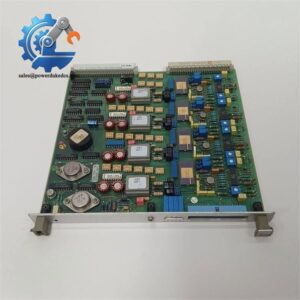
Available product records identify DSQC202 as a YB560103-AC computer/memory board for legacy ABB S2 and S3 robot control systems.
Module 3: Supply Chain & Technical Deep Dive
A failed memory board in an older ABB robot can create a disproportionate sourcing problem. The controller may still contain the original application hardware, yet one discontinued board can become the reason a production cell remains offline. DSQC202 / YB560103-AC is identified in available records as a memory expansion board for ABB S2 and S3 robot controllers, with RAM and EPROM used for robot programs and system data.
For TCO, retaining the existing controller architecture can avoid a much larger migration project. That said, memory capacity requires careful qualification. One current third-party record lists 128 KB/256 KB configurations depending on chip population, but this is not sufficient evidence for a universal specification. Verify the actual board revision and memory population against the installed controller before purchase.
Module 4: Migration, Compatibility & Field Traps
Replacement Matrix
| Replacement Category | Assessment |
|---|---|
| Drop-in Replacement | Applicable only to a matching DSQC202 / YB560103-AC configuration |
| Software Compatible | Designed for the corresponding legacy S2/S3 controller environment |
| Hardware Modification | Normally not required for an exact board replacement |
| Modern Controller Replacement | Not a direct substitute for DSQC202 |
| Engineering Approval | Required before installation |
⚠️ Field Trap 1: Memory Population Matters
Do not identify this board from the DSQC number alone.
Available records indicate that memory capacity can vary with the installed chip population.
Before ordering:
- Photograph the complete board.
- Record the YB560103-AC part marking.
- Photograph every memory chip.
- Record the chip markings.
- Check the existing controller model.
- Compare the replacement board layout.
A visually similar memory board may not contain the same memory configuration.
⚠️ Field Trap 2: Data Retention
A memory board is different from an ordinary I/O card.
Before removing the old board:
- Back up the robot program where the controller permits it.
- Record system parameters.
- Document memory configuration.
- Confirm whether battery-backed retention is used.
- Follow the ABB controller service procedure.
Never assume that installing another memory board automatically restores the original application.
⚠️ Field Trap 3: Legacy Controller Identification
DSQC202 is associated with older ABB robot platforms. Available records specifically identify S2 and S3 controller compatibility.
If the cabinet contains an S4, S4C, IRC5, or OmniCore controller, stop and verify the board number again. Do not substitute based on the DSQC prefix alone.
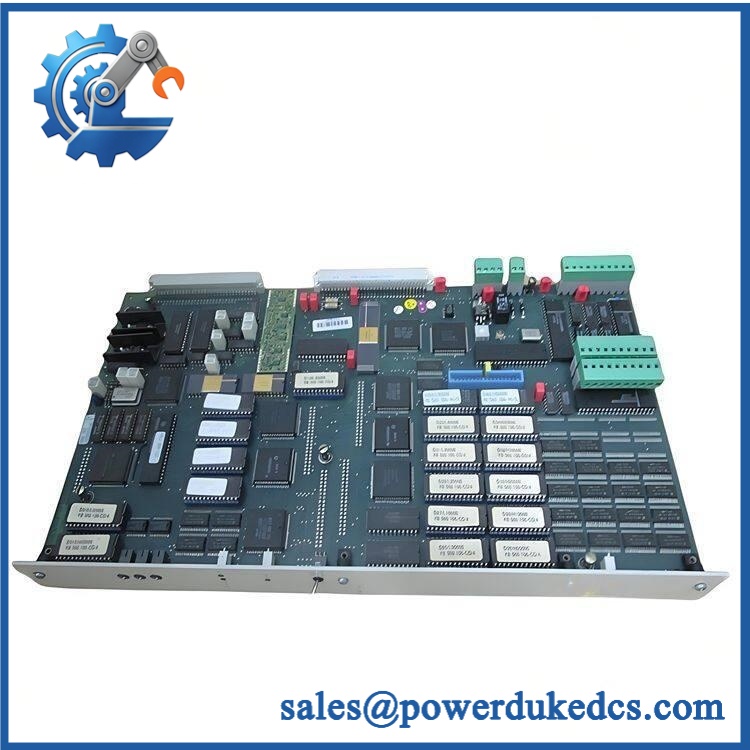
ABB DSQC202 YB560103-AC
Module 5: Quality Assurance & Testing SOP
1. OEM Identification Check
- Confirm ABB identification.
- Verify marking.
- Verify YB560103-AC where present.
- Record serial number if available.
- Record board revision.
- Photograph the nameplate.
- Compare PCB layout with the customer’s existing board.
2. Physical Inspection
Inspect:
- PCB surface
- Memory ICs
- Backplane connector
- Solder joints
- Battery area, if fitted
- Corrosion
- Oxidation
- Burn marks
- Cracked components
- Previous repair marks
- Bent or damaged connector pins
The memory IC markings should be photographed and retained with the inspection record.
3. Electrical Inspection
Before controller-level testing:
- Check for obvious PCB damage.
- Inspect supply-related components.
- Check for abnormal resistance between relevant power rails.
- Inspect connector continuity where applicable.
- Verify no loose or missing components.
Do not apply arbitrary external voltage to the board.
4. Controller-Level Functional Test
Where a compatible ABB S2/S3 test system is available:
- Install the board in the correct controller position.
- Apply controller power.
- Observe startup behavior.
- Confirm memory recognition.
- Check controller diagnostics.
- Verify access to stored data.
- Run the applicable controller memory test.
5. Data and Memory Verification
Where supported by the controller:
- Read available memory information.
- Verify program/data access.
- Check for memory errors.
- Perform controlled read/write testing.
- Confirm stable operation after restart.
A continuity check alone does not prove memory-board functionality.
6. Final QC
- Test Report completed
- Part number recorded
- Memory chip markings documented
- Board revision recorded
- Controller test results archived
- Actual-unit photographs stored
- QC approval completed
- ESD packaging applied
- Protective cushioning installed
- Shipping carton sealed
Test photographs and available Test Reports can be supplied for procurement review.
Module 6: Procurement-Driven FAQ
1. Is ABB available for immediate shipment?
Physical inventory should be confirmed against / before the order is released.
For an urgent robot repair, provide the existing board photograph and controller model. This helps verify the correct legacy hardware before shipment.
2. How do you verify a surplus ?
The inspection should include the PCB, memory ICs, connectors, board revision, and evidence of previous repair.
For tested inventory, request actual-unit photographs and the corresponding Test Report. Memory-chip markings are particularly useful for confirming the board configuration.
3. Can be installed directly into any ABB robot controller?
No.
Available records associate this board specifically with ABB S2 and S3 robot controllers.
If your controller is S4, S4C, S4C+, IRC5, or another platform, provide the controller identification before approving the replacement.
4. Could a different DSQC memory board be used instead?
Do not assume so.
The DSQC prefix covers many different ABB robot boards. Memory capacity, connector arrangement, controller generation, and firmware/data architecture can differ. Match the complete part number and board configuration.
5. What information should I send for an urgent quotation?
Send:
- , if shown
- Robot controller model
- Controller revision
- Front and rear PCB photographs
- Memory-chip photographs
- Quantity required
- Required delivery date
For this legacy board, a clear photograph of the memory chips is worth sending. It can reveal configuration details that a simple model-number search cannot.



 Start Chat


