

Description
Module 2: The 10-Second Procurement Snapshot
- Brand: ABB
- Full Model Number: DSQC352
- Lifecycle Status: Legacy / Lifecycle verification required
- Core Function: Robot control and system interface
- Product Type: ABB Robotics Control Module
- Product Family: DSQC Robot Control Series
- Application: ABB industrial robot control systems
- System Compatibility: Controller-generation dependent
- Configuration: Robot application dependent
- Stock & Condition: New Surplus / Tested Stock; physical stock confirmation required
Module 3: Supply Chain & Technical Deep Dive
A failed legacy ABB robot module can stop a production cell even when the robot mechanics are still in good condition. DSQC352 belongs to ABB’s DSQC robotics hardware family and should be matched against the controller architecture already installed in the cabinet. For maintenance teams supporting older robot systems, obtaining the exact board can reduce the risk of an extended shutdown caused by an uncertain substitute.
From a TCO perspective, the purchase decision should include more than the module price. A verified spare can reduce emergency engineering hours, troubleshooting time, and production losses. Exact electrical specifications, firmware requirements, and supported controller models for this specific part should be confirmed against ABB documentation and the installed controller before procurement. Do not infer compatibility from the DSQC prefix alone.
Module 4: Migration, Compatibility & Field Traps
Replacement Matrix
| Replacement Scenario | Assessment | Engineering Action |
|---|---|---|
| Exact DSQC352 replacement | Direct replacement candidate | Match complete part number and revision |
| DSQC352 with different hardware revision | Compatibility review required | Compare controller and software versions |
| Different DSQC-series module | Not automatically compatible | Verify controller architecture |
| Generic robot-control module | Not a direct replacement | Requires engineering validation |
| Hardware modification | Not normally required for exact replacement | Preserve existing cabinet configuration |
⚠️ Field Traps
1. Identify the controller before ordering.
ABB robot hardware is controller-generation dependent. Check the cabinet identification plate and existing system documentation before approving a DSQC352 replacement.
2. Preserve the robot application.
Back up the controller data before removing the failed module. Record the software or firmware revision if accessible.
3. Label every connector.
Take high-resolution photographs before disassembly. Mark connector positions and cable numbers. This simple step can prevent a second fault after replacement.
4. Protect the board from ESD.
Power down the controller according to the ABB maintenance procedure. Use an ESD wrist strap and antistatic work surface when handling the module.
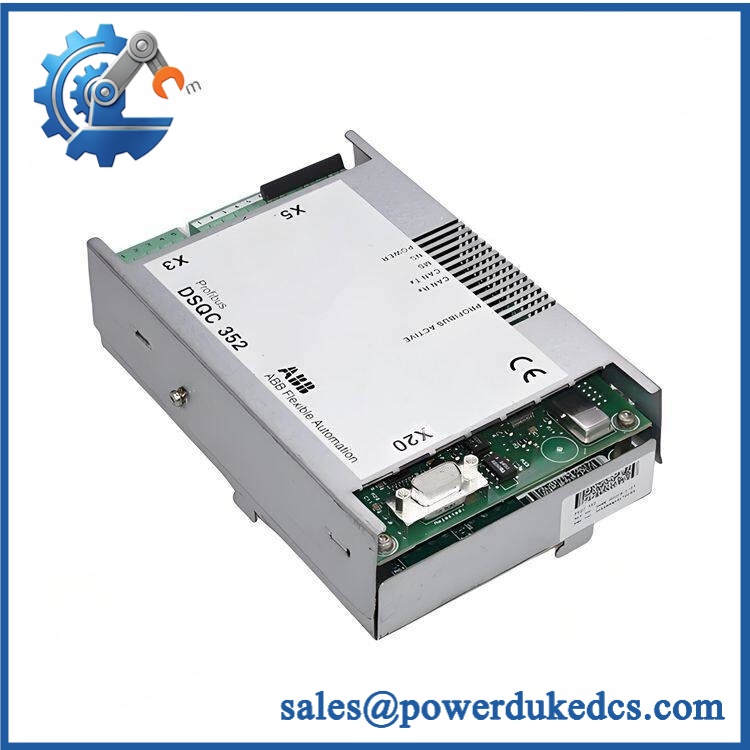
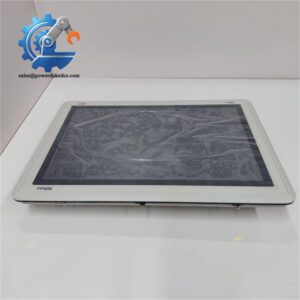
ABB DSQC352
Module 5: Quality Assurance & Testing SOP
For legacy ABB Robotics hardware, a visual inspection does not establish functional condition. The unit should pass identity verification, electrical inspection, controlled startup, and applicable controller-level testing before shipment.
1. OEM Identity Inspection
- Verify ABB DSQC352
- Record serial number
- Record hardware revision
- Photograph the complete nameplate
- Perform OEM anti-counterfeit visual inspection
- Inspect PCB condition
- Check connectors and card-edge contacts
- Look for corrosion, burn marks, cracked components, or repair evidence
2. Configuration Inspection
- Photograph accessible DIP switches.
- Record jumper positions where applicable.
- Photograph connector locations.
- Record the original configuration.
- Compare the board with an approved reference unit.
3. Electrical Pre-Test
- Inspect power-input circuitry.
- Check for obvious short circuits.
- Inspect grounding points.
- Check connector condition.
- Record applicable continuity and resistance readings.
High-voltage testing should only be performed when specifically permitted by the applicable ABB procedure.
4. Power-On Self-Test
Use a suitable ABB Robotics controller test environment where available.
- Apply controlled power.
- Observe startup behavior.
- Check available RUN/ERR/status indicators.
- Monitor power behavior.
- Check for abnormal temperature rise.
- Record startup results.
5. Functional Verification
Where the correct ABB controller and test environment are available:
- Install the module in the approved test system.
- Confirm module identification.
- Start the controller diagnostic sequence.
- Verify communication with associated hardware.
- Exercise applicable interfaces.
- Review diagnostic messages.
- Check for intermittent faults.
- Record the results.
Robot motion testing should only be performed with the required safety circuits and controlled test conditions in place.
6. Extended Observation
- Run the module under controlled conditions.
- Monitor diagnostic status.
- Check communication stability.
- Monitor temperature.
- Record abnormal behavior.
- Generate a serial-number-linked Test Report.
7. Final QC and Packaging
- QC technician signs the inspection record.
- Photograph the tested module.
- Seal in an ESD-safe bag.
- Protect connectors and PCB surfaces.
- Add shock-absorbing material.
- Use a rigid shipping carton.
- Apply QC Passed identification and test date.
Test photographs and the Test Report can be supplied for procurement review.
Module 6: Procurement-Driven FAQ
1. Is ABB DSQC352 physically in stock, and when can it ship?
Physical availability should be confirmed against the actual warehouse unit. For an urgent robot-cell requirement, request the actual module photograph, complete nameplate, serial number, condition, test status, and confirmed dispatch time before placing the order.
2. How do you verify the condition of a surplus DSQC352?
The unit should undergo:
- Part-number and serial-number verification
- PCB and connector inspection
- Configuration documentation
- Electrical pre-test
- Controlled power-on
- Applicable controller functional testing
- Extended observation
- Final QC inspection
The serial number should correspond to the Test Report.
3. Can DSQC352 replace another DSQC module directly?
Not automatically. Similar physical dimensions or the same DSQC family do not prove electrical or software compatibility.
Confirm the controller model, existing module revision, firmware/software version, cabinet position, and system configuration before approving the substitution.
4. Could firmware compatibility cause commissioning problems?
Yes. A hardware revision may require a particular controller software or firmware environment. Record the existing software version before removing the original module.
If the replacement revision differs, have the controls engineer confirm compatibility before commissioning.
5. What warranty information should I request?
The purchase documentation should state the warranty period, defective-unit process, and return conditions. The module serial number should be recorded on the Test Report and shipping documents.
For a production-critical spare, request pre-shipment photographs and functional-test records as part of the procurement file.



 Start Chat


