

Description
- Brand: ABB
- Full Model Number: FM9925A-E
- ABB Part Number: HIEE451116R0001
- Lifecycle Status: Legacy/industrial spare; current OEM availability requires application-specific verification
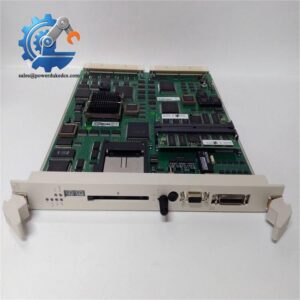
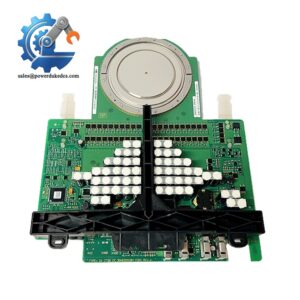
- Core Function in System: ABB control/communication circuit board
- Top 3 Hardcore Specs: ABB FM9925A-E; HIEE451116R0001; Industrial control/communication board configuration
- Board Type: Circuit board / control board
- Reported Application: ABB industrial automation control systems
- Condition & Lead Time: New replacement inventory subject to physical verification; emergency dispatch based on confirmed stock
- Compatibility Control: Match exact model, part number, hardware revision, connector layout, and host-system documentation
Available records consistently associate FM9925A-E with ABB part number HIEE451116R0001 and describe the item as an ABB control/interface circuit board. However, public technical records disagree on its exact host platform and detailed electrical specifications, so those values should be verified from the installed equipment documentation before procurement.
Module 3: Technical Intro & Downtime Impact
When a control board fails unexpectedly, the cabinet may remain physically intact while the affected automation function disappears from the control path. ABB FM9925A-E, HIEE451116R0001 is identified in available records as an ABB control/interface board, making exact part-number verification the first priority during an emergency replacement. A visually similar board is not sufficient evidence of compatibility; connector arrangement, board revision, host controller family, and installed configuration all need to agree.
For MTTR reduction, the strongest documented identifiers are the complete FM9925A-E / HIEE451116R0001 pairing and the physical board configuration. Public sources do not provide a sufficiently authoritative and consistent set of values for RAM, supply voltage, operating temperature, channel count, or communications architecture for this exact part. Some secondary listings assign the board to different ABB product families, which is a clear warning against using unverified specifications as the basis for commissioning. —Use the failed board’s nameplate, cabinet drawings, installed hardware revision, and ABB project documentation as the controlling references.
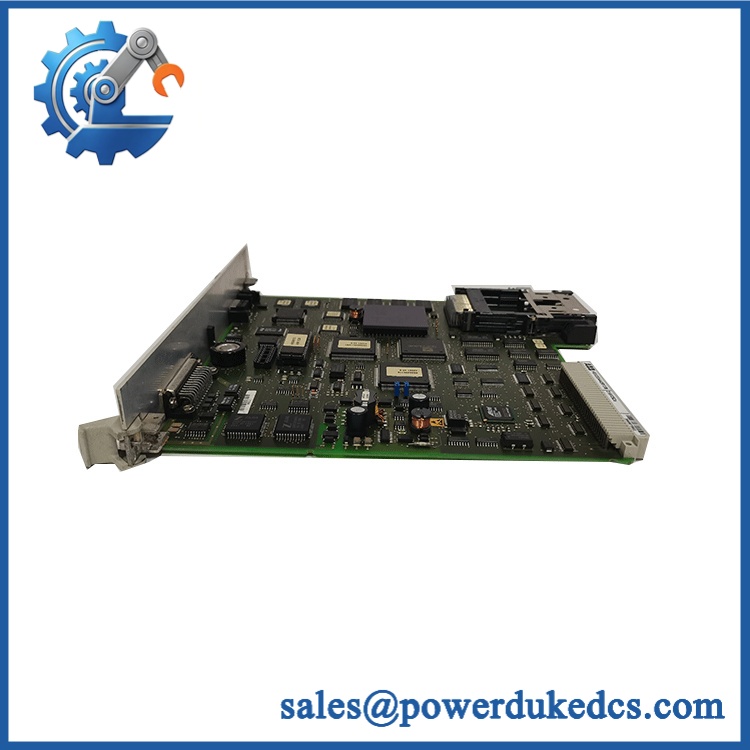
ABB FM9925A-E HIEE451116R0001
Module 4: Dynamic Emergency Swap & Configuration Guide
1. Pre-Swap Prep — Establish exact identity
- Place the affected ABB control system in the approved maintenance state.
- Apply site lockout/tagout and verify the cabinet is electrically safe.
- Allow stored energy to discharge according to the host-system procedure.
- Photograph the failed FM9925A-E from both component and connector sides where accessible.
- Record HIEE451116R0001, board revision, serial identification, and connector positions.
- Use ESD protection before handling the circuit board.
2. Removal — Preserve the original installation
- Confirm absence of hazardous voltage before opening the enclosure.
- Label every cable, plug, jumper, or terminal connection before removal.
- Release the board’s retaining screws, clips, carrier, or card guides according to the actual cabinet design.
- Withdraw the board straight and evenly from its mating connector or backplane.
- Do not flex the PCB or pull on individual wires.
- Inspect the mating connector and adjacent cabinet hardware for contamination, corrosion, bent pins, or thermal damage.
3. Installation & Configuration — Match the original build
- Verify ABB / before installation.
- Compare board revision and connector layout with the removed unit.
- Install the replacement in the identical orientation and secure all retaining hardware.
- Reconnect every interface using the original photographs and approved wiring drawings.
- Restore documented jumper, switch, address, termination, or configuration settings exactly as recorded.
- Confirm the replacement belongs to the same ABB controller family and project configuration.
- Do not perform a firmware flash unless the applicable ABB documentation specifically requires it.
4. Power-On Self-Test (POST) — Validate the control path
- Re-energize according to the host ABB system startup procedure.
- Observe all available power, status, RUN, and ERR indicators during initialization.
- Confirm the controller recognizes the replacement board without persistent diagnostic faults.
- Verify applicable communication or control interfaces.
- Check the affected I/O or control function against a known-good baseline.
- Perform a controlled functional test before returning the equipment to normal operation.
Because the available documentation does not establish one universal LED sequence or mechanical mounting arrangement for , the host-system manual should control the exact removal and POST procedure.
Module 5: Quality Assurance & Testing SOP
A board-level spare should pass identity, physical, electrical, and functional checks before shipment. For , configuration verification is especially important because public sources do not agree on every system-level specification.
1. OEM identity verification
- Verify ABB
- Verify
- Verify
- Compare nameplate, PCB markings, revision information, connectors, and board layout
- Perform OEM anti-counterfeit visual inspection
- Photograph all identification labels and traceability markings
2. Physical inspection
- Inspect the PCB for corrosion, contamination, cracked connectors, damaged components, lifted pads, and visible rework
- Check board mounting points and card-edge connectors
- Inspect protective coating or conformal finish where applicable
- Check for thermal discoloration around power and interface sections
- Record the pre-shipment physical condition
3. Electrical screening
- Perform continuity checks appropriate to the documented board design
- Check for obvious shorts between power and ground where meaningful
- Inspect connector pin integrity
- Verify power-input characteristics only with the correct approved test fixture
- Do not apply arbitrary insulation or hipot voltages to a populated electronic board
4. Functional testing
- Install in a compatible ABB test environment when available
- Perform power-on self-test
- Check applicable RUN/ERR or equivalent diagnostic indicators
- Verify controller or host-system recognition
- Test documented communication interfaces where supported
- Perform I/O full-range simulation only when the actual board configuration exposes those functions
- Record test conditions, hardware revision, measured values, and pass/fail results
5. Final QC release
- Independent QC sign-off
- ESD-safe packaging
- Connector protection against impact and contamination
- Final cross-check of /
- Retain inspection photographs and functional-test records with the shipment documentation
A current secondary product record identifies as an ABB circuit board and reports new-original-packaging availability and a 12-month warranty on that specific listing. Those commercial terms should still be confirmed against the supplier’s written quotation before purchase.
Module 6: Maintenance & Reliability FAQ
Q1. Is ABB a direct drop-in replacement, or does it require a firmware flash?
Do not assume a universal drop-in condition. Match / , hardware revision, connector layout, and host-system family first. Firmware should be changed only when the applicable ABB documentation specifies a required version. Public listings do not establish one universal firmware requirement for every installation.
Q2. Is it safe to hot-swap this board while the system is running?
Do not assume hot-swap capability. Unless the exact ABB system documentation explicitly permits live replacement for this board position, shut down and isolate the equipment before removal. ESD control is also required during board handling.
Q3. Will replacing the cause my current program or configuration to be lost?
The safest procedure is to back up the host-system configuration before removing the failed board. Record hardware revision, addresses, jumpers, communication parameters, and any board-specific settings. After installation, restore only the documented configuration and verify system diagnostics before placing the equipment back into service.
Q4. Which specifications should I verify before ordering?
Verify the complete / identification first, followed by board revision, connector arrangement, physical dimensions, host-system family, power requirements, and communication interfaces. Public sources currently provide conflicting descriptions of the exact application, so unverified channel counts, voltage values, or protocol claims should not be used for purchase approval.
Q5. What are the warranty terms if the replacement fails post-installation?
Warranty coverage should be defined in the supplier’s written terms before purchase. One available listing states 12 months for its stock, but that is a supplier-specific commercial term, not a universal ABB warranty statement. Retain incoming inspection records, board photographs, test results, installation notes, and failure diagnostics for any warranty claim.



 Start Chat


