

Description
Module 2: The 10-Second Procurement Snapshot
- Brand: ABB Bailey
- Full Model Number: IMCIS02
- Lifecycle Status: Legacy / Supported replacement path
- Core Function: Process signal I/O for INFI 90 DCS
- Product Type: Control I/O Slave Module
- Top 3 Technical Specs: 4 analog inputs; 2 analog outputs; 3 digital inputs + 4 digital outputs
- Mounting: One slot in standard INFI 90 MMU
- Operating Temperature: 0 to 70 °C
- Relative Humidity: Up to 95% at 55 °C, non-condensing
- Stock & Condition: New Surplus / Tested Stock; physical stock confirmation required
ABB documentation identifies IMCIS02 as a Control I/O Slave Module for the INFI 90 Process Management System. The module brings four analog and three digital process signals into the system and provides four digital and two analog outputs.
ABB’s own spare-parts material also lists IMCIS02 under the Class I-90 Control I/O Module family and identifies IMCIS22 as its functional replacement in an INFI 90 evolution path.
Module 3: Supply Chain & Technical Deep Dive
A failed IMCIS02 can leave an otherwise serviceable INFI 90 control system without the required process I/O. This is a legacy DCS component, so the practical problem is often procurement lead time rather than engineering complexity. The module occupies one slot in a standard INFI 90 Module Mounting Unit and interfaces field signals with the Multi-Function Processor through the slave expander bus.
The hardware handles 4 analog inputs, 2 analog outputs, 3 digital inputs, and 4 digital outputs. That I/O mix makes the exact module important; replacing it with a generic analog or digital card can require control-logic changes. ABB’s documented evolution path identifies IMCIS22 as the functional replacement, which is useful when planning lifecycle inventory rather than waiting for an emergency failure.
Module 4: Migration, Compatibility & Field Traps
Replacement Matrix
| Replacement Scenario | Assessment | Engineering Action |
|---|---|---|
| Exact IMCIS02 replacement | Direct replacement candidate | Match model, hardware revision, and system configuration |
| IMCIS22 | Functional replacement path | Validate existing application and configuration |
| Generic analog I/O module | Not a direct replacement | I/O count and signal type must be checked |
| Generic digital I/O module | Not a direct replacement | Verify complete I/O architecture |
| Different INFI 90 slave module | Compatibility check required | Compare TU/TM, expander bus, and configuration |
| Hardware modification | Not normally required for exact replacement | Follow ABB installation documentation |
ABB’s evolution documentation specifically lists IMCIS02 → IMCIS22 as a functional replacement path. That does not mean the newer module should be inserted without an application review.
⚠️ Field Traps
1. I/O configuration is easy to get wrong.
The uses a DIP switch to configure each analog output, while jumpers configure the digital inputs. Analog inputs are configured at the associated Termination Unit or Termination Module. Photograph the old board before removal.
2. Do not treat the P3 connector as ordinary field wiring.
The module uses separate connection points for logic power, the slave expander bus, and process I/O. Field wiring terminates at the associated TU/TM rather than directly at the module PCB. Verify the applicable wiring diagram before reconnecting anything.
3. Response time can matter.
ABB documentation distinguishes the Control I/O Slave from the Quick Response I/O Module. The latter provides approximately 10 times faster response for analog inputs. If the application has tight process-response requirements, do not substitute modules based only on matching I/O counts.
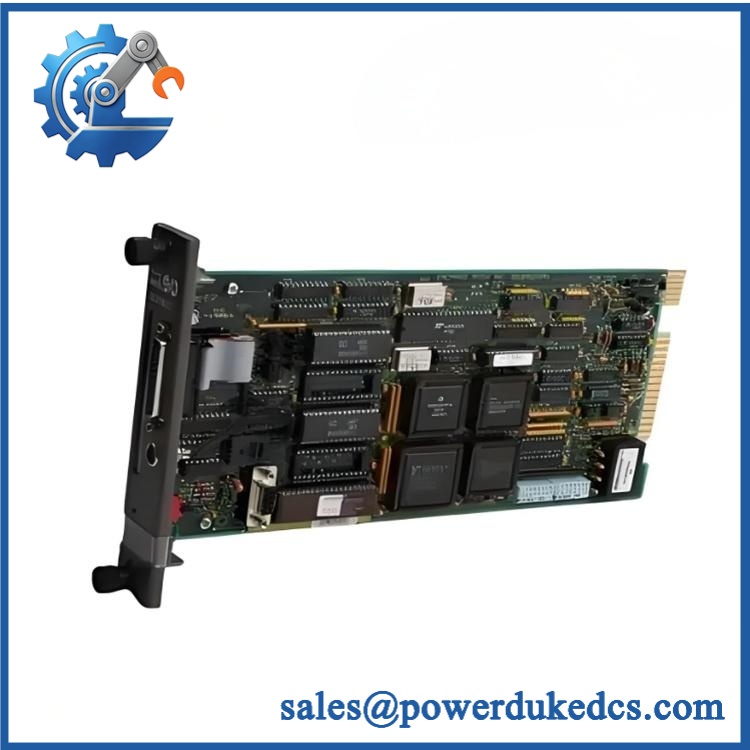
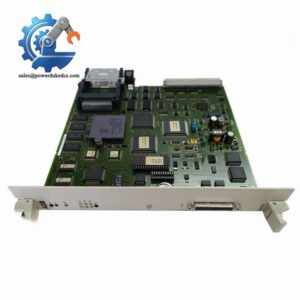
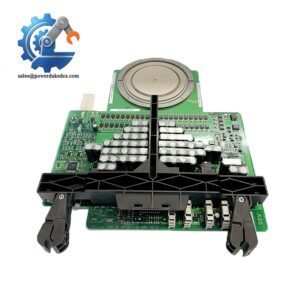
ABB IMCIS02
Module 5: Quality Assurance & Testing SOP
For legacy INFI 90 inventory, a clean front panel is not enough. The module should be identified, electrically checked, powered, and functionally tested before shipment.
1. OEM Identity Inspection
- Verify
- Record serial number and visible hardware revision
- Compare nameplate with the purchase specification
- Perform OEM anti-counterfeit visual inspection
- Inspect the PCB and edge connector
- Check the faceplate and captive screws
- Look for corrosion, burn marks, cracked components, or repair evidence
2. Mechanical Inspection
- Confirm the PCB fits the standard MMU slot.
- Inspect the module edge connector.
- Check the P1, P2, and P3 connection areas.
- Inspect DIP switches.
- Inspect configuration jumpers.
- Photograph the original configuration before test setup.
3. Electrical Pre-Test
- Check the module for visible shorts.
- Verify logic-power input circuitry according to the ABB test procedure.
- Check connector continuity where applicable.
- Inspect the grounding arrangement.
- Record pre-test measurements.
The documentation identifies P1 for logic power, P2 for the slave expander bus, and P3 for process I/O connections.
4. Power-On Self-Test
Install the module in an approved INFI 90 test rack.
- Apply the specified system power.
- Observe the front-panel status LED.
- Confirm normal startup.
- Check for abnormal current draw.
- Monitor the module for abnormal heating.
- Record the startup condition.
5. I/O Functional Test
Use a controlled test fixture to verify the complete I/O set:
Analog inputs
- Simulate input A1–A4.
- Apply known reference signals.
- Confirm corresponding values at the controller.
Analog outputs
- Command output channels 1–2.
- Measure actual output values.
- Compare readings with the programmed reference.
Digital inputs
- Simulate all three digital input states.
- Confirm ON/OFF recognition.
Digital outputs
- Command all four outputs.
- Verify the corresponding output states.
This test directly reflects the documented 4 AI / 2 AO / 3 DI / 4 DO architecture.
6. Extended Observation
- Run the module continuously under controlled conditions.
- Monitor status indications.
- Check for intermittent I/O behavior.
- Record test readings.
- Generate a serial-number-linked Test Report.
7. Final QC and Packaging
- QC technician signs the inspection record.
- Photograph the tested module.
- Seal the board in an ESD-safe bag.
- Add protective cushioning.
- Use a rigid carton.
- Apply QC Passed identification and inspection date.
Test photographs and the inspection report should be available for customer review when requested.
Module 6: Procurement-Driven FAQ
1. Is ABB genuinely in stock, and what is the cutoff for overnight shipping?
Physical inventory should be confirmed before order release. Current supplier records show offered as both factory-new and used-surplus stock, while ABB’s own material confirms the part as a Class I-90 Control I/O Module.
For an urgent DCS replacement, request the actual unit photograph, condition, test status, warehouse location, dispatch cutoff, and carrier service.
2. How do you verify the condition of an obsolete ?
The module should pass identity inspection, PCB and connector inspection, controlled power-on testing, and a complete I/O simulation test.
A useful Test Report should record:
- Serial number
- Hardware revision
- Test date
- Test equipment
- AI readings
- AO readings
- DI states
- DO states
- Technician name
- Pass/fail result
3. Is IMCIS22 a replacement for ?
Yes, ABB identifies IMCIS22 as the functional replacement path for . However, functional replacement does not mean that every existing configuration can be migrated without review. Check the application, termination hardware, configuration, and control logic before making the change.
For a running plant, keeping one tested as buffer stock can still be sensible when immediate replacement is more valuable than a planned migration.
4. Are firmware compatibility issues a concern?
is an INFI 90 I/O slave module rather than a modern standalone Ethernet controller. The more immediate checks are module identity, I/O configuration, termination hardware, DIP-switch settings, jumpers, and system compatibility.
Record the existing configuration before removal. A replacement with incorrect switch or jumper settings can produce incorrect I/O behavior even when the module itself passes its power-on test.
5. Can I replace with a different ABB I/O module?
Not simply because the modules belong to the same INFI 90 family.
provides a specific combination of 4 analog inputs, 2 analog outputs, 3 digital inputs, and 4 digital outputs. The associated TU/TM and control strategy must also be considered.
For procurement, provide ABB Bailey + the existing module photograph + rack/TU/TM information + required I/O configuration. That gives the engineering team a much safer basis for approving the replacement.



 Start Chat


