

Description
Module 2: The 10-Second Procurement Snapshot
- Brand: ABB Bailey
- Full Model Number: IMSPM01
- Lifecycle Status: Discontinued / Legacy
- Core Function: Serial communication interface for INFI 90
- Product Type: Serial Port Module
- Top 3 Technical Specs: 5–15 VDC input; 6 VA power consumption; INFI 90 Module Bus interface
- Communication Role: Computer/engineering workstation serial access
- Alternate Identifiers: PIMSPM01; IMSPM01R; YIMSPM01
- Weight: Approx. 1.30 lb / 0.59 kg
- Stock & Condition: New Surplus / Tested Refurbished; physical stock confirmation required
ABB Bailey documentation identifies IMSPM01 as a Serial Port Module for the INFI 90 system. The module provides serial communication access to the system, while the SLC02 manual shows IMSPM01 in the INFI 90 Module Bus architecture.
Module 3: Supply Chain & Technical Deep Dive
Legacy INFI 90 installations can remain productive for years, but a failed serial interface creates a difficult sourcing problem. ABB Bailey IMSPM01 connects computer-side equipment with INFI 90 components through the Module Bus and supports communication functions used by configuration and engineering software. The SLC02 documentation specifically identifies IMSPM01 as the Serial Port Module and places it alongside the IMCPM01 Configuration Port Module in the system architecture.
The TCO case is mainly about avoiding control-system migration work when only a communication interface has failed. Available product records specify 5–15 VDC and 6 VA for the module; supplier technical references also identify it as an INFI 90 serial interface. Exact port configuration and electrical details should be checked against the applicable ABB Bailey manual before replacement, because some third-party listings publish conflicting specifications.
Module 4: Migration, Compatibility & Field Traps
Replacement Matrix
| Replacement Scenario | Assessment | Engineering Action |
|---|---|---|
| Exact IMSPM01 replacement | Direct replacement candidate | Match part number and hardware revision |
| PIMSPM01 / IMSPM01R / YIMSPM01 | Related identifier; verify before substitution | Compare nameplate and system documentation |
| IMCPM01 | Not a direct replacement | Different configuration-port function |
| Generic RS-232 module | Not automatically compatible | Verify INFI 90 bus and electrical requirements |
| Hardware modification | Not recommended | Retain original rack and bus architecture |
⚠️ Field Traps
1. Do not confuse with IMCPM01.
The INFI 90 documentation lists as the Serial Port Module and IMCPM01 as the Configuration Port Module. Their names are similar, but their system roles are different.
2. Verify the serial connection before removal.
Photograph the existing serial cable and termination arrangement. Serial communication problems can come from the cable, connector, or configuration rather than the module itself.
3. Power specification matters.
Available records identify a 5–15 VDC supply range and 6 VA power requirement. Do not apply a generic 24 VDC supply simply because that voltage is common in modern automation cabinets.
4. ESD handling still matters.
Disconnect power before removing the module. Use an ESD wrist strap and avoid touching exposed PCB contacts.
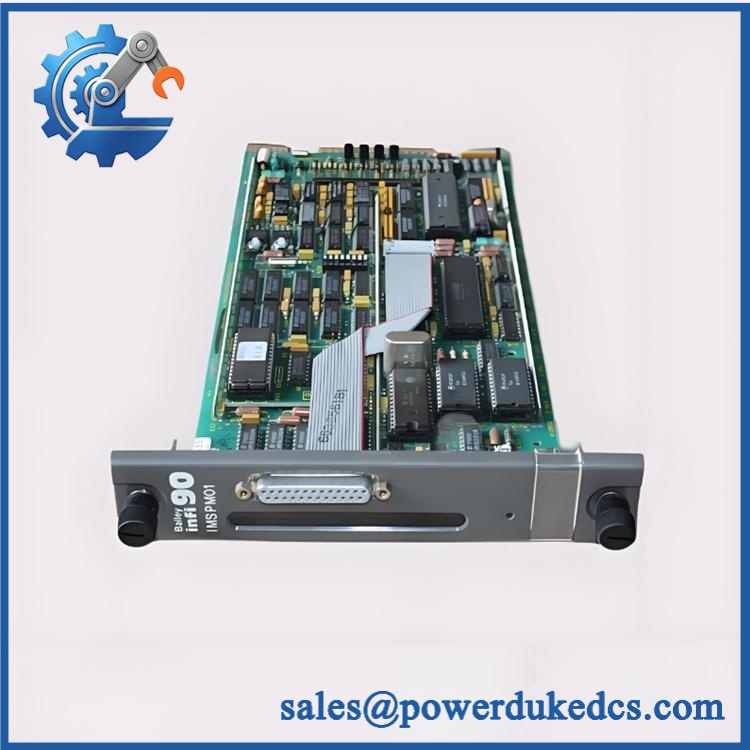
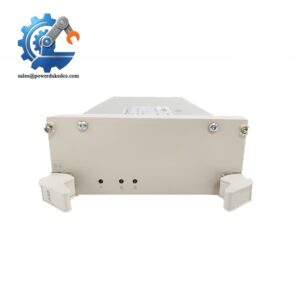
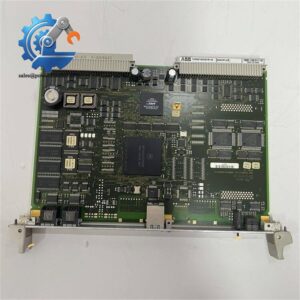
ABB IMSPM01
Module 5: Quality Assurance & Testing SOP
A legacy communication module should not be shipped based on appearance alone. The pre-shipment procedure should establish identity, electrical condition, and serial communication performance.
1. OEM Identity Inspection
- Verify
- Check the complete nameplate
- Record serial number and visible revision information
- Compare the module against the purchase specification
- Perform OEM anti-counterfeit visual inspection
- Inspect connectors and mounting hardware
- Check for corrosion, scratches, burn marks, or repair evidence
2. Mechanical Inspection
- Inspect the module housing.
- Check the board and connector alignment.
- Examine serial-port connectors.
- Inspect the module edge connector.
- Compare the physical layout with an approved reference image.
3. Electrical Pre-Test
- Verify the specified 5–15 VDC supply range.
- Check power input continuity.
- Inspect for obvious short circuits.
- Check grounding and connector condition.
- Record pre-test measurements.
Do not perform an arbitrary high-voltage insulation test on sensitive electronic circuitry. Use the applicable ABB test procedure.
4. Power-On Test
Install the module in an appropriate ABB Bailey INFI 90 test environment.
- Apply controlled DC power.
- Check startup behavior.
- Monitor available status indications.
- Confirm stable power consumption.
- Check for abnormal heating.
- Verify the module remains operational during extended observation.
5. Serial Communication Test
Where the test fixture supports it:
- Connect the serial interface to the approved test equipment.
- Establish communication.
- Transmit controlled test data.
- Confirm received data.
- Check communication stability.
- Verify the expected configuration or engineering access function.
The goal is not merely to see the module power up. Communication must be demonstrated.
6. Final QC and Packaging
- Create a serial-number-linked Test Report.
- Record test date and technician.
- Photograph the tested unit.
- Place the module in ESD-safe packaging.
- Add cushioning around connectors.
- Use a rigid shipping carton.
- Apply QC Passed identification.
Test photographs and the inspection report can be supplied with the shipment when requested.
Module 6: Procurement-Driven FAQ
1. Is ABB genuinely in stock, and what is the cutoff for overnight shipping?
Stock should be confirmed against the physical warehouse unit before the order is released. Current supplier records show inventory listings, but supplier inventory is not the same as confirmed availability from ABB.
For an urgent replacement, request the actual unit photograph, part-number label, condition, test status, warehouse location, and dispatch cutoff.
2. How do you verify the condition of a discontinued ?
The unit should pass identity inspection, mechanical inspection, electrical checks, controlled power-on testing, and serial communication testing.
For a production-critical INFI 90 system, request a serial-number-linked Test Report. New Surplus, Never Used, Used, and Refurbished should be stated separately on the quotation.
3. What warranty and return protection should I require?
Specify the warranty period and return procedure before purchase. The supplied serial number should be recorded so the warranty applies to the exact module shipped.
Installation errors, incorrect supply voltage, ESD damage, physical modification, and incorrect cabling should be distinguished from an internal module failure.
4. Are there firmware compatibility issues with ?
is primarily a serial communication hardware module, so the first checks should be hardware identity, INFI 90 system compatibility, serial configuration, and cabling.
Before removal, record the existing system configuration and communication settings. Do not change unrelated INFI 90 configuration simply because a replacement module has been installed.
5. Can I replace with a modern serial interface?
Not as an automatic substitution. The module is part of the INFI 90 Module Bus architecture, so a modern serial interface would need to reproduce the required system-level communication function. The INFI 90 documentation specifically distinguishes from IMCPM01, confirming that these modules have different roles.
For procurement, provide ABB Bailey + the complete nameplate photograph + the INFI 90 controller/rack information. That gives the engineering team enough information to verify the replacement before shipment.



 Start Chat


