

Description
- Brand: ABB
- Full Model Number: PU410 / 3BSE056478R1
- Lifecycle Status: Obsolete; replaced by PU410K01 / 3BSE051826R1
- Core Function in System: RTA communication interface for ABB MB300-based Advant systems
- Top 3 Hardcore Specs: MB300 RTA communication; 0.39 kg net weight; HS tariff 85389091
- System Association: ABB Advant OCS / Advant Master / MB300
- ABB Catalog Description: PU410 RTA Communication Box for MB300
- Condition & Lead Time: New or tested legacy stock; availability must be confirmed before emergency dispatch
ABB’s product data identifies PU410 / 3BSE056478R1 as a Communication Box, specifically a PU410 RTA Communication Box for MB300, and states that the obsolete part is replaced by PU410K01 / 3BSE051826R1. ABB lists a 0.39 kg net weight and 85389091 customs tariff classification.
Module 3: Technical Intro & Downtime Impact
When an RTA communication box fails, the immediate problem is not an individual field I/O point—it is loss of the communication path between engineering or supervisory equipment and the legacy MB300 control network. That can prevent online access to controllers, disrupt diagnostics, and significantly extend fault-finding time on an aging Advant installation. ABB identifies PU410 as an RTA Communication Box for ; ABB documentation also shows PU410K01 being used to connect an engineering PC to Advant controllers for online debugging and program editing.
For MTTR planning, the critical identification is the complete ordering chain: PU410 → 3BSE056478R1, with PU410K01 / 3BSE051826R1 identified by ABB as the replacement product. The legacy unit has a documented 0.39 kg net weight, which is useful when preparing emergency logistics and cabinet-handling records. Do not substitute a newer communication device simply because it has Ethernet connectivity; compatibility, system software revision, and the existing communication architecture must be checked first. (This is a legacy control-system component, so configuration records are often more valuable than assumptions based on physical similarity.)
Module 4: Dynamic Emergency Swap & Configuration Guide
1. Pre-Swap Prep — Preserve the Network State
Before touching the , record the existing communication topology, cable routing, device identification, and any active diagnostics. Back up the relevant Advant engineering configuration and note the connected controller addresses and communication parameters. Use ESD protection and follow the site’s electrical isolation procedure. Because this is an older communication architecture, have the system-specific wiring and communication drawings available.
2. Removal — Disconnect Communications Before Extracting the Box
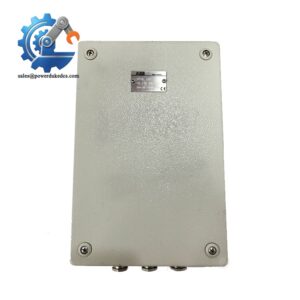
Document every communication connection with photographs. Isolate the applicable power source according to the maintenance procedure, disconnect the communication interfaces without pulling on the cable itself, then release the enclosure’s mounting hardware. Remove the carefully and compare its identification plate with 3BSE056478R1 before installing the replacement.
3. Installation & Configuration — Verify the Replacement Relationship
Install the replacement using the same physical mounting arrangement and reconnect every communication cable to its original interface. The most important identification check is whether the incoming spare is the legacy 3BSE056478R1 or ABB’s stated replacement PU410K01 / 3BSE051826R1. Do not invent DIP-switch, IP-address, or protocol settings from a generic listing; transfer the actual site configuration from the engineering records and verify compatibility with the network.
4. Power-On Self-Test (POST) — Confirm Communications, Not Just Power
Restore power under controlled conditions and inspect the unit for abnormal fault indications. Then verify communication from the engineering station or applicable host system to the intended Advant controllers. ABB’s Control Builder A documentation specifically describes PU410K01 as the RTA Communication Unit used to connect a PC to Advant controllers for online access, debugging, and editing. A green power indication alone is not a successful acceptance test; prove actual communication and controller accessibility.
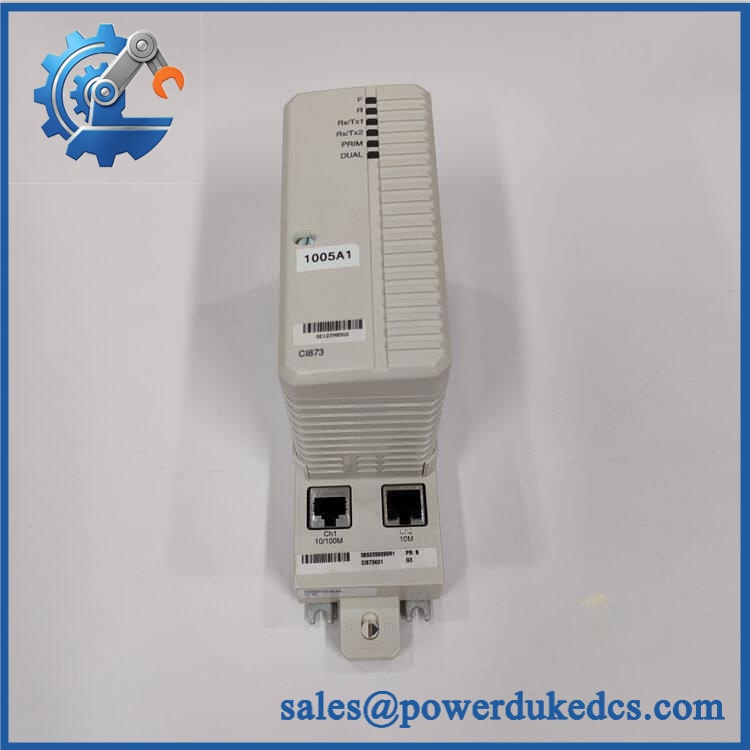
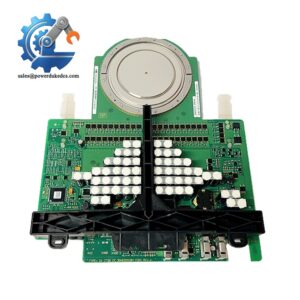
ABB PU410 3BSE056478R1
Module 5: Quality Assurance & Testing SOP
The should be evaluated as a legacy network-interface assembly, with particular attention to communication integrity and replacement compatibility.
- Identity verification: Record , 3BSE056478R1, revision markings, serial information, and all visible identification labels.
- OEM anti-counterfeit visual inspection: Compare enclosure markings, PCB identifiers, connectors, labels, fasteners, and manufacturing details against known ABB references.
- Mechanical inspection: Check housing integrity, mounting points, connector condition, cable interfaces, corrosion, contamination, and signs of previous overheating.
- Power-on self-test (POST): Apply the specified test power in a controlled environment and verify normal startup behavior and absence of hardware fault indications.
- Communication-path test: Establish the approved test connection to an -compatible environment and verify that the communication interface establishes the expected link.
- Controller access verification: Confirm that the connected engineering station can reach the intended Advant controller or controllers through the RTA communication path.
- Data integrity check: Verify that controller communication remains stable during repeated connection and diagnostic operations rather than accepting a one-time successful connection.
- Cable/interface inspection: Examine communication connectors and mating cables for bent contacts, contamination, damaged latches, or intermittent connection behavior.
- Extended runtime test: Run the unit long enough to identify intermittent communication loss, abnormal temperature rise, or repeated diagnostic events.
- Final QC record: Store serial-number photographs, communication test results, configuration references, test date, technician sign-off, and final disposition.
ABB’s published product record classifies 3BSE056478R1 as an obsolete communication box and explicitly directs ordering of / 3BSE051826R1 as the new replacement product.
Module 6: Maintenance & Reliability FAQ
1. Is ABB 3BSE056478R1 a direct drop-in replacement, or does it require a firmware flash?
Do not assume a universal drop-in exchange. ABB identifies 3BSE056478R1 as obsolete and points to / 3BSE051826R1 as the replacement. Before installation, verify the Advant/ system revision, communication configuration, physical interfaces, and the replacement unit’s documentation. A firmware procedure should not be invented unless ABB documentation for the installed system requires it.
2. Is it safe to hot-swap the while the system is running?
Do not assume hot-swapping is permitted. The published ABB identification information does not establish a blanket live-replacement procedure for every Advant/ installation. Use the site’s approved isolation procedure and verify whether the particular architecture has redundant communication equipment before removing a live unit.
3. Will replacing this communication box cause my current control program to be lost?
The is identified as an RTA communication box, not the controller that stores the primary application program. Replacing it therefore should not be treated as a controller-memory replacement. Nevertheless, back up the engineering database, controller configuration, communication parameters, and any current diagnostic records before intervention.
4. What should I verify after installing as the replacement?
First verify that the replacement identification is correct and that the system accepts it. Then test the complete communication path: engineering station → RTA communication unit → network → target controller. ABB specifically documents as the communication unit used for online access to Advant controllers.
5. What are the warranty terms if the unit fails post-installation?
Warranty depends on the condition supplied and the commercial terms attached to the specific spare. For legacy stock, retain the serial number, incoming inspection photographs, pre-shipment communication test, installation date, and post-installation diagnostic records. Those records are especially important when diagnosing an apparent failure because cabling, configuration, and adjacent communication hardware can produce similar symptoms.



 Start Chat


