

Description
- ABB REF615 HBFDACADABCIANN2XE | Integrated Overcurrent & Earth Fault Protection for Cable & Overhead Feeders
Product Core Brief
- Model: REF615 HBFDACADABCIANN2XE
- Brand: ABB
- Series: Relion® 615 Series
- Core Function: Implement feeder protection, circuit breaker control, measurement and disturbance recording for medium voltage distribution networks
- Type: Numerical protection IED (Intelligent Electronic Device)
- Key Specs: Draw-out design, IEC 61850, directional overcurrent & earth fault protection, built-in disturbance recorder
- Condition: New Surplus, non-refurbished, complete factory configuration matching full ordering code
- Stock Strategy: Class A critical asset; maintain minimum 1 unit buffer stock at site; execute last-time-buy planning upon official EOL notification
Product Introduction
Key Technical Specifications
| Parameter | Specification |
|---|---|
| Model Code | REF615 HBFDACADABCIANN2XE |
| Product Family | Relion 615 Series Feeder Protection IED |
| Mounting Form | Draw-out plug-in unit |
| Main Protection Functions | Phase overcurrent, directional overcurrent, earth fault, sensitive earth fault, thermal overload, CB failure protection, auto-reclose |
| Communication Protocols | IEC 61850 Ed.1/Ed.2, Modbus TCP/RTU, DNP3, IEC 60870-5-103 |
| Data Recording | Disturbance recorder, load profile recorder, fault event log |
| Display | Front panel graphical HMI with local control access |
| Power Supply Range | 88–264 V AC / 88–300 V DC |
| Operating Ambient Temperature | -25 ℃ ~ +70 ℃ |
| Front Protection Class | IP54; Rear terminals IP20 |
| Time Characteristics | ANSI / IEC IDMT and definite time curves |
| CT Safety Feature | Built-in CT shorting upon unit withdrawal |
| Configuration Tool | PCM600 Protection and Control IED Manager |
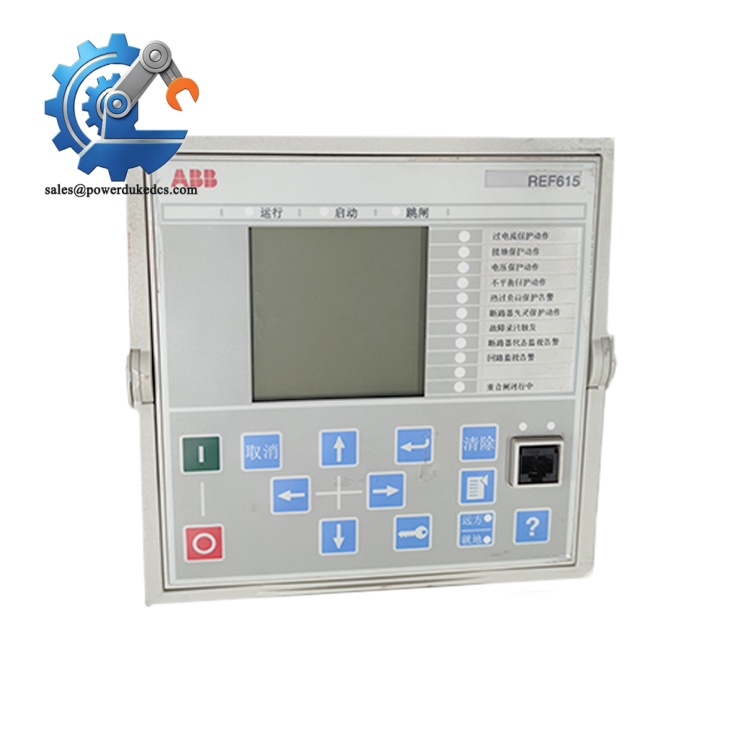
ABB REF615 HBFDACADABCIANN2XE
Strict Quality Inspection SOP (Full Transparency)
1. Warehouse Incoming Verification
Visual inspection covers housing integrity, zero scratches, no aging discoloration, intact front panel display and undamaged terminal connectors. Original manuals and factory test certificates are verified as complete sets.
2. Live Bench Functional Testing
- Power-on self-test: Verify all LED indicators and HMI boot normally
- Communication handshake: Establish IEC 61850 connection with PCM600 software
- Analog input simulation: Inject test currents and voltages to validate measurement accuracy
- Binary input/output test: Check trip and close contact response without chatter
- Continuous 24-hour aging test to monitor temperature stability
- Complete test report generated and available for customer review
3. Electrical Performance Testing
CT/VT circuit supervision channels are validated. All internal circuits checked for leakage and short-circuit risks. EMC compliance aligns with IEC 60255 standards.
4. Firmware & Configuration Verification
5. Final QC & Packaging
Field Replacement Pitfall Guide (Engineer Practical Experience)
1. Mismatched Firmware & PCM600 Software Version
Fix: Record firmware revision of the faulty IED before replacement. Match firmware version or upgrade on-site PCM600 accordingly.
Real case: One industrial substation spent an entire shift troubleshooting because PCM600 could not recognize the new IED firmware.
2. Ignoring CT Shorting Mechanism
Fix: Isolate feeder and confirm de-energized before extraction.
3. Incomplete Configuration Migration
Fix: Export complete application configuration (.pcmp file) from original unit instead of only protection settings. Take photos of all HMI access levels and user permission settings.
4. Communication Network Parameter Conflict
Fix: Write down IP, VLAN and GOOSE parameters before removing the faulty relay.
5. Improper ESD Handling
Fix: Wear ESD wristband and operate on anti-static mat. Avoid direct contact with rear board connectors. We have witnessed front panel communication failure caused by static damage during replacement.
6. Wrong Access Level Permissions
Fix: Document access passwords in substation maintenance logs.
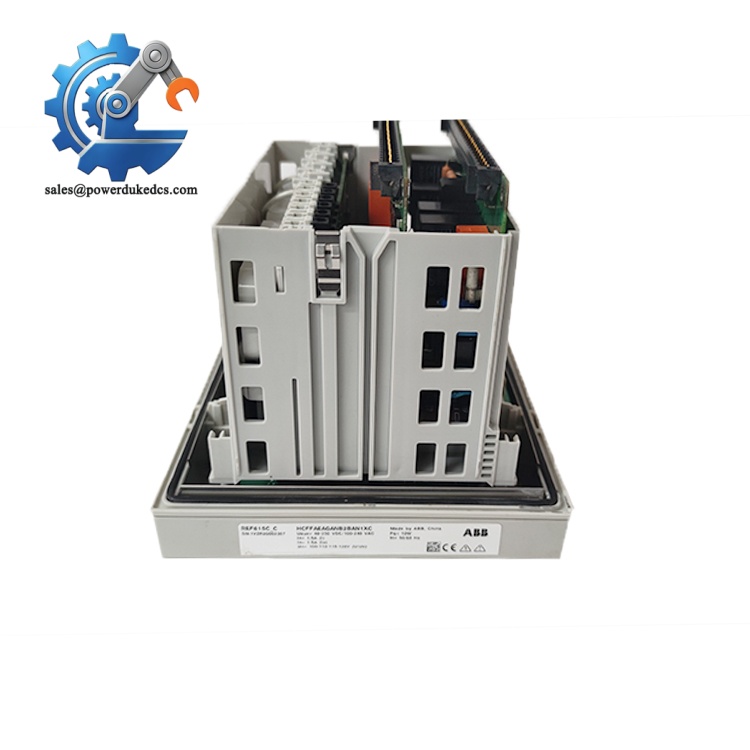
ABB REF615 HBFDACADABCIANN2XE
Installation & Configuration Guide
Phase 1: Pre-Installation Preparation (18 min)
- Organize planned feeder outage and implement lockout-tagout procedures
- Confirm circuit breaker is open and earthing switches closed
- Allow 3 minutes for cabinet circuit discharge
- Prepare anti-static equipment before handling IED
Phase 2: Old IED Removal (15 min)
- Close auxiliary power supply feeding the relay
- Disconnect front Ethernet service cable
- Unlock the draw-out handle, move unit to test position first
- Confirm CT circuits are shorted, then pull unit fully outward
- Inspect cabinet rear wiring connectors for corrosion and bent pins
⚠️ Do not force the draw-out mechanism; jamming may damage internal CT shorting contacts.
Phase 3: New Unit Installation (20 min)
- Take REF615 HBFDACADABCIANN2XE out of anti-static packaging
- Slide the plug-in unit into cabinet chassis and push to service position
- Lock the draw-out handle firmly
- Reconnect auxiliary power and communication wiring following photographed records
- Connect laptop Ethernet to front service port
[ ] Draw-out mechanism locked at service position
[ ] Auxiliary power wiring polarity verified
[ ] No loose wiring inside cabinet compartment
[ ] Front panel Ethernet cable correctly routed
Phase 4: Power-On & Commissioning (35 min)
- Restore auxiliary DC/AC power and wait for full boot sequence
- Connect PCM600 and establish communication
- Upload saved complete configuration file
- Verify all protection function blocks match site requirements
- Check measurement readings for phase current and voltage balance
- Perform binary input/output loop test with test equipment
- Validate IEC 61850 communication and GOOSE signal exchange
- Execute partial secondary injection test for core protection elements
- Run continuous monitoring for minimum 30 minutes with no communication or measurement alarms
- Failed configuration download: Check firmware compatibility and PCM600 version
- Incorrect measured values: Verify CT/VT wiring polarity and ratio parameters
- GOOSE message loss: Confirm network VLAN setup and IED access control list
- HMI access denied: Match user access level and passwords
Frequently Asked Questions (FAQ)
-
Can REF615 HBFDACADABCIANN2XE directly replace other REF615 ordering variants?
Physical draw-out size fits the same cabinet chassis. I/O module layout and function scope vary between order codes. You must verify internal hardware modules and reload matched configuration; direct plug-and-play without testing is not recommended.
-
Does this IED support hot swapping while the feeder remains energized?
Hot swap is prohibited. Removal triggers loss of protection functions and breaks control circuits. Replacement must be arranged during planned feeder shutdown.
-
What risk appears if CT open circuit occurs during maintenance?
High induced voltage will damage CT insulation and create safety hazards. Always move the draw-out unit fully to test position to activate CT shorting circuit before pulling out.
-
Can fault records be retrieved after unit replacement?
Historical fault data stores inside the IED. Export disturbance records and event logs before removing the faulty unit. Data cannot be recovered once the unit is scrapped.
-
Which software version is required for commissioning?
Use PCM600 matching the relay firmware. Older PCM600 releases cannot parse configuration files from new firmware variants.
-
What is the warranty coverage for stocked units?
We provide 12-month industrial warranty. Damage caused by reverse power polarity, wiring errors, lightning surge, mechanical collision or unapproved firmware modification voids warranty coverage.
-
What is the recommended spare parts inventory plan for this IED?
It belongs to Class A critical protection equipment. Deploy 1 unit on-site buffer stock. Implement cross-site inventory sharing between multiple substations to cut total carrying costs. Schedule last-time-buy actions once ABB releases end-of-life notifications.



 Start Chat


