

Description
Product Core Brief
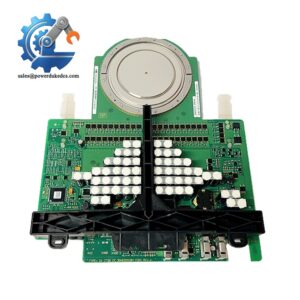
- Model: SX554
- Material Code: 3BSE004258R1
- Brand: ABB
- Series: Advant Master / Advant OCS (AC410, AC450 Controller)
- Core Function: Distribute fused DC power to controllers, I/O racks and auxiliary field devices inside control cabinets
- Type: Cabinet DC Power Distribution Unit
- Key Specs: Supports 24 VDC / 48 VDC input, built-in 1 A and 10 A fused output circuits, integrated ground connection
- Condition: New Surplus, factory intact, non-refurbished
⚠️ Discontinued legacy DCS component, limited emergency buffer stock for power station MRO maintenance
Product Introduction
Key Technical Specifications
| Parameter Item | Technical Specification |
|---|---|
| Model Number | SX554 |
| Part Number | 3BSE004258R1 |
| Compatible Controllers | Advant AC410, Advant AC450 |
| Supported Input Voltage | 24 VDC / 48 VDC |
| Input Connection | Two main screw terminals for DC power inlet |
| Output Circuits | Multiple unfused main power outlets; five ×10 A fused ports; one ×1 A fused branch |
| Diagnostic | Power input status LED indicator |
| Mounting Position | Installed below SA1xx power supply inside controller steel rack |
| Shield Ground | Fast-on tab for cable shield grounding |
| Protection Class | IP20, cabinet-only installation |
| Operating Temperature | 0 °C ~ +55 °C |
| Typical Application | Power splitting for Advant controller racks, S100 I/O subracks and auxiliary peripherals |
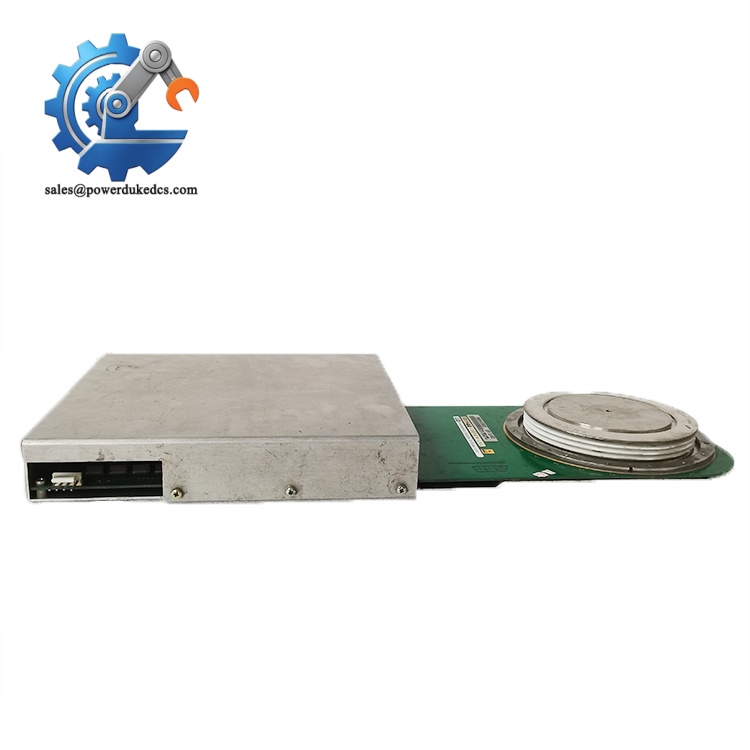
ABB SX554 3BSE004258R1
Installation & Configuration Guide
Stage 1: Pre-Installation Preparation (12 Minutes)
Stage 2: Old Module Removal (10 Minutes)
Detach ground fast-on tab and remove mounting hardware to extract the unit. Inspect rack mounting area for dust and metal debris. Clean contact surfaces with dry compressed air. Check for signs of terminal overheating or oxidation.
Stage 3: New Module Installation (15 Minutes)
Secure the distribution unit to the rack frame in the designated position under the main power supply. Reconnect DC input power, ground terminal and all output wiring following recorded photos. Verify all fuse ratings match the original configuration. Tighten terminals to recommended torque value.
Stage 4: Power-On & Commissioning (18 Minutes)
Switch on cabinet power and confirm the status LED illuminates normally. Measure output voltage on each fused branch to confirm consistent power delivery. Power up the Advant controller and verify no hardware fault alarms appear. Maintain continuous observation for 60 minutes, checking for abnormal temperature rise on terminals. Log serial number and replacement date to site maintenance records.
Standard Quality Inspection SOP
Qualified units are sealed in anti-static packaging with QC Pass labels. Test photos and documentation can be provided upon request.
Field Replacement Pitfall Guide
Many sites replace blown fuses with higher-rated alternatives. This removes circuit protection and creates fire risks for connected controller hardware. Keep spare fuses matching the original specification on hand.
SX554 supports both 24 VDC and 48 VDC systems. Confirm cabinet supply voltage before power-up. Wrong voltage will damage downstream I/O and controller modules.
Control cabinet vibration gradually loosens screw terminals. Poor contact creates voltage drop, triggering random controller restarts. Recheck all terminal tightness 24 hours after replacement.
The dedicated fast-on ground tab stabilizes signal quality for adjacent communication boards. Skipping this connection increases EMI interference in high-noise power plant cabinets.
Internal circuit traces are sensitive to electrostatic discharge. Wear ESD protection when handling exposed PCBs during installation.
Frequently Asked Questions (FAQ)
It is designed exclusively for ABB Advant Master DCS, matched with AC410 and AC450 controller racks. It cannot work with AC800M or System 800xA native racks.
Hardware allows physical removal, yet power interruption will cut supply to controllers and I/O modules. For critical turbine and boiler control loops, replacement must happen during planned shutdown.
Program data resides inside the processor module, not SX554. No configuration loss occurs. You still need to confirm stable power supply to all subracks after installation.
Common failure symptoms include intermittent power drop on fused branches, burned terminal traces, permanently unlit power LED, and repeated fuse blowouts without external short circuits.
Official production has been discontinued. We maintain limited safety buffer stock for emergency breakdown support. Long-term operators should evaluate system migration or execute last-time-buy procurement.
All units carry a 12-month industrial warranty. Our technical team provides remote guidance for wiring verification, fuse configuration and post-install power loop troubleshooting.



 Start Chat


