

Description
- Brand: ABB
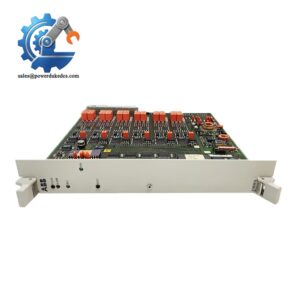
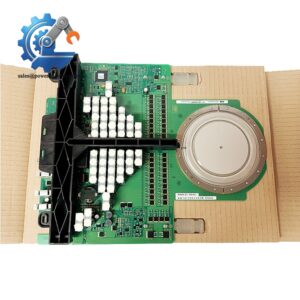
- Full Model Number: UFC765AE102 / 3BHE003604R0102
- Lifecycle Status: Legacy ABB ACS/medium-voltage drive hardware
- Core Function in System: Main control and processor interface for ABB drive-control equipment
- Top 3 Hardcore Specs: UFC 765 controller family; 3BHE003604R0102 article number; 24 V DC control-system architecture
- System Association: ABB ACS 6000 / ACS 1000 drive-control platforms
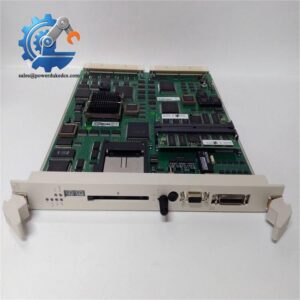
- Form Factor: Plug-in control board
- Condition & Lead Time: New OEM or tested replacement stock; emergency dispatch subject to confirmed inventory
Module 3: Technical Intro & Downtime Impact
A failed ABB UFC765AE102 can stop a medium-voltage drive from executing its control application even when the power section itself remains electrically healthy. That distinction matters during a breakdown: operators may see drive faults, loss of control, or communication alarms, while the actual failure is localized to the control-board level. The UFC765AE102 / 3BHE003604R0102 is an ABB UFC-series control board used within drive-control equipment, where controller availability directly affects the ability to start, regulate, and protect the drive.
For MTTR reduction, the replacement must be matched by complete article number, hardware revision, installed firmware, and surrounding control-board configuration. This is not a simple field terminal assembly. A controller board can carry application-dependent settings and communicate with multiple parts of the drive system, so a physically identical spare is not automatically a configured spare. (On older drive cabinets, connector oxidation and backplane contact resistance are worth checking before condemning the board.)
Module 4: Dynamic Emergency Swap & Configuration Guide
1. Pre-Swap Prep — Back Up the Drive Controller First
Place the drive in the approved maintenance condition and complete the site’s LOTO procedure. Record the full UFC765AE102 / 3BHE003604R0102 identification, hardware revision, firmware version, board position, connector locations, and any visible jumper or switch settings. Back up the drive configuration, parameters, fault history, and application data using the approved ABB engineering procedure before removing the controller.
Use ESD protection, insulated tools, the drive electrical drawings, and a calibrated multimeter.
2. Removal — Release the Plug-In Control Board Carefully
Verify that the control cabinet is de-energized and that stored energy has been discharged in accordance with the drive maintenance procedure. Label every rear connector before disconnection. Release the board retainers and withdraw the UFC765AE102 straight from its backplane or card interface.
Do not twist the PCB during extraction. Inspect the mating connector and adjacent control boards for heat discoloration, contamination, or damaged contacts.
3. Installation & Configuration — Match Firmware and Hardware
Install the replacement UFC765AE102 / 3BHE003604R0102 in exactly the same position and reconnect every interface according to the recorded connection map. Restore any documented jumper or switch configuration.
Next, verify the installed firmware against the removed board and the approved drive configuration. Do not assume that the replacement contains the correct application parameters simply because the article number matches. Load or restore the approved configuration only through the manufacturer’s supported engineering procedure.
4. Power-On Self-Test (POST) — Prove Controller and Drive Communications
Apply auxiliary control power and observe the controller’s startup sequence. Confirm that the board initializes without processor, memory, backplane, or communication alarms. Verify communication with the drive’s subordinate control and I/O hardware.
Before applying full medium-voltage power, complete the approved low-energy functional test: confirm speed/reference commands, feedback values, digital status, fault reporting, and permissive logic. A normal controller startup is not sufficient evidence that the drive-control application is fully operational.
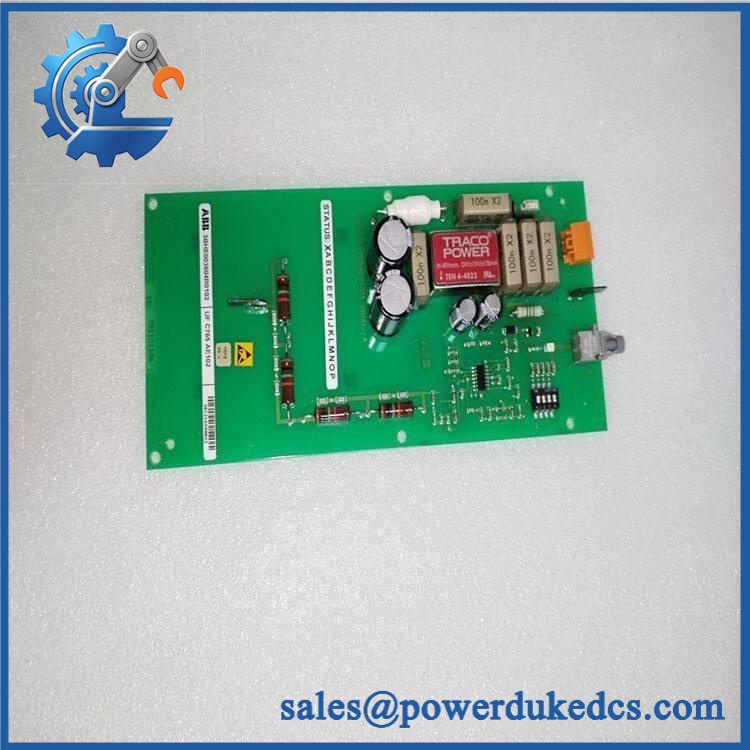
ABB UFC765AE102 3BHE003604R0102
Module 5: Quality Assurance & Testing SOP
The ABB / 3BHE003604R0102 should undergo a controller-board acceptance procedure before being released as a critical spare.
- Identity verification: Record , 3BHE003604R0102, hardware revision, serial number, and firmware identification.
- OEM anti-counterfeit visual inspection: Inspect ABB labels, PCB markings, component placement, connectors, mounting hardware, and manufacturing identifiers.
- Mechanical inspection: Check the PCB, backplane connector, mounting points, retainers, cooling area, and edge contacts for physical damage.
- Power-on self-test (POST): Install the board in an approved test chassis and verify normal processor startup and diagnostic behavior.
- Memory/processor diagnostics: Run the approved controller diagnostic routines and verify that no CPU, memory, or internal-bus fault is generated.
- Backplane communication test: Confirm stable communication between the UFC765 board and the associated drive-control hardware.
- Digital I/O simulation: Exercise applicable binary inputs and outputs and verify correct status indication and response.
- Analog signal verification: Where the installed configuration uses analog feedback, inject calibrated representative signals and compare the controller values against the reference.
- Communication-interface testing: Verify all applicable drive-control communication links used by the specific installation.
- Configuration restoration test: Load the approved application/configuration package and confirm successful validation without parameter corruption.
- Fault-handling test: Generate approved diagnostic conditions and verify that fault reporting and recovery functions operate correctly.
- Extended runtime test: Run the controller continuously under representative load to expose intermittent resets, communication dropouts, abnormal heating, or processor faults.
- Final QC record: Retain identification photographs, firmware records, diagnostic results, configuration checksum/version, test date, technician sign-off, and final pass/fail disposition.
Module 6: Maintenance & Reliability FAQ
1. Is ABB a direct drop-in replacement, or does it require a firmware flash?
Do not assume a blind drop-in exchange. is a control/processor board, so firmware revision and application configuration can be significant. Before installation, compare the hardware revision, firmware version, installed options, and drive configuration against the failed unit. Apply firmware or application restoration only when required by the specific ABB drive documentation.
2. Is it safe to hot-swap the while the drive is running?
No. Treat the board as non-hot-swappable unless the exact ABB drive documentation explicitly provides a live-replacement procedure. The controller participates in drive-control functions, and removing it while energized can interrupt control and protective functions.
3. Will replacing cause my current drive program to be lost?
The application may not reside exclusively on the physical board, but you should never assume that a replacement controller will retain the site’s exact configuration. Back up the drive application, parameters, firmware information, I/O configuration, communication settings, and protection parameters before replacement. Restore the approved configuration after the hardware passes its initial diagnostics.
4. What should I verify after installing ?
Verify the complete hardware identity, firmware compatibility, controller startup diagnostics, backplane communications, I/O status, reference and feedback values, permissive logic, and fault reporting. Perform the drive’s approved low-voltage or commissioning test before enabling the power section.
5. What are the warranty terms if the unit fails post-installation?
Warranty should follow the commercial terms for the exact supplied unit and condition. Retain the serial number, pre-shipment diagnostic report, firmware record, configuration backup, installation date, and commissioning results. Those records help distinguish a failed controller board from a backplane fault, firmware mismatch, power-supply issue, or communication problem elsewhere in the drive.



 Start Chat


