

Description
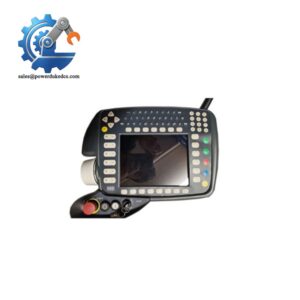
- EATON XVS-440-10MPI-1-1U | Legacy HMI Replacement Unit
At-A-Glance Executive Brief
- Model: EATON XVS-440-10MPI-1-1U
- Series: XVS400 Operator Interface / HMI-PLC Series
- Part Type: Industrial Touch Panel / Operator Terminal
- Core Function: Provides machine visualization, operator interaction, and PLC communication through an integrated industrial HMI platform.
- Key Specifications:
- 10.4-inch TFT color display.
- VGA resolution: 640 × 480 pixels.
- Infrared touch technology.
- 24 VDC power supply.
- Ethernet, RS232, USB, and PROFIBUS/MPI interfaces.
- Front protection rating IP65 for panel installation.
- Typical Procurement Category: Industrial HMI spare, machine operator interface replacement, legacy automation panel inventory.
Product Introduction
Mounted on the front of automation cabinets, the EATON XVS-440-10MPI-1-1U operator panel provides the interface between machine operators and industrial control systems. When this HMI fails, production teams may lose access to alarms, recipes, process values, and manual control functions. In field deployments, technicians normally verify the communication network, project files, and power supply before replacing the panel because display faults and PLC communication issues can originate from multiple points.
The XVS-440 series combines visualization hardware with optional PLC functionality for industrial automation applications. The XVS-440-10MPI-1-1U includes a 10.4-inch TFT display, infrared touch input, Ethernet communication, RS232, USB ports, and PROFIBUS/MPI connectivity. This unit is commonly maintained in legacy machine systems where replacing the complete operator architecture would require software migration and machine validation.
Core Technical Specifications
| Parameter | Value |
|---|---|
| Manufacturer | EATON / Moeller |
| Model Number | XVS-440-10MPI-1-1U |
| Product Type | Industrial HMI Touch Panel |
| Series | XVS400 |
| Display Size | 10.4 inch TFT Color |
| Resolution | VGA 640 × 480 pixels |
| Touch Technology | Infrared touch |
| Display Colors | 256 / 65,536 selectable colors |
| Brightness | Approx. 350 cd/m² |
| Contrast Ratio | Approx. 350:1 |
| Backlight Type | LED dimmable |
| Backlight Life | Approx. 50,000 hours |
| Power Supply | 24 VDC |
| Power Consumption | Approx. 18–24 W |
| Heat Dissipation | Approx. 24 W |
| Ethernet Interface | 10/100 Base-TX |
| Serial Interface | RS232 |
| Fieldbus Interface | PROFIBUS/MPI |
| USB Ports | 2 × USB host, 1 × USB device |
| Memory Expansion | CompactFlash card slots |
| Front Protection | IP65 |
| Rear Protection | IP20 |
| Operating Temperature | Approx. 0°C to +50°C |
| Mounting Type | Flush panel mounting |
| Weight | Approx. 3.7 kg |
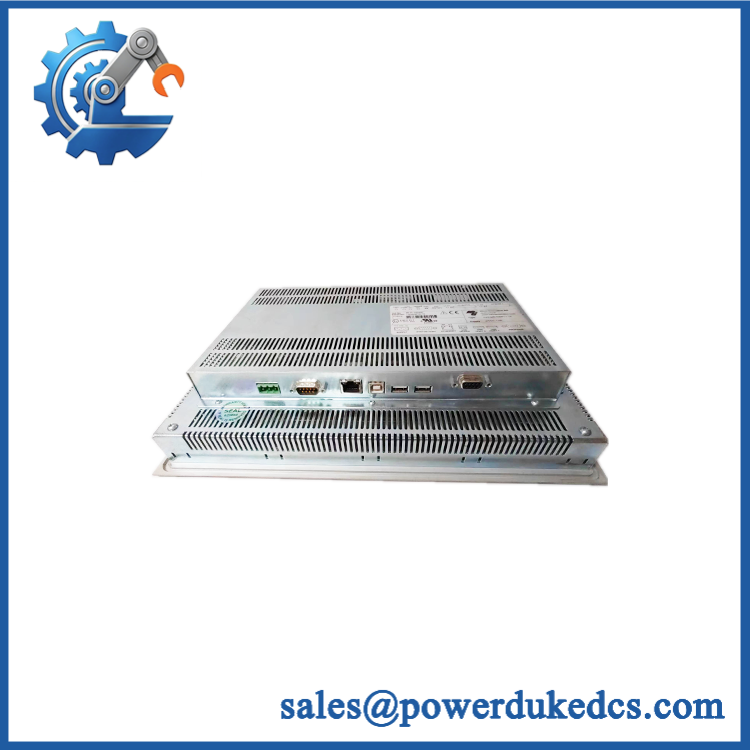
- EATON XVS-440-10MPI-1-1U
Application Scenarios & Pain Points
At packaging and assembly lines, the provides operator access to machine status, production settings, and alarm information.
For Siemens MPI-based control systems, this HMI can provide direct communication with PLC networks where legacy operator panels remain installed.
Inside process automation cabinets, the unit supports visualization tasks where operators need real-time monitoring without accessing the PLC hardware directly.
During machine refurbishment projects, keeping the original HMI avoids the risk of changing validated operator screens and control sequences.
Without a functioning HMI, the controller may continue running while operators lose visibility and manual adjustment capability.
Common Error Codes & Diagnostic Symptoms
Symptom/Code: Blank screen / no display after power-up
→ Diagnosis: Possible backlight failure, internal power circuit fault, or damaged display electronics.
→ Action: Verify 24VDC supplhe if internal hardware failure is confirmed.
Symptom/Code: PLC communication timeout / MPI communication failure
→ Diagnosis: Possible incorrect communication settings, damaged cable, or failed communication interface.
→ Action: Verify PLC parameters and replace the HMI if the communication hardware is defective.
Symptom/Code: Touch input not responding
→ Diagnosis: Possible infrared touch sensor contamination, calibration loss, or touchscreen hardware failure.
→ Action: Clean the front surface, recalibrate if supported, and replace the panel if required.
Cross-Reference & Lifecycle Migration
- Product Family: EATON XVS400 HMI operator panels.
- Related Models:
- -10
- XVS-430 series
- XVS-460 series
- Replacement Considerations:
- Confirm display size and resolution.
- Verify PROFIBUS/MPI requirement.
- Confirm Ethernet communication settings.
- Check CompactFlash project backup.
- Verify mounting cutout dimensions.
- Firmware Requirement:
Replacement may require restoration of HMI runtime software, visualization project files, and communication parameters from the original engineering backup. - Lifecycle Status: Legacy / Limited Availability.
- Maintain tested spare units for installed machines.
- Preserve HMI project files and communication configuration backups.
Field Engineer’s Tech Notes (Anti-Pitfall Guide)
- Do not replace the panel without saving the original project file.
The hardware replacement alone does not restore operator screens, recipes, or machine-specific settings. - Check MPI/PROFIBUS addressing before commissioning.
Incorrect node settings can make a replacement HMI appear defective. - Protect the front touch surface during storage.
Scratches or contamination on the infrared touch area can affect operator input accuracy.
Strict QA & Testing SOP
Step 1 — Incoming Inspection
- Verify EATON label and complete part number.
- Record serial number and hardware revision.
- Inspect front glass and mounting frame.
Step 2 — Physical Examination
- Check touch surface condition.
- Inspect Ethernet, RS232, USB, and fieldbus connectors.
- Verify CompactFlash slot condition.
Step 3 — Electrical Testing
- Apply 24VDC power.
- Verify startup sequence.
- Measure current consumption.
- Confirm display operation.
Step 4 — Communication Testing
- Connect Ethernet network.
- Test RS232 communication.
- Verify MPI/PROFIBUS communication.
- Load sample visualization project.
Step 5 — Packaging Control
- Use anti-static protection.
- Protect front display surface.
- Include inspection records.
Test videos are available for verification procedures when required.
Buyer’s FAQ (Dynamic Q&A)
ON be replaced while the machine is running?
A: No. Shut down the control system and isolate the 24VDC supply before removing the operator panel.
Q: How can Ine unit?
A: Check the EATON label, model code, display assembly, communication ports, hardware revision, and supplier inspection records.
Q: Does this HMI include the original machine program?
A: No. The panel hardware does not automatically contain the customer-specific visualization project. The original application backup is required.
Q: What should be confirmed before purchasing this legacy HMI?
A: Confirm screen size, communication protocol, firmware/runtime version, project compatibility, physical dimensions, and warranty terms.
Procurement Note:ON should be managed as a controlled automation spare. Store the unit with the HMI project backup, PLC communication settings, and machine documentation to reduce recovery time after operator interface failure.



 Start Chat


