

Description
- Brand: Emerson Network Power
- Full Model Number: MV6100COMI
- System/Series Family: MVME6100 Series VMEbus
- Core Function: 6U single-slot VMEbus single-board computer for embedded control
- Top 3 Hardcore Specs: MPC7457 PowerPC up to 1.267 GHz / 2eSST VMEbus up to 320 MB/s / Dual Gigabit Ethernet
- Memory: Up to 2 GB DDR ECC and 128 MB flash
- Expansion: Two 33/66/100 MHz PMC-X sites
- Stock Status: New Surplus — actual configuration to be verified
Commercial-Technical Deep Dive
A failed legacy VME processor can stop an entire control platform even when the I/O hardware remains serviceable. MV6100COMI belongs to the MVME6100 VMEbus single-board computer family and is used where existing VME infrastructure must remain in service. The MVME6100 architecture combines an MPC7457 PowerPC processor, MV64360 system controller, and Tsi148 VME bridge. The board also provides dual Gigabit Ethernet and two PMC-X expansion sites. That combination makes it more than a basic CPU replacement; the board sits at the center of the VME computing architecture.
Performance depends on the exact hardware configuration. The documented MVME6100 family supports a processor speed up to 1.267 GHz, 2eSST VMEbus transfers up to 320 MB/s, up to 2 GB of DDR ECC memory, and 128 MB of flash. The technical benefit is practical: higher VME transfer capability reduces bus-side transfer constraints in data-intensive applications, while ECC memory adds error-detection capability for stored working data. The board also supports VxWorks and Linux environments, subject to the installed board support package and application configuration.
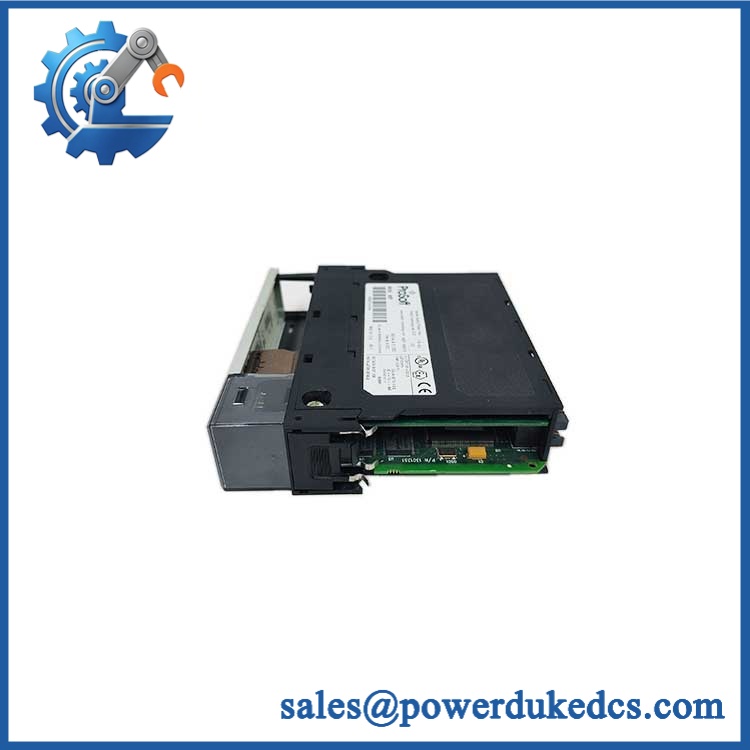
Emerson MV6100COMI
Compatibility & Installation Traps
Migration/Compatibility
MV6100COMI should be treated as an MVME6100-family configuration, not as a generic Emerson controller. The documented MVME6100 board is a single-slot 6U VMEbus computer with two PMC-X sites, a Tsi148 VME bridge, and dual Gigabit Ethernet. Exact memory, PMC population, firmware, and front-panel configuration can vary between units.
For a same-configuration replacement, hardware migration may be straightforward, but software compatibility still depends on the operating system, BSP, firmware image, and application dependencies. Do not assume that another variant is equivalent merely because the PCB family matches.
⚠️ Field Traps (Watch Out)
- ESD exposure: The installation manual specifically includes ESD precautions. Use a grounded ESD workstation and antistatic packaging when removing or installing the board.
- PMC keying voltage: The documented PCI bus arrangement uses PMC keying pins to establish VIO. The pins must designate the same voltage, either +3.3 V or +5 V. A mismatched PMC configuration can prevent correct operation.
- Backplane dependency: The is a VMEbus board. Verify the target chassis, backplane, VME slot position, rear I/O requirements, and PMC routing before energizing the replacement.
Quality Assurance SOP
Our pre-shipment inspection should treat MV6100COMI as a computer-board assembly rather than a simple passive spare.
- Part-number verification: Check the MV6100COMI identification against the physical board label.
- OEM anti-counterfeit visual inspection: Examine labels, PCB markings, connectors, component placement, solder condition, and manufacturing identifiers.
- PCB condition inspection: Check for corrosion, cracked components, damaged contacts, bent pins, contamination, and signs of rework.
- Processor and memory configuration check: Record visible configuration identifiers and installed memory arrangement.
- Power-on self-test (POST): Power the board through a suitable test chassis and check expected BRDFAIL and CPU RUN indications during startup.
- VMEbus communication handshake: Verify board access through the VMEbus test environment.
- Ethernet interface check: Test both front-panel Gigabit Ethernet interfaces where the test configuration permits.
- Serial interface check: Verify the asynchronous serial interface and associated status indications.
- PMC interface inspection: Confirm PMC slot mechanical condition and applicable PCI/PMC interface behavior.
- Firmware check: Record the installed firmware or boot-monitor information where accessible.
- Final packaging: Place the tested board in ESD-safe packaging with impact protection before shipment.
Testing results should be tied to the actual serial number or inventory identifier. That matters for surplus stock because hardware revisions and installed options can differ between otherwise similar -family boards.
CRO-Driven Buyer FAQ
Is Emerson MV6100COMI obsolete?
The is a legacy VMEbus platform, and current commercial availability is primarily through replacement-stock channels rather than normal new-production procurement. Treat lifecycle status as legacy/limited-availability hardware and verify the exact revision before purchase.
Can replace another directly?
Not automatically. Check the processor configuration, memory size, front-panel arrangement, PMC population, firmware, VME backplane requirements, and rear-I/O configuration. Identical family numbers do not guarantee identical installed options.
Can I remove the board while the system is powered?
Use the applicable Emerson/MVME installation procedure and follow the chassis manufacturer’s power-down requirements. Do not treat this board as a routine hot-swap module. The installation documentation emphasizes controlled board handling and ESD precautions.
What software environments are supported?
The family was designed to boot multiple operating systems, including VxWorks and Linux. Actual compatibility depends on the board revision, firmware, BSP, and application software version.
What warranty and technical support are provided?
A 12-month hardware warranty can be offered for the supplied unit under the agreed sales terms. Technical support covers model identification, configuration review, documentation, installation guidance, and basic communication testing. Application-specific software development, legacy BSP modification, and customer control-system engineering remain outside standard hardware support.



 Start Chat


