

Description
- Brand: GE General Electric
- Full Model Number: IC752SPL013-BA
- System/Series Family: EX2100 Excitation Control System
- One-Sentence Core Function: Operator interface panel providing local display, keypad entry, status monitoring, alarm viewing, and control access for the GE EX2100 excitation system
- Top 3 Hardcore Specs: 16-character alphanumeric display; 12-button keypad; EX2100 excitation-control interface
- Stock Status: New Surplus / Fully Tested Refurbished — exact BA-series panel identity and hardware condition verified before shipment
Module 3: Commercial-Technical Deep Dive
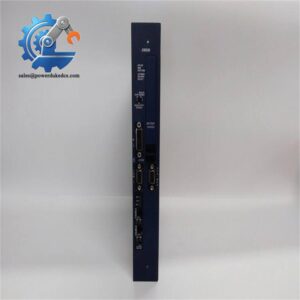
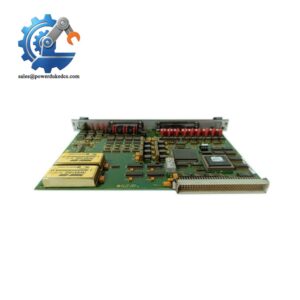
When an EX2100 excitation cabinet loses its local operator interface, the regulator may remain active while technicians lose direct access to operating status, alarms, parameters, and manual-control functions. The GE IC752SPL013-BA is identified in current inventory references as the EX2100 Excitation Control Interface Panel, BA Series. Specialist references describe the unit as a dedicated operator interface for the EX2100 system, with a 16-character alphanumeric display and 12-button keypad for local interaction. Another technical listing associates the part specifically with GE’s excitation-control architecture rather than a generic PLC or drive panel
The value of this panel is maintaining the installed human-machine interface without disturbing the excitation regulator’s application logic. The display and keypad provide a local access path for viewing system data and alarm messages and for entering authorized control or configuration commands. Public sources do not provide a sufficiently authoritative connector-level pinout, supply-voltage range, or exact communication-port specification for the BA variant, and some reseller pages publish conflicting claims about those parameters. The correct engineering approach is therefore to match the IC752SPL013-BA marking, cabinet revision, connector arrangement, and existing interface configuration before installation
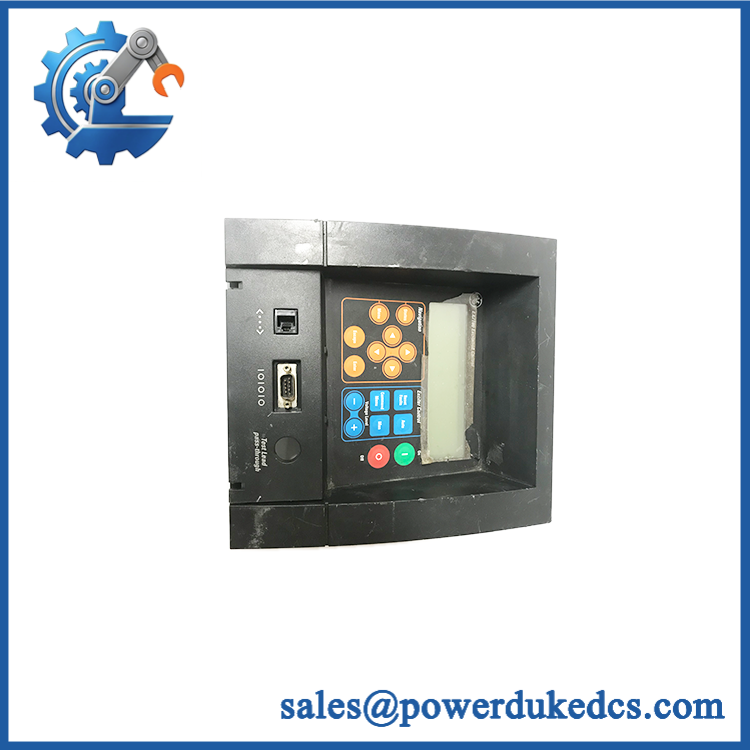
GE IC752SPL013-BA
Module 4: Compatibility & Installation Traps
Migration/Compatibility
- Replacement status: Configuration-specific excitation-control operator interface panel.
- Official family identification: Current catalog references identify IC752SPL013-BA as an Excitation Control Interface Panel, BA Series.
- Functional role: Local operator/display interface for the excitation system; not a generic PLC CPU or standalone AVR controller.
- Firmware requirement: Do not assume the panel requires independent firmware updating. Record the existing controller and HMI/interface revision before replacement.
- Logic rewrite: Normally not required for a like-for-like interface-panel replacement. Verify display behavior, keypad functions, alarm access, and configured operator permissions after installation.
- Variant control: The BA suffix is part of the ordering identity. Do not substitute another IC752SPL013 revision without confirming the cabinet hardware and interface assembly.
⚠️ Field Traps (Watch Out)
- Panel versus controller confusion: Some online descriptions incorrectly characterize IC752SPL013-BA as the excitation regulator itself. Current catalog references identify it as an operator interface panel. Do not use it as a substitute for an control board.
- Keypad mapping: Confirm that every keypad function corresponds to the expected screen or command. A replacement panel can illuminate correctly while a key matrix fault prevents specific commands.
- Display-content verification: A working LCD does not prove communication with the excitation controller. Verify actual live values, alarm messages, and status information rather than accepting backlight operation as a pass.
- Configuration access: Parameter-editing functions can affect excitation operation. Restore only the authorized configuration and verify operator access levels after replacement.
- ESD and power isolation: Isolate the panel’s associated low-voltage supply and use grounded ESD procedures before removing or installing the unit.
Module 5: Quality Assurance SOP
Our pre-shipment inspection for a focuses on display integrity, keypad operation, controller communication, and exact BA-series identification:
- OEM anti-counterfeit visual inspection — verify GE identification, full marking, BA-series designation, serial/revision labels, display assembly, keypad, connector construction, and enclosure condition.
- Part-number capture — photograph the front panel, rear label, connectors, and all secondary identification markings.
- Variant verification — confirm the unit is specifically , not another revision.
- Mechanical inspection — check bezel, display window, keypad membrane/buttons, mounting hardware, connector shells, and evidence of impact or contamination.
- Display inspection — verify complete character visibility, segment integrity, backlight behavior where fitted, and absence of dead or unstable display areas.
- Power-on self-test (POST) — energize the panel using a compatible test setup and observe startup sequence, display initialization, status indications, and abnormal current draw.
- Keypad test — individually test all 12 buttons for reliable registration, repeatability, and correct command response.
- Display-data verification — confirm that representative operating values and status information are correctly displayed.
- Alarm-display verification — simulate approved alarm conditions and verify that corresponding messages appear on the interface.
- Controller handshake verification — establish communication with compatible control hardware and confirm stable exchange of display and command data.
- Operator-command test — where the test environment permits, verify non-hazardous operator commands and screen navigation without issuing uncontrolled excitation commands.
- Power-cycle test — perform controlled restart cycles and verify reliable display initialization and keypad operation after each restart.
- Extended observation — monitor the panel for display flicker, intermittent keys, communication dropouts, or abnormal temperature during controlled operation.
- Configuration record — document part number, revision, test environment, display results, keypad results, communication status, and photographs.
- Final QC review — cross-check all identifiers against the customer’s exact interface-panel requirement.
- ESD and packaging — protect the display, keypad, connectors, and enclosure against ESD, impact, dust, and moisture before shipment.
The current evidence strongly supports the operator-interface identity and the 16-character / 12-button front-panel configuration. Because public sources disagree on detailed electrical and communication specifications, those values should be verified from the actual panel and applicable GE documentation before being used in an engineering drawing.
Module 6: CRO-Driven Buyer FAQ
1. Is GE -BA obsolete, and how do I verify authenticity?
The is a legacy GE interface-panel part. Current inventory references identify it specifically as an Excitation Control Interface Panel, BA Series. Verify the complete part number, BA suffix, panel artwork, keypad layout, display assembly, connectors, and physical condition before acceptance.
2. Is -BA the excitation controller?
No. It is an operator interface panel used with the excitation-control system. The panel provides local human-machine interaction; the main regulator/control functions are handled by the associated control hardware.
3. How many display characters and keypad buttons does -BA have?
Current specialist references identify a 16-character alphanumeric display and 12-button keypad for the operator interface.
4. Can -BA be hot-swapped?
Do not assume energized replacement is permitted. The panel interfaces with an operating excitation-control system, and loss of the HMI can affect local operator access during maintenance. Follow the applicable maintenance procedure, isolate the required low-voltage supply, and apply the site’s approved LOTO and configuration-control process before removal.
5. Does replacing the panel require reprogramming the ?
A like-for-like interface-panel replacement normally should not require rewriting the excitation-control application. After installation, verify controller communication, display values, alarm messages, keypad mapping, operator permissions, and any stored panel configuration before returning the excitation system to normal operation.
6. What warranty and technical support should I expect?
Warranty duration should be stated on the quotation for the exact physical panel supplied. Technical support should cover part-number verification, BA-series matching, compatibility checks, display and keypad testing, communication verification, and documented pre-shipment QA results. It should not substitute for excitation-system engineering, generator protection validation, or final commissioning.



 Start Chat


