

Description
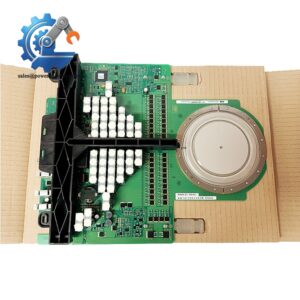
- Model: IOR810
- ABB Product Code: P-HB-IOR-80010000
- System: ABB S800 I/O
- Brand: ABB
- Part Type: S800 I/O Interface / Optical Interface Module
- Core Function: Provides the interface connection between the S800 I/O system and its associated control-system communication architecture.
- Key Specs: S800 I/O family; IOR810 hardware; P-HB-IOR-80010000 identification; intended for distributed I/O architectures using ABB S800 hardware.
- Typical Platform: ABB AC 800M / S800 I/O installations.
Product Introduction
In a distributed I/O cabinet, an interface fault can affect communication with an entire group of field I/O modules rather than a single sensor or actuator. ABB IOR810, P-HB-IOR-80010000 belongs to the hardware family and is used as an interface component within ABB’s distributed I/O architecture.
The I/O platform is designed as a modular I/O system for ABB control architectures, with communication interfaces connecting field-level I/O modules to the controller network. IOR810 is therefore a system-level interface component rather than a conventional analog or digital input/output card.
For replacement procurement, the complete identification should be retained as IOR810 / P-HB-IOR-80010000 / . ( hardware contains multiple interface and I/O module variants.) Before substitution, verify the installed interface arrangement, node configuration, communication path, and associated I/O modules.
Core Technical Specifications
| Parameter | Value |
|---|---|
| Manufacturer | ABB |
| Model | IOR810 |
| Product Code | P-HB-IOR-80010000 |
| Product Family | I/O |
| Product Type | I/O Interface Module |
| System Category | Distributed I/O |
| Associated Platform | ABB I/O |
| Typical Controller Platform | ABB AC 800M |
| Functional Role | I/O Interface |
| Installation | Control Cabinet / I/O Station |
| Application | Distributed Process I/O |
| Communication Architecture | ABB I/O Architecture |
| Mounting System | Modular I/O System |
| Application Areas | Process Automation / Industrial Control |
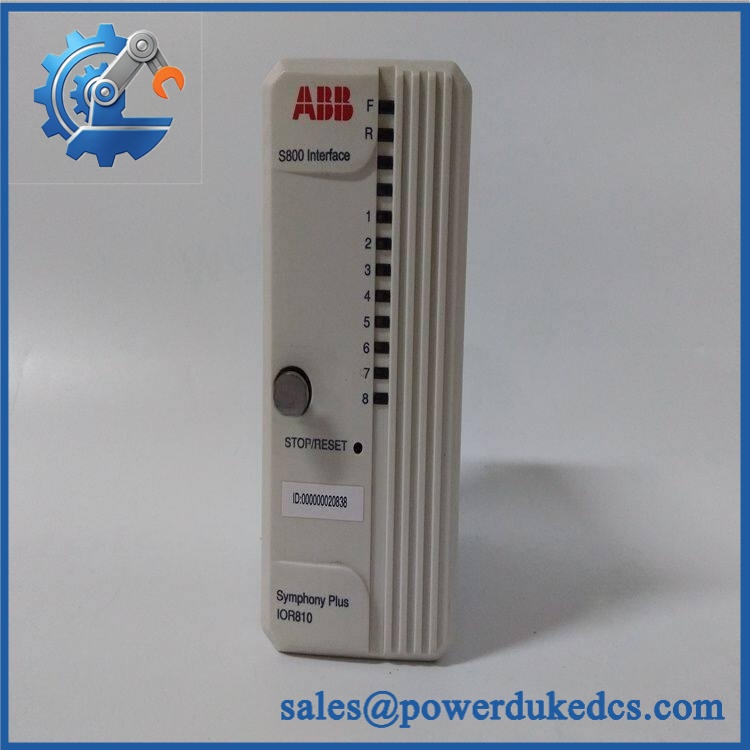
ABB IOR810 P-HB-IOR-80010000 S800
Application Scenarios & Pain Points
When an I/O communication path goes down, the problem can extend well beyond one failed channel. The interface hardware needs to be evaluated as part of the complete I/O station.
1. Process Automation Plants
Within chemical and process facilities, I/O stations can collect large numbers of field signals distributed around the plant. A defective interface can interrupt communication with multiple I/O modules simultaneously.
2. Power Generation
Power plants commonly use distributed control architectures where field signals are routed through remote I/O stations. During maintenance, identifying whether the fault is located in the controller, network, interface, or individual I/O module is critical.
3. Water and Wastewater Systems
Remote pumping and treatment equipment can use distributed I/O to reduce field cabling. If an I/O interface stops communicating, operators may lose visibility of several remote process signals at once.
4. Oil and Gas Facilities
In large process installations, distributed I/O reduces the amount of point-to-point wiring between field devices and control cabinets. (A communication-interface fault can therefore create a much broader operational symptom than a single failed analog input.)
5. High-Temperature Control Cabinets
When cabinet temperatures remain above 50°C, technicians should inspect power supplies, ventilation, terminal connections, and neighboring communication hardware before replacing the .
Common Error Codes & Diagnostic Symptoms
The is an interface component, and a universal numerical fault-code list specific to this exact hardware identifier is not established in the available product information. Practical diagnosis should therefore focus on communication and station-level symptoms.
- Symptom/Code: I/O station communication lost → Diagnosis: The interface path, power supply, communication connection, or hardware may be preventing normal station communication → Action: Check station power and communication connections, then replace the interface if the hardware fault is isolated.
- Symptom/Code: Multiple I/O modules unavailable simultaneously → Diagnosis: A common interface or communication-path problem is more likely than simultaneous failure of several independent I/O cards → Action: Check the and associated communication infrastructure before replacing individual I/O modules.
- Symptom/Code: Intermittent I/O station communication → Diagnosis: Loose connections, degraded communication hardware, power instability, or thermal stress can produce intermittent station-level communication → Action: Inspect connectors, supply voltage, cabinet temperature, and interface hardware; replace the when the fault follows the module.
Cross-Reference & Lifecycle Migration
Identification
The relevant identification for this item is:
| Identifier | Value |
|---|---|
| ABB Model | |
| ABB Product Code | P-HB-IOR-80010000 |
| System |
The complete identifier should be used when sourcing a replacement.
Compatibility
The family contains many different I/O modules, communication interfaces, terminal units, and accessories. A similar-looking module should not be treated as a direct replacement without checking:
- model
- Complete ABB product code
- I/O station architecture
- Associated controller
- Communication arrangement
- Mounting position
- Adjacent modules
- Firmware and configuration requirements
Previous Revisions / Replacement
A verified public cross-reference establishing a universal older part-number replacement for P-HB- is not available. Avoid listing another identifier as a direct replacement unless the installed system documentation confirms the equivalence.
Firmware / Configuration
I/O installations can depend on controller-side hardware configuration and station addressing. After replacing an interface component, verify the configured I/O station, communication parameters, module identities, and diagnostic status before returning the process to normal operation.
Lifecycle Status
Lifecycle: Legacy / Mature
The I/O platform is an established ABB automation platform with a large installed base. For older AC 800M/ installations, maintaining a verified spare interface can reduce recovery time when a station-level communication fault occurs.
Field Engineer’s Tech Notes
Tech Note 1 — Multiple failed channels usually point upstream.
If an entire group of modules disappears at the same time, do not start replacing individual AI, AO, DI, or DO cards. Check the common interface, communication path, and station power first. (The fault boundary is often much wider than the individual channel that first appears abnormal.)
Tech Note 2 — Check station configuration before commissioning the replacement.
An electrically good interface can still produce a communication problem if the controller-side configuration does not match the installed hardware arrangement. Record the existing configuration before removing the original unit.
Strict QA & Testing SOP
For an ABB P-HB-, a suitable quality-control process should include:
- Part Number Verification
Confirm the model and product code . - Visual Inspection
Check housing, connectors, terminals, labels, mounting features, and accessible electronics for physical damage. - Connector Inspection
Examine communication and power interfaces for bent contacts, contamination, corrosion, or mechanical damage. - Power-On Test
Apply the correct supply through an approved test arrangement and verify normal startup indications. - Communication Test
Connect the module to a compatible test configuration and verify communication with the associated I/O station architecture. - Station Recognition Test
Confirm that the connected I/O configuration is recognized correctly by the test controller or diagnostic environment. - Module Diagnostic Test
Check station-level diagnostic information for communication errors, hardware faults, or missing modules. - Load Simulation
Where applicable, connect known-good I/O modules and simulated field signals to verify the interface path under controlled conditions. - Intermittency Check
Monitor communication stability during an extended test period rather than relying only on successful startup. - Final Documentation
Record part number, serial information, test configuration, diagnostic results, photographs, and inspection status. - ESD-Safe Packaging
Package the module in anti-static material with adequate mechanical protection.
Test videos can be provided with the inspection record when required.
Buyer’s FAQ
Q: Can the ABB be hot-swapped?
A: Do not assume it can. I/O modules and interface components have specific installation and replacement procedures. Follow the applicable ABB system documentation and isolate the relevant equipment before replacement unless the installed architecture explicitly supports live replacement.
Q: Is the same as every interface module?
A: No. is a broad modular I/O family. The complete / P-HB- identification should be matched against the installed hardware before ordering.
Q: What information should I provide when requesting a replacement?
A: Provide the complete model and product code, photographs of the existing module label, the associated I/O station configuration, and the controller platform. This makes it easier to distinguish the interface from other hardware.
Q: Can I purchase a New Original with a warranty?
A: Warranty terms depend on the supplier and unit condition. Before ordering, request actual-unit photographs, identification details, inspection results, test documentation, and the applicable warranty period.



 Start Chat


