

Description
- SST 5136-PFB-VME | New Surplus Fieldbus Interface Card
2. At-A-Glance Executive Brief
- Model: SST 5136-PFB-VME
- Manufacturer: SST (Woodhead / Molex Automation Group)
- Series: SST PROFIBUS VME Interface Family
- Part Type: VMEbus PROFIBUS Communication Interface Card
- Core Function: Connects VMEbus host computers, controllers, or motion systems to PROFIBUS DP networks for industrial communication.
- Key Specifications:
- Supports PROFIBUS DP Master and DP Slave operation.
- Supports FDL (Layer 2) communication.
- Intel i960 32-bit processor onboard.
- 512 KB local RAM and 512 KB flash memory.
- PROFIBUS communication rates from 9.6 kbaud to 12 Mbaud.
- 6U VMEbus format with IEEE 1014 compatibility.
- Typical Procurement Category: Legacy fieldbus communication spare, VME industrial computer interface, automation network replacement card.
3. Product Introduction
Installed inside a VME-based industrial computer system, the SST 5136-PFB-VME operates as the communication bridge between a host processor and PROFIBUS field devices. A failed interface card can interrupt remote I/O communication, motion control data exchange, or process monitoring functions. In field deployments, engineers usually verify the PROFIBUS cable, termination resistors, host software driver, and card configuration together because communication faults are rarely isolated to a single component.
The 5136-PFB-VME was designed for VMEbus automation platforms requiring direct PROFIBUS connectivity. The onboard Intel i960 processor manages communication protocols, while local memory and flash storage maintain communication software and configuration data. This hardware remains relevant in legacy automation systems where replacing the complete VME architecture would require major engineering changes.
4. Core Technical Specifications
| Parameter | Value |
|---|---|
| Manufacturer | SST (Woodhead / Molex) |
| Model Number | 5136-PFB-VME |
| Product Type | PROFIBUS VME Interface Card |
| Bus Architecture | VMEbus |
| Mechanical Format | 6U VME, IEEE 1014 |
| Processor | Intel i960 32-bit RISC Processor |
| Local RAM | 512 KB |
| Shared RAM | 256 KB |
| Flash Memory | 512 KB |
| PROFIBUS Protocol | DP Master, DP Slave, FDL Layer 2 |
| PROFIBUS Baud Rate | 9.6 kbaud to 12 Mbaud |
| VME Interface | P1 compatible |
| Addressing | Standard and Short I/O addressing |
| Interrupt Support | VME interrupt levels 1–7 |
| Power Consumption | Maximum 950 mA at +5 VDC |
| Operating Temperature | 0°C to +60°C |
| Storage Temperature | -40°C to +85°C |
| PROFIBUS Connector | DB9 / Phoenix connector interface |
| Weight | Approx. 1.3 kg |
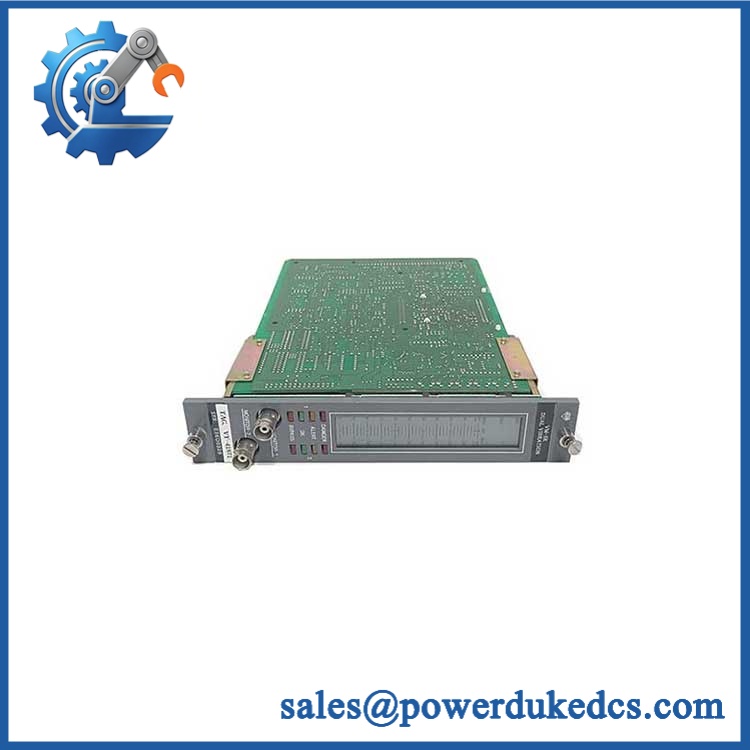
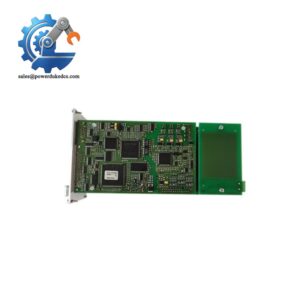
SST 5136-PFB-VME
5. Application Scenarios & Pain Points
Within VME-based industrial controllers, the 5136-PFB-VME provides PROFIBUS communication for distributed I/O systems, motion controllers, and programmable control platforms.
For factory automation equipment operating with legacy architectures, this card allows continued use of existing VME computers without redesigning the entire control network.
In machine tools and motion systems, PROFIBUS communication stability is critical because network interruptions can stop synchronized operations.
At power and process facilities maintaining older automation platforms, stocked communication cards reduce downtime during unexpected hardware failures.
Without a functioning fieldbus interface, the host computer may remain operational while losing access to remote PROFIBUS devices.
6. Common Error Codes & Diagnostic Symptoms
Symptom/Code: PROFIBUS network communication failure / COMM LED fault
→ Diagnosis: Possible incorrect bus termination, cable fault, configuration mismatch, or failed communication hardware.
→ Action: Verify PROFIBUS wiring and configuration, then replace the 5136-PFB-VME if the interface hardware is defective.
Symptom/Code: Card not detected by VME host system
→ Diagnosis: Possible VME addressing conflict, incorrect jumper settings, or hardware failure.
→ Action: Check VME configuration parameters and replace the interface card if required.
Symptom/Code: Intermittent DP master/slave communication dropout
→ Diagnosis: Possible aging memory components, unstable power supply, or corrupted configuration data in flash memory.
→ Action: Reload configuration and replace the module if instability continues.
7. Cross-Reference & Lifecycle Migration
- Compatible Platform:
- VMEbus industrial computers.
- PROFIBUS DP automation networks.
- Motion and programmable controller systems.
- Related Models:
- SST-PB3-VME series (newer PROFIBUS VME generation).
- SST 5136-PFB-PCI (PCI-based equivalent family).
- Replacement Considerations:
- Verify VME rack compatibility.
- Confirm host driver support.
- Check PROFIBUS configuration files.
- Confirm firmware module compatibility.
- Firmware Requirement:
The card stores communication software modules and configuration data in flash memory. Replacement may require loading the correct VMEPROFI software and network configuration. - Lifecycle Status: Legacy / Limited Availability.
- Maintain tested spare units for installed VME systems.
- Preserve driver files, configuration backups, and communication settings.
8. Field Engineer’s Tech Notes (Anti-Pitfall Guide)
- Do not replace the card without recording VME address settings.
Incorrect switch or jumper settings can make a good replacement appear defective. - Check PROFIBUS termination before replacing hardware.
A missing termination resistor or damaged cable often creates the same symptoms as a failed communication card. - Protect the VME connector during storage.
Oxidized contacts can interrupt bus communication after long warehouse periods.
9. Strict QA & Testing SOP
Step 1 — Incoming Inspection
- Verify SST label and model number.
- Confirm 5136-PFB-VME identification.
- Record serial number and revision information.
- Photograph board condition.
Step 2 — Physical Examination
- Inspect VME edge connector.
- Check jumpers and switches.
- Inspect PCB surface for contamination or corrosion.
Step 3 — Electrical Testing
- Apply controlled +5 VDC supply.
- Verify current consumption.
- Check onboard indicators.
- Confirm processor startup.
Step 4 — Communication Testing
- Install into compatible VME chassis.
- Load VMEPROFI software.
- Connect PROFIBUS test network.
- Verify DP Master/Slave communication.
Step 5 — Packaging Control
- Use ESD shielding packaging.
- Protect VME connector edges.
- Include test documentation.
Test videos are available for verification procedures when required.
10. Buyer’s FAQ (Dynamic Q&A)
Q: Can the SST 5136-PFB-VME be replaced while the VME system is powered?
A: No. VME boards should be removed only after following the host system shutdown procedure. Hot insertion can damage the backplane or the replacement card.
Q: How do I confirm a genuine SST 5136-PFB-VME unit?
A: Verify the SST label, part number, PCB markings, serial information, connector condition, and supplier inspection records.
Q: Does this PROFIBUS card include the required driver software?
A: The hardware includes onboard flash storage for communication software, but host-side drivers and configuration files must match the installed VME application.
Q: What warranty information should be requested before purchasing?
A: Request functional test records, communication test results, storage condition details, and warranty coverage. Legacy VME communication cards should be evaluated by operational testing rather than appearance alone.
Procurement Note: The SST 5136-PFB-VME should be managed as a controlled legacy communication spare. Store the card with VME address settings, driver software, PROFIBUS configuration files, and system documentation to reduce recovery time after network failures.



 Start Chat


