

Description
Module 2: The 10-Second Procurement Snapshot
- Brand: ABB
- Full Model Number: GCC960C103 3BHE033067R0103
- Lifecycle Status: Legacy / stock-dependent
- Core Function: Control and interface electronics for ABB industrial systems
- Product Type: Control / Interface Module
- Series: ABB system-specific control hardware
- Top 3 Technical Specs: GCC960C103 identification; 3BHE033067R0103 order number; system-specific ABB interface architecture
- Application: Industrial automation and control equipment
- Configuration: Hardware-revision dependent
- Stock & Condition: New surplus / tested stock, subject to physical availability
Module 3: Supply Chain & Technical Deep Dive
When a legacy ABB control board fails, the difficult part is often not the physical replacement. It is finding the exact hardware revision before the production window closes. GCC960C103 3BHE033067R0103 should therefore be purchased by its complete ABB reference, rather than by a shortened GCC960C103 description.
From a TCO perspective, an exact replacement can avoid cabinet modification, engineering changes, software validation, and extended commissioning. Publicly available information does not provide enough verified technical data to safely state the module’s I/O count, supply voltage, communication protocol, or operating limits. Those values should not be guessed. Confirm the nameplate, hardware revision, system manual, and installed configuration before approving the spare.
Module 4: Migration, Compatibility & Field Traps
Replacement Matrix
| Replacement Type | Assessment | Engineering Action |
|---|---|---|
| Drop-in Replacement | Conditional | Match GCC960C103 and 3BHE033067R0103 exactly |
| Software Compatible | System-dependent | Verify controller configuration and hardware revision |
| Hardware Modification | Not expected for an exact match | Confirm mounting and connector arrangement |
| Cross-Reference Replacement | Engineering approval required | Do not substitute from appearance alone |
⚠️ Field Trap 1: Hardware Revision
Do not approve the spare using GCC960C103 alone.
The complete ABB order number 3BHE033067R0103 should be checked against the existing board. If the revision differs, confirm compatibility with the applicable ABB documentation before installation.
⚠️ Field Trap 2: Connector and Pinout
A connector that physically fits does not prove electrical compatibility.
Before removing the original board:
- Photograph every connector.
- Record cable numbers.
- Record terminal positions.
- Photograph jumper or switch settings.
- Check the wiring diagram.
Never move cables based only on connector shape.
⚠️ Field Trap 3: ESD
Handle the PCB with an ESD wrist strap and grounded work surface.
Keep the replacement in its antistatic packaging until the cabinet is ready for installation.
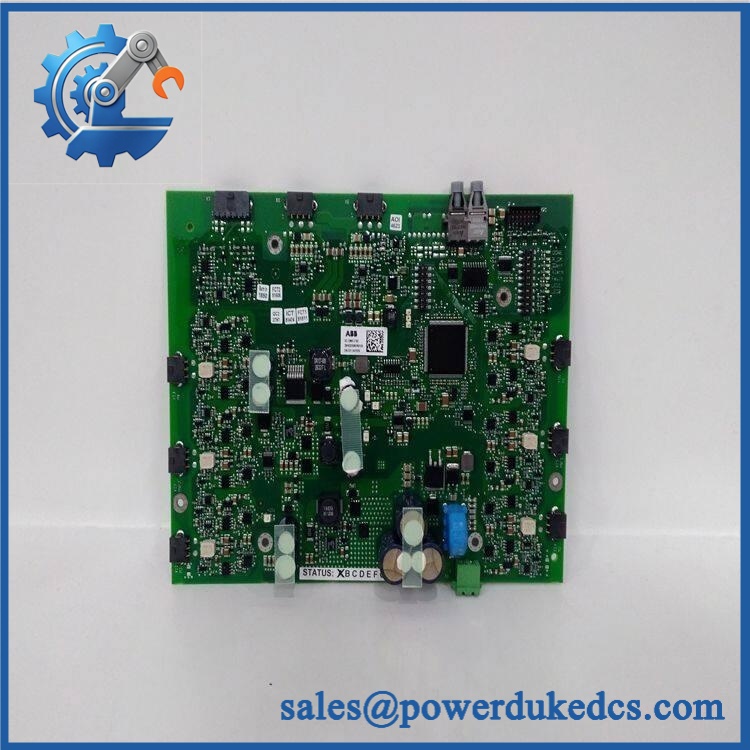
ABB GCC960C103 3BHE033067R0103
Module 5: Quality Assurance & Testing SOP
1. Incoming Identity Inspection
- Verify ABB marking.
- Confirm GCC960C103.
- Confirm 3BHE033067R0103.
- Record serial number and hardware revision.
- Compare the physical label with the purchase order.
- Inspect PCB condition.
- Check connectors and contacts.
- Look for corrosion, overheating, cracks, or repair marks.
- Perform OEM marking and anti-counterfeit visual inspection.
2. Electrical Inspection
Before energizing:
- Inspect accessible power circuits.
- Check connector condition.
- Inspect the PCB for contamination or damage.
- Check for obvious short circuits.
- Verify grounding provisions.
- Confirm the correct test fixture.
Electrical acceptance limits must follow the applicable ABB documentation.
Do not invent voltage, current, insulation, or resistance limits for this module when the exact service documentation is unavailable.
3. Power-On Self-Test
Using a compatible ABB test environment:
- Install the board in the approved test position.
- Apply the specified system power.
- Observe status indicators.
- Check system recognition.
- Verify diagnostic status.
- Record startup behavior.
4. Functional Test
Testing should reproduce the module’s actual application wherever the correct test rack is available:
- Verify system communication.
- Check applicable input/output functions.
- Exercise connected interfaces.
- Monitor diagnostic status.
- Check for intermittent behavior.
- Record measured results.
If the module requires a dedicated ABB system for functional testing, that limitation should be stated on the Test Report.
5. Extended Stability Test
Where technically applicable:
- Run the module under representative conditions.
- Monitor temperature.
- Check communication stability.
- Monitor status indications.
- Record test duration.
- Generate a Test Report.
6. Final QA and Packaging
- Record exact ABB reference.
- Record hardware revision.
- Record serial number.
- Save test results.
- Photograph the tested unit.
- Apply QC status.
- Seal the PCB in an ESD shielding bag.
- Add shock protection.
- Mark the package with the complete part number.
Test photographs and available Test Report records can be supplied for procurement review before shipment.
Module 6: Procurement-Driven FAQ
1. Is ABB GCC960C103 3BHE033067R0103 physically in stock?
Availability depends on verified warehouse inventory and unit condition. For an urgent maintenance requirement, confirm the exact complete part number, quantity, condition, and dispatch cutoff before releasing the purchase order.
For legacy equipment, physical verification is more useful than a generic “available” status.
2. How do you verify the condition of this ABB control board?
Inspection starts with the complete identification.
The label, PCB, connectors, contacts, hardware revision, corrosion, overheating, and visible repair evidence are checked. Where a compatible test environment is available, the board is powered and functionally tested before shipment.
New surplus, used, and refurbished conditions should be clearly separated on the quotation.
3. Can I replace GCC960C103 with another ABB control module?
Not without an engineering review.
The complete order number 3BHE033067R0103 should be matched first. A different ABB board may have a different connector assignment, firmware requirement, electrical interface, or system role.
If the original part is unavailable, provide the existing board’s full label and system information before selecting a cross-reference.
4. Could a hardware revision create compatibility problems?
Yes. Hardware revisions can affect system compatibility even when the shortened model designation looks identical.
Before installation, record the original model, ABB order number, hardware revision, serial number, and installed system configuration. If any of these differ on the replacement, verify the revision with the applicable ABB documentation.
5. What should my engineer check before ordering?
Use this procurement checklist:
- GCC960C103
- 3BHE033067R0103
- Hardware revision
- Existing system/platform
- Connector arrangement
- Current firmware or configuration data, where applicable
- Required condition
- Required warranty
- Required delivery date
- Functional Test Report requirement
For a legacy ABB board, the complete part number is the purchasing control point. Do not approve a substitute from the short model name alone.




 Start Chat


