

Description
- HIMA F3503SILWORX | Industrial SIS Controller Replacement
2. At-A-Glance Executive Brief
- Model: HIMA F3503SILWORX
- Brand: HIMA Paul Hildebrandt GmbH
- Series: HIMatrix F35 Safety Controller Family
- Part Type: Compact Safety PLC / Safety-Related Controller
- Core Function: Executes safety logic programs configured through the SILworX engineering environment for critical shutdown and protection applications.
- Key Specs:
- 24 safety-related digital inputs.
- 8 safety-related digital outputs.
- 8 analog inputs.
- 2 counter inputs.
- SIL 3 capable safety controller architecture.
- Supports SILworX configuration, programming, and diagnostics.
3. Product Introduction
Structure B — Technical Direct
Within the HIMA HIMatrix safety automation architecture, the F3503SILWORX functions as a compact safety controller programmed through the SILworX engineering platform. The controller integrates CPU processing, communication functions, and distributed safety I/O into a single metal enclosure, allowing deployment in applications where dedicated safety logic execution is required.
In field deployments, this controller is commonly installed for emergency shutdown, burner management, fire and gas, and machinery protection systems (—where deterministic response and certified safety functions are mandatory). The SILworX variant should not be confused with earlier ELOP II configured versions because engineering tools and project compatibility differ. Verify application files, firmware revision, and safety certification records before replacement.
4. Core Technical Specifications
| Parameter | Value |
|---|---|
| Manufacturer | HIMA |
| Model | F3503SILWORX |
| Product Family | HIMatrix F35 |
| Product Type | Safety-Related Compact Controller |
| Engineering Tool | SILworX |
| Safety Rating | Up to SIL 3 |
| Digital Inputs | 24 channels |
| Digital Outputs | 8 channels |
| Analog Inputs | 8 channels |
| Counter Inputs | 2 channels |
| Communication | SafeEthernet and system-dependent interfaces |
| Processor | Integrated safety CPU |
| Programming Method | SILworX application configuration |
| Operating Temperature | 0°C to +60°C |
| Mounting | Cabinet / DIN rail style installation |
| Enclosure | Metal housing |
| Application Standards | IEC 61508 / IEC 61511 / IEC 62061 related safety applications |
| Event Recording | Sequence of Events (SOE) support |
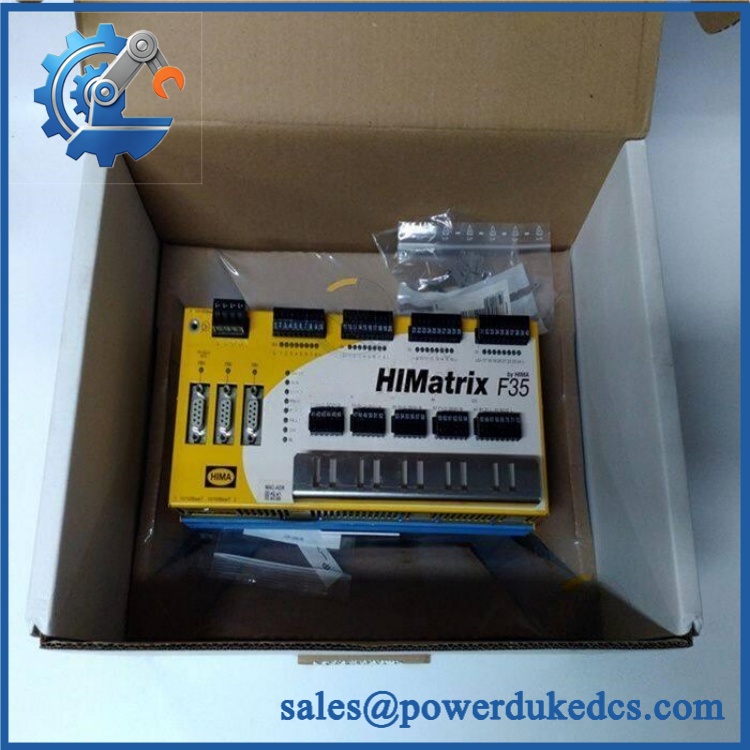
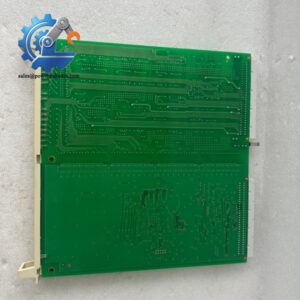
HIMA F3503SILWORX
5. Application Scenarios & Pain Points
Bold technical conclusion:
A safety controller failure is not simply an automation interruption; it can remove a certified protection layer. The F3503SILWORX is selected where controlled shutdown behavior, diagnostics, and safety lifecycle documentation are required.
- Oil & Gas Processing: Used in emergency shutdown systems where valve isolation and trip logic must execute within defined safety requirements.
- Burner Management Systems: Applied in boiler and combustion control packages requiring certified safety monitoring. HIMA SILworX systems support safety-related burner control functions.
- Chemical Plants: Handles safety interlocks for process protection where incorrect logic execution could create hazardous conditions.
- Machine Safety Applications: Supports protective functions in industrial machinery environments.
- Power Generation: Used for turbine protection, auxiliary systems, and shutdown sequences.
In high-temperature cabinets exceeding 50°C ambient conditions, review ventilation, power supply loading, and enclosure heat buildup before installing replacement safety hardware.
6. Common Error Codes & Diagnostic Symptoms
Symptom/Code: CPU Fault LED Active / Controller Not Running
→ Diagnosis: Internal controller diagnostic failure, corrupted application data, or processor hardware issue.
→ Action: Verify project backup and replace the F3503SILWORX controller if hardware failure is confirmed.
Symptom/Code: SafeEthernet Communication Fault
→ Diagnosis: Network configuration mismatch, communication interface failure, or incorrect safety network parameters.
→ Action: Verify SILworX communication settings and replace the controller if the interface hardware is defective.
Symptom/Code: I/O Module Diagnostic Error
→ Diagnosis: Internal I/O channel fault, wiring issue, or field device short circuit detection.
→ Action: Check field wiring and replace the controller only after external causes are eliminated.
7. Cross-Reference & Lifecycle Migration
- Compatible Platform: HIMA HIMatrix F35 safety controller family.
- Engineering Compatibility: Requires SILworX project files and compatible firmware configuration.
- Older Version Consideration: Earlier HIMatrix controllers configured with ELOP II may require engineering conversion before migration.
- Firmware Requirement: Confirm firmware revision before loading an existing safety application.
- Replacement Planning: Maintain application backup, hardware revision records, and safety validation documents.
- Lifecycle Status: Classic / Long-Term Support Category
For spare inventory, keep verified replacement units with matching firmware and documented safety approval status. A controller without the correct SILworX project archive cannot restore a certified safety function.
8. Field Engineer’s Tech Notes (Anti-Pitfall Guide)
- Do not download a safety application without verifying the target controller identity.
HIMA safety systems rely on controlled configuration management. Loading the wrong project can invalidate the safety assessment. - Check terminal wiring before blaming the controller.
Field shorts, incorrect polarity, and missing line monitoring resistors can generate I/O diagnostics that look like internal failures.
9. Strict QA & Testing SOP
A professional inspection process for HIMA F3503SILWORX should include:
Step 1 — Incoming Inspection
- Confirm model marking: F3503SILWORX.
- Record serial number and hardware revision.
- Inspect enclosure, terminal interfaces, and mounting points.
- Photograph received condition.
Step 2 — Electrical Verification
- Check supply voltage input.
- Verify startup indicators.
- Confirm CPU diagnostic status.
Step 3 — Functional Test
- Install into a compatible HIMatrix test environment.
- Connect using SILworX engineering software.
- Verify controller communication.
- Confirm I/O channel diagnostics.
Step 4 — Safety Configuration Review
- Verify firmware compatibility.
- Check application checksum where applicable.
- Confirm project loading procedure.
Step 5 — Packaging Control
- Place controller in anti-static protection.
- Add shock-resistant export packaging.
- Attach test documentation.
Inspection photos, diagnostic records, and test videos are available for verification.
10. Buyer’s FAQ (Dynamic Q&A)
Q1. Can the HIMA F3503SILWORX be hot-swapped during operation?
A: No. Safety controllers should only be replaced according to the approved maintenance procedure. Removing an active safety CPU may interrupt protection functions.
Q2. “Is this a genuine New Original HIMA F3503SILWORX?”
A: Verify the HIMA nameplate, serial number, production information, packaging, and inspection records. Safety-related hardware requires traceable documentation.
Q3. Does the F3503SILWORX include the SILworX programming software?
A: No. The controller hardware is configured using SILworX engineering tools, but the engineering license and project files are separate items.
Q4. What warranty should be requested for this safety PLC?
A: Request written warranty coverage, functional test results, and return conditions. For safety controllers, documented verification is important because replacement hardware must maintain the approved safety architecture.



 Start Chat


