

Description
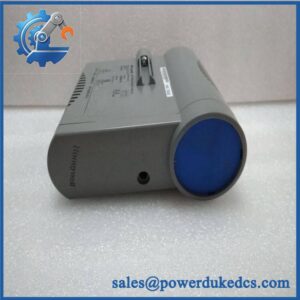
- HONEYWELL CC-PUI001 | New Original Control System Replacement
2. At-A-Glance Executive Brief
- Model: HONEYWELL CC-PUI001
- Series: Honeywell Experion PKS Series C I/O
- Part Type: Universal Process Input/Output Module (UIO)
- Core Function: Provides configurable field signal interfacing for process automation systems, supporting analog and digital measurement/control channels.
- Key Specifications:
- Universal I/O module for Honeywell Experion Series C architecture.
- Supports analog input, analog output, digital input, and digital output field devices.
- Designed for C300 controller-based DCS environments.
- Requires compatible IOTA termination assembly.
- Suitable for process industries requiring flexible signal handling.
- Typical Procurement Category: DCS spare module, Honeywell Experion PKS replacement I/O, process control hardware inventory.
3. Product Introduction
Installed within the Honeywell Experion PKS Series C I/O architecture, the CC-PUI001 Universal Process I/O Module provides the electronic interface between field instruments and the control system. A failed module can interrupt transmitter readings, valve commands, status signals, or process monitoring functions. In field deployments, engineers normally inspect the IOM, IOTA terminal assembly, field wiring, and controller communication path together because a single I/O alarm does not always identify the failed hardware.
The CC-PUI001 is designed as a universal interface module that supports multiple field signal types through one hardware platform. Honeywell documentation identifies it as a Universal Input Output module within the Series C I/O family, interfacing with analog input, analog output, digital input, and digital output devices. This flexibility reduces spare-part variety in large process plants (which is valuable for maintenance inventory planning).
4. Core Technical Specifications
| Parameter | Value |
|---|---|
| Manufacturer | Honeywell |
| Model Number | CC-PUI001 |
| Product Type | Universal Process I/O Module |
| System Platform | Experion PKS Series C I/O |
| Controller Compatibility | Honeywell C300 Controller |
| Signal Types | AI / AO / DI / DO |
| Field Interface | Through compatible IOTA assembly |
| Power Supply | 24 VDC system supply |
| Communication Interface | Series C I/O backplane |
| Channel Configuration | Universal configurable channels |
| Isolation | Channel and system isolation features |
| Hazardous Area Support | Supports energy-limited / nonincendive field wiring applications depending on configuration |
| Mounting Method | Series C I/O carrier mounting |
| Operating Temperature | Approx. -40°C to +70°C |
| Storage Temperature | Approx. -40°C to +85°C |
| Humidity | Non-condensing industrial environment |
| Protection Rating | Cabinet installation |
| Weight | Approx. 0.3–0.5 kg |
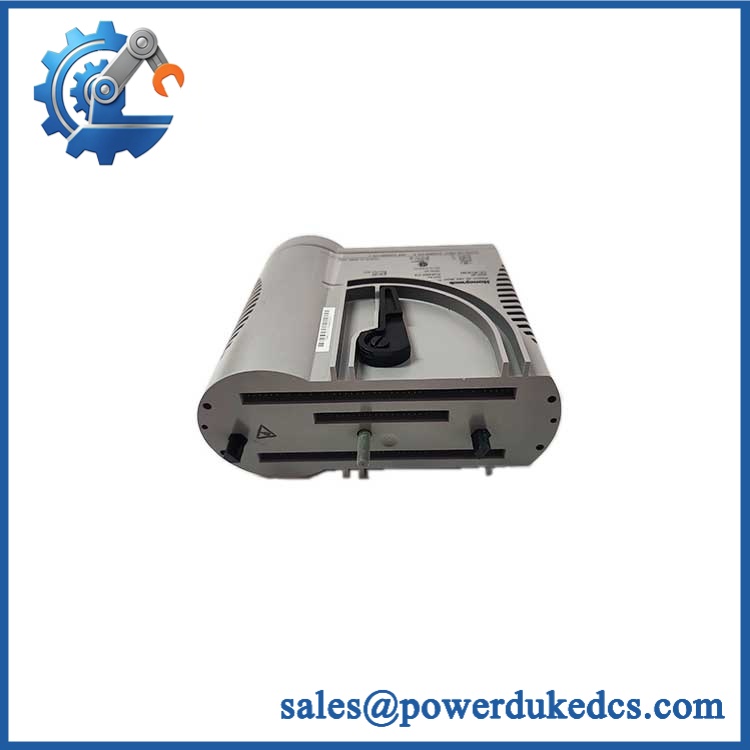
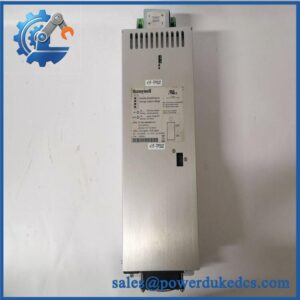
HONEYWELL CC-PUI001
5. Application Scenarios & Pain Points
At oil and gas processing facilities, the CC-PUI001 manages mixed field signals where multiple instrument types must communicate with a single DCS platform.
For chemical plants operating continuous processes, a failed universal I/O channel can affect critical measurements such as pressure, temperature, flow, or equipment status.
During control system maintenance projects, keeping tested Honeywell Series C modules reduces downtime when replacing aging field interface hardware.
Inside power generation facilities, flexible I/O capability helps maintain legacy Experion PKS installations without immediate system redesign.
Without a functioning I/O module, the controller may remain online while losing field visibility or output control capability.
6. Common Error Codes & Diagnostic Symptoms
Symptom/Code: I/O module fault LED / communication failure
→ Diagnosis: Possible backplane communication issue, module hardware fault, or incorrect IOTA connection.
→ Action: Check carrier seating and communication status, then replace the CC-PUI001 module if failure remains.
Symptom/Code: Multiple field channels unavailable simultaneously
→ Diagnosis: Possible module-level power issue or internal electronics failure rather than individual field device problems.
→ Action: Verify field wiring and replace the module after confirmation.
Symptom/Code: Incorrect analog signal reading
→ Diagnosis: Possible channel configuration mismatch, wiring fault, or input circuit failure.
→ Action: Verify channel settings and field connections, then replace the I/O module if required.
7. Cross-Reference & Lifecycle Migration
- Compatible Platform: Honeywell Experion PKS Series C I/O system.
- Related Modules:
- CC-PUIO01 Universal Input Output Module (later Series C universal I/O variant).
- CC-PUIO31 Universal I/O with enhanced event features.
- Replacement Considerations:
- Confirm exact module model.
- Verify IOTA compatibility.
- Confirm controller firmware compatibility.
- Check channel configuration database.
- Verify hazardous-area installation requirements.
- Firmware Requirement:
Replacement modules may require system recognition and configuration download from the Experion engineering environment. Confirm controller and I/O database versions before commissioning. - Lifecycle Status: Legacy / Active Support Dependent.
- Maintain tested spare inventory for installed Honeywell systems.
- Store configuration backups with module records.
8. Field Engineer’s Tech Notes (Anti-Pitfall Guide)
- Do not replace the CC-PUI001 without checking the IOTA assembly.
The terminal assembly is part of the signal interface path, and mismatched IOTA hardware can create false module faults. - Record channel configuration before removal.
Universal I/O modules may support multiple signal types, so restoring the wrong channel assignment can create unexpected process behavior. - Handle the module using ESD precautions.
Backplane connectors and internal electronics can be damaged by static discharge during maintenance.
9. Strict QA & Testing SOP
Step 1 — Incoming Inspection
- Verify Honeywell label and CC-PUI001 marking.
- Record serial number and hardware revision.
- Photograph module condition.
Step 2 — Physical Examination
- Inspect backplane connector contacts.
- Check terminal interface compatibility.
- Verify housing condition and LED indicators.
Step 3 — Electrical Inspection
- Apply controlled system power.
- Check module startup behavior.
- Verify supply stability.
Step 4 — Functional Testing
- Install in compatible Experion Series C test rack.
- Verify module recognition.
- Test representative AI/AO/DI/DO functions.
- Confirm communication with controller.
Step 5 — Packaging Control
- Place module in ESD shielding bag.
- Protect connector pins.
- Include inspection records.
Test videos are available for verification procedures when required.
10. Buyer’s FAQ (Dynamic Q&A)
Q: Can the Honeywell CC-PUI001 be replaced while the DCS rack is powered?
A: Follow the site-approved Honeywell maintenance procedure. Hot replacement capability depends on the specific Series C installation and operating rules.
Q: How do I verify an original Honeywell CC-PUI001 module?
A: Confirm the Honeywell label, model number, hardware revision, serial information, connector condition, and functional test documentation.
Q: Does the CC-PUI001 include the DCS configuration database?
A: No. The module is hardware only. Channel assignments, scaling, alarms, and control logic are stored in the Experion engineering database.
Q: What information should be provided before purchasing this module?
A: Confirm the installed Experion version, IOTA model, module revision, application environment, test status, and warranty conditions.
Procurement Note: The Honeywell CC-PUI001 should be managed as a controlled DCS spare. Store the module together with its IOTA compatibility information, system configuration records, and inspection history to reduce restoration time during process interruptions.



 Start Chat


