

Description
Module 2: The 10-Second Procurement Snapshot
- Brand: ABB Robotics
- Full Model Number: DSQC322
- Related Part Number: 3HAB5960-1
- Lifecycle Status: Obsolete / legacy
- Core Function: Robot computer control for ABB S4C systems
- Product Type: Robot Computer Board
- System Family: ABB S4C
- Top 3 Technical Specs: 57 MHz processor; S4C robot controller architecture; supports 1 external axis in S4C M97
- Application: ABB industrial robot controllers
- Stock & Condition: New surplus / tested used, subject to physical availability
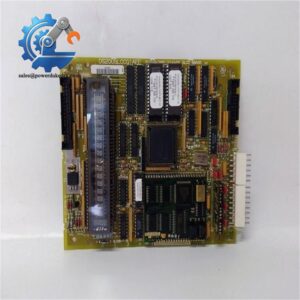
ABB documentation records DSQC322 as a Robot Computer used in the S4C M97 controller generation, with the associated part number 3HAB5960-1. The same ABB Robotics Community technical reference identifies the M97 configuration as supporting 1 external axis.
Module 3: Supply Chain & Technical Deep Dive
A failed robot computer is not an ordinary I/O replacement. On an older ABB S4C controller, this board sits inside the robot-control architecture, so losing it can stop motion control, axis coordination, I/O handling, and teach-pendant communication. DSQC322 is specifically associated with the S4C M97 hardware generation, making the exact board reference important when maintaining an aging robot cell.
The TCO argument is strongest when the alternative is a controller migration. An exact legacy spare can avoid new controller hardware, software conversion, cabinet changes, robot mastering work, and extended commissioning. ABB’s historical hardware information identifies the DSQC322 as a 57 MHz Robot Computer and notes the M97 limitation of one external axis. Do not treat a later DSQC robot computer as an automatic replacement; controller generation and RobotWare version must be checked first.
Module 4: Migration, Compatibility & Field Traps
Replacement Matrix
| Replacement Type | Assessment | Engineering Action |
|---|---|---|
| Drop-in Replacement | Conditional | Match DSQC322 and 3HAB5960-1 |
| Software Compatible | System-dependent | Verify S4C generation and RobotWare version |
| Hardware Modification | Not expected for an exact match | Confirm board position and backplane |
| Cross-Reference Replacement | Engineering approval required | Do not substitute a later DSQC board by appearance |
⚠️ Field Trap 1: Controller Generation
DSQC322 is tied to the S4C M97 hardware configuration. ABB’s historical reference shows different Robot Computer boards for later S4C generations, including DSQC363 and DSQC373.
Check the controller generation before ordering.
A may be correct for one S4C cabinet and unsuitable for another revision.
⚠️ Field Trap 2: RobotWare Version
The S4C M97 configuration is associated with RobotWare 3.0. Later S4C generations used different hardware and software combinations.
Before replacement, record the installed system software and controller revision. Do not flash firmware simply because the replacement board starts with a different software image.
⚠️ Field Trap 3: External Axis Configuration
ABB’s historical S4C information identifies the M97 configuration as supporting 1 external axis.
If the robot cell uses an external positioner or track, confirm the existing axis configuration before approving the spare.
⚠️ Field Trap 4: ESD
This is a computer board, not a field terminal card.
Use an ESD wrist strap and grounded work surface. Keep the board inside its antistatic packaging until installation.
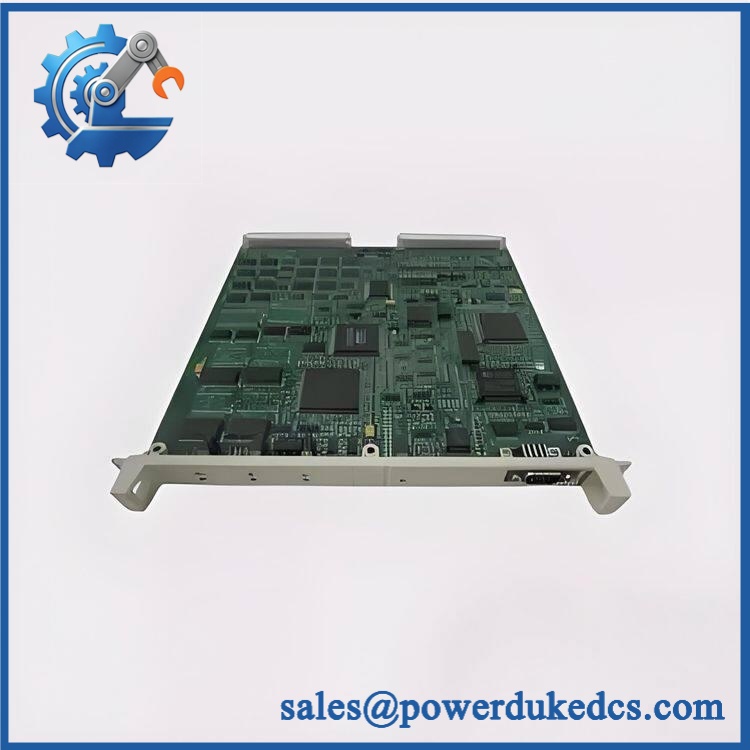
ABB DSQC322
Module 5: Quality Assurance & Testing SOP
1. Incoming Identity Inspection
- Verify ABB Robotics identification.
- Confirm .
- Check associated part number 3HAB5960-1 where applicable.
- Record serial number.
- Record hardware revision.
- Compare the board label with the purchase order.
- Inspect PCB and connectors.
- Check for corrosion and oxidation.
- Inspect for burned components.
- Look for previous repair or rework marks.
- Perform OEM marking and anti-counterfeit visual inspection.
2. Electrical Inspection
Before energizing:
- Inspect board connectors.
- Check card-edge contacts.
- Inspect accessible power circuits.
- Check for visible PCB damage.
- Check for contamination.
- Verify grounding provisions.
- Compare the hardware configuration with the approved reference.
Do not apply arbitrary voltage limits. Use the applicable ABB S4C documentation for electrical acceptance values.
3. Power-On Self-Test
Using a compatible ABB S4C controller:
- Install the board in the correct computer position.
- Verify all connections.
- Apply controller power.
- Observe startup indicators.
- Check controller initialization.
- Verify system recognition.
- Record diagnostic messages.
The historical ABB troubleshooting material identifies the Robot Computer as a key controller unit involved in system initialization.
4. Robot Control Functional Test
Where a suitable S4C test system is available:
- Verify controller startup.
- Check I/O operation.
- Verify serial communication.
- Check teach-pendant communication.
- Execute controlled robot motion.
- Verify axis control.
- Test the configured external axis where applicable.
- Check system diagnostics.
Motion testing must be performed in a controlled and safe test area.
5. Extended Stability Test
Where the test setup permits:
- Run repeated controller cycles.
- Execute controlled robot programs.
- Monitor diagnostic status.
- Check communication stability.
- Monitor board temperature.
- Record test duration.
- Generate a Test Report.
6. Final QA and Packaging
- Record exact model.
- Record part number.
- Record hardware revision.
- Record serial number.
- Save test results.
- Photograph the tested board.
- Apply QC status.
- Seal in an ESD shielding bag.
- Add shock protection.
- Mark the package with / 3HAB5960-1.
Test photographs and available Test Report records can be provided for procurement review before shipment.
Module 6: Procurement-Driven FAQ
1. Is ABB available for immediate shipment?
is an obsolete S4C-generation robot computer, so availability is normally dependent on existing spare inventory.
For an urgent robot outage, confirm physical stock, exact part number, condition, test status, and dispatch cutoff before releasing the purchase order.
2. How do you verify a surplus ?
Identity comes first.
The board is checked for , associated part number 3HAB5960-1, serial information, hardware revision, connector condition, corrosion, overheating, and repair evidence.
Where an S4C test controller is available, the board should also receive controlled power-up and robot-control functional testing.
New surplus and tested used stock should be quoted separately.
3. Can replace DSQC363 or DSQC373?
No—not as an automatic cross-reference.
ABB’s historical S4C hardware information assigns to the M97 generation, while later S4C versions use DSQC363 or DSQC373.
The controller generation, RobotWare version, external-axis configuration, and complete hardware identification must be checked before substitution.
4. Could the RobotWare version cause compatibility problems?
Yes.
The historical ABB information associates with the S4C M97 configuration and RobotWare 3.0.
Before replacing the board, record the existing RobotWare version, controller generation, system disk information, and hardware revisions. If the replacement contains a different software image, do not overwrite it until the correct recovery procedure has been confirmed.
5. What should my engineer check before ordering?
Use this checklist:
- 3HAB5960-1
- S4C controller generation
- RobotWare version
- Robot serial number
- External-axis configuration
- Hardware revision
- Existing system software media
- Required product condition
- Functional Test Report requirement
For this legacy robot computer, the controller generation is the key purchasing checkpoint. A board with the right DSQC family number can still be wrong for the installed S4C revision.




 Start Chat


