

Description
Module 2: The 10-Second Procurement Snapshot
- Brand: ABB
- Full Model Number: DSQC633 / 3HAC022286-001
- Lifecycle Status: Legacy ABB Robotics hardware; verify current availability
- Core Function: Digital I/O interface for ABB robot controllers
- Top 3 Technical Specs: 24 V DC I/O; 16 digital inputs; 16 digital outputs
- Stock & Condition: New Surplus; tested condition available by request; dispatch subject to physical stock confirmation
Module 3: Supply Chain & Technical Deep Dive
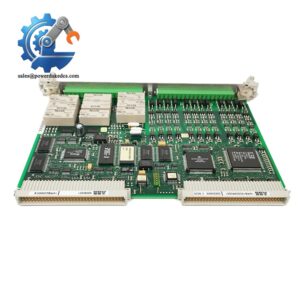
A failed robot I/O board can stop more than the robot itself. Grippers, clamps, sensors, valves, and machine interlocks may all depend on the controller’s I/O path. ABB DSQC633, part number 3HAC022286-001, is an ABB Robotics digital I/O module used with compatible robot controller configurations. It provides a practical replacement route when an installed board fails and the production cell cannot wait for a longer factory supply cycle.
The TCO case is straightforward: restoring an existing robot cell is often less disruptive than modifying its controller architecture. The DSQC633 is associated with 16 digital inputs and 16 digital outputs, with 24 V DC I/O used in the applicable configuration. Before ordering, however, verify the installed controller generation, I/O configuration, connector arrangement, and RobotWare compatibility. A physically similar ABB board is not automatically a valid substitute.
Module 4: Migration, Compatibility & Field Traps
Replacement Matrix
| Replacement Category | Assessment |
|---|---|
| Drop-in Replacement | Yes, when replacing the exact DSQC633 configuration |
| Software Compatible | Normally configuration-dependent; verify RobotWare/controller compatibility |
| Hardware Modification | Not normally required for an exact replacement |
| Engineering Approval | Recommended before installation |
⚠️ Field Trap 1: Controller Compatibility
Do not treat the DSQC633 part number as a universal I/O solution for every ABB robot controller.
Before purchase, record:
- Robot controller model
- RobotWare version
- Existing I/O configuration
- DSQC633 hardware revision
- Connected I/O signals
- Connector and terminal arrangement
The controller software matters.
A replacement board can power up correctly while the expected I/O mapping remains unavailable.
⚠️ Field Trap 2: 24 V DC Wiring
Digital I/O wiring should be documented before removal.
Photograph the existing terminal arrangement and mark each wire. Confirm the field-device voltage and common arrangement before energizing the replacement.
Pay particular attention to:
- Input common
- Output common
- Sensor supply
- Solenoid loads
- External relay interfaces
- Emergency-stop and safety circuits
Do not assume standard digital I/O can replace a safety-rated circuit.
⚠️ Field Trap 3: I/O Mapping
After replacement, check the controller’s I/O configuration rather than testing only one input and one output.
A practical commissioning sequence is:
- Confirm all expected input signals.
- Trigger each critical sensor.
- Verify corresponding controller status.
- Test outputs with the machine in a safe state.
- Confirm gripper, valve, clamp, and interlock signals.
- Run the cell through a controlled dry cycle.
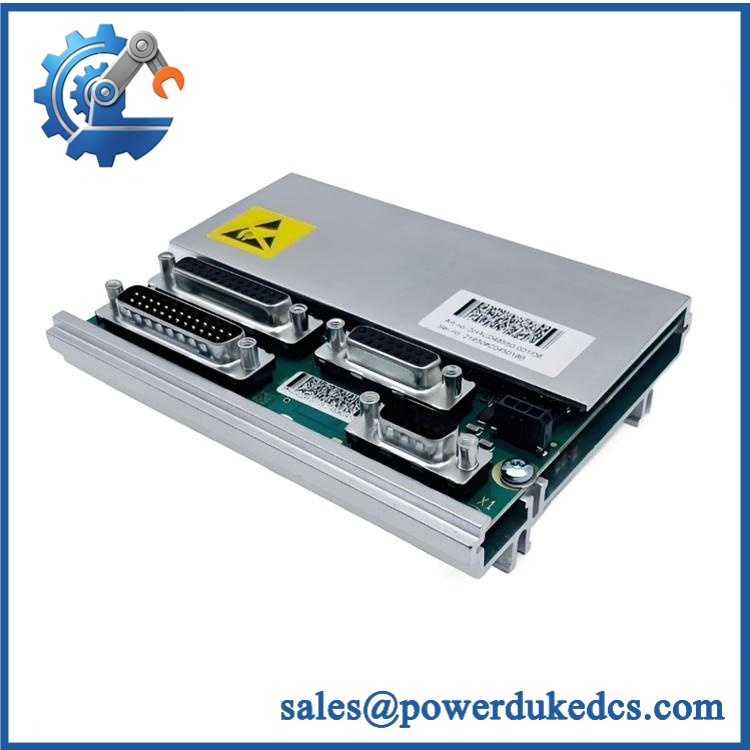
ABB DSQC633 3HAC022286-001
Module 5: Quality Assurance & Testing SOP
A robot I/O module should be tested at the signal level, not simply powered on and declared good.
1. OEM Identification Check
- Verify ABB branding.
- Confirm designation.
- Verify 3HAC022286-001.
- Record serial number and hardware revision.
- Inspect the original identification label.
- Photograph the nameplate.
- Compare the physical configuration with the purchase specification.
2. Physical Inspection
Inspect the board and housing for:
- Corrosion
- Scratched PCB areas
- Burn marks
- Cracked connectors
- Bent pins
- Loose terminals
- Missing components
- Signs of previous repair
- Abnormal discoloration
Connector condition deserves special attention. Robot-cell vibration can expose marginal connections quickly.
3. Power-On Self-Test
Using a compatible ABB Robotics test environment:
- Apply the specified supply.
- Check startup behavior.
- Observe status LEDs.
- Confirm module recognition.
- Verify controller communication.
- Read module identification.
- Check diagnostic status.
Any unexpected diagnostic code is recorded before shipment.
4. Digital I/O Testing
For the applicable configuration:
- Verify digital input response.
- Simulate input signals across the required channels.
- Check input state changes in the controller.
- Test digital output activation.
- Verify output state retention.
- Check response under controlled load.
- Monitor abnormal temperature rise.
A full I/O test should cover the channels required by the customer’s application rather than relying on a single-channel demonstration.
5. Controller Communication Test
Where the correct ABB robot controller is available:
- Establish controller communication.
- Confirm module recognition.
- Verify I/O mapping.
- Test configured signals.
- Check diagnostic messages.
- Confirm stable operation during an extended test cycle.
6. Final QC
- Test Report completed
- Serial number recorded
- I/O test results archived
- Inspection photographs stored
- QC approval completed
- ESD packaging applied
- Protective cushioning installed
- Shipping carton sealed
Test photographs and available Test Reports can be supplied to the procurement team.
Module 6: Procurement-Driven FAQ
1. Is ABB 3HAC022286-001 in stock, and when can it ship?
Physical inventory should be confirmed against the exact 3HAC022286-001 ordering code before the PO is released. For urgent robot-cell downtime, provide the required quantity and delivery destination so the actual dispatch schedule can be confirmed.
For overnight requirements, the order cutoff should be confirmed before payment rather than assumed from a website stock indicator.
2. How do you verify the condition of a surplus ?
The unit should undergo an identification check, physical inspection, power-on test, and digital I/O verification.
For tested stock, request the serial-number record, inspection photographs, and Test Report. The serial number should match the unit being shipped.
3. What warranty and return terms apply to a defective unit?
The quotation should state the warranty duration, functional coverage, return authorization process, and inspection requirements.
For surplus automation hardware, a documented pre-shipment test provides a useful baseline. If a failure occurs after installation, the troubleshooting process can then separate transport damage, installation error, configuration issues, and component failure.
4. Will work with my ABB robot controller?
Verify the controller model and RobotWare version before ordering.
Provide the existing controller type, RobotWare version, installed I/O configuration, and a clear photograph of the current module label. That information is more useful than simply stating that the cell uses an “ABB robot.”
5. Can I replace the module without changing the I/O program?
Often, an exact replacement can retain the existing application configuration, but this should be verified rather than assumed.
Before removing the failed board:
- Back up the robot controller configuration.
- Record the existing I/O mapping.
- Photograph every connector and terminal.
- Install the matching hardware.
- Verify I/O mapping before running the robot.
Do not test outputs with the robot in automatic production mode. Use a controlled commissioning state and verify connected actuators before enabling automatic operation.




 Start Chat


