

Description
Module 2: The 10-Second Procurement Snapshot
- Brand: ABB Bailey
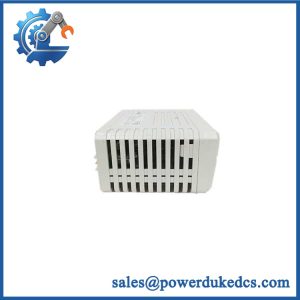
- Full Model Number: IMDS003
- Lifecycle Status: Legacy / Obsolete
- Core Function: Digital output signal control for INFI 90 systems
- Top 3 Technical Specs: INFI 90 Series; digital output interface; rack-mounted I/O architecture
- Stock & Condition: New Surplus; tested inventory subject to physical stock confirmation; expedited dispatch available
Module 3: Supply Chain & Technical Deep Dive
A failed digital output module can stop field commands even when the DCS processor itself remains healthy. The IMDS003 belongs to the Bailey INFI 90 I/O hardware family and is used for digital output functions within the control system. For a legacy installation, matching the exact module number matters because similar-looking INFI 90 boards can have different signal functions and electrical interfaces.
The procurement value comes from avoiding an unnecessary rack redesign. A verified replacement keeps the existing I/O architecture in place, reducing engineering hours and commissioning work. Exact channel count, output voltage, current rating, isolation characteristics, and field wiring must be verified against the applicable ABB hardware manual before purchase; these values should not be inferred from visually similar Bailey modules.
Module 4: Migration, Compatibility & Field Traps
Replacement Matrix
| Replacement Category | Assessment |
|---|---|
| Drop-in Replacement | Applicable for an exact IMDS003 replacement after configuration verification |
| Software Compatible | Verify against the installed INFI 90 configuration |
| Hardware Modification | Normally not required for an exact replacement |
| Engineering Approval | Recommended before energizing field outputs |
⚠️ Field Trap 1: Output Wiring Must Be Verified
Do not move wires based only on terminal position.
Before removing the existing module:
- Photograph the complete terminal block.
- Record every wire number.
- Record the corresponding field device.
- Check the wiring diagram.
- Verify common/return connections.
- Compare the replacement terminal arrangement.
One misplaced output wire can energize the wrong field device.
⚠️ Field Trap 2: Output Electrical Ratings
A digital output module must match the connected load.
Check:
- Field voltage
- Output current
- Load type
- Common arrangement
- Isolation requirements
- Fuse protection
- External suppression components
Do not assume a relay, solenoid, contactor, and PLC input present the same electrical load.
⚠️ Field Trap 3: Forced Outputs
Before commissioning, check whether any outputs were forced in the DCS.
A replacement can restore communication while an old force condition creates an unexpected field action.
Clear or verify all output forces before returning the process to automatic operation.
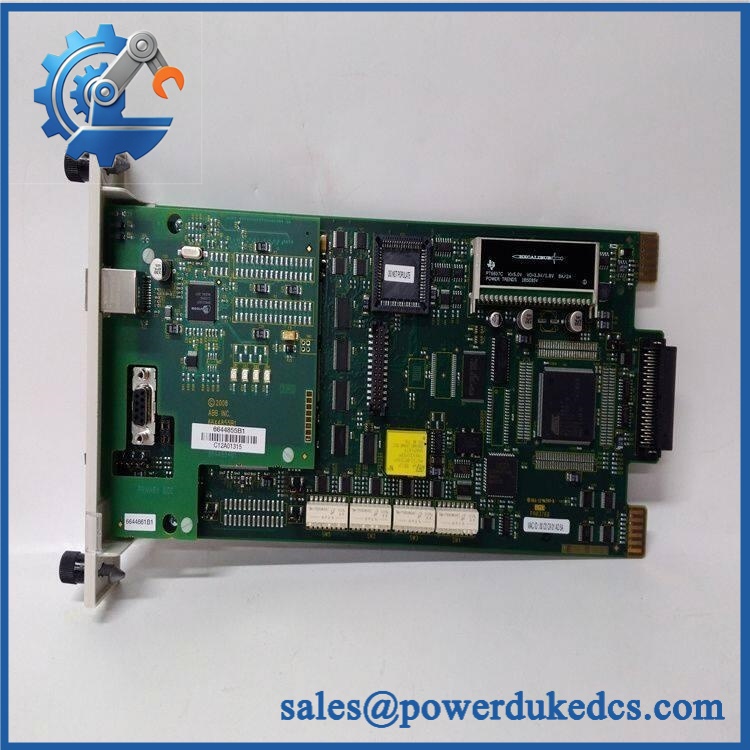
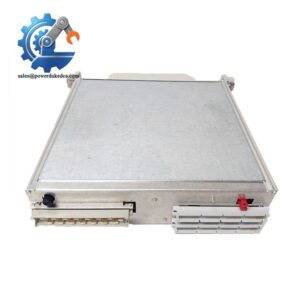
ABB IMDS003
Module 5: Quality Assurance & Testing SOP
Digital output hardware requires functional testing with the correct load conditions. A visual inspection alone is not enough.
1. OEM Identification Check
- Verify ABB Bailey identification.
- Confirm IMDS003 marking.
- Record serial number where available.
- Photograph the nameplate.
- Check labels for alteration.
- Compare PCB layout and connector arrangement.
2. Physical Inspection
Inspect for:
- Corrosion
- Oxidation
- Burn marks
- Damaged connectors
- Bent pins
- Cracked PCB areas
- Missing components
- Solder rework
- Discoloration
- Mechanical damage
Output terminals receive particular attention.
3. Power-On Self-Test
Using a compatible INFI 90 test rack:
- Install the module in the correct rack position.
- Apply the specified system power.
- Observe startup indications.
- Check module status LEDs where fitted.
- Verify module recognition.
- Record diagnostic information.
4. Digital Output Testing
Where the correct test equipment is available:
- Command each output channel.
- Verify ON/OFF response.
- Measure output voltage.
- Check output current under an approved test load.
- Confirm channel isolation where applicable.
- Check return/common behavior.
- Verify no unintended output activation.
Do not connect an unknown field load during bench testing.
5. I/O Simulation and Load Test
Use a suitable test load or simulator to verify output behavior.
Record:
- Channel number
- Command state
- Measured voltage
- Load current
- Response status
- Diagnostic status
For a production replacement, compare the test configuration with the customer’s actual wiring documentation.
6. Final QC
- Test Report completed
- Serial number recorded
- Channel test results archived
- Physical inspection completed
- Configuration photographs stored
- QC approval completed
- ESD packaging applied
- Protective cushioning installed
- Shipping carton sealed
Test photographs and available Test Reports can be provided for procurement review.
Module 6: Procurement-Driven FAQ
1. Is ABB IMDS003 in stock, and how quickly can it ship?
Physical inventory should be confirmed against the exact IMDS003 model before the order is released.
For a shutdown requirement, confirm quantity, condition, test status, warehouse availability, and shipping cutoff. Legacy I/O stock can vary from one unit to the next.
2. How do you verify a surplus IMDS003 before shipment?
The board should undergo identification, visual inspection, power-up, module recognition, and digital-output testing in a compatible test environment where available.
Ask for actual-unit photographs and the Test Report. The documentation should correspond to the serial number of the unit being supplied.
3. What warranty and return terms should procurement require?
The quotation should clearly state the warranty period, covered functional failures, return authorization procedure, and inspection requirements.
For an output module, the pre-shipment channel test is useful evidence because it documents the condition of the I/O circuitry before dispatch.
4. Can I install the IMDS003 directly without changing the program?
For an exact replacement in the same INFI 90 configuration, major program changes may not be required. However, the I/O configuration, channel assignments, field wiring, and output logic must be checked before returning the system to automatic operation.
Do not treat “same model” as permission to skip the commissioning checks.
5. What should I send for an urgent IMDS003 replacement quote?
Provide:
- IMDS003 nameplate photograph
- PCB photograph
- Rack position
- Terminal-block photograph
- Existing wiring diagram if available
- Associated controller/I/O information
- Quantity required
- Required delivery date
For this type of spare, a clear terminal-block photograph is especially valuable. It allows the engineering team to check the physical wiring arrangement before the replacement is dispat



 Start Chat


