

Description
- ABB INICT03 Genuine ABB DCS Spare With Fast Dispatch
Module 2: The 10-Second Procurement Snapshot
- Brand: ABB Bailey
- Full Model Number: INICT03
- Product Family: INFI 90 / INFI-NET
- Lifecycle Status: Legacy
- Core Function: Transfers data between INFI-NET and host computers
- Product Type: Infi-Net to Computer Transfer Module
- Memory: 512 kB ROM; 2 MB RAM
- Host Interfaces: RS-232-C; SCSI
- Communication Rate: RS-232-C up to 19,200 baud; SCSI up to 4 MB/s
- Power Requirement: +5 VDC, approximately 1.958 A
- Stock & Condition: New Surplus; physical stock confirmation required
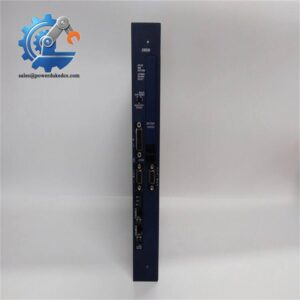
The INICT03 is documented as an INFI-NET to Computer Transfer Module for the Bailey INFI 90 DCS. ABB documentation also shows INICT03 as part of the CNET-to-computer interface architecture.
Module 3: Supply Chain & Technical Deep Dive
A failed INICT03 can interrupt the path between an older INFI 90 control network and its host computer. That makes this small board a potential production bottleneck despite its modest hardware footprint. The documented design uses the INICT03 as a bus-master transfer module, working with the INNIS01 network interface and external host connections through serial or SCSI interfaces.
From a TCO perspective, retaining one tested spare can be cheaper than waiting for a legacy communication module during an unplanned shutdown. The published technical data lists 512 kB ROM, 2 MB RAM, RS-232-C communication from 50 to 19,200 baud, and SCSI transfer up to 4 MB/s. Power demand is listed at about +5 VDC, 1.958 A, or roughly 9.8 W typical. Firmware deserves attention too: technical documentation identifies different INICT03 firmware generations, including compatibility considerations for revisions before E0, E0, F0/F1, and G0 or later.
Module 4: Migration, Compatibility & Field Traps
Replacement Matrix
| Replacement Scenario | Assessment | Required Action |
|---|---|---|
| Same INICT03 hardware and compatible revision | Drop-in Replacement | Match module type, revision, and configuration |
| Same hardware with different firmware | Software Compatibility Check | Verify EPROM revision against host driver |
| INICT12 substituted for INICT03 | Not automatically compatible | Review system architecture and communication path |
| Different interface hardware | Hardware Modification may be required | Engineering review before installation |
⚠️ Field Traps: Watch Out
Firmware mismatch: This is the main trap. The INICT03 uses versioned EPROM firmware. Technical documentation specifically identifies firmware compatibility differences, so record the existing revision before removing the module.
DIP-switch configuration: The board has multiple DIP switches controlling baud rate, serial characteristics, diagnostics, SCSI settings, and other operating options. Photograph every switch position before replacement. The documented settings include RS-232 baud-rate selections and SCSI configuration options.
SCSI configuration: If the host uses SCSI, verify the SCSI address and parity settings. A dedicated SCSI channel may be required for DCS communication in some host configurations.
Slot and interface identification: The INICT03 is part of a larger INCI03 interface arrangement. Do not replace one module without checking the associated INNIS01, IMMPI01, termination unit, and cabling.

ABB INICT03
Module 5: Quality Assurance & Testing SOP
1. Incoming Inspection
- Verify ABB Bailey identification.
- Confirm INICT03 marking.
- Record serial number and revision letter.
- Inspect PCB condition.
- Check connectors for bent contacts or oxidation.
- Inspect EPROM devices and sockets.
- Check for corrosion, burn marks, cracked components, or repair traces.
2. OEM Authenticity Inspection
- Inspect ABB labels and board markings.
- Compare PCB layout against an approved reference.
- Verify connector positions.
- Check revision information.
- Record available manufacturing codes.
- Photograph the complete board before testing.
3. Power-On Self-Test
On a suitable INFI 90 test rack:
- Apply the specified +5 VDC supply.
- Observe startup behavior.
- Check available status indicators.
- Verify module initialization.
- Record diagnostic status.
- Check for abnormal current consumption.
The published technical specification lists approximately 1.958 A at +5 VDC for the module.
4. Communication Testing
A suitable test environment should verify:
- INFI-NET communication
- Expander-bus communication
- RS-232-C host communication
- SCSI interface operation
- Baud-rate configuration
- SCSI address configuration
- Module status reporting
The INICT03 documentation confirms RS-232-C and SCSI as host communication paths.
5. Extended Functional Test
Where the complete test rack is available:
- Run the module continuously.
- Monitor communication stability.
- Check for intermittent module errors.
- Verify host data transfer.
- Record firmware revision.
- Save diagnostic results.
A Test Report should contain the module revision, firmware revision, test date, test equipment, communication settings, and test results.
6. Final QC & Packaging
- QC inspection signed.
- ESD-safe bag sealed.
- Connector protection fitted.
- Shock protection added.
- QC label attached.
- Test records archived.
Test photographs or video can be supplied when available.
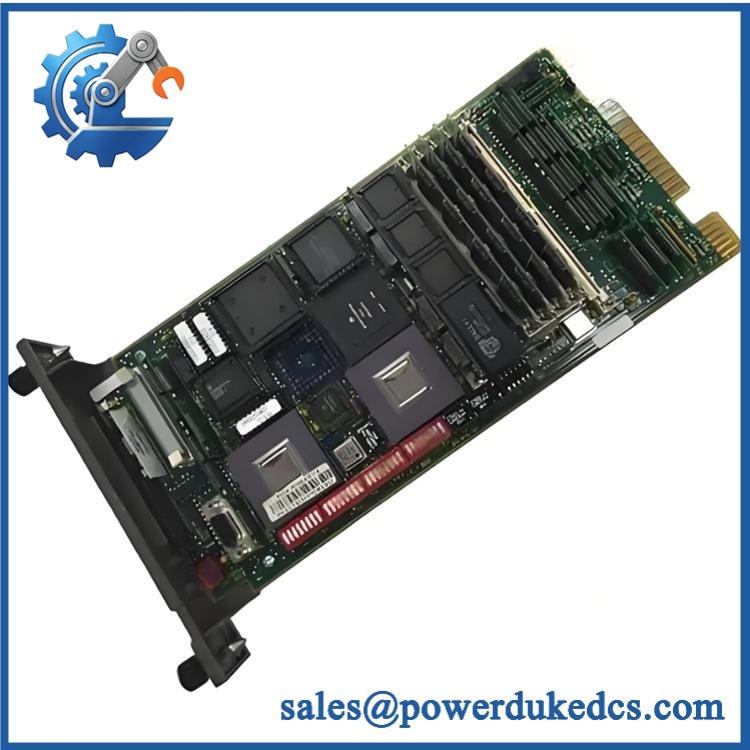
ABB INICT03
Module 6: Procurement-Driven FAQ
1. Is the ABB INICT03 physically in stock, and what is the shipping cutoff?
Physical inventory should be confirmed against the actual serial-numbered unit before order release. For an emergency requirement, request confirmation of exact revision, firmware version, condition, test status, and dispatch cutoff.
2. How do you verify an obsolete INICT03 before shipment?
The inspection should cover the PCB, connectors, EPROMs, module markings, revision information, and power-up behavior. Where an INFI 90 test environment is available, communication testing should include the applicable RS-232-C or SCSI interface.
3. What warranty should apply to this legacy DCS module?
Request a written warranty period and defective-unit procedure. The commercial terms should define the claim period, failure evidence, return process, and replacement or refund conditions.
4. Can firmware differences cause an INICT03 replacement to fail?
Yes. The firmware revision matters. Available technical documentation identifies different INICT03 firmware generations with specific host-driver compatibility considerations. Record the existing EPROM revision before approving the replacement.
5. Can I replace INICT03 with INICT12?
Not automatically. Both are CNET-to-computer transfer modules, but they are different module types. ABB documentation lists INICT03 and INICT12 separately, and the system architecture and interface requirements must be checked before substitution.




 Start Chat


