

Description
- Model: SYN5202
- Brand: ABB
- Series: SYNCHROTACT 5
- Core Function: Automatically synchronizes generators and power lines
- Type: Dual-channel automatic synchronizing device
- Key Specs: 2 independent channels; 7 parameter sets; 50 Hz / 60 Hz / 16⅔ Hz operation
- Condition: Confirm New Original (New Surplus) or refurbished status before purchase
Product Introduction
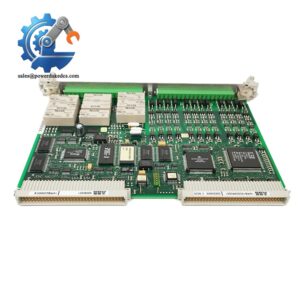
ABB SYNCHROTACT 5 SYN5202 is a dual-channel automatic synchronizing device for generator-to-grid synchronization and paralleling of synchronous lines. ABB classifies SYN 5202 as a dual-channel device, with two independently structured channels housed in one unit.
For a generator control panel, the job is very specific: verify the synchronization conditions and issue the appropriate closing command when the configured conditions are met. The device supports up to 7 parameter sets, while the SYNCHROTACT 5 family accommodates 50 Hz, 60 Hz and 16⅔ Hz applications.
Key Technical Specifications
| Parameter | Value |
|---|---|
| Manufacturer | ABB |
| Model | SYN5202 |
| Product Series | SYNCHROTACT 5 |
| Product Type | Automatic dual-channel synchronizing device |
| Main Function | Automatic synchronization / paralleling |
| Channel Configuration | 2 independent channels |
| Parameter Sets | 7 |
| Rated Frequencies | 50 Hz / 60 Hz / 16⅔ Hz |
| Operating Application | Generator-to-grid synchronization; synchronous-line paralleling |
| Synchrocheck Function | Supported |
| Automatic Paralleling | Supported |
| Configuration Tool | SynView / PC-based configuration |
| Auxiliary Supply | Variant-dependent; verify exact ordering code |
| Digital I/O | Variant/configuration dependent |
| Communication Interfaces | Variant/configuration dependent |
| Installation | Control cabinet / synchronizing system |
| Documentation | ABB SYN 5201/SYN 5202 Operating Instructions, 3BHS109762 E01 Rev. D |
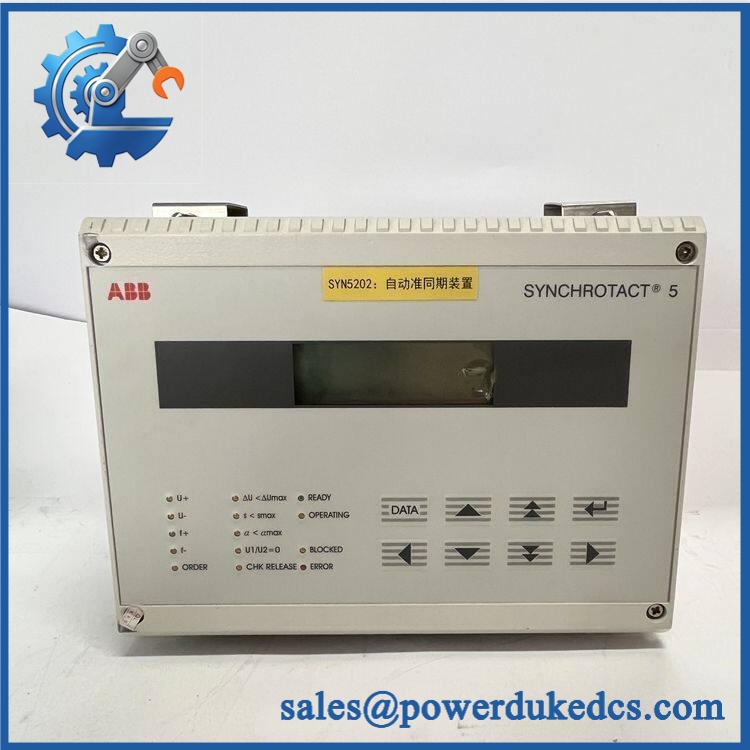
ABB SYNCHROTACT 5 SYN5202
ABB’s official datasheet confirms that SYN 5202 is the dual-channel version, while the operating instructions cover installation, commissioning and operation of SYN 5201/SYN 5202.
Installation & Configuration Guide
Phase 1: Pre-Installation — 10–15 minutes
⚠️ This equipment is associated with generator and grid synchronization. Incorrect wiring or settings can create serious electrical hazards.
- Notify the plant control room and schedule the maintenance window.
- Place the generator and associated breaker in a safe state.
- Follow the site’s approved electrical isolation procedure.
- Isolate control power where required.
- Verify the absence of hazardous voltage.
- Wear an ESD wrist strap when handling the electronic device.
- Record the existing unit:
- Full type designation
- Serial number
- Hardware revision
- Firmware revision
- Parameter-set configuration
- Input/output wiring
- Communication connections
- Photograph every terminal and configuration setting.
Do not change synchronization parameters simply because the replacement powers up.
Phase 2: Remove Existing Unit — 5–10 minutes
- Confirm electrical isolation.
- Label all voltage-sensing and control wires.
- Photograph the terminal arrangement.
- Disconnect wiring carefully.
- Release the cabinet mounting hardware.
- Remove the synchronizer without stressing terminal blocks.
- Inspect connectors and terminals for corrosion, loose screws or heat damage.
Pay special attention to voltage-sensing circuits. A wiring mistake here is not a minor commissioning issue.
Phase 3: Install Replacement — 10–15 minutes
- Verify the complete SYN5202 ordering configuration.
- Compare the replacement’s hardware markings with the removed unit.
- Check the voltage-transformer/PT connections against the wiring diagram.
- Reconnect digital inputs and outputs according to the original documentation.
- Restore communication wiring where fitted.
- Check terminal tightness according to the ABB installation instructions.
- Verify that no sensing wire has been moved to another terminal.
Phase 4: Parameter Configuration — 10–20 minutes
SYNCHROTACT 5 supports multiple parameter sets for different paralleling points. ABB states that SYN 5200/5202 can use seven parameter sets.
- Read the configuration from the existing device where possible.
- Record:
- Nominal voltage
- Nominal frequency
- Phase sequence
- Synchronization limits
- Voltage difference limits
- Frequency difference limits
- Phase-angle limits
- Breaker closing time
- Frequency/voltage matching settings
- Restore the correct parameter set.
- Check the configuration with SynView where supported.
- Compare every setting with the approved plant commissioning record.
Do not copy parameters blindly. A generator breaker and a bus-tie breaker may require different synchronization settings.
Phase 5: Commissioning & Functional Test — 15–30 minutes
- Energize the control system under controlled conditions.
- Confirm the device starts without diagnostic errors.
- Verify both channels.
- Check voltage and frequency measurements.
- Verify phase-angle measurement.
- Confirm the selected parameter set.
- Test the synchronization logic according to the approved commissioning procedure.
- Verify the breaker closing command under a controlled test condition.
- Confirm the synchrocheck function independently.
- Record the final parameter set and test results.
⚠️ Never bypass synchronization protection simply to force a breaker test.
Quality Inspection SOP
1. Incoming Inspection
- Verify ABB identification.
- Check the full model and ordering code.
- Record serial number.
- Inspect labels and seals.
- Check housing for corrosion or repair marks.
- Inspect terminals and connectors.
- Photograph the unit before warehouse entry.
2. Live Functional Test
For this product, a meaningful test requires a suitable synchronization test environment, not a generic PLC rack.
Recommended checks:
- Power-up self-test
- Voltage measurement
- Frequency measurement
- Phase-angle measurement
- Channel 1 operation
- Channel 2 operation
- Synchrocheck logic
- Synchronization command logic
- Parameter-set selection
A genuine Test Report should state the actual test equipment and conditions.
3. Electrical Testing
Where permitted by ABB documentation:
- Auxiliary supply verification
- Input circuit verification
- Output contact verification
- Insulation testing where applicable
- Protective earth continuity
Use the exact test limits specified for the installed hardware variant.
4. Firmware / Parameter Verification
Record:
- Firmware revision
- Hardware revision
- Parameter-set numbers
- Synchronization limits
- Breaker closing-time setting
- Nominal frequency
- Nominal voltage
- Configuration backup
Keep a copy of the final configuration with the spare.
5. Final QC & Packing
- QC inspection completed
- Configuration record archived
- ESD protection applied
- Shock protection installed
- Outer carton sealed
- QC label attached
- Serial number recorded
For customer shipment, actual test photos or videos can be supplied when the unit has genuinely been tested.
Common Questions
1. What is ABB SYN5202 used for?
SYN5202 is a dual-channel automatic synchronizing device. Its main applications include synchronizing generators with power lines and paralleling synchronous lines. ABB also identifies the SYN 5202 as a device that can operate as an automatic paralleling unit.
2. What is the difference between SYN5201 and ?
The key distinction is channel configuration.
| Model | Configuration | Typical Role |
|---|---|---|
| SYN5201 | Single channel | Automatic synchronization |
| Dual channel | Automatic synchronization with two independent channels | |
| SYN5302 | Two systems | Redundant dual-channel arrangement |
ABB’s datasheet specifically describes SYN 5202 as having two differently structured independent channels in the same casing.
3. Can synchronize a generator with the grid?
Yes. Generator-to-grid synchronization is one of its intended applications. The device evaluates synchronization conditions before the associated breaker closing operation.
4. How many parameter sets does support?
The SYNCHROTACT 5 documentation specifies 7 parameter sets for the SYN 5200 family, including the SYN 5202 configuration. This is useful where one synchronizer handles several paralleling points with different settings.
5. Can I replace the old unit directly?
Potentially, but verify the complete ordering configuration first.
Check the auxiliary supply, voltage-transformer inputs, digital I/O, communication options, firmware, parameter sets, and breaker closing-time settings. A physically identical unit with different configuration can still require commissioning work.
6. My powers up but will not issue a closing command. What should I check?
Start with synchronization conditions, not the breaker.
Check:
- Generator voltage
- Bus/grid voltage
- Frequency difference
- Voltage difference
- Phase-angle difference
- Selected parameter set
- Breaker closing-time compensation
- Synchrocheck status
- Channel diagnostics
Do not bypass the synchronizing logic. Find the condition preventing the close command.
7. Should I keep a as spare stock?
For a plant where generator synchronization is production-critical, 1 verified spare unit is a reasonable starting buffer.
Recommended inventory policy:
- Min: 1 unit
- Max: 1–2 units
- Reorder point: At minimum stock
- Storage: ESD-controlled, dry cabinet
- Configuration: Keep a current parameter backup
- Review: Every 6–12 months
For a slow-moving legacy spare, the total cost of ownership should include storage, testing, lifecycle risk and emergency lead time—not just the purchase price.



 Start Chat


