

Description
- Brand: GE / GE Fanuc
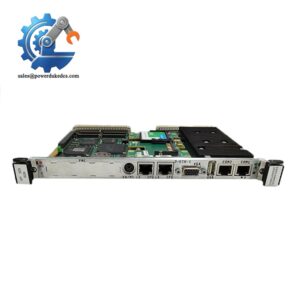
- Full Model Number: HR911103A VMIVME-7750 RJ45
- Lifecycle Status: Legacy / Obsolete-generation VME computing platform; current factory availability requires verification
- Core Function: Ethernet connectivity for the VMIVME-7750 VME single-board computer
- Top 3 Technical Specs: Dual RJ45 Ethernet ports; 10Base-T / 100Base-TX; Intel Ethernet controller architecture
- Host Platform: VMIVME-7750 VMEbus Single Board Computer
- Processor Family: Intel Pentium III up to 1.26 GHz on the VMIVME-7750 platform
- Bus Architecture: VMEbus with PCI-to-VME interface
- Expansion: 5 V PCI PMC expansion site
- Stock & Condition: Availability, exact assembly identity, and condition to be verified by serial/label inspection
Obsolescence & Supply Chain Deep Dive
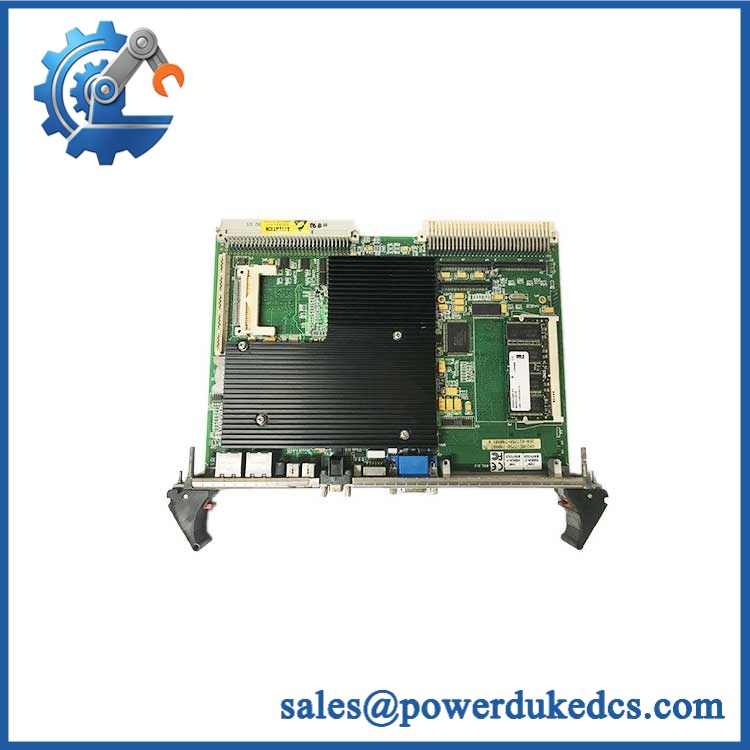
The GE HR911103A VMIVME-7750 RJ45 reference should be handled carefully during procurement because the underlying VMIVME-7750 is a legacy VME single-board computer rather than a contemporary Ethernet communication module. GE Fanuc documentation identifies the as an Intel Pentium III-based VMEbus SBC with two Ethernet controllers and two RJ45 connectors supporting 10Base-T and 100Base-TX. Remote Ethernet booting is also supported.
The larger lifecycle concern is the host computer, not simply the RJ45 connector. The supports older operating environments including Windows 2000/XP, VxWorks, Solaris, QNX, LynxOS and Linux, making exact hardware preservation valuable where the installed application depends on legacy drivers or a specific VME software stack. Replacing the complete VME computer may require application migration, BSP changes, driver validation and commissioning work. Keeping a verified spare can therefore reduce the cost of an otherwise disproportionate modernization project.
Compatibility & Replacement Matrix
| Replacement Scenario | Classification | Engineering Assessment | Typical Labor / Downtime Planning |
|---|---|---|---|
| Exact assembly with matching Ethernet/RJ45 configuration | Drop-in Replacement | Preferred option when processor, memory, CompactFlash, BIOS, PMC configuration and front-panel arrangement match the installed board | Approximately 1–3 hours for hardware replacement and basic network verification |
| Another configuration with different processor or memory option | Software Compatible / Hardware Verification Required | The ordering structure includes processor, SDRAM and CompactFlash options. Confirm the complete configuration before substitution. | Approximately 2–6 hours including BIOS, boot media and application checks |
| Different VME single-board computer | Hardware Modification | Requires VMEbus, CPU architecture, memory, I/O, operating-system, driver and application compatibility review | Approximately 8–40+ hours depending on migration scope |
| Modern Ethernet interface substituted for the existing Ethernet path | Hardware Modification | Not equivalent if the application relies on the onboard controller, legacy drivers or remote-boot functionality | Engineering validation required before shutdown |
Field Traps — Watch Out
Do not order by “” alone.
The documentation specifies two Ethernet connections, but the Ethernet interface is part of a larger VME SBC architecture. A generic connector or Ethernet interface is not automatically an acceptable replacement for the installed assembly.
Preserve the complete configuration.
The documented ordering options vary by processor speed, SDRAM capacity, CompactFlash capacity and front-panel configuration. For example, the published configuration table includes Pentium III options from 733 MHz through 1.26 GHz, SDRAM options up to 512 MB, and CompactFlash options up to 1 GB.
HR911103A requires identification verification.
Public component databases identify HR911103A as a HanRun connector part number, while some industrial spare-parts listings associate “HR911103A ” with the GE product. These references are not sufficient to establish that HR911103A is an official GE assembly number. Procurement should therefore verify the physical GE/VMIC label and complete board identification before shipment.
- GE
Quality Assurance & Testing SOP
A replacement supplied for an operating VME system should be tested as a complete computer assembly rather than checked only for connector condition.
Identity and configuration inspection
- Verify GE/GE Fanuc/VMIC identification markings
- Record the complete model and serial information
- Record processor option where identifiable
- Verify installed SDRAM capacity
- Verify CompactFlash configuration if fitted
- Inspect PMC expansion area
- Inspect VMEbus connectors and board edge contacts
- Check both Ethernet connectors
- Inspect front-panel LEDs, switches and mechanical hardware
- Photograph all identification labels before shipment
Power-on and POST testing
- Install the board in an appropriate VME test chassis
- Apply the specified VME power rails
- Confirm normal power-up behavior
- Verify BIOS/POST initialization
- Check system memory recognition
- Verify processor identification
- Check CompactFlash detection when installed
- Verify front-panel status indicators
The published specifications identify +5 VDC as the principal supply and list typical current requirements of approximately 6 A, with additional +12 VDC and −12 VDC requirements. Actual test limits should follow the applicable hardware revision and manual.
Ethernet verification
- Test Ethernet port 1
- Test Ethernet port 2
- Verify link establishment
- Verify 10Base-T operation where applicable
- Verify 100Base-TX operation where applicable
- Perform basic network communication testing
- Check both ports independently
- Confirm remote Ethernet boot capability when required by the application
VMEbus and system validation
- Verify VMEbus initialization
- Check expected VME address-space operation
- Confirm system-controller behavior when configured for that role
- Verify interrupt operation where required
- Confirm PMC functionality if an installed PMC is part of the application
- Record all test results against the board serial number
Final release inspection
- Clean and visually inspect the board
- Protect VME connectors against mechanical damage
- Use ESD-safe packaging
- Separate loose accessories from the board
- Include serial-specific inspection records when requested
Procurement & Lifecycle FAQ
What is the GE ?
The is an Intel Pentium III-based VME single-board computer from the GE Fanuc/VMIC embedded-computing product family. It supports VMEbus operation, Ethernet, serial interfaces, USB, CompactFlash and a PMC expansion site.
How many Ethernet ports does the have?
The documented architecture provides two Ethernet connectors supporting 10Base-T and 100Base-TX. The two Ethernet controllers are based on an Intel 82559 controller and the Ethernet controller integrated into the Intel chipset.
Is the official GE part number?
This should be verified before procurement. Available public documentation identifies as the GE Fanuc/VMIC product designation, while also appears in component databases as a separate connector part number. The association “ ” appears in some industrial listings, but it is not enough by itself to establish an official GE ordering code.
Can any replace another ?
Not automatically. The was available with different processor speeds, SDRAM capacities, CompactFlash configurations and front-panel options. Match the installed configuration before approving a replacement.
What information should be supplied for an emergency replacement?
Provide the complete board marking, serial number, processor option, installed memory, CompactFlash configuration, PMC configuration, front-panel photographs and operating-system/application information. For a shutdown-critical spare, request pre-shipment power-on, POST and Ethernet-port testing against the specific serial-numbered board.




 Start Chat


