

Description
- Model: IS220PSCAH1B
- Brand: GE
- Series: Mark VIe
- Part Type: Serial Communications I/O Pack
- Core Function: Provides the serial communications interface between the Mark VIe Ethernet-based I/O architecture and an associated serial communications terminal board.
- Key Specs: Six individually configurable serial transceiver channels; RS-232, RS-422, and RS-485 half-duplex support; dual RJ45 Ethernet ports; 3-pin power input; DC-62 connection to the terminal board.
- Procurement Status: New Original availability should be confirmed against current physical stock, date code, and factory identification before purchase.
Product Introduction
A failed serial communications pack can create a deceptively difficult Mark VIe maintenance event: the controller may remain operational while selected serial devices stop exchanging data, leaving engineers to distinguish a field-device problem from an I/O architecture fault.
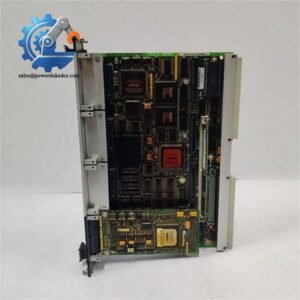
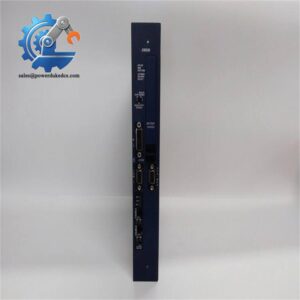
Installed in the Mark VIe distributed I/O architecture, the GE IS220PSCAH1B functions as the PSCA Serial Communications I/O Pack. Its communications board provides six serial transceiver channels, with each channel configurable for RS-232, RS-422, or RS-485 half-duplex operation. The pack interfaces to one or two I/O Ethernet networks and connects directly to a compatible serial communications terminal board through a DC-62 connector.
For plants maintaining legacy serial instruments, protective relays, analyzers, or other third-party equipment, the PSCA can be particularly relevant during legacy migration projects where existing serial infrastructure must remain connected to a Mark VIe control platform (protocol settings still need to match the actual field device and terminal-board arrangement).
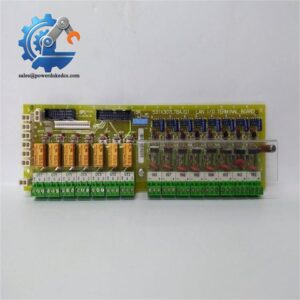
GE documentation identifies IS200SSCAH1A and IS200SSCAH2A as compatible accessory terminal boards for the IS220PSCAH1B.
Core Technical Specifications
| Parameter | Value |
|---|---|
| Manufacturer | GE |
| Model | IS220PSCAH1B |
| Series | Mark VIe |
| Product Type | Serial Communications I/O Pack |
| Communication Channels | 6 serial transceiver channels |
| Serial Standards | RS-232, RS-422, RS-485 half-duplex |
| RS-232 Maximum Communication Rate | 19.2 kbps |
| RS-232 Maximum Cable Distance | 50 ft |
| RS-422 Maximum Communication Rate | 375 kbps |
| RS-422 Maximum Cable Distance | 1,000 ft |
| RS-422 Maximum Drops | 8 |
| RS-485 Maximum Communication Rate | 375 kbps |
| RS-485 Maximum Cable Distance | 1,000 ft |
| RS-485 Maximum Drops | 8 |
| Ethernet Interfaces | 2 × RJ45 |
| Power Connection | 3-pin power input |
| Pack-to-Terminal Board Interface | DC-62 connector |
| Compatible Terminal Boards | IS200SSCAH1A, IS200SSCAH2A |
| PSCAH1B Supply Voltage | 22.5–28.6 VDC range; 24.0/28.0 V nominal values are documented |
| Maximum Current | 0.36 A |
| Operating Temperature | -30°C to +65°C |
| Approx. Dimensions | 82.6 × 41.9 × 121 mm |
| Diagnostics | Local LED indicators and software diagnostics |
| Configuration Environment | ToolboxST |
| Hazardous Location Documentation | Certified combinations are documented for applicable Mark VIe installations |
The electrical ratings and hazardous-location combinations are documented in GE Mark VIe equipment documentation. The published installation information also identifies the supported serial distances and communication rates.
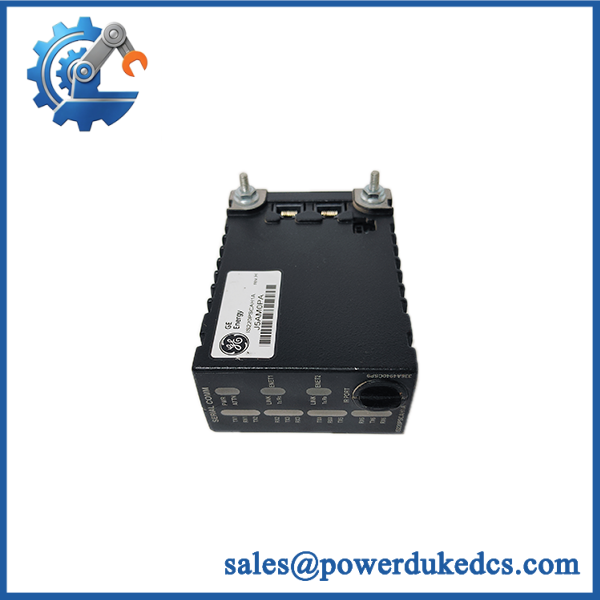
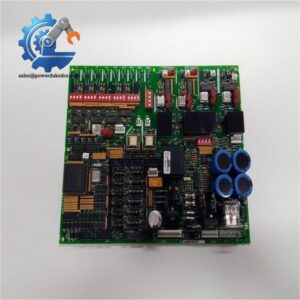
GE IS220PSCAH1B
Application Scenarios & Pain Points
A gas turbine control cabinet with intermittent serial data loss is one common field situation. A technician may see Ethernet communications remain healthy while one or more connected serial devices become unavailable. At that point, checking the PSCA channel configuration and physical terminal-board connection can separate a PSCA fault from a field wiring issue.
In power-generation applications, the module can serve serial communications between the Mark VIe system and external intelligent equipment. RS-422 or RS-485 installations can support communication distances up to 1,000 ft, depending on the interface and system design.
For process plants running older serial instruments, maintaining the existing field communication layer can avoid an unnecessary wholesale replacement of downstream devices. This is especially useful when a larger control-system upgrade is being performed in stages rather than during a single shutdown.
Within industrial turbine packages, six individually configurable serial channels allow one PSCA pack to support multiple serial communication paths (subject to the selected terminal board, protocol, wiring, and control-system configuration).
In hazardous-area projects, component selection cannot stop at the I/O pack part number. GE documentation specifically pairs the IS220PSCAH1B with IS200SSCAH1A or IS200SSCAH2A for documented hazardous-location applications, so the complete installed combination must be checked against the site’s certification requirements.
🚨 Common Error Codes & Diagnostic Symptoms
GE Mark VIe diagnostics are configuration-dependent, so there is no single universal PSCAH1B replacement error code that should be used as a standalone proof of hardware failure. Engineers should correlate controller diagnostics, ToolboxST status, LED indications, Ethernet status, and field-device communication behavior.
Symptom/Code: Multiple serial devices on the same PSCA pack stop communicating → Diagnosis: A common loss across several channels can indicate a PSCA pack, power, terminal-board, or upstream Ethernet/configuration problem rather than several simultaneous field-device failures → Action: Verify 24 VDC supply, Ethernet connectivity, terminal-board seating, configuration, then substitute a known-good PSCAH1B where practical.
Symptom/Code: One serial channel repeatedly drops offline while the field device and wiring test normal → Diagnosis: A failing channel transceiver or channel-specific hardware fault becomes more likely after cable, termination, protocol, and baud-rate checks are eliminated → Action: Replace the I/O pack and revalidate the channel configuration.
Symptom/Code: I/O pack fails to return to service after replacement or reboot → Diagnosis: The controller may require configuration or firmware-related reconfiguration, particularly where automatic reconfiguration is disabled or the pack is not receiving the expected system files → Action: Check ToolboxST configuration and controller-side Auto-Reconfiguration settings before declaring the new module defective.
🚨 Cross-Reference & Lifecycle Migration
The IS220PSCAH1B belongs to the GE Mark VIe PSCA serial communications family. GE documentation identifies the earlier IS220PSCAH1A and the H1B variant, while also documenting the associated terminal-board families.
For terminal-board selection:
- → IS200SSCAH1A / IS200SSCAH2A are documented Mark VIe combinations.
- The coated IS221PSCAH1B uses IS201SSCAH1A / IS201SSCAH2A.
- GE also documents newer IS42yPSCAH1B variants with IS40ySSCAH1A / IS40ySSCAH2A terminal boards.
Do not assume that every PSCA family revision is a physical or configuration-level drop-in replacement simply because the product description is similar. Check the complete I/O pack and terminal-board combination before procurement.
Firmware / configuration: A separate firmware flash is not necessarily required simply because an has been replaced. Mark VIe systems can use Auto-Reconfiguration, through which the controller can download the expected configuration and, where required, the bootload, baseload, firmware, and parameters to the I/O pack. Whether that occurs depends on system configuration and controller settings.
Lifecycle position: Public market evidence is mixed. Some current suppliers list the as available, while another industrial-controls listing describes it as unavailable once existing stock is exhausted. GE’s own documentation confirms the part remains part of the documented Mark VIe equipment family, but that should not be interpreted as an assurance of unrestricted new-production availability.
For asset planning, I would treat this as a limited-availability / lifecycle-managed spare rather than assuming an unlimited supply position. Plants with high downtime exposure should establish a buffer based on installed quantity, lead time, failure history, and the availability of an approved migration path.
Field Engineer’s Tech Notes
Warning 1 — Do not force the DC-62 connection.
The mechanical bracket beside the Ethernet ports is not cosmetic. GE installation guidance calls for positioning the bracket so that no right-angle force is transferred into the DC-62 connector between the I/O pack and terminal board. Misalignment here can create intermittent contact or mechanical damage (a fault that can be extremely difficult to reproduce during bench inspection).
Warning 2 — Verify the terminal board before energizing the replacement.
A PSCAH1B is not simply a generic Ethernet I/O module. The serial communication board depends on the associated terminal-board architecture, channel wiring, and software configuration. Do not copy an old wiring assumption onto a different PSCA variant or terminal board without checking the approved combination first. GE specifically identifies IS200SSCAH1A and IS200SSCAH2A for the .
Strict QA & Testing SOP
For a spare, a practical incoming-QA process should include the following sequence:
Step 1 — Model and revision verification
Confirm the complete part number , nameplate markings, revision identification, manufacturer markings, and visible serialization. Any discrepancy is quarantined for review.
Step 2 — Physical inspection
Inspect the enclosure, RJ45 interfaces, 3-pin power connector, DC-62 connector, mounting hardware, LED window, and board housing. Look for impact marks, oxidation, bent contacts, cracked housings, or signs of prior installation.
Step 3 — ESD-controlled handling
Handle the pack using grounded ESD procedures and place it in an anti-static bag with appropriate cushioning. Connector pins should not be exposed to uncontrolled handling.
Step 4 — Power validation
Where test equipment and an approved test procedure are available, verify the expected PSCAH1B supply range. GE documentation lists a maximum current rating of 0.36 A and PSCAH1B nominal supply values of 24.0 / 28.0 V with a documented maximum of 28.6 V.
Step 5 — Live-rig functional test
Install the pack on an appropriate compatible terminal board and controller test environment. Confirm boot behavior, Ethernet communication, LED diagnostics, and serial-channel operation under the applicable RS-232/RS-422/RS-485 configuration.
Step 6 — Configuration verification
Use the applicable ToolboxST environment to verify identification, configuration, and controller communication. Auto-Reconfiguration behavior should be checked where enabled.
Step 7 — Documentation and traceability
Record inspection results, test date, visible identification, test configuration, and packaging condition. Test videos are available upon request for qualifying inventory and can be provided as part of the pre-shipment inspection record.
Step 8 — Final packaging
After QA acceptance, place the tested unit in ESD-safe packaging with impact protection and a QC identification label before shipment.
Buyer’s FAQ
Q1. Can I hot-swap the without shutting down the control system?
Do not treat the as universally hot-swappable. GE’s installation guidance describes connecting power to the I/O pack and notes that the pack has soft-start capability, but site-specific control architecture, redundancy, operating procedures, and hazardous-location requirements still govern whether live replacement is permitted.
Q2. How do I know a New Original is genuine?
Ask for clear nameplate photographs, serial/identification details, packaging photographs, and the actual unit being supplied. For higher-value procurement, request a pre-shipment inspection video showing the physical part number and QA checks. A sales description alone is not sufficient evidence of factory origin.
Q3. Does the require firmware flashing after replacement?
Not always. On Mark VIe systems with suitable Auto-Reconfiguration settings, the controller can automatically deliver the expected configuration and, where applicable, required firmware files to the replacement pack. Manual configuration may still be necessary depending on the site’s system setup.
Q4. What warranty should I expect?
Warranty depends on the supplier and the exact inventory condition. Published market offerings for this model vary, including one supplier listing a one-year warranty and others advertising longer coverage for unused or refurbished inventory. For procurement, obtain the warranty period in writing and confirm whether coverage applies to New Original, New Surplus, or refurbished condition.
Procurement note: For a replacement , confirm the existing terminal board, installed PSCA revision, serial protocol requirements, controller configuration, and current lifecycle plan before issuing the purchase order. This reduces the risk of receiving a physically similar module that cannot be commissioned as expected.



 Start Chat


