

Description
- Brand: GE / GE Power Management
- Full Model Number: MMI301
- Lifecycle Status: Legacy / Obsolete
- Core Function: Man-machine interface module for GE DGP Digital Generator Protection System
- System: GE Multilin DGP Digital Generator Protection System
- Top 3 Technical Specs: 16-character alphanumeric LED display | 20-key keypad | RS232 communications interface
- Status Indication: Dual-color relay status LED
- Communication: RS232 serial interface for laptop/remote communication
- Module Position: DGP MMI module
- Stock & Condition: Physical stock and condition to be confirmed per quotation; New Surplus or Tested Refurbished where available
- Supply Mode: Direct industrial spare-parts supply; emergency dispatch subject to confirmed inventory and carrier cutoff
Obsolescence & Supply Chain Deep Dive
A failed can leave an otherwise serviceable GE DGP protection system without its local operator interface. The is not simply a generic display: GE documentation identifies it as the DGP’s man-machine interface, incorporating a 16-character alphanumeric LED display, 20-key keypad, dual-color status indication, and an RS232 port. The DGP documentation also lists as a replaceable module across DGPxxxAAA, DGPxxxABA, and DGPxxxACA configurations.For maintenance teams supporting aging generator protection panels, sourcing the correct module can therefore avoid unnecessary replacement of the complete DGP assembly.
The TCO case is primarily about preserving the installed protection architecture. Replacing an module can be substantially less disruptive than redesigning the DGP panel, protection logic, field wiring, and commissioning procedure around a different protection platform. Configuration must be checked before release, however; the includes service and communication functions, and GE documentation identifies jumper-controlled remote settings behavior on the module. The DGP manual also states that modules should be replaced only after the relay has been powered down.
Compatibility & Replacement Matrix
| Replacement Scenario | Assessment | Engineering / Procurement Guidance | Estimated Switch Time |
|---|---|---|---|
| replacing an identical in the same DGP configuration | Drop-in Replacement subject to matching hardware and system configuration | Verify module markings, DGP model, connectors, and existing configuration before installation | Approx. 2–6 hours |
| with different hardware or revision information | Software Compatible — verification required | Compare installed DGP configuration and module revision before commissioning | Approx. 4–8 hours |
| Different GE DGP interface module | Not automatically interchangeable | Confirm DGP family, module architecture, connector arrangement, and firmware requirements | Approx. 1–2 days |
| Modern relay platform replacing the complete DGP system | Hardware Modification | Requires protection-setting conversion, wiring review, panel engineering, testing, and commissioning | Several days to several weeks |
Field Traps — Watch Out
- DGP family mismatch: GE documentation identifies across specific DGP configurations, including DGPxxxAAA, DGPxxxABA, and DGPxxxACA. Verify the complete DGP model before approving the replacement.
- Remote-settings jumper: The J2 jumper on the controls remote settings-change functionality and related output behavior. Its position must be checked against the existing installation before commissioning.
- Power isolation: GE documentation states that DGP modules should not be replaced while energized. Power must be removed before module replacement.
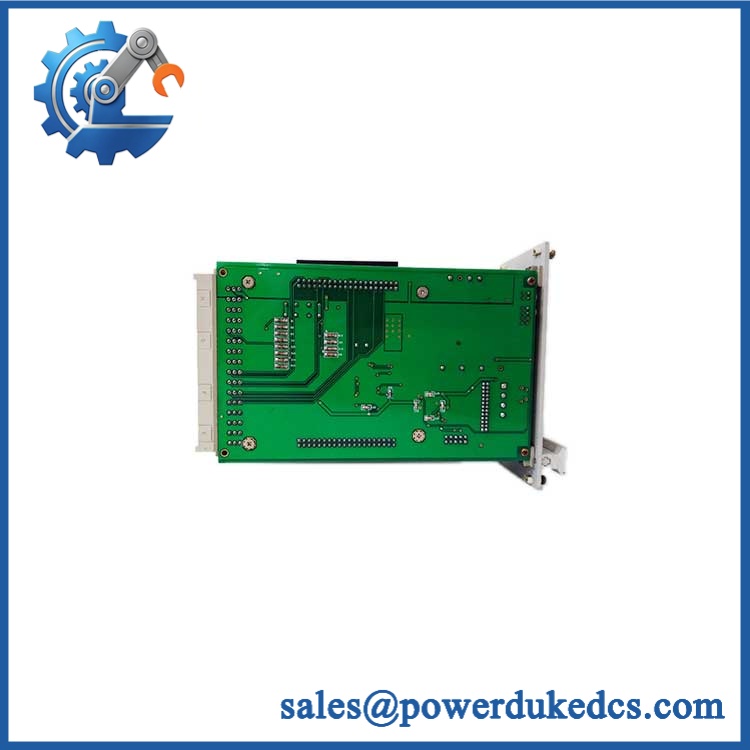
GE MMI301
Quality Assurance & Testing SOP
The should be evaluated as a protection-system interface module, not merely as a display board. Pre-shipment inspection should establish both physical authenticity and functional condition.
- OEM anti-counterfeit visual inspection: Check GE identification markings, designation, module construction, PCB condition, connectors, labels, and visible manufacturing information.
- Nameplate verification: Record the exact model marking and available serial/revision information.
- Mechanical inspection: Examine the keypad, LED display area, connector interfaces, mounting points, PCB, and housing for damage, corrosion, contamination, or unauthorized modification.
- Power-on self-test: Install the module in an appropriate DGP test environment and verify initialization, display operation, keypad response, and status indication.
- LED verification: Confirm normal dual-color status indication and check for abnormal diagnostic indications.
- Display test: Verify the 16-character alphanumeric LED display for readable characters, missing segments, abnormal brightness, or intermittent operation.
- Keypad load testing: Exercise the 20-key keypad and confirm reliable registration of representative commands.
- RS232 communication test: Verify serial communication through the applicable DGP communication interface and confirm stable data exchange.
- Configuration-function test: Where the test environment permits, verify access to status, settings, and applicable diagnostic functions.
- Jumper inspection: Record J1, J2, and J3 positions before shipment when accessible, with particular attention to J2.
- Final traceability: Photograph the actual , record identification data, retain test results, and associate the inspection record with the shipment.
- ESD-safe packaging: Protect the module against electrostatic discharge, mechanical shock, and moisture during transport.
Procurement & Lifecycle FAQ
Is the GE genuinely in stock, and what is the cutoff for emergency shipping?
Physical inventory should be confirmed before the PO is accepted. For emergency requirements, provide the required quantity and destination so the available unit, condition, and carrier cutoff can be confirmed before dispatch.
How do you verify the condition and authenticity of an obsolete ?
The unit should undergo identification and physical inspection followed by controlled power-on testing. Display, keypad, status LED, RS232 communication, connectors, and accessible configuration functions should be checked where the appropriate DGP test environment is available.
Can be installed directly into any GE DGP system?
No. GE documentation associates with specific DGP configurations. Confirm the complete DGP model, existing module arrangement, hardware information, and configuration before approving the replacement.
Are there configuration or jumper issues my engineers should check before installation?
Yes. In particular, verify the jumper configuration, including J2, because it affects remote settings-change functionality and related controls. Existing DGP settings should also be documented before replacement.
What warranty and return terms apply?
Warranty coverage should be stated on the quotation according to the unit’s condition and testing status. Return eligibility, warranty duration, and applicable exclusions should be confirmed in writing before the PO is issued.



 Start Chat


