

Description
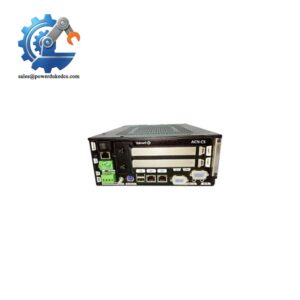
- KONGSBERG RMP400 | Bridge Control Interface Replacement
2. At-A-Glance Executive Brief
- Model: KONGSBERG RMP400
- Brand: KONGSBERG
- Series: K-Chief / Marine Automation System Family
- Part Type: Remote Marine Panel (RMP) Operator Interface Module
- Core Function: Provides a local operator access point for monitoring and control of shipboard automation functions.
- Key Specs:
- Designed for marine automation environments.
- Used as a remote user interface node within KONGSBERG vessel control architectures.
- Supports operator interaction with alarms, equipment status, and control commands.
- Panel-based installation for bridge, engine room, or machinery control locations.
3. Product Introduction
Structure B — Technical Direct
Within the KONGSBERG K-Chief marine automation architecture, the RMP400 operates as a remote operator interface node connected to the vessel control network. The unit extends access to automation functions away from the main control cabinet, allowing operators to review system conditions and interact with configured equipment controls.
In field deployments, these remote panels are commonly installed at locations where quick access to alarms and machinery information is required (—especially on vessels with multiple control stations). Before replacement, verify communication configuration, mounting dimensions, and software compatibility with the installed K-Chief version. A physically identical panel may not operate correctly if the application database does not recognize the hardware node.
4. Core Technical Specifications
| Parameter | Value |
|---|---|
| Manufacturer | KONGSBERG |
| Model | RMP400 |
| Product Type | Remote Marine Panel |
| Application | Shipboard automation operator interface |
| System Family | K-Chief Marine Automation System |
| Installation Type | Panel-mounted operator station |
| Communication | Marine automation network interface (system dependent) |
| User Interface | Display and operator controls |
| Function | Alarm monitoring, status display, control access |
| Power Supply | Marine DC supply system (installation dependent) |
| Operating Environment | Marine industrial environment |
| Mounting Location | Bridge, engine control room, machinery spaces |
| Enclosure Protection | Depends on installed panel configuration |
| Cooling Method | Natural cabinet/panel convection |
| Configuration Method | K-Chief engineering tools and system database |
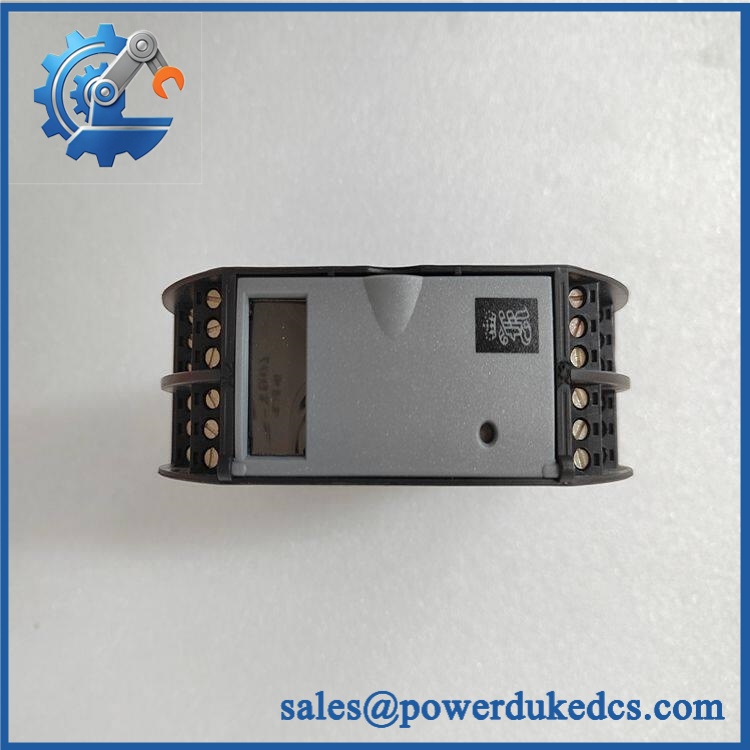
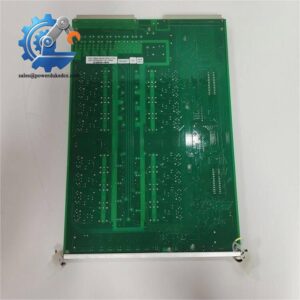
KONGSBERG RMP400
5. Application Scenarios & Pain Points
Micro-case approach:
A vessel operator reports delayed alarm acknowledgement because the existing remote panel has a failed display module. Replacing the RMP400 restores local access without modifying the main automation cabinet.
- Engine Control Room: Used for machinery monitoring where engineers require direct access to propulsion and auxiliary system information.
- Bridge Installation: Provides navigation personnel with automation status visibility without entering machinery spaces.
- Offshore Support Vessels: Supports distributed monitoring locations where equipment may be spread across multiple decks.
- Power Generation Systems: Helps operators supervise generator-related alarms and operational states.
- Retrofit Projects: Used during legacy migration programs where older operator stations require replacement while maintaining existing automation infrastructure.
For marine installations, environmental conditions matter. Salt atmosphere exposure, vibration, and continuous operation at temperatures above 45°C can accelerate aging of displays, connectors, and internal electronics.
6. Common Error Codes & Diagnostic Symptoms
Symptom/Code: Communication Loss / Panel Offline Alarm
→ Diagnosis: The RMP400 may have lost network communication due to damaged communication wiring, incorrect node configuration, or internal interface failure.
→ Action: Verify network parameters and replace the panel if hardware failure is confirmed.
Symptom/Code: Blank Display / No Backlight
→ Diagnosis: Possible display assembly failure, internal power issue, or aging of display components.
→ Action: Check supply voltage and replace the remote panel if the power section is functional.
Symptom/Code: Touch or Key Input Failure
→ Diagnosis: Operator interface hardware degradation caused by long service exposure, moisture ingress, or mechanical wear.
→ Action: Replace the RMP400 module and confirm configuration loading.
7. Cross-Reference & Lifecycle Migration
- Compatibility: Confirm exact K-Chief system version and software database before replacement.
- Replacement Strategy: RMP400 units should be matched by hardware revision, communication interface, and configured application.
- Firmware Requirement: Firmware or application synchronization may be required after installation depending on the vessel automation version.
- Previous Revisions: Specific predecessor/successor mappings depend on the installed KONGSBERG project documentation.
- Lifecycle Status: Limited Availability / Legacy Support Item in many installed marine automation systems.
For maintenance planning, keep verified spare units with recorded firmware revision, serial number, and vessel configuration data. Marine automation replacements are rarely plug-and-play when the application database is not preserved.
8. Field Engineer’s Tech Notes (Anti-Pitfall Guide)
- Do not replace the panel before checking configuration files.
A replacement RMP400 may power up correctly but fail to communicate if the vessel database does not contain the correct node settings. - Protect the connectors during handling.
The communication and power interfaces are sensitive to corrosion and ESD damage. Use proper grounding equipment before touching internal connections.
9. Strict QA & Testing SOP
A professional inspection process for a KONGSBERG RMP400 spare should include:
Step 1 — Incoming Inspection
- Verify model marking: RMP400.
- Record serial number and hardware revision.
- Inspect enclosure, display surface, mounting brackets, and connectors.
- Check packaging condition.
Step 2 — Electrical Verification
- Confirm supply input behavior.
- Check startup sequence.
- Verify display operation.
Step 3 — Communication Testing
- Connect to a compatible K-Chief test environment where available.
- Confirm network recognition.
- Verify alarm/status communication.
Step 4 — Functional Testing
- Test operator input response.
- Verify display visibility.
- Confirm configured functions load correctly.
Step 5 — Packaging Control
- Place the tested unit inside anti-static protection.
- Add shock protection for international shipment.
- Attach inspection records.
Test videos, inspection photos, and functional verification records are available as part of the quality documentation package.
10. Buyer’s FAQ (Dynamic Q&A)
Q1. Can the KONGSBERG RMP400 be hot-swapped while the vessel automation system is running?
A: Generally, no. Follow the vessel-specific maintenance procedure before disconnecting the panel. Removing communication equipment from an active automation network may create alarms or communication faults.
Q2. “How do I know this is a genuine RMP400 and not a refurbished unit?”
A: Check the nameplate, serial number, hardware revision, packaging condition, and inspection records. New Original units should have consistent OEM identification and traceable documentation.
Q3. Does the RMP400 require firmware loading after replacement?
A: It depends on the K-Chief system version and stored configuration. Some installations require application synchronization or software configuration after hardware replacement.
Q4. What warranty should I expect when purchasing this marine spare?
A: Warranty terms depend on the supplier and condition category. Confirm whether the unit is New Original, New Surplus, or Refurbished, and request written warranty coverage before purchase.



 Start Chat


