

Description
- Model: 3BHB005243R0117
- Brand: ABB
- Series: ABB industrial automation spare parts
- Core Function: Industrial control system replacement component
- Type: ABB automation spare part
- Key Specs: Exact module function and electrical ratings require ABB documentation verification
- Condition: Confirm New Original (New Surplus) or refurbished status before purchase
- Stocking Status: Recommended for critical installed equipment only after compatibility verification
Product Introduction
ABB 3BHB005243R0117 is an ABB industrial automation spare part identified by its unique ordering number. The exact product family, hardware function, connector arrangement, and electrical specifications should be confirmed against the original ABB documentation before installation.
For maintenance teams, the practical value is mainly replacement readiness. If this part is installed in a production-critical system, keeping one verified unit as buffer stock can reduce emergency procurement pressure. The correct firmware, hardware revision, and system interface still need checking—part-number matching alone is not enough.
Technical note: Do not use assumed voltage, temperature, weight, or communication data for purchasing or commissioning. The applicable ABB manual or product datasheet should control the final specification.
Installation & Configuration Guide
Phase 1: Pre-Installation — 10–15 minutes
⚠️ Safety first.
- Notify the production team of the planned maintenance window.
- Place the equipment in a safe state.
- Isolate the relevant control power according to site procedures.
- Verify that hazardous voltage has been removed.
- Wear an ESD wrist strap and use an ESD-safe work surface.
- Record the existing component’s:
- Full part number
- Serial number
- Hardware revision
- Firmware revision, if available
- Connector arrangement
- Switch or jumper settings
- Take clear photos before removing the old component.
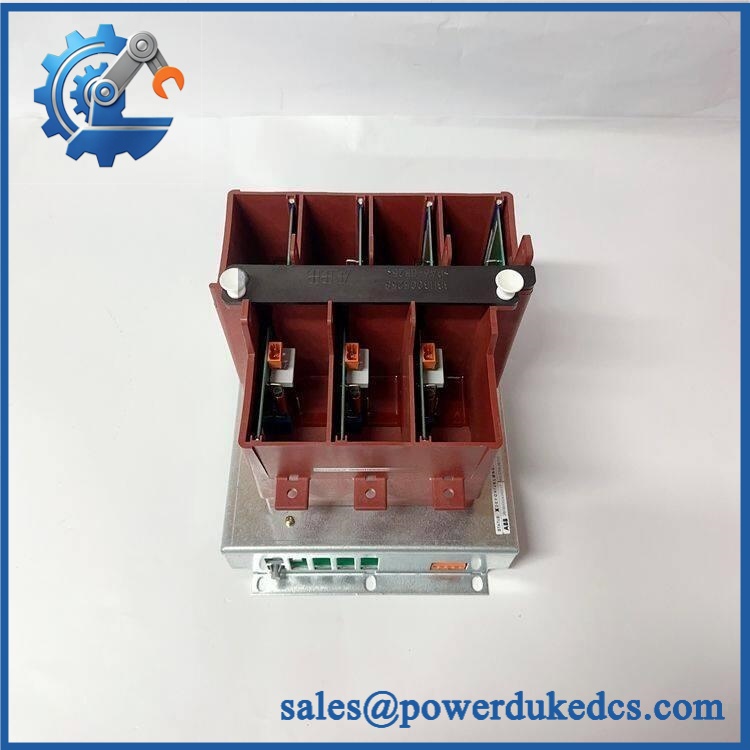
ABB 3BHB005243R0117
Phase 2: Remove the Existing Component — 5–10 minutes
- Confirm power isolation.
- Label every cable and terminal.
- Photograph the wiring from several angles.
- Disconnect cables without pulling on the conductors.
- Release the applicable mounting mechanism.
- Remove the component carefully.
- Inspect connectors for bent pins, contamination, or corrosion.
Do not force the connector.
Phase 3: Install the Replacement — 5–10 minutes
- Verify the complete part number against the maintenance BOM.
- Inspect the replacement for physical damage.
- Compare connectors with the removed component.
- Reproduce documented switches or jumpers only after confirming they apply to the replacement revision.
- Install the component using the manufacturer’s specified mounting method.
- Reconnect each cable according to the photographs and wiring diagram.
- Check that every connector is fully seated.
⚠️ Do not guess terminal assignments or torque values. Use the applicable ABB installation documentation.
Phase 4: Power-On and Testing — 10–20 minutes
- Check all wiring before energizing.
- Verify the supply voltage against the ABB documentation.
- Restore power under controlled conditions.
- Observe status LEDs and system diagnostics.
- Check communication with the control system.
- Verify hardware identification.
- Check firmware compatibility.
- Run the approved functional test.
- Monitor the system for alarms.
Record the replacement date, serial number, firmware revision, and test result in the maintenance log.
Quality Inspection SOP
1. Incoming Inspection
- Verify the supplier packing list.
- Record the full ABB ordering number.
- Record serial number and hardware revision.
- Inspect labels for damage or alteration.
- Check the housing for corrosion, cracks, scratches, or repair marks.
- Confirm included accessories against the agreed packing list.
2. Live Functional Test
A live test should only be claimed when a suitable test environment exists for this exact ABB component.
The Test Report should record:
- Test equipment
- Test configuration
- Power-on result
- Diagnostic result
- Communication result
- Functional result
- Test date
- Technician
A generic ABB test rack should not be described as compatible without technical verification.
3. Electrical Testing
Where permitted by the applicable ABB documentation:
- Supply voltage verification
- Insulation resistance testing
- Protective earth continuity
- Applicable dielectric/withstand testing
Test voltage and acceptance limits must come from the relevant ABB documentation.
4. Firmware and Configuration Verification
Record:
- Firmware version
- Hardware revision
- Serial number
- DIP switch settings
- Jumper settings
- Configuration data, where applicable
Keep these records with the warehouse inventory entry.
5. Final QC and Packing
- QC inspection completed
- ESD-safe bag used
- Protective cushioning installed
- Outer carton secured
- QC label attached
- Photos retained with the shipment record
Test photos and videos can be provided to a customer only when the corresponding inspection was actually performed.
Common Questions
1. What is ABB 3BHB005243R0117?
It is an ABB industrial automation spare identified by ordering number 3BHB005243R0117. The exact product function should be confirmed from the applicable ABB documentation before purchase or replacement.
2. Can I install it as a direct replacement?
Not based on the part number alone.
Check:
- Hardware revision
- Connector type
- Electrical rating
- Firmware requirements
- Installed system configuration
Similar-looking ABB parts can have different functions or interfaces.
3. My replacement does not communicate. What should I check?
Start with configuration.
Check the hardware identification, firmware revision, communication settings, cabling, and system diagnostics. Do not immediately update firmware; record the original revision first.
4. Can this item be kept as buffer stock?
Yes, if the associated equipment is production-critical and replacement lead time is uncertain.
A reasonable starting point is:
| Inventory Item | Recommendation |
|---|---|
| Minimum | 1 unit |
| Maximum | 1–2 units |
| Reorder Point | At or below minimum |
| Storage | ESD-controlled area |
| Review | Every 6–12 months |
For slow-moving parts, excessive inventory increases carrying cost and obsolescence exposure.
5. What should I verify before buying surplus stock?
Check the label, full ordering number, serial number, physical condition, hardware revision, and available test evidence.
Traceability matters. A clear label photo plus an actual test report is much more useful than a simple warehouse photograph.
6. Can the exact technical specifications be confirmed from the order number?
The ordering number identifies the item, but installation decisions should not rely on the number alone. Confirm the product datasheet, manual, hardware revision, and system configuration before commissioning.
7. How should a plant manage this spare?
For a critical low-consumption component, keep a small buffer stock rather than a large quantity.
Use Min/Max control, review cross-site inventory, consolidate vendors where practical, and monitor lifecycle status. If ABB has discontinued or announced an EOL path for the component, evaluate a controlled last-time-buy against actual installed-base demand.




 Start Chat


