

Description
- Model: 3ASC25H219B DATX133
- Brand: ABB
- Series: ABB industrial automation / control system component
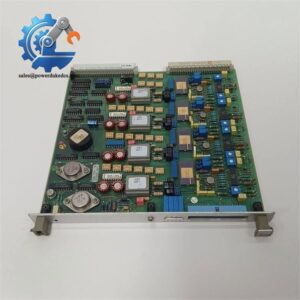
- Core Function: Control and interface board for ABB automation equipment
- Type: Industrial control board / spare module
- Key Specs: DATX133 designation; ABB part number 3ASC25H219B; application details depend on the host system
- Condition: New Surplus available subject to stock confirmation
Lifecycle note: Public supplier records describe this part inconsistently, including control board, rotor-feedback board, and other functions. The exact host-system function should therefore be confirmed from the equipment nameplate or original ABB documentation before replacement.
Product Introduction
When an older ABB control system has a failed board, the real problem is usually not finding a similar-looking PCB. It is finding the exact revision and application. ABB DATX133 3ASC25H219B is identified as an industrial automation spare part, but available public records give conflicting descriptions of its role. Some list it with ABB HC800-related parts, while others call it a rotor-feedback board or a control module.
For procurement, that distinction matters. Do not approve a replacement from the model number alone. Check the original board label, hardware revision, cabinet location, connector layout, and host equipment. Some supplier records also list approximately 1 kg gross weight, but this is packaging information rather than a verified ABB net-weight specification.
Key Technical Specifications
| Parameter | Specification |
|---|---|
| Manufacturer | ABB |
| Part Number | 3ASC25H219B |
| Product Designation | DATX133 |
| Product Category | Industrial automation spare board |
| Board Type | Control / interface board |
| System Application | ABB industrial control equipment |
| Host System | Must be confirmed from the installed equipment |
| Electrical Data | Not verified from an ABB primary source |
| Communication Interface | Not verified |
| Operating Temperature | Not verified |
| Dimensions | Not verified |
| Net Weight | Not verified |
| Reported Gross Weight | Approx. 1 kg from one supplier listing |
| Lifecycle | Older / legacy part; current production status requires confirmation |
| Condition | New Surplus / used / refurbished depends on actual stock |
| Warranty | Confirm with supplier before purchase |
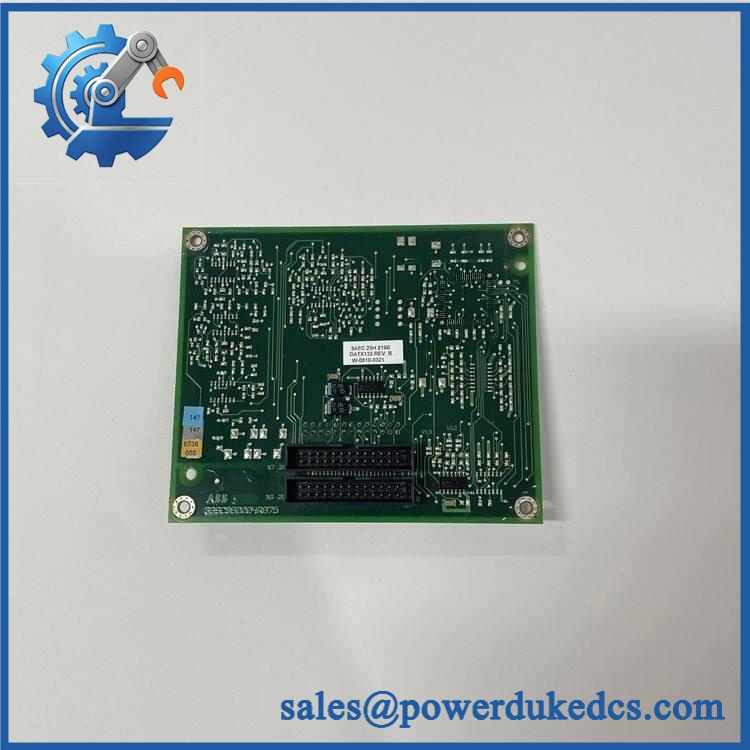
ABB DATX133 3ASC25H219B
Important: Several online listings publish highly specific specifications for this part, but they conflict with one another. For example, one source describes DATX133 as a terminal base, another as a rotor-feedback board, and another as an intelligent gate driver. These claims should not be treated as verified ABB specifications.
Installation & Configuration Guide
Estimated replacement time: 30–60 minutes
The exact procedure depends on the ABB host equipment. The steps below are a safe spare-board replacement framework, not a substitute for the original ABB service manual.
Stage 1 — Pre-Installation: 10 minutes
⚠️ Safety first.
- Notify the production team about the planned shutdown.
- Put the controlled equipment into a safe state.
- Disconnect the control-system power, including UPS output where applicable.
- Wait for the discharge time specified by the equipment manual.
- Wear an ESD wrist strap and use an ESD mat.
Prepare:
- PH1 screwdriver
- Multimeter
- ESD wrist strap
- ESD mat
- Labels and marker
- Phone or camera
- Original wiring diagram
- Original ABB manual, if available
Before removing anything, take photos.
Capture:
- Board label
- Part number
- Hardware revision
- Connector positions
- Cable routing
- DIP switches or jumpers
- Cabinet position
Stage 2 — Remove the Existing Board: 5–10 minutes
- Confirm the equipment is fully de-energized.
- Label every cable before removal.
- Photograph each connector again.
- Remove retaining screws or clips.
- Disconnect cables without pulling on the wires.
- Remove the board vertically where the mechanical design requires it.
- Inspect connectors for bent pins, oxidation, dust, or heat damage.
Do not force the board.
A damaged connector can turn a simple spare-part replacement into a much longer repair.
Stage 3 — Install the Replacement: 10 minutes
- Check the complete part number again.
- Compare the old and replacement boards side by side.
- Check PCB revision and connector arrangement.
- Copy any documented DIP-switch or jumper settings.
- Install the board in the same position.
- Secure all retaining hardware.
- Reconnect cables according to the photographs and wiring diagram.
- Check that no connector is loose.
Do not assume that a similar ABB board has the same pin assignment.
Part-number similarity is not proof of electrical compatibility.
Stage 4 — Power-On & Functional Test: 10–30 minutes
Before energizing:
- Check wiring against the drawing.
- Check for loose conductors.
- Verify supply voltage against the host-equipment specification.
- Confirm that no tools remain inside the cabinet.
Power up the equipment according to the ABB service procedure.
Then check:
- Board status indicators.
- Controller diagnostics.
- Communication status.
- Relevant feedback or control signals.
- Alarm history.
- HMI/SCADA status.
- Normal equipment operation.
Run the system under controlled conditions.
Record:
- Replacement date
- Board serial number
- Part number
- Hardware revision
- Firmware information, if applicable
- Test result
- Technician name
If the board does not communicate, stop. Do not repeatedly cycle power. Check the wiring, board revision, host configuration, and diagnostic code first.
Quality Inspection SOP
For a spare part with uncertain lifecycle history, incoming inspection is important.
1. Incoming Inspection
Check:
- Original packing information, when available
- Serial number
- Product label
- Anti-counterfeit markings
- PCB condition
- Connector condition
- Signs of corrosion
- Scratches or repair marks
- Yellowing or aging of plastic
- Included documentation
Photograph the board before testing.
2. Live Test
Use the actual compatible ABB host system or a documented simulation/test rack where available.
Check:
- Power-on behavior
- LED status
- Communication
- Relevant I/O or feedback signals
- System diagnostics
- Continuous operation
A test report should record the test conditions.
Do not claim a 24-hour load test unless the board was actually tested for 24 hours.
3. Electrical Testing
Where applicable:
- Insulation resistance
- Ground continuity
- Supply voltage verification
- Appropriate withstand-voltage testing
Test limits must follow the ABB equipment specification.
4. Firmware / Configuration Verification
Record:
- Firmware revision
- Hardware revision
- DIP-switch settings
- Jumper positions
- Configuration data
Back up the original configuration before replacement.
5. Final QC and Packaging
After testing:
- QC inspector signs the report
- Place the board in an ESD bag
- Add bubble protection
- Use a rigid carton
- Attach QC identification
- Record test date
Test photos and videos can be provided when available.
Spare Inventory Recommendation
For a legacy ABB board, holding cost and availability need to be balanced.
| Inventory Factor | Recommendation |
|---|---|
| Critical production application | Keep 1 verified spare on site |
| Two or more identical systems | Consider 1–2 shared spares |
| Low-use application | Avoid large stock quantities |
| Long supplier lead time | Increase buffer stock |
| EOL risk | Consider a controlled last-time-buy |
| Fast-moving replacement | Use scheduled replenishment |
| Slow-moving spare | Consider vendor-managed stock |
| Unknown condition | Test before adding to critical stock |
A single tested spare can be cheaper than several days of production downtime.
For an obsolete system, the total cost of ownership includes storage, inspection, obsolescence risk, and emergency freight—not only the purchase price.
Technical Replacement Risks
1. Hardware Revision Mismatch
A board with the same base number may have a different revision.
Avoid the trap: photograph the complete label before ordering.
If the replacement has a different hardware revision, confirm compatibility with the ABB manual or technical support.
2. Connector Configuration
This is an easy mistake.
A connector may look identical but have a different function or pin assignment.
Check the wiring diagram.
Do not transfer cables by position alone.
3. Firmware or Configuration Differences
If the host system uses firmware-dependent functions, a revision difference may affect operation.
Record the old configuration before removal.
Well, technically, firmware may not apply to every DATX133 configuration. Confirm this from the actual host system.
4. ESD Damage
Legacy boards are still sensitive to static discharge.
Use:
- ESD wrist strap
- ESD mat
- ESD packaging
- Proper grounding
Never handle exposed PCB contacts unnecessarily.
5. Wrong Application Identification
This is the biggest procurement risk for this part.
Public listings disagree about the exact function of 3ASC25H219B.
Match the complete board label and host equipment before purchase.
FAQ
1. Is ABB 3ASC25H219B still available?
It can be found through industrial automation spare-part suppliers, but availability varies. One current supplier listing shows the part as available, while other sources describe it as an older or obsolete item.
For critical equipment, ask for the actual serial number, photos, condition, and test report before placing the order.
2. Is the same as 3ASC25H219B?
Yes. is the product designation associated with 3ASC25H219B in multiple supplier records.
Use both references when searching for stock.
3. Can I replace my old board directly?
Not from the part number alone.
Check:
| Item | Required Check |
|---|---|
| Part number | 3ASC25H219B |
| Board revision | Match or approved substitute |
| Connectors | Same arrangement |
| Host equipment | Confirm |
| Configuration | Compare with old board |
| Firmware | Confirm where applicable |
Send a photo of the original label before ordering. That is usually faster than fixing a wrong shipment later.
4. My failed. What should I check first?
Start with the basics.
- Record the diagnostic indication.
- Check the supply voltage.
- Inspect connectors.
- Check the wiring.
- Compare the replacement board revision.
- Check the host-system configuration.
If the fault appeared after a board replacement, do not immediately assume the new board is defective.
5. Can you provide a test report?
Yes, if the actual stock unit has been tested. A proper report should identify the tested serial number, test method, date, and results.
Do not accept a generic report that does not identify the actual board.
6. Is this part new original?
Condition must be confirmed against the actual inventory. Listings for this reference describe different conditions, including new stock, so the purchasing record should clearly state New Surplus, refurbished, or used before payment.
For a critical spare, ask for:
- Real product photos
- Serial-number photo
- Condition statement
- Test report
- Warranty terms
- Packing photos
7. What price should I expect?
The listed price should be treated as a reference price, not a fixed transaction price. Legacy ABB spare prices depend heavily on condition, revision, test status, and available stock.
For procurement, compare the purchase price with the cost of downtime. Sometimes one tested buffer unit is economically better than repeated emergency sourcing.




 Start Chat


