

Description
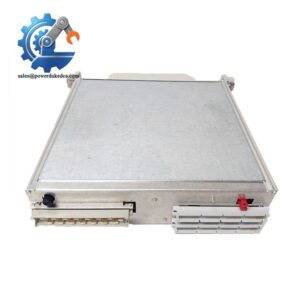
- ABB IMMPI01 Genuine OEM Bailey INFI 90 Fast Shipping
Module 2: The 10-Second Procurement Snapshot
- Brand: ABB Bailey
- Full Model Number: IMMPI01
- Lifecycle Status: Legacy / Obsolete
- Core Function: Multi-Function Processor Interface for INFI 90 systems
- Top 3 Technical Specs: RS-232-C interface; SCSI interface; 60-pin ribbon-cable connection
- Stock & Condition: New Surplus; tested inventory subject to physical stock confirmation; fast dispatch available for confirmed stock
Module 3: Supply Chain & Technical Deep Dive
A failed interface module in an older Bailey INFI 90 installation can create a disproportionate sourcing problem. The IMMPI01 is not a general-purpose CPU board; it is a Multi-Function Processor Interface (MPI) used with compatible INFI 90 computer-interface architectures. ABB documentation identifies it as the interface between the INICT03 INFI-NET to Computer Transfer Module and external computer equipment, providing RS-232-C and SCSI connections.
The procurement value is tied to keeping an installed legacy system operational without redesigning its communication architecture. The board connects to the associated ICT module through a 60-pin ribbon cable and interfaces with an NTMP01 termination unit or NIMP01 termination module. The documented INFI-NET architecture uses a 10-megabaud response rate, while the exact external connection arrangement depends on the installed system.
Module 4: Migration, Compatibility & Field Traps
Replacement Matrix
| Replacement Category | Assessment |
|---|---|
| Drop-in Replacement | Yes, when replacing the same IMMPI01 configuration |
| Software Compatible | Generally hardware-interface dependent; verify the associated ICT configuration |
| Hardware Modification | Not normally required for an exact replacement |
| Engineering Approval | Recommended before installation |
⚠️ Field Trap 1: Do Not Confuse MPI With the Main Processor
The IMMPI01 is an interface module, not the primary INFI 90 multi-function processor.
ABB documentation specifically describes the MPI as handling I/O between the ICT module and external equipment. Communication signals pass through a 60-pin ribbon connection to the MPI board, while external connections use the appropriate termination unit and cable assembly.
Check the complete rack architecture before ordering.
⚠️ Field Trap 2: Cable and Jumper Configuration
The replacement is not complete just because the PCB part number matches.
The related NIMP01 documentation includes a dedicated section for IMMPI01/IMMPI02 jumper settings, including the MPI J2 jumper setting.
Before removing the old board:
- Photograph the jumper position.
- Photograph every cable connection.
- Record the associated ICT module.
- Record the termination-unit model.
- Compare the replacement board before energizing.
That five-minute photo record can save hours of fault finding.
⚠️ Field Trap 3: SCSI and RS-232 Connections
The IMMPI01 supports external communication connections including RS-232-C and SCSI.
Do not assume a modern serial converter can simply replace the original connection path. Verify the cable type, termination hardware, pin assignment, and host interface against the installed INFI 90 documentation.
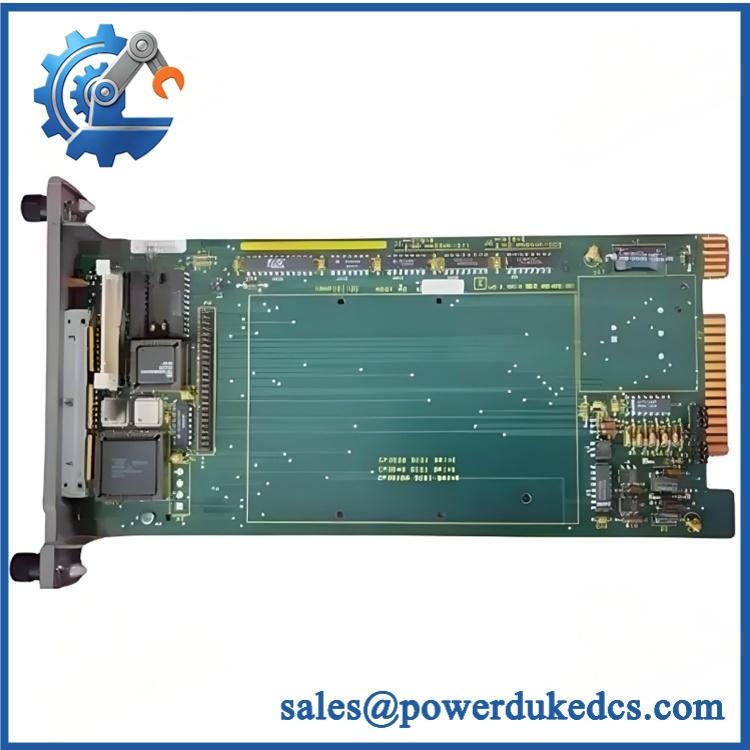
ABB IMMPI01
Module 5: Quality Assurance & Testing SOP
Legacy communication boards deserve a stricter incoming inspection because age-related storage problems can be difficult to detect visually.
1. OEM Identification Check
- Verify ABB Bailey identification.
- Confirm IMMPI01 model marking.
- Record serial number where present.
- Photograph the nameplate.
- Inspect labels for alteration.
- Compare the board layout with the specified hardware.
- Check available documentation and packaging.
2. Physical Inspection
Inspect the PCB and connectors for:
- Corrosion
- Oxidation
- Bent connector pins
- Damaged ribbon-cable connectors
- Burn marks
- Cracked components
- Missing components
- Evidence of solder rework
- Storage-related contamination
Particular attention should be given to the edge connectors and ribbon-cable interface.
3. Power-On / Diagnostic Test
Using a compatible INFI 90 test environment:
- Install the module in the appropriate mounting unit.
- Apply the specified system power.
- Check module status indications.
- Confirm module recognition.
- Verify communication with the associated ICT equipment.
- Check for diagnostic alarms.
- Record abnormal LED behavior.
Do not rely on a bench power test alone.
4. Communication Interface Testing
Where the appropriate test equipment is available:
- Verify RS-232-C interface operation.
- Verify SCSI interface operation.
- Check the 60-pin ribbon-cable connection.
- Confirm communication with the associated ICT module.
- Verify data transfer through the intended interface path.
The original ABB documentation identifies the MPI as the board that provides these communication ports to the ICT architecture.
5. Configuration Verification
Before final QC:
- Record jumper settings.
- Confirm cable configuration.
- Verify termination-unit compatibility.
- Check module address or related configuration where applicable.
- Compare the replacement configuration with the removed unit.
6. Final QC
- Test Report completed
- Serial number recorded
- Interface test results archived
- Jumper configuration photographed
- QC approval completed
- ESD packaging applied
- Protective cushioning installed
- Shipping carton sealed
Test photographs and available Test Reports can be supplied for procurement review.
Module 6: Procurement-Driven FAQ
1. Is the ABB IMMPI01 actually in stock, and when can it ship?
Physical inventory should be confirmed against the exact IMMPI01 model before the purchase order is released. For emergency maintenance, confirm the quantity, warehouse availability, shipping destination, and carrier cutoff in writing.
Legacy stock can change quickly.
2. How do you verify the condition of an obsolete IMMPI01?
The inspection starts with the model identification and PCB condition. Connectors, ribbon-cable interfaces, components, and signs of previous repair are checked before functional testing.
For tested inventory, request the serial-number record, inspection photographs, and Test Report. The report should correspond to the actual unit being shipped.
3. What warranty and return terms should procurement require?
The quotation should specify the warranty period, covered functional failures, return authorization process, and inspection requirements.
For legacy electronics, a documented pre-shipment functional test provides a clear baseline. Any warranty terms should be stated explicitly on the commercial documentation.
4. Are there firmware compatibility issues with IMMPI01?
The main replacement concern is the system interface configuration, rather than treating the board like a modern standalone processor.
ABB describes the IMMPI01 as an interface for the INICT03 computer-transfer architecture, with RS-232-C and SCSI connections. Verify the associated ICT module, cable arrangement, termination hardware, and jumper configuration before installation.
5. What information should I send for an urgent replacement quote?
Provide:
- IMMPI01 part number
- Clear photo of the existing nameplate
- Photo of the full PCB
- Associated ICT module model
- Termination-unit model
- Cable and connector photographs
- Quantity required
- Required delivery date
For this legacy INFI 90 component, photos are particularly useful. They let the engineering team verify the physical interface before the replacement is approved.



 Start Chat


