

Description
-
- Model: 104X905BA603
- Brand: General Electric (GE)
- Series/System: Legacy GE DCC / SDCC control equipment; related listings also reference SLCC and LDCC configurations.
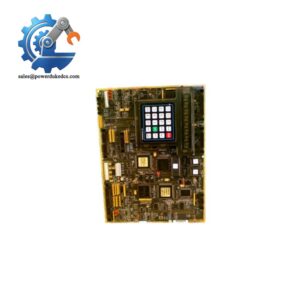
- Part Type: Display Panel with Keypad.
- Core Function: Provides local operator display and keypad access to the associated GE control electronics.
- Key Specs: Public catalog records identify a 20-button keypad and distinguish black-frame SLCC/SDCC and smoke-gray T-style LDCC versions. Commercial technical listings also describe a character LCD and 24 VDC supply, but those detailed values should be checked against the actual hardware revision before commissioning.
Product Introduction
The biggest maintenance problem with a legacy operator panel is often not the electronics themselves. A production team can have a functioning control board and still lose local operator access when the display, keypad matrix, or interface connection fails. GE 104X905BA603 is identified in equipment catalogs as a display panel with keypad for DCC and SDCC boards, placing it at the operator-interface layer of older GE control equipment.
For replacement work, match the complete assembly rather than relying only on the catalog number. Available records identify a 20-button version, with frame configurations associated with SLCC/SDCC and LDCC equipment. Another commercial technical record describes a 24 VDC character-display assembly, but its published dimensions and electrical details conflict with other listings; those values should therefore be treated as supplier data rather than certified GE specifications.
Core Technical Specifications
Parameter Value Manufacturer General Electric (GE) Part Number 104X905BA603 Product Type Display Panel with Keypad Primary Application DCC / SDCC control-board operator interface Related Application SLCC / LDCC configurations reported in commercial records Keypad 20-button configuration documented in catalog records Display Operator display panel; commercial listings describe a character LCD Frame Configuration Black-frame SLCC/SDCC; smoke-gray T-style LDCC referenced in commercial records Panel Category HMI / MMI / OIT Firmware No independent firmware specification verified for the panel assembly Application Memory No independent memory specification verified Power Supply 24 VDC reported by one commercial technical listing; verify against actual unit Current Draw Approximately 120 mA typical, plus about 30 mA for backlight according to one commercial listing; verify before use Key Matrix 4 × 4 matrix reported for the 16-key description in one commercial listing, which conflicts with the catalog’s 20-button identification Display Format 20 × 4 character LCD reported by one supplier Interface 20-pin ribbon interface reported by one supplier Mounting Panel-mounted operator interface Exact OEM Dimensions Not independently verified Exact OEM Weight Not independently verified Lifecycle Legacy / discontinued according to current commercial records The 20-button identification is directly supported by current catalog records. At the same time, one technical listing describes a 16-key membrane keypad and 20 × 4 LCD. Because of this conflict, the physical unit should be inspected before the specification is used in an engineering drawing or replacement approval.
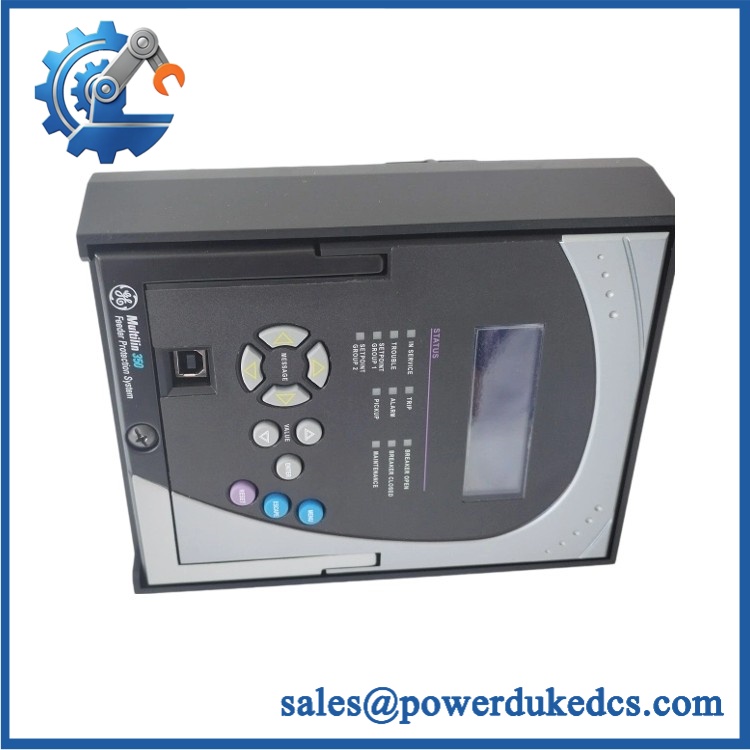
GE 104X905BA603
Application Scenarios & Pain Points
On legacy GE control equipment, the loss of a local display can become a maintenance bottleneck even when the underlying controller remains operational. The 104X905BA603 is suited to installations where operators still depend on the original panel for status viewing, parameter access, or local commands. Its documented association with DCC/SDCC boards makes host-board verification essential.
In turbine or excitation-related equipment, an operator panel replacement can be necessary when the keypad becomes intermittent, the LCD loses readability, or communication between the panel and control board becomes unstable. A spare should be matched to the original frame and connector arrangement before shutdown work begins.
For aging electrical-control cabinets, mechanical condition can become as important as electrical function. Check the mounting face, rear connector, keypad membrane, and display window; replacement geometry that is off by even a few millimeters can create cabinet-fit problems.
At sites with high ambient temperatures, inspect the display contrast and backlight condition after the cabinet reaches its normal operating temperature. A supplier listing reports operation around -10°C to +55°C, but this should not be treated as an OEM-certified environmental limit without the applicable GE documentation.
🚨 Common Error Codes & Diagnostic Symptoms
This legacy panel does not have a reliably documented universal numeric fault-code set in the public references reviewed. Troubleshooting should therefore begin with physical symptoms and host-board diagnostics.
Symptom/Code: LCD blank while host control remains powered → Diagnosis: Possible loss of panel DC supply, failed display electronics/backlight, or an interface connection problem between the panel and host board. → Action: Verify the panel supply and interface first; replace the display assembly after external causes are ruled out.
Symptom/Code: Key presses ignored or intermittent → Diagnosis: Likely keypad membrane, matrix-switch, connector, or encoder failure. Mechanical wear is particularly relevant on older operator panels. → Action: Test each key position systematically; replace the panel when the keypad matrix is confirmed defective.
Symptom/Code: Display active but no valid host information → Diagnosis: The panel can have local power while losing its interface with the associated DCC/SDCC/SLCC/LDCC electronics. → Action: Check the ribbon/interface connection and host-board status before replacing the panel.
🚨 Cross-Reference & Lifecycle Migration
Compatibility and Related Hardware
The strongest documented relationship is the 104X905BA603 display panel with keypad for DCC/SDCC boards. Current catalog data also identify frame variants associated with SLCC/SDCC and LDCC equipment.
Do not treat similarly numbered display panels as automatic substitutes. GE has other display-panel references, including 104X905BA482 and 104X905EA024, but the available catalog evidence identifies these as different assemblies and does not establish them as drop-in replacements for 104X905BA603.
Firmware
No independently managed firmware version has been verified for the 104X905BA603 panel itself. For this hardware, connector compatibility, host-board compatibility, display format, and keypad configuration are more important replacement checks than a firmware revision.
Lifecycle Status
Lifecycle: Obsolete / Discontinued
Current commercial records identify the part as discontinued by the manufacturer.
For an installed legacy control system, this should translate into controlled buffer-stock management. A plant with several identical cabinets may consider retaining a tested spare rather than depending entirely on spot-market availability. Record the exact frame style and physical configuration in the ERP item description so an incorrect visually similar panel is not released during an outage.
Field Engineer’s Tech Notes
Warning 1 — Verify the host board before connecting the replacement.
Do not plug the panel into a connector simply because the interface looks mechanically correct. The catalog specifically associates this assembly with DCC/SDCC equipment, while commercial records also describe SLCC and LDCC configurations. Host-system matching comes first.Warning 2 — Do not rotate or alter panel-side adjustments without documentation.
When dealing with old operator assemblies, technicians sometimes assume every accessible component is an adjustment point. Avoid that practice. Record the original condition, inspect the connectors, and follow the host-system maintenance drawing before making any electrical change (especially where a panel is part of a turbine or excitation control cabinet).Strict QA & Testing SOP
Step 1 — Identity verification
Confirm GE 104X905BA603 from the physical label and compare the received hardware against the purchase record. Record all visible revision, assembly, and serial information.Step 2 — Physical inspection
Examine the front bezel, LCD window, keypad membrane, mounting points, rear connector, cable interface, and enclosure for cracks, deformation, corrosion, or missing hardware.Step 3 — Connector inspection
Check the ribbon/interface connector for bent contacts, contamination, oxidation, or mechanical damage. Inspect both the panel-side connector and the supplied cable, when applicable.Step 4 — Power verification
Where the actual revision documentation confirms the required supply, verify the DC input before energization. One commercial specification identifies 24 VDC ±10%, but this must be confirmed against the physical unit or approved schematic rather than assumed.Step 5 — Display test
Power the panel from an approved test source and verify startup behavior, character visibility, contrast, backlight operation, and stability.Step 6 — Keypad test
Test every available keypad position individually. Record intermittent, stuck, double-triggered, or nonresponsive keys.Step 7 — Host-interface test
Where a compatible DCC/SDCC test environment is available, connect the panel and verify communications, display updates, and operator-input recognition.Step 8 — Burn-in observation
Monitor the panel for repeated power cycles and extended energized operation to detect intermittent display or keypad faults.Step 9 — Documentation
Record the unit’s part number, physical condition, test results, and serial/date information. Test videos are available for applicable tested units.Step 10 — ESD-safe packing
After testing, protect the display surface and keypad face with non-abrasive cushioning, place the electronics in suitable ESD-protective packaging, and immobilize the unit inside the shipping carton.Buyer’s FAQ
Is 104X905BA603 a current production GE panel?
Public commercial records identify 104X905BA603 as discontinued by the manufacturer. It should therefore be handled as a legacy replacement asset, with exact physical verification before purchase.
Can I hot-swap this panel?
Do not assume hot-swapping is permitted. The correct procedure depends on the host DCC/SDCC/SLCC/LDCC equipment and its electrical architecture. Remove power unless the approved GE system maintenance procedure explicitly authorizes energized replacement.
How do I verify a New Original unit?
Ask for clear photographs of the actual 104X905BA603 label, front face, keypad, rear interface, and packaging. The catalog number alone does not establish authenticity, revision, or physical condition. For a sealed unit, preserve the factory packaging and document the serial/date information before opening.
What warranty should be expected?
Warranty depends on the supplier’s written commercial terms. For obsolete hardware, obtain the warranty period and replacement conditions before purchase, and request a pre-shipment functional-test record. A one-year warranty is offered by some current commercial sellers, but that is a seller policy, not a verified GE factory warranty.




 Start Chat


