

Description
- Brand: GE Fanuc
- Full Model Number: IC754CSL12CTD
- Lifecycle Status: Legacy / Obsolete
- Core Function: QuickPanel Control operator interface and industrial HMI
- Top 3 Technical Specs: 12-inch color TFT touchscreen; 800 × 600 resolution; 24 VDC input power
- Stock & Condition: Physical stock verification required; New Surplus / Tested Refurbished; Emergency dispatch subject to QA release
Module 3: Obsolescence & Supply Chain Deep Dive
A failed GE IC754CSL12CTD can create an immediate HMI availability problem when a plant still depends on an older QuickPanel Control installation. This model is part of GE Fanuc’s 12-inch QuickPanel Control family and uses a color TFT touchscreen with an 800 × 600 display resolution. The hardware uses 24 VDC input power, with Ethernet and serial communications available for industrial equipment connectivity. Historical product documentation also records multiple hardware and software revisions for this model family, so sourcing the exact suffix and revision remains important when replacing a failed unit.
For a functioning legacy machine, replacing the HMI itself can carry a much lower TCO than redesigning the operator station around a newer platform. A direct replacement can avoid panel-cutout changes, PLC communication redevelopment, screen migration, operator retraining, control-panel revalidation, and extended commissioning. The IC754CSL12CTD also supports expansion and communication options associated with the QuickPanel Control family, allowing the installed architecture to remain largely intact. That is particularly valuable during an unplanned outage—though the installed firmware, application image, communication interfaces, and exact hardware revision should be recorded before the replacement is approved.
Module 4: Compatibility & Replacement Matrix
| Replacement Scenario | Classification | Engineering / Procurement Guidance |
|---|---|---|
Exact IC754CSL12CTD replacing the same installed model |
Drop-in Replacement — subject to revision verification | Match model, hardware revision, connectors, panel cutout, and application image |
| Same model with compatible firmware/application | Software Compatible | Verify firmware revision and reload the approved HMI project if necessary |
| Different QuickPanel model with different display or chassis configuration | Hardware Modification | Confirm panel dimensions, connectors, mounting, and application compatibility |
| Migration to a modern HMI platform | Hardware Modification | Requires application conversion, PLC communications validation, panel engineering, and commissioning |
Estimated switch cost/time: A verified replacement already available at the facility can generally be planned as a 2–6 hour maintenance task, including removal, physical installation, power verification, application loading, communications checkout, and operator acceptance testing. A sourced unit may require 1–5 business days for inspection and expedited transportation. These are planning ranges rather than guaranteed outage durations.
Field Traps — Watch Out
- Revision mismatch: GE issued hardware and software revisions for the IC754CSL12CTD family. One documented 2004 update replaced earlier
-DAvariants with newer hardware/software configurations, meaning the suffix or revision can affect interchangeability. - 24 VDC requirement: The unit is designed for 24 VDC input power. Verify the existing panel supply and polarity before energization.
- Application image: A replacement touchscreen does not automatically contain the site’s HMI application. Preserve the existing project/application image and communications settings before removing the failed unit.
- Panel dimensions: The documented QuickPanel+ hardware specification lists a panel cutout of approximately 183.5 × 128.5 mm for that later hardware generation. Confirm the exact physical revision before relying on dimensions from a different IC754 variant.
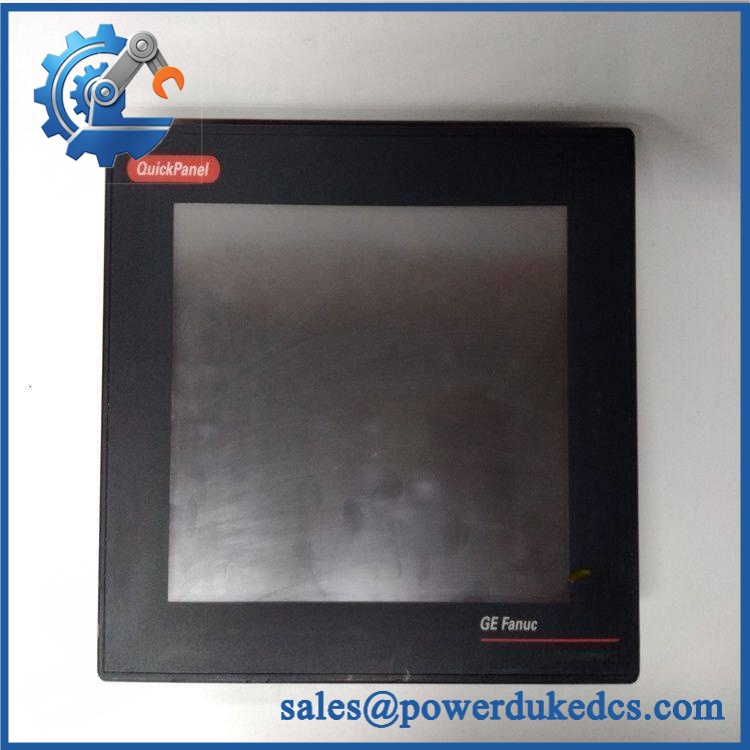
GE IC754CSL12CTD
Module 5: Quality Assurance & Testing SOP
A legacy HMI should be qualified as a complete operator-interface assembly. Screen illumination and touch response are only part of the acceptance criteria.
- Part-number verification: Confirm
IC754CSL12CTD, hardware suffix/revision, serial number, labels, and configuration identifiers. - OEM anti-counterfeit visual inspection: Inspect GE Fanuc markings, front bezel, touchscreen assembly, rear connectors, PCB identification, screws, seals, and evidence of unauthorized repair.
- Physical condition inspection: Check the display for cracks, delamination, dead areas, contamination, bezel damage, and mounting distortion.
- Power-input verification: Apply controlled 24 VDC power and verify current draw remains within the applicable specification.
- Power-on self-test (POST): Verify boot sequence, status indicators, display initialization, touchscreen response, and absence of startup faults.
- Touchscreen functional test: Test the complete active area for missed touches, offset response, dead zones, drift, and calibration stability.
- Display test: Inspect uniformity, backlight operation, resolution, brightness, contrast, and pixel anomalies.
- Ethernet communication test: Connect through the applicable Ethernet interface and verify link establishment and network communication.
- Serial communication test: Where applicable, verify COM-port operation using the required electrical interface and test device.
- Application loading test: Load or verify a representative QuickPanel application and confirm normal screen transitions, alarms, data updates, and user input.
- PLC communication test: Verify expected data exchange with the associated controller under a controlled test environment.
- Storage/boot-media check: Where the hardware contains removable or nonvolatile storage, verify the system can retain and recover its application data as required.
- Extended runtime observation: Operate the panel continuously under controlled conditions to identify intermittent touch, display, communication, or boot failures.
- Final QC release: Record hardware revision, firmware/software version, serial number, functional-test results, photographs, condition grade, and QC approval.
The historical QuickPanel documentation also identifies Intel XScale PXA255 at 400 MHz, 32 MB or 64 MB flash, 32 MB DRAM, and Ethernet/serial communication capabilities for the relevant hardware family. These details should be used as identification checks rather than assumed to apply to every suffix or later revision.
Module 6: Procurement & Lifecycle FAQ
Q1. Is the GE genuinely in stock, and what is the cutoff for emergency shipping?
Physical inventory should be verified against the exact model and hardware revision before the PO is accepted. Emergency dispatch depends on QA completion, warehouse location, carrier pickup, and destination. Same-day shipment should therefore be confirmed only after the specific unit has passed inspection.
Q2. How do you guarantee the condition and authenticity of an obsolete ?
Require exact model verification, OEM visual inspection, 24 VDC power-up testing, touchscreen testing, display inspection, Ethernet/serial communication checks, and documented runtime observation. Actual photographs of the unit and its identification labels should be retained with the procurement record.
Q3. Are there firmware or application compatibility issues engineers should check before issuing the PO?
Yes. GE issued multiple hardware and software revisions within the family. The buyer should record the installed firmware, hardware suffix, application version, PLC communication settings, and project files before replacement.
Q4. Does replacing the restore the machine application automatically?
Not necessarily. The replacement hardware may require the correct QuickPanel application/project, communication parameters, network settings, and associated files to be restored. Procurement should therefore confirm whether the replacement is supplied with the required application image or whether the existing site backup will be used.
Q5. What warranty and return terms should be written into the PO?
Specify warranty duration, DOA coverage, touchscreen/display failure coverage, communication-function coverage, return authorization procedures, inspection windows, and serial-number traceability. For refurbished inventory, require the applicable test record and clearly define whether failures discovered during commissioning are covered.




 Start Chat


