

Description
- Brand: GE Fanuc
- Full Model Number: IC754CSX06CTD
- Lifecycle Status: Obsolete / Discontinued by manufacturer
- Core Function: QuickPanel Control operator interface and industrial HMI
- Top 3 Technical Specs: 6-inch color TFT touchscreen; Intel XScale PXA255 400 MHz CPU; 64 MB DRAM + 64 MB flash with 512 KB battery-backed SRAM
- Stock & Condition: Lot-specific; New Surplus or Tested Refurbished; shipping subject to physical stock and QC release
The IC754CSX06CTD is identified as a 6-inch color TFT QuickPanel Control operator interface. Published hardware documentation specifies an Intel XScale PXA255 processor running at 400 MHz for this model, plus 64 MB DRAM, 64 MB flash, 512 KB battery-backed SRAM, and a Silicon Motion SM501 graphics accelerator.
Obsolescence & Supply Chain Deep Dive
An HMI failure can stop operator access to an otherwise serviceable control system. The IC754CSX06CTD is listed as discontinued by the manufacturer, which changes the procurement problem from routine replenishment to lifecycle-controlled sourcing. This model belongs to the GE Fanuc QuickPanel Control family and runs Microsoft Windows CE.NET, with application execution supported by its internal memory architecture. Published records also identify the unit as a 6-inch color TFT operator interface with 64 MB/96 MB marketed memory configuration.
A verified replacement can preserve the existing HMI architecture and avoid the wider cost of a panel redesign, application conversion, communications revalidation, and operator retraining. The technical case is strongest when the installed cabinet, PLC connections, application project, and panel cutout remain usable. One important TCO point: replacing the HMI alone may take hours, whereas migrating an entire operator-interface platform can require several engineering days or more (project scope varies with PLC protocols, application complexity, and required validation). The historical documentation identifies serial, Ethernet, and communication-expansion options across the QuickPanel family, so the exact installed interface configuration should be matched before purchase.
Compatibility & Replacement Matrix
| Replacement Scenario | Replacement Class | Required Engineering Action | Estimated Switch Time | Budgetary Cost Estimate |
|---|---|---|---|---|
| Exact IC754CSX06CTD replacing the same installed model | Drop-in Replacement | Match model, hardware revision, power connection, communications, mounting, and project backup; then execute operational verification | 1–3 labor hours | 150–450 labor |
| Same model with different memory or hardware revision | Conditional Drop-in Replacement | Confirm project compatibility and installed options before commissioning | 2–4 hours | 200–600 engineering |
| Different IC754 QuickPanel model | Software Compatible only after verification | Recheck display resolution, project runtime, memory, communications, mounting, and project conversion requirements | 4–12+ labor hours | 400–1,500+ |
| New-generation HMI platform | Hardware Modification | Panel, power, communications, software, and application changes may be required | 2–10+ engineering days | Project-specific |
Field Traps (Watch Out)
Project and Runtime Compatibility: The IC754CSX06CTD uses Microsoft Windows CE.NET and belongs to the QuickPanel Control architecture. An HMI with the same screen size is not automatically a substitute. Verify the existing project format, runtime environment, communication drivers, and engineering-software version before approval.
Memory Configuration: Documentation specifically identifies 64 MB DRAM and 64 MB flash for the IC754CSX06CTD hardware configuration. Some commercial listings describe the unit as 64 MB/96 MB, so procurement should verify the physical memory configuration rather than relying on a generic family description.
Power and Panel Fit: Do not assume every IC754 QuickPanel uses identical electrical and mechanical specifications. Verify the actual input-voltage requirement, panel cutout, mounting depth, and front-panel dimensions from the applicable hardware guide before removing the failed unit.
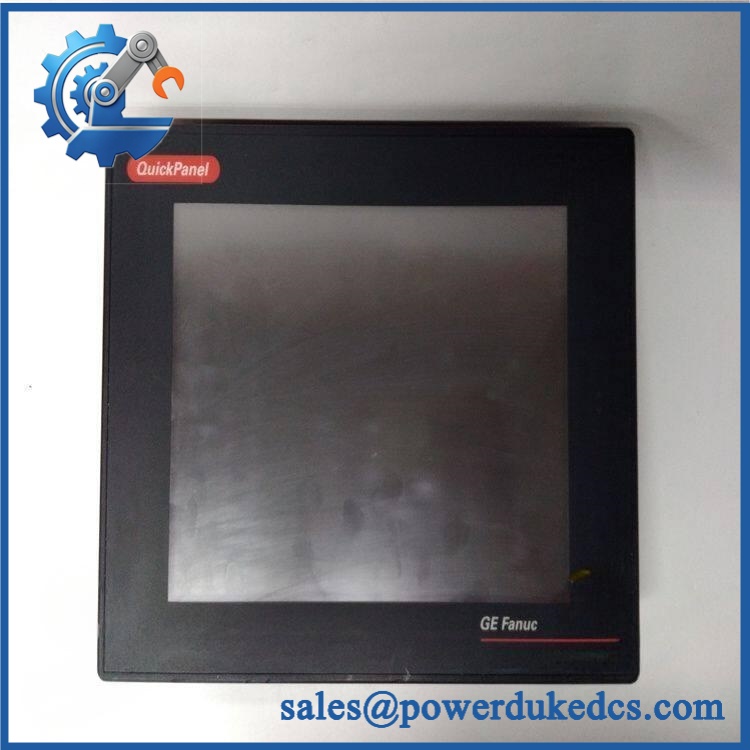
GE IC754CSX06CTD
Quality Assurance & Testing SOP
Incoming identity control
- Photograph the complete before testing
- Record part number, hardware revision, serial/date code, and visible manufacturer markings
- Match the physical identification against the procurement record
- Inspect the touchscreen, bezel, rear housing, connectors, mounting points, and power connection
OEM anti-counterfeit visual inspection
- Examine labels for altered text, replacement adhesive, abrasion, or inconsistent printing
- Compare PCB markings, connector construction, board layout, and component placement with reference documentation where available
- Inspect for corrosion, contamination, unauthorized solder rework, lifted components, or connector damage
- Reject units with unexplained identification changes
Power-on self-test
- Install the HMI on a controlled test setup using the correct DC supply
- Apply power and observe startup initialization
- Confirm the Windows CE.NET environment reaches normal startup behavior
- Verify display backlight, touchscreen response, and operator-input registration
- Check PWR/ERR/RUN indicators where applicable to the installed hardware or carrier
- Record abnormal startup messages, display artifacts, touch dead zones, or boot failures
Display and touchscreen load testing
- Exercise the full usable touchscreen area
- Check multiple touch locations for dead or unstable zones
- Run representative graphics, numeric-entry, alarm, and navigation screens
- Monitor for flicker, contrast problems, ghost touches, or intermittent input
Communication testing
- Verify the configured serial interface where fitted
- Exercise RS-232/RS-485 communications using the approved test fixture
- Verify Ethernet communication where the installed configuration provides Ethernet
- Confirm stable data exchange with the designated controller or simulator
- Record communication errors, reconnect behavior, and diagnostic messages
Application and memory verification
- Load or validate an approved project backup when available
- Confirm application startup and representative screen navigation
- Check retentive-data behavior where battery-backed SRAM is used
- Record memory faults, project corruption, or unexpected resets
Final release
- Record complete test results against the unit serial number
- Photograph the tested identification label
- Mark the unit with internal QC disposition
- Package in ESD-safe protection with cushioning suitable for an industrial touchscreen HMI
Procurement & Lifecycle FAQ
Is the genuinely in stock, and what is the cutoff for emergency shipping?
Inventory should be confirmed against the physical warehouse quantity before the PO is released. For emergency requirements, obtain written confirmation of available quantity, condition, QC status, and the same-day shipping cutoff. Do not treat a website quantity as a guaranteed allocation until the supplier confirms it.
How do you verify the condition and authenticity of an obsolete ?
Verification should cover the complete part number, hardware revision, serial/date code, enclosure, touchscreen, connectors, PCB condition, and powered operation. For a legacy HMI, functional testing matters because cosmetic inspection alone cannot confirm display, touch, boot, memory, or communications performance.
Are there firmware or software compatibility issues my engineers should check before issuing the PO?
Yes. The uses Windows CE.NET, and application compatibility depends on the installed QuickPanel environment and project configuration. Engineers should confirm the existing project backup, runtime/software version, communication drivers, controller protocol, memory configuration, and any installed communication expansion hardware before approving a substitute.
What warranty terms and return policy apply?
The quotation should state the exact commercial warranty period, DOA coverage, failure-reporting window, return-authorization process, and any exclusions for installation or electrical damage. Historical OEM documentation and a present-day independent-supplier warranty are separate matters; the current supplier warranty should control the transaction terms.
Is replacing the more economical than upgrading the HMI system?
That depends on the remaining service life of the control cabinet and the condition of the existing application. A replacement HMI can avoid panel modification, software conversion, controller-driver changes, commissioning, and operator retraining. For a capital upgrade decision, compare those engineering and downtime costs against the purchase price of a verified replacement.



 Start Chat


