

Description
- Model: GE IS420UCSCH2A-C-V0.1-A
- Base Part Number: IS420UCSCH2A
- Brand: General Electric
- Series: Mark VIe / UCSC Controller
- Part Type: Standalone UCSC Controller
- Core Function: Executes application-specific Mark VIe control logic and provides the communication gateway between the control application, IONet I/O modules, and higher-level Ethernet services.
- Key Specs: Dual-core AMD GX-216HC at 1.6 GHz, 2 GB DDR3-1066 ECC SDRAM, 40 GB pSLC SSD, QNX Neutrino 6.5/7.1 support, six Ethernet ports, 18–30 VDC nominal operating range, and convection cooling.
- Architecture: Non-safety UCSC controller; simplex and dual configurations are supported.
Product Introduction
The IS420UCSCH2A occupies the controller layer of the Mark VIe architecture rather than the field-I/O layer. It is a compact, base-mounted computer that executes the application-specific control logic while communicating with distributed Mark VIe I/O packs through its IONet interfaces. GE identifies the H2A version as a dual-core 1.6 GHz AMD G-Series controller with 2 GB ECC memory and 40 GB solid-state storage.
For brownfield assets, this distinction matters. The suffix C-V0.1-A should be preserved in the asset record because the complete ordering identity can encode the controller configuration beyond the base IS420UCSCH2A number. It is also important not to confuse H2A with the earlier UCSBH1A/H3A/H4A families or with the UCSCS2A safety controller; they occupy different hardware generations and application roles.
Core Technical Specifications
| Parameter | Value |
|---|---|
| Manufacturer | GE General Electric |
| Full Ordering Identifier | IS420UCSCH2A-C-V0.1-A |
| Base Model | IS420UCSCH2A |
| Controller Family | UCSC |
| Product Family | Mark VIe / Mark VIeS |
| Functional Type | Mark VIe Gateway / application controller |
| Safety Classification | Non-safety controller |
| Processor | AMD GX-216HC |
| Processor Frequency | 1.6 GHz |
| Processor Cores | 2 |
| Mark VIe Processing Cores | 2 |
| L2 Cache | 2 MB |
| Main Memory | 2 GB DDR3-1066 SDRAM |
| ECC Memory | Yes |
| Flash / SSD Storage | 40 GB pSLC SSD |
| SSD Allocated Storage | Approximately 16 GB allocated in the documented configuration |
| Operating System | QNX Neutrino 6.5 or 7.1, depending system/software generation |
| Ethernet Ports | 6 total |
| IONet Ports | 3 dedicated IONet interfaces |
| Other Ethernet Ports | Application-dependent controller communication ports |
| Profinet | Not supported on H2A |
| Frame Rates | 10, 20, 40, 80, 160, or 320 ms |
| Non-Volatile Program Variables | Up to 6,139 with ControlST V07.05 and higher |
| Forces | 338 |
| Totalizers | 128 |
| Power Input | 18–30 VDC for this UCSC hardware family |
| Nominal Voltage | 24/28 VDC |
| Maximum Power Consumption | Approximately 31 W |
| Cooling | Convection |
| Mounting | Base-mounted |
| Chassis Width | 55 mm |
| Chassis Height | 168 mm |
| Chassis Depth | 150 mm, excluding mounting bracket |
| Mounting Bracket Width | 42 mm |
| Mounting Bracket Height | 204 mm |
| Mounting Bracket Thickness | Approximately 2 mm |
| Operating Temperature | Approximately -40°C to +70°C for current UCSC documentation; application certification may impose a narrower range |
| Storage Temperature | -40°C to +85°C |
| Humidity | Up to 95% RH, non-condensing |
| Battery | None |
| Fan | None |
| Hardware Configuration Jumpers | None |
| Firmware / Software | System/application dependent |
| Hot Replacement | Do not assume live replacement |
GE’s current UCSE/UCSC technical material lists the H2A at 1.6 GHz, dual-core, with 2 GB DDR3-1066 ECC memory, 40 GB pSLC SSD, six Ethernet ports, 24/28 VDC nominal operation, and a maximum power figure of about 31 W.
Memory and application capacity
The H2A supports substantially more nonvolatile control data than the older 600 MHz UCSB generation. GE documents support for 6,139 nonvolatile program variables, 338 forces, and 128 totalizers when using ControlST V07.05 or later. Software revision therefore matters during controller replacement.
Network architecture
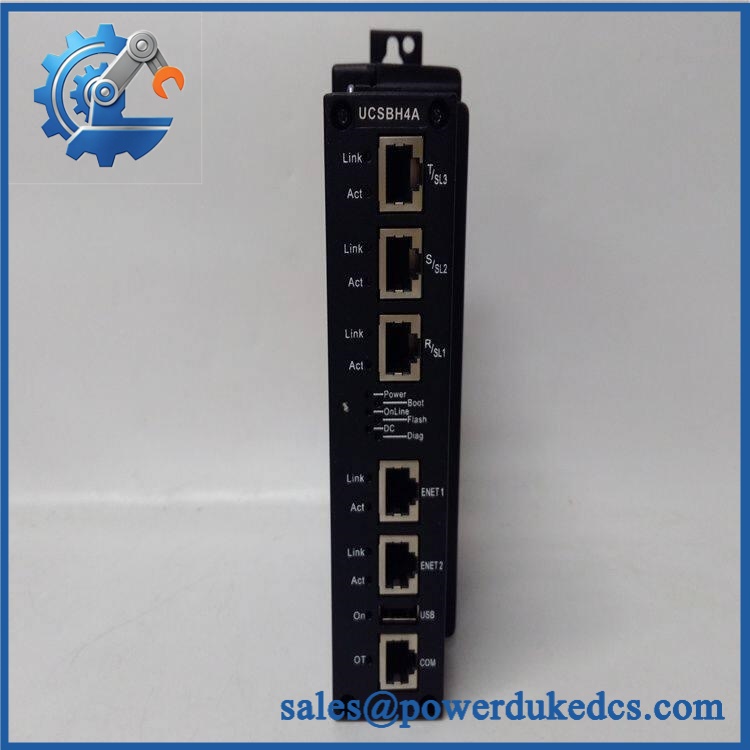
The H2A provides three IONet ports for distributed I/O communication. Its additional Ethernet interfaces are used for controller-level communication functions rather than simply serving as spare IONet ports.
Do not assign a field Ethernet cable arbitrarily to an available RJ-45 socket. Port function is part of the control-system design.
GE IS420UCSCH2A-C-V0.1-A
Application Scenarios & Pain Points
Gas-turbine control: The UCSCH2A can serve as the main application-processing platform for Mark VIe turbine control, executing sequence logic, regulatory control, alarms, and communication services while distributed I/O remains physically close to field equipment.
Combined-cycle power plants: Multiple controllers can participate in coordinated control architectures where precise frame scheduling matters. A configured 10–320 ms frame rate provides application-dependent execution choices, but the selected rate must match the control strategy and system configuration.
EX2100e / LS2100e applications: GE’s UCSC family is used across turbine and electrical-control applications. A replacement controller taken from another service should not be assumed to contain compatible application software merely because the hardware number matches.
Brownfield controller replacement: During a forced outage, an H2A replacement can restore the processing layer while existing I/O modules remain in place. The faster recovery path comes from having the correct application image and network configuration already documented.
High-temperature cabinets: At 50°C+ ambient, the H2A’s convection path must remain unobstructed. Cable bundles pressed against the cooling surfaces can restrict natural airflow and increase controller temperature.
🚨 Common Error Codes & Diagnostic Symptoms
Symptom/Code: IONet communication loss on one network path
→ Diagnosis: Possible Ethernet link failure, network configuration error, cable fault, or controller-side interface problem. Because the controller uses separate IONet paths, one failed network does not necessarily indicate total controller failure.
→ Action: Check the affected port, cable, switch/network equipment, and controller diagnostics before replacing the UCSCH2A.
Symptom/Code: Controller boots but the application does not enter the expected operating state
→ Diagnosis: A missing or incompatible application image, software revision mismatch, invalid configuration, or storage problem can produce this symptom even when the processor is healthy.
→ Action: Verify the approved ControlST project, application image, firmware revision, and system configuration before replacing hardware.
Symptom/Code: Repeated restart, boot fault, or storage-related diagnostic
→ Diagnosis: Check the DC supply and SSD condition first. The controller can draw approximately 31 W maximum, so a marginal cabinet supply or connector can create intermittent behavior under load.
→ Action: Measure supply voltage at the controller while operating, inspect the power connector, review boot diagnostics, and replace the UCSCH2A only after external causes are excluded.
Exact numerical diagnostics vary with the Mark VIe software and application revision. The installed ControlST diagnostic environment should be treated as the authoritative fault source.
🚨 Cross-Reference & Lifecycle Migration
Lifecycle Status: Active / Current Technology Family
GE’s current technical material lists as an active UCSC controller variant, alongside IS420UCSCH1B and the newer UCSE family.
Compatibility data
- : Dual-core 1.6 GHz AMD GX-216HC UCSC controller.
- IS420UCSCH1A / H1B: Different UCSC hardware generation. H1B uses a quad-core 1.2 GHz AMD G-Series processor and 4 GB DDR3-1333 memory in current documentation, so it is not a hardware-equivalent label swap.
- IS420UCSBH1A: Earlier UCSB platform using a 600 MHz Intel EP80579. It is a different hardware generation and should not be treated as an H2A substitute.
- IS420UCSBH3A / H4A: Later UCSB processors at 1200 MHz and 1066 MHz respectively; application and hardware compatibility require engineering review.
- IS420UCSCS2A: Mark VIeS Safety Controller. It supports IEC 61508 safety functions and Simplex/Dual/TMR configurations; it should not be substituted for the non-safety H2A without a complete system redesign.
- IS420UCSEH2A/H2B/H2C: Newer UCSE platform using Intel Core processors. These are migration candidates rather than presumed drop-in replacements.
- Firmware flashing: Required software compatibility must be checked before deployment. Flashing firmware does not change the underlying processor generation or automatically make an H2A equivalent to another UCSC/UCSE model.
- Configuration migration: Back up the ToolboxST project, controller network configuration, application files, and relevant I/O definitions before replacing the controller.
- Buffer-stock strategy: For critical installations, maintain at least one tested spare with a verified compatible application image. Controller stock without a matching software backup has limited outage value.
GE certification records issued in 2026 continue to list among the evaluated Mark VIe low-voltage control models under ANSI/CAN/UL/ULC 6200. That certification pertains to the defined equipment/system context, not an unrestricted claim for every standalone use.
Field Engineer’s Tech Notes
Warning 1 — Preserve the software image before changing the CPU.
The UCSCH2A contains the controller hardware, but the plant’s control strategy lives in the configured application and system project. Record the running ControlST version, application revision, controller IP parameters, and I/O-network configuration before removing the original unit.
Warning 2 — Do not confuse six Ethernet ports with six interchangeable network connections.
Three ports belong to the IONet architecture. Other ports perform controller communications. Plugging a network cable into an available connector simply because the physical RJ-45 fits can place the device on the wrong network segment.
Strict QA & Testing SOP
Step 1 — Inbound identity inspection
Verify -C-V0.1-A, base model , hardware revision, serial/traceability markings, label quality, connectors, enclosure, and mounting bracket.
Step 2 — Mechanical examination
Inspect the 55 × 168 × 150 mm chassis envelope, mounting surfaces, connector retention, and convection-cooling surfaces. Confirm that no fins or airflow passages are obstructed.
Step 3 — Electrical pre-check
Verify supply polarity and perform controlled resistance/continuity checks. The test setup should support the specified 18–30 VDC operating range and provide sufficient current for the approximately 31 W maximum load.
Step 4 — Controlled power-up
Energize the controller on an approved test bench. Record startup behavior, status LEDs, supply voltage, current draw, boot sequence, and diagnostic indications.
Step 5 — CPU and memory verification
Confirm the controller identifies the expected dual-core AMD GX-216HC at 1.6 GHz and 2 GB DDR3-1066 ECC memory. Check memory and storage health through the approved service environment.
Step 6 — SSD verification
Verify the 40 GB pSLC SSD is recognized and accessible. Check for filesystem, boot, or storage errors before loading an application.
Step 7 — Ethernet and IONet testing
Exercise all three IONet ports independently, then test the applicable controller Ethernet interfaces. Confirm stable link operation and correct network assignment.
Step 8 — Application-load verification
Load an approved test application or the authorized site project. Confirm correct controller identification, application startup, frame-rate behavior, and absence of configuration errors.
Step 9 — I/O communication test
Connect a representative Mark VIe I/O network and verify communication with selected I/O packs. Where dual architecture is used, test the corresponding redundant network path.
Step 10 — Documentation and packaging
Record supply measurements, processor identification, memory/storage results, network tests, software revision, serial number, and inspection photographs. Test videos are available as part of the QA evidence package when requested. Package the controller in ESD protection with all connectors mechanically protected.
Buyer’s FAQ — Dynamic Q&A
A: Do not assume live replacement. The UCSCH2A is the application-processing controller, and its removal can affect the running control architecture. Whether a controller can be changed without full system shutdown depends on the specific simplex or dual configuration and approved GE/site maintenance procedure.
Q: Is the “-C-V0.1-A” suffix important when ordering?
A: Yes. Preserve the complete ordering identifier in the purchase record. The base model establishes the UCSCH2A hardware family, while the complete string can identify a particular configured product revision. Match the supplied nameplate against the removed controller rather than ordering from a shortened description.
Q: Does this controller need firmware or application loading after replacement?
A: Plan for configuration and software verification. The controller is a programmable computing platform, so the correct ControlST-compatible application image and network configuration must be available. Firmware loading should follow the approved GE software baseline; it should not be performed simply to make an unrelated controller revision appear compatible.
Q: How do I verify New Original authenticity and warranty coverage?
A: Confirm the complete model string, serial/traceability markings, hardware condition, connector quality, and documented QA test results. For warranty protection, require the warranty to identify the exact serialized controller and tested condition, with coverage starting from receipt rather than from an unspecified warehouse date.




 Start Chat


