

Description
- Brand: GE Intelligent Platforms / Abaco Systems
- Full Model Number: V7668A-131000 / 350-9310007668-131000 B
- System/Series Family: V7768 6U VME Single Board Computer
- Core Function: Embedded VMEbus computing platform for industrial and embedded control applications
- Top 3 Hardcore Specs: Intel Core 2 Duo up to 2.16 GHz; up to 2 GB DDR2 SDRAM; 6U dual-slot VME form factor
- Stock Status: New Surplus — exact revision, processor configuration, memory, and physical condition to be verified before shipment
The supplied part number is cataloged by multiple industrial-equipment references as V7668A-131000 350-9310007668-131000 B, while Abaco’s official documentation identifies the closely associated platform as the V7768 VME SBC. Confirm the board nameplate and PCB revision against the installed system before ordering.
Module 3: Technical Product Introduction
Replacing an embedded controller in a VME chassis is rarely just a matter of finding a board with the same connector profile. The GE V7668A-131000 is associated with the V7768 family, a dual-slot 6U VMEbus single-board computer built around an Intel Core 2 Duo processor. The documented platform supports processor speeds up to 2.16 GHz, up to 2 GB DDR2 SDRAM, one PCI-X capable PMC site, dual Gigabit Ethernet, two serial interfaces, and additional I/O including USB and SATA interfaces.
For an aging VME control cabinet, the value is mainly in preserving an existing computing architecture without immediately redesigning the whole rack. The V7768 uses the Tundra Universe II VME interface chip and a 667 MHz system/memory bus on the Core 2 Duo configuration; its published storage support includes CompactFlash up to 8 GB. The platform is also documented with VxWorks software support, making operating-system and BSP compatibility a critical part of any replacement project. (The exact CPU, RAM, flash, BIOS, and PMC configuration can vary by board build.)
Module 4: Application Scenarios & Field Realities
- In legacy VME control cabinets, the first concern is chassis topology. The V7768 occupies a dual-slot 6U VME position, so replacing a smaller or single-slot SBC with this board can change adjacent-board clearance and slot allocation. Check the rack drawing before installation.
- For embedded test and simulation systems, the dual Gigabit Ethernet interfaces and PMC expansion capability provide the external I/O needed for data acquisition, instrumentation, and custom interface cards. The PMC option is particularly relevant where the original application depends on a proprietary mezzanine board.
- Where a VxWorks application has already been qualified, maintaining the existing software environment may be more practical than migrating immediately to a newer processor architecture. GE Intelligent Platforms documentation specifically identifies VxWorks support for the V7768 platform, including VxWorks 653 configurations for qualifying applications.
- During a brownfield control-system repair, the board’s legacy processor architecture can be useful when the objective is restoring an existing application rather than changing application logic. Abaco currently identifies the as having entered Restricted Production in 2017 and points customers toward newer 6U VME alternatives, so lifecycle planning should accompany any replacement purchase.
Module 5: Migration, Compatibility & Installation Traps
Replacement Matrix
| Replacement Classification | Engineering Assessment |
|---|---|
| Drop-in Replacement | Conditional. Appropriate only when the installed system is designed for the same -family hardware configuration, slot geometry, processor option, memory arrangement, and rear-I/O scheme. |
| Software Compatible | Conditional. Existing VxWorks or other embedded software may remain usable, but BIOS, BSP, device-driver, PMC, and storage configuration must match the original application environment. |
| Hardware Modification Required | Not normally required for a true like-for-like replacement. Modification becomes possible when the original board uses a different PMC, rear-transition arrangement, CPU option, or custom I/O configuration. |
Field Traps — Watch Out
Part-number family confusion: The supplied V7668A-131000 identifier is repeatedly associated in reseller catalogs with the platform, while the official Abaco documentation names the product . Do not use the family name alone as the purchasing reference; photograph and verify the exact nameplate, board revision, and GE/Abaco part number.
PMC and rear-I/O dependency: A can use a PCI-X PMC site and specified rear-transition modules such as the ACC-0603RC. Removing or replacing the SBC without documenting these connections can leave an otherwise functional application without its required external I/O path.
Memory and storage mismatch: The published maximums are 2 GB DDR2 SDRAM and up to 8 GB CompactFlash, but the actual production configuration on a surplus board can be lower. Verify installed RAM and boot-media configuration rather than assuming the published maximum is present.
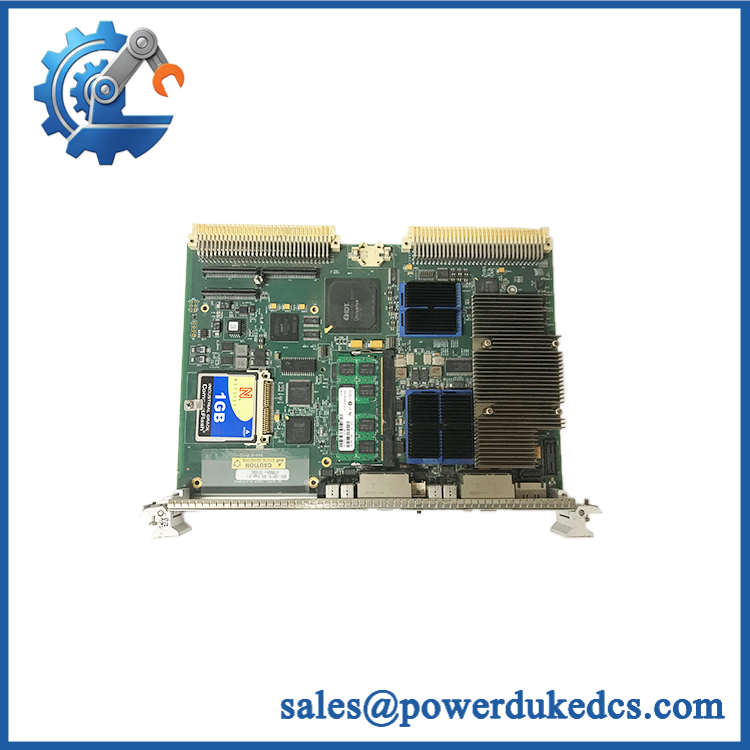
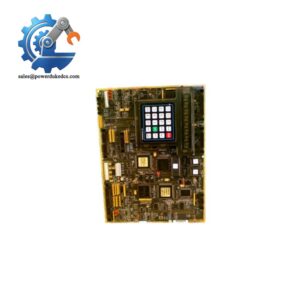
GE V7668A-131000
Module 6: Quality Assurance SOP
Incoming Identity Inspection
- Verify V7668A-131000 marking and 350-9310007668-131000 B identification.
- Compare PCB silkscreen, revision markings, connectors, heatsink arrangement, and front-panel interfaces with the expected construction.
- Perform an OEM anti-counterfeit visual inspection using available GE Intelligent Platforms / Abaco identification references.
- Photograph the complete board, nameplate, revision area, connectors, and any installed memory or storage devices.
Mechanical Inspection
- Check all VME connector pins for bending, contamination, oxidation, or mechanical damage.
- Inspect the PMC mounting area and retention hardware.
- Verify that guide rails, ejectors, front-panel hardware, and card-edge interfaces are mechanically sound.
- Record any signs of prior repair, component replacement, or board-level rework.
Power-On Test
- Install the board in a known-good compatible VME test environment.
- Perform controlled power application and monitor the board for abnormal current draw, overheating, or startup failure.
- Execute the applicable power-on self-test (POST) and record BIOS or diagnostic results.
- Check available status indicators and confirm that no unexpected fault indication remains after initialization.
Functional Interface Verification
- Verify VMEbus initialization and board recognition.
- Test the available Gigabit Ethernet interfaces and serial ports where the test fixture supports them.
- Confirm recognition of installed memory and boot media.
- Where a supported PMC card is available, verify PMC enumeration and basic data transfer.
Communication and Software Handshake
- Boot a compatible test image or approved service environment.
- Perform a communication handshake verification between the SBC and the connected VME system.
- Confirm expected network addressing, serial communication, and application-level communication where applicable.
- For VxWorks installations, verify that the deployed BSP and device configuration recognize the specific hardware revision.
Final Shipment Record
- Record exact part number, revision, installed RAM, storage configuration, and test result.
- Preserve pre-shipment photographs with the identification record.
- Package the VME board with ESD protection and mechanical support suitable for the PMC and connector areas.
- For surplus stock, clearly document any configuration details that differ from the standard specification.



 Start Chat


