

Description
- Brand: GE
- Full Model Number: V7768-320001
- System/Series Family: GE V7768 Series VMEbus Embedded Computing
- Core Function: VMEbus single-board computer for industrial control, data acquisition, and embedded computing architectures
- Top 3 Hardcore Specs: VMEbus architecture; embedded processor platform; industrial single-board form factor
- Stock Status: New Surplus / Fully Tested Refurbished subject to actual inventory inspection
Module 3: Commercial-Technical Deep Dive
A failed VME processor can stop an otherwise healthy control cabinet because the board often sits at the center of application execution, VMEbus communication, and peripheral coordination. The GE V7768-320001 belongs to GE’s V7768 family of VMEbus embedded computer products, making it relevant to legacy industrial computing systems where maintaining the original board architecture matters more than migrating an entire application to a new platform. For replacement procurement, the complete assembly number matters; do not substitute a visually similar VME CPU without confirming processor configuration, memory, I/O, and software compatibility.
The commercial value is in preserving an established VME system without forcing a cabinet-wide redesign. A correctly matched replacement can avoid changes to VME backplanes, application software, peripheral interfaces, and system wiring—though the exact migration burden depends heavily on the installed operating system, processor configuration, and application image. Before purchase, verify the board revision and installed memory/options against the failed unit. Technically, a VMEbus-compatible board is not automatically a drop-in replacement; software dependencies and board-level configuration can determine whether commissioning takes minutes or requires engineering intervention.
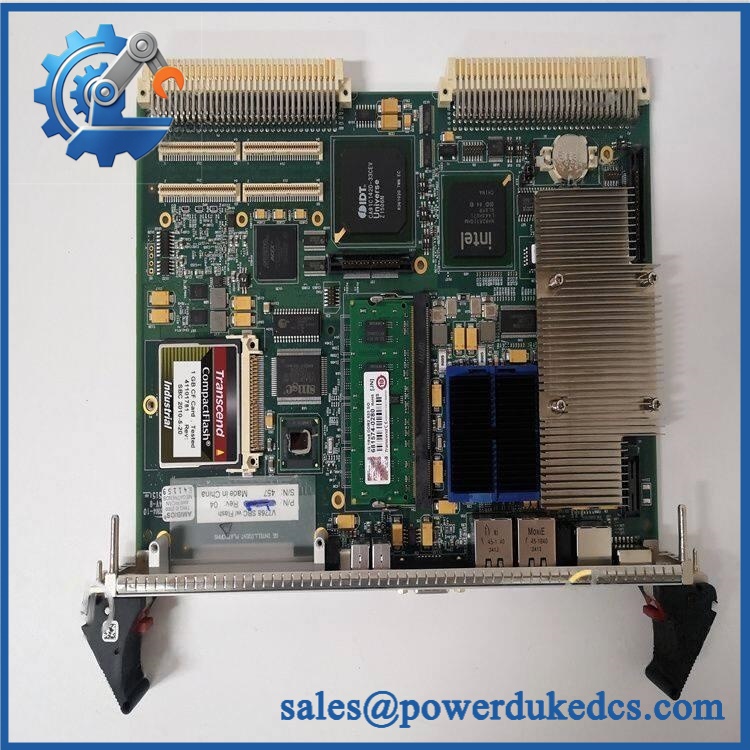
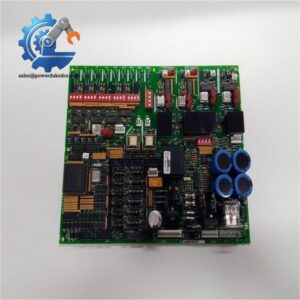
GE V7768-320001
Module 4: Compatibility & Installation Traps
Migration/Compatibility
- Replacement status: Treat V7768-320001 as a configuration-specific VME computer board, not a generic VMEbus replacement.
- Logic rewrite: Usually not required when replacing an identical board with the same hardware configuration and software image; verify the application environment first.
- Firmware flash: Configuration dependent. Do not overwrite firmware simply because the replacement board carries a different revision.
- Drop-in status: Mechanical VME compatibility does not by itself guarantee software compatibility. Confirm processor, memory, firmware, operating system, and board revision before installation.
⚠️ Field Traps (Watch Out)
- VME connector damage: Inspect the P1/P2 connector pins carefully before insertion. A bent VME connector can prevent proper bus contact or damage the backplane during installation.
- ESD exposure: The processor board contains static-sensitive electronics. Use a grounded ESD workstation, wrist strap, and approved antistatic packaging; avoid handling edge connectors or exposed circuitry unnecessarily.
- Software image mismatch: A board can power up normally while still failing to boot the installed application. Record the original firmware/software environment before removing the failed controller.
Module 5: Quality Assurance SOP
Before shipment, the GE V7768-320001 should undergo a board-level inspection and functional verification process:
- OEM anti-counterfeit visual inspection — verify GE markings, catalog number, PCB construction, labels, connectors, component population, and board identification.
- PCB condition inspection — examine the board for corrosion, cracked solder joints, damaged components, bent connector pins, contamination, and evidence of unauthorized rework.
- Connector inspection — check VME P1/P2 interfaces for alignment, contact damage, oxidation, or mechanical deformation.
- Power-rail verification — where the correct test fixture is available, verify expected supply-rail behavior before functional testing.
- Power-on self-test (POST) — install the board in a compatible VME test chassis and confirm expected startup behavior, status indicators, and processor initialization.
- VMEbus communication handshake — verify that the controller establishes expected bus communication with the test backplane and compatible peripheral hardware.
- Memory and processor verification — confirm detected memory and processor configuration against the expected -320001 specification.
- Final QC record — document catalog number, board revision, serial/identification information where available, test results, photographs, and packaging condition.
For legacy VME inventory, cosmetic appearance is not enough. Connector integrity, power behavior, boot sequence, and bus communication are the meaningful acceptance points.
Module 6: CRO-Driven Buyer FAQ
1. Is GE -320001 still available as an original replacement?
Legacy VME hardware can become difficult to source as manufacturers transition older computing platforms out of active production. Availability therefore depends on remaining surplus and refurbished inventory. Request the exact identification, board revision, condition, and inspection evidence before purchasing.
2. Can I replace while the VME system is powered?
No—use a controlled power-down unless the specific system documentation explicitly authorizes a hot-swap procedure. A standard VME processor board should not be treated as hot-swappable merely because it uses a VMEbus connector. Follow site LOTO procedures and the equipment manufacturer’s installation instructions.
3. Will replacing this board require a program or firmware download?
Not necessarily. An identical replacement may use the existing application environment, but firmware, boot media, processor configuration, and memory options can affect startup. Capture the failed board’s configuration before replacement whenever possible.
4. How do I confirm is the correct replacement?
Match more than the model number. Verify the complete assembly number, board revision, processor configuration, memory, firmware environment, VME interface arrangement, and installed application requirements. If the original board has option codes or revision markings, include photographs with your RFQ.
5. What warranty and technical support are available?
Warranty terms should be stated according to the actual inventory condition. For tested surplus or refurbished equipment, the quotation should identify the warranty period and testing scope. Technical support should cover part-number verification, configuration review, installation guidance, and interpretation of documented test results—not undocumented modifications to the customer’s control software.



 Start Chat


