

Description
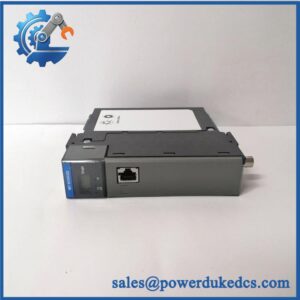
- HONEYWELL TC-IAH161 | Original Industrial Automation Spare
At-A-Glance Executive Brief
- Model: HONEYWELL TC-IAH161
- Brand: Honeywell
- Series: Experion PKS / C200 I/O System
- Part Type: High Level Analog Input Module
- Core Function: Converts field analog signals such as voltage and current inputs into digital process data for Honeywell DCS controllers.
- Primary Use: Process control systems, refinery automation, chemical plants, power generation, and industrial measurement applications.
- Key Specifications:
- 16 analog input channels
- Supports voltage and current signals
- 16-bit input resolution
- 4–20 mA / 0–20.5 mA current measurement
- ±10.25 V, 0–10.25 V, and 0–5.125 V voltage ranges
- 250 ms module update rate
- Typical Deployment: Honeywell C200 controller chassis and Experion PKS distributed control cabinets.
Product Introduction
The Honeywell TC-IAH161 operates as a high-level analog input module inside the Experion PKS control architecture. Installed within the I/O rack, it receives standard field transmitter signals and transfers measured process values to the controller for monitoring, alarming, and closed-loop control functions.
In field deployments, this module is commonly used for pressure, temperature, flow, and level transmitter connections where accurate analog conversion is required. Before replacement, confirm the channel wiring, terminal block type, controller compatibility, and I/O configuration database (a physically correct module can still fail to communicate if the project configuration does not match).
Core Technical Specifications
| Parameter | Value |
|---|---|
| Manufacturer | Honeywell |
| Model Number | TC-IAH161 |
| Product Type | High Level Analog Input Module |
| System Platform | Experion PKS / C200 |
| Number of Channels | 16 analog input points |
| Input Type | Voltage and Current |
| Voltage Input Range | ±10.25 V, 0–10.25 V, 0–5.125 V |
| Current Input Range | 0–20.5 mA |
| Current Input Resistance | 249 Ω nominal |
| Resolution | 16 bits |
| Module Publish Rate | 250 ms |
| Channel Bandwidth | 20 Hz (-3 dB) |
| Voltage Input Impedance | >1.0 MΩ |
| Power Dissipation | Maximum 4.1 W |
| Isolation Voltage | 2550 VDC tested for 1 second |
| RFI Immunity | Less than 2% error at 10 V/m, 27–1000 MHz |
| Terminal Block | TC-TBCH, 36-position |
| Supply Voltage | 24 VDC system power |
| Weight | Approx. 0.24–0.27 kg (module only) |
| Mounting Method | Honeywell I/O rack installation |
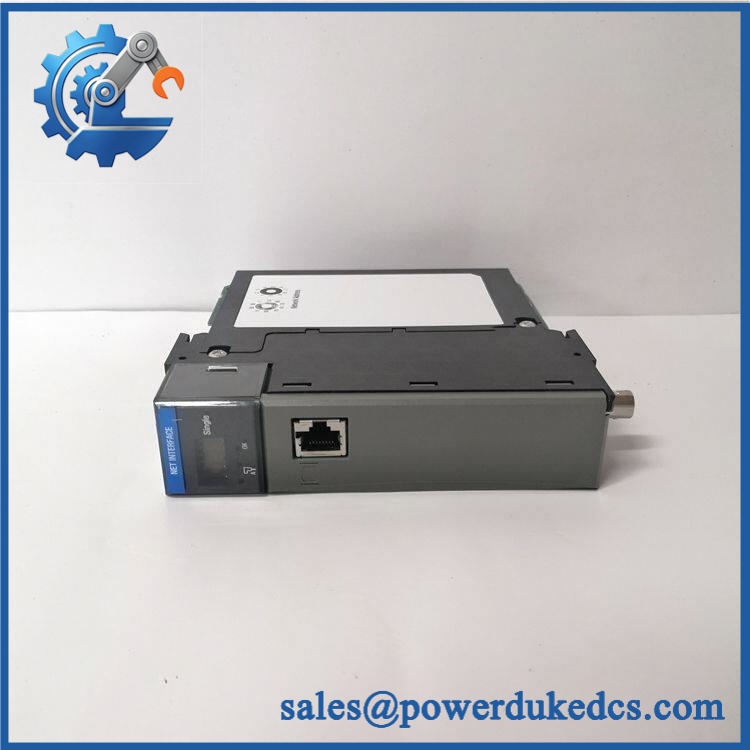
HONEYWELL TC-IAH161
Application Scenarios & Pain Points
Analog input failures often appear as incorrect process values before they become complete module failures.
- Refinery control systems: The TC-IAH161 monitors transmitter signals for pressure and flow loops where inaccurate readings can affect process stability.
- Chemical production facilities: Used for continuous measurement applications requiring reliable 4–20 mA signal acquisition.
- Power generation plants: Supports monitoring of temperature, pressure, and auxiliary system parameters in DCS cabinets.
- Water treatment facilities: Provides analog acquisition for pumps, valves, and process monitoring instruments.
- Legacy Honeywell C200 installations: Plants operating older Experion systems often maintain spare I/O modules to reduce downtime during planned maintenance.
Common Error Codes & Diagnostic Symptoms
Symptom/Code: Analog Channel Value Fixed at High or Low Limit
→ Diagnosis: Possible open circuit, transmitter fault, incorrect scaling, or damaged input channel.
→ Action: Verify field loop wiring and replace the TC-IAH161 if channel hardware failure is confirmed.
Symptom/Code: I/O Module Not Detected by Controller
→ Diagnosis: Possible backplane connection issue, rack configuration mismatch, or module electronics failure.
→ Action: Check chassis configuration and replace the module if recognition fails.
Symptom/Code: Unstable Analog Reading / Excessive Signal Noise
→ Diagnosis: Possible grounding issue, shield problem, electromagnetic interference, or degraded input circuitry.
→ Action: Inspect field wiring and replace the module after eliminating external causes.
Cross-Reference & Lifecycle Migration
- Related Models:
- — coated version of the analog input module.
- TC-IAH061 — 6-channel analog input module from the same family.
- Compatibility Notes:
- Verify Experion PKS controller generation.
- Confirm chassis type.
- Match terminal block configuration.
- Confirm coated/non-coated hardware requirements.
- Firmware Requirements:
The module does not operate as a standalone controller. Controller firmware and Experion configuration must support the installed I/O module. - Lifecycle Status: Legacy / Installed Base Support
- Widely used in existing Honeywell C200 systems.
- Recommended stock strategy: maintain tested spare modules for critical process loops.
- Migration Strategy:
Migration to newer Honeywell platforms requires I/O database conversion, cabinet engineering review, and commissioning validation.
Field Engineer’s Tech Notes (Anti-Pitfall Guide)
- Do not move field wiring directly without verifying terminal assignment.
Analog modules depend on correct channel mapping. A single misplaced transmitter wire can create misleading process alarms. - Check whether the replacement requires conformal coating.
Plants with corrosive atmospheres or offshore environments may require coated versions such as TK-series hardware instead of standard modules.
Strict QA & Testing SOP
Step 1 — Incoming Inspection
- Confirm Honeywell TC- label.
- Record serial number and hardware revision.
- Inspect terminal interface and module housing.
- Photograph physical condition.
Step 2 — Electrical Inspection
- Check module power input condition.
- Inspect connector pins.
- Verify no visible overheating or component damage.
Step 3 — Rack Recognition Test
- Install into compatible Honeywell test chassis.
- Confirm module identification.
- Verify controller communication.
Step 4 — Analog Channel Test
- Apply simulated voltage inputs.
- Apply simulated current signals.
- Verify scaling accuracy.
- Confirm channel update performance.
Step 5 — Packaging Control
- Place module inside ESD shielding packaging.
- Protect terminal connectors.
- Use shock protection for international shipment.
Test videos are available for verified inspection records.
Buyer’s FAQ (Dynamic Q&A)
Q: Can the Honeywell TC- be hot-swapped?
A: Do not assume live replacement is permitted. Follow the Honeywell Experion maintenance procedure and confirm the rack design before removing the module.
Q: How do I verify an original TC-?
A: Check the Honeywell identification label, part number, hardware revision, terminal condition, and functional test documentation.
Q: Does the TC- include configuration software?
A: No. The module is an I/O hardware component. Channel configuration, scaling, and alarms are managed through the Honeywell control system engineering environment.
Q: What warranty information should be confirmed before purchase?
A: Confirm warranty duration, analog channel testing scope, inspection records, and whether the unit is New Original, New Surplus, or refurbished. For DCS I/O modules, traceable test results are important before installation.



 Start Chat


