

Description
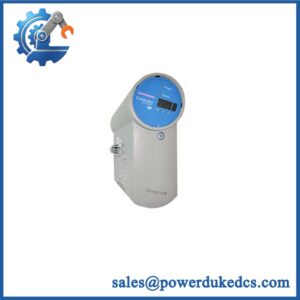
- HONEYWELL FC-FANWR-24R | Factory Tested Honeywell Fan Assembly
2. At-A-Glance Executive Brief
- Model: FC-FANWR-24R
- Brand: HONEYWELL
- Series: Honeywell Safety Manager / Universal Safe I/O Cabinet
- Part Type: 24VDC Cabinet Cooling Fan Unit with Readback Contact
- Core Function: Maintains airflow inside Honeywell Safety Manager cabinets while providing fan operation feedback for diagnostic monitoring.
- Key Specs:
- Dual fan assembly with monitoring PCB.
- 24 VDC power supply.
- Fan speed monitoring with readback contact.
- Nominal airflow: approximately 360 m³/hr (211.8 CFM).
- Nominal speed: 3,200 RPM.
- Operating temperature range: -30°C to +75°C.
- Certifications referenced: CE, UL, FM.
3. Product Introduction
Structure A — Pain-point Hook
A failed cabinet cooling fan can create a hidden reliability issue long before a controller fault appears. In a Safety Manager cabinet, rising internal temperature may accelerate aging of processors, power supplies, and I/O electronics, eventually leading to unexpected shutdown conditions.
The Honeywell FC-FANWR-24R is a dedicated 24VDC fan assembly designed for Safety Manager cabinet cooling applications. The unit contains two fans, a PCB monitoring circuit, and a readback contact that reports fan operating status to the control system (—which is critical for safety cabinets where loss of ventilation must be detected early).
4. Core Technical Specifications
| Parameter | Value |
|---|---|
| Manufacturer | Honeywell |
| Model | FC-FANWR-24R |
| Alternate Reference | FS-FANWR-24R |
| Product Type | 24VDC Fan Unit with Readback |
| Application | Safety Manager cabinet cooling |
| Fan Quantity | 2 fans |
| Fan Manufacturer | Papst |
| Fan Model | 4184N/17X (ball bearing) |
| Power Supply | 24 VDC |
| Power Consumption | 9.5 W |
| Voltage Range | 12–29 VDC |
| Reverse Polarity Protection | Not provided |
| Airflow Capacity | 360 m³/hr (211.8 CFM) |
| Noise Level | 52 dB |
| Nominal Fan Speed | 3,200 RPM |
| Minimum Readback Speed | 1,500 ±100 RPM |
| Fan Life Expectancy | 85,000 hrs at 40°C |
| Protection Rating | IP20 |
| Operating Temperature | -30°C to +75°C |
| Readback Contact Rating | 300 VDC / 240 VAC max, 0.5 A |
| Dimensions | Approx. 391 × 142 × 51 mm |
| Approximate Weight | 1.7 kg |
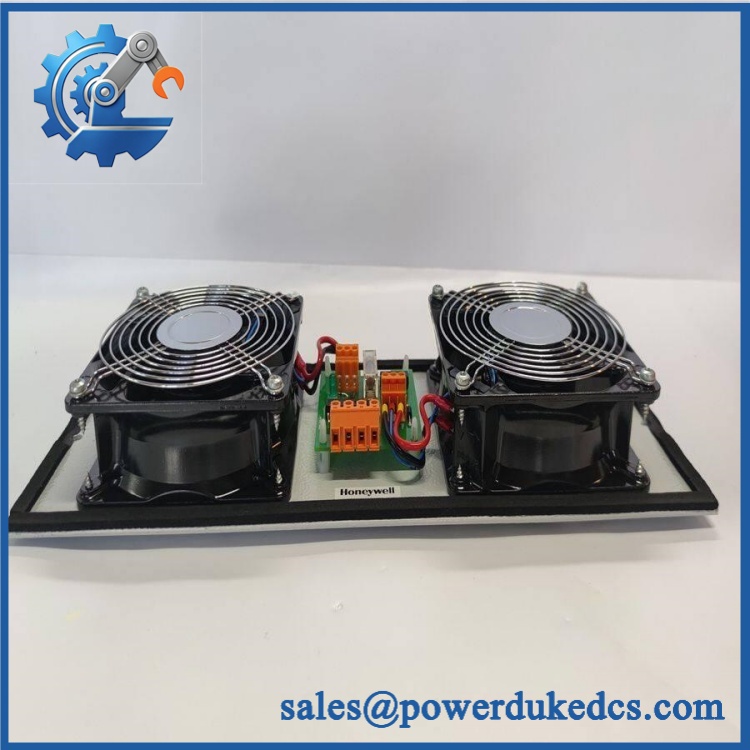
HONEYWELL FC-FANWR-24R
5. Application Scenarios & Pain Points
Bold technical conclusion:
Cabinet ventilation is part of the safety system environment. A cooling failure may not immediately stop the controller, but prolonged overheating can shorten electronic component life and increase diagnostic events.
- Honeywell Safety Manager Cabinets: Provides forced airflow for installed safety controller hardware.
- Oil & Gas Facilities: Supports SIS cabinets operating continuously in refinery and petrochemical environments.
- Power Generation Plants: Helps maintain stable cabinet temperatures for turbine and auxiliary protection systems.
- Chemical Processing Units: Reduces heat accumulation around safety-related electronics.
- Offshore Installations: Supports enclosed cabinets exposed to vibration, temperature cycling, and limited maintenance access.
When cabinet temperatures exceed 50°C, inspect fan bearings, filters, airflow paths, and cabinet sealing conditions. A fan operating at reduced speed may still appear normal while delivering insufficient cooling.
6. Common Error Codes & Diagnostic Symptoms
Symptom/Code: Fan Failure Alarm / Cabinet Cooling Fault
→ Diagnosis: One or both fans may have stopped, dropped below minimum RPM, or developed bearing wear.
→ Action: Verify fan rotation and replace the FC-FANWR-24R assembly if speed feedback is abnormal.
Symptom/Code: Readback Contact Open / Fan Status Missing
→ Diagnosis: Monitoring PCB failure, wiring issue, or fan speed below the feedback threshold may prevent status confirmation.
→ Action: Check connector wiring and replace the fan assembly if the feedback circuit fails.
Symptom/Code: High Cabinet Temperature Warning
→ Diagnosis: Reduced airflow, blocked filters, or aging fan motors may cause insufficient heat removal.
→ Action: Inspect ventilation components and replace degraded fan units.
7. Cross-Reference & Lifecycle Migration
- Compatible System: Honeywell Safety Manager cabinet cooling architecture.
- Related Identification:
- FC-FANWR-24R
- FS-FANWR-24R
- Replacement Considerations:
- Confirm cabinet mounting arrangement.
- Verify 24VDC supply wiring.
- Confirm readback contact wiring before commissioning.
- Firmware Requirement:
None. The FC-FANWR-24R is a cooling hardware assembly and does not contain application firmware. - Lifecycle Status: Legacy / Installed Base Support
For spare inventory, store the fan assembly with connector protection and record installation date. Fan bearings degrade with operating hours, even when the cabinet remains within temperature limits.
8. Field Engineer’s Tech Notes (Anti-Pitfall Guide)
- Do not replace only one fan inside the assembly.
The FC-FANWR-24R is designed as a matched dual-fan unit with monitoring electronics. Replacing individual fans may affect airflow balance and diagnostics. - Check airflow direction before installation.
Incorrect mounting orientation can reduce cooling performance. Both sides of the fan unit require unobstructed airflow paths.
9. Strict QA & Testing SOP
A professional inspection process for HONEYWELL FC-FANWR-24R should include:
Step 1 — Incoming Inspection
- Verify model marking and label.
- Inspect fan blades, guards, mounting plate, and connector.
- Check PCB condition.
- Record serial information if available.
Step 2 — Electrical Verification
- Apply 24VDC power.
- Measure current consumption.
- Confirm both fans start correctly.
- Verify readback contact operation.
Step 3 — Mechanical Testing
- Check fan rotation noise.
- Confirm bearing condition.
- Verify mounting plate integrity.
Step 4 — Functional Verification
- Test RPM feedback.
- Confirm alarm status behavior.
- Verify connector pin assignment.
Step 5 — Packaging Control
- Protect fan blades during shipment.
- Use anti-static packaging for PCB protection.
- Secure mounting hardware.
Inspection photos, electrical test records, and functional test videos are available for quality review.
10. Buyer’s FAQ (Dynamic Q&A)
Q1. Can the Honeywell FC-FANWR-24R be replaced while the Safety Manager cabinet is running?
A: Replacement should follow approved maintenance procedures. Disconnecting cabinet cooling during operation may increase internal temperature and affect installed safety hardware.
Q2. “How do I verify this is an original FC-FANWR-24R?”
A: Check the Honeywell label, fan assembly markings, PCB identification, connector configuration, and inspection documentation.
Q3. Does the FC-FANWR-24R require firmware loading?
A: No. This is a passive cooling assembly with monitoring electronics. No application firmware installation is required.
Q4. What storage conditions are recommended for a spare fan unit?
A: Store it in a dry environment, protect the connector and PCB from contamination, and avoid long-term exposure to high humidity. Before installation, verify that the fan rotates freely and the readback circuit operates correctly.




 Start Chat


