

Description
Module 2: The 10-Second Procurement Snapshot
- Brand: ABB Bailey
- Full Model Number: IEPAS01
- Lifecycle Status: Legacy / stock-dependent
- Core Function: Supplies regulated power to INFI 90 system hardware
- Product Type: Power Supply Module
- System Family: Bailey INFI 90 / Network 90
- Top 3 Technical Specs: 120 VAC input; 5 VDC logic output; 24 VDC auxiliary output
- Input Type: AC power input
- Application: INFI 90 control-system power distribution
- Stock & Condition: New surplus / tested stock, subject to physical availability
Module 3: Supply Chain & Technical Deep Dive
A power-supply failure is one of the fastest ways to turn a healthy legacy control system into a production outage. ABB Bailey IEPAS01 is used within the INFI 90 power architecture, making it a strategic spare when the installed system still depends on legacy Bailey hardware. Keeping the exact power module on the shelf can reduce the time between fault isolation and system recovery.
The investment case is simple: replacing a power module is usually less disruptive than redesigning an established control cabinet. However, exact electrical specifications must be checked against the installed system documentation before approval. Input voltage, output rails, load capacity, rack position, and system revision all matter. Do not assume that another Bailey power module is an electrical substitute merely because its enclosure looks similar.
Module 4: Migration, Compatibility & Field Traps
Replacement Matrix
| Replacement Type | Assessment | Engineering Action |
|---|---|---|
| Drop-in Replacement | Conditional | Match IEPAS01 and the installed INFI 90 power architecture |
| Software Compatible | Not normally the primary issue | Verify system hardware configuration |
| Hardware Modification | Not expected for an exact match | Confirm rack and power connections |
| Cross-Reference Replacement | Engineering approval required | Compare input/output ratings and loading |
⚠️ Field Trap 1: AC Input
Do not treat the input circuit like a low-voltage I/O connection.
Isolate the AC supply before removing the module. Verify the actual incoming voltage with an approved meter and follow the plant’s electrical isolation procedure.
The replacement should not be energized until the input and output specifications have been checked against the applicable ABB documentation.
⚠️ Field Trap 2: Output Loading
A replacement power supply may physically fit while having a different current capacity.
Check the total rack load before commissioning. Include controller modules, communication modules, I/O cards, and other powered devices.
A useful maintenance rule: check the load, not just the voltage.
⚠️ Field Trap 3: Capacitor Discharge
Power supplies can retain hazardous energy after incoming power has been removed.
Follow the manufacturer’s discharge requirements and verify the circuit is de-energized before touching terminals.
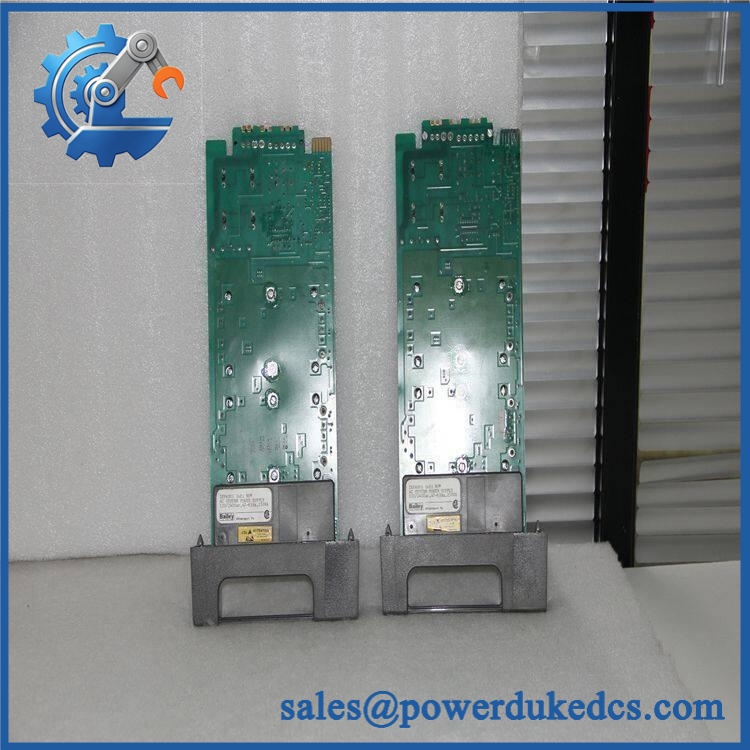
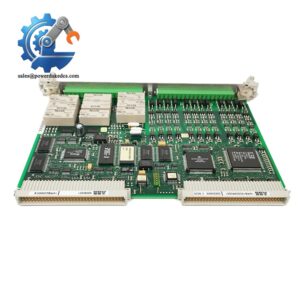
ABB IEPAS01
Module 5: Quality Assurance & Testing SOP
1. Incoming Identity Inspection
- Verify ABB Bailey identification.
- Confirm IEPAS01.
- Record serial number and hardware revision where available.
- Compare the nameplate with the purchase order.
- Inspect the enclosure.
- Check connectors and terminals.
- Look for corrosion, discoloration, cracks, or overheating.
- Inspect for previous repair evidence.
- Perform OEM marking and anti-counterfeit visual inspection.
2. Electrical Inspection
Before energizing:
- Inspect AC input terminals.
- Check accessible output connections.
- Inspect the PCB for burn marks.
- Check for obvious shorts.
- Verify grounding provisions.
- Confirm the approved test fixture and protection devices are in place.
High-voltage testing must follow the applicable ABB service procedure.
3. Power-On Test
Using a compatible Bailey INFI 90 test environment:
- Install the power module in the approved position.
- Verify all safety interlocks.
- Apply the specified AC input.
- Measure the specified output rails.
- Check system power status.
- Monitor for abnormal noise, odor, heating, or alarms.
- Record measured values.
4. Load Test
A meaningful power-supply test should include a representative load:
- Apply the specified input voltage.
- Connect a controlled test load.
- Monitor output voltage.
- Check voltage stability.
- Monitor temperature rise.
- Check behavior during load changes.
- Record measurements.
Do not accept a power module solely because it produces the correct unloaded voltage.
5. Extended Stability Test
Where the test fixture permits:
- Run the supply under representative load.
- Monitor output voltage.
- Check temperature rise.
- Watch for intermittent operation.
- Record test duration.
- Generate a Test Report.
6. Final QA and Packaging
- Record exact model.
- Record revision.
- Record serial number.
- Save electrical test results.
- Photograph the tested unit.
- Apply QC status.
- Seal sensitive electronics appropriately.
- Add shock protection.
- Mark the outer package with IEPAS01.
For critical spare orders, available test photographs and Test Report records can be supplied before dispatch.
Module 6: Procurement-Driven FAQ
1. Is ABB IEPAS01 physically in stock for urgent shipment?
Legacy Bailey power modules are normally handled as stock-dependent spare parts. For a shutdown requirement, confirm physical quantity, exact model, condition, warehouse location, and shipping cutoff before releasing the PO.
An urgent replacement should be physically verified before the order is treated as ready for dispatch.
2. How do you verify a surplus IEPAS01?
The process starts with identity verification.
The label, enclosure, connectors, PCB condition, terminals, corrosion, overheating, and evidence of previous repair are checked. Tested units should also receive controlled power-up and representative-load testing.
New surplus and tested used units should be quoted as separate conditions.
3. Can I use another ABB Bailey power supply instead?
Do not assume so.
The replacement must match the installed system’s input requirements, output rails, current capacity, mechanical installation, and power-distribution architecture.
A visually similar module can still have a different electrical rating.
4. Does IEPAS01 have firmware compatibility concerns?
A power supply normally does not create the same firmware issue as a processor or communication module.
The engineering checks should focus on input voltage, output voltage, current capacity, rack configuration, and load requirements. If the replacement revision differs, verify it against the relevant ABB documentation before installation.
5. What should my maintenance team record before replacing the module?
Record:
- Incoming AC voltage
- Existing output-voltage measurements
- Rack position
- Connected load
- Module part number and revision
- Terminal wiring
- Alarm or diagnostic indications
- Photographs of the existing installation
For a legacy power supply, good records matter. The replacement itself may take minutes; identifying a hidden load or wiring issue can take hours.



 Start Chat


