

Description
Module 2: The 10-Second Procurement Snapshot
- Brand: ABB Bailey
- Full Model Number: IEPAS02
- Lifecycle Status: Legacy / INFI 90 spare
- Core Function: Provides regulated power within the INFI 90 system
- Top 3 Technical Specs: INFI 90 architecture; power-supply function; Bailey system compatibility
- Stock & Condition: New Surplus / Tested Refurbished; physical stock confirmed before shipment
Module 3: Supply Chain & Technical Deep Dive
A failed power-supply module has a different risk profile from a normal I/O card. One electrical failure can affect multiple control modules at once. ABB IEPAS02 is associated with the Bailey INFI 90 power-supply hardware family and is intended for use within the system’s power architecture. For plants maintaining legacy Bailey systems, keeping an exact spare can reduce recovery time when a power fault occurs.
The inventory decision should be based on the load served by the module, replacement lead time, and the cost of an unplanned shutdown. One tested spare is often a practical buffer for a production-critical rack. Exact input voltage, output ratings, current capacity, mounting arrangement, and compatible power-distribution hardware must be verified against the applicable ABB/Bailey documentation before purchase. Do not assume the specifications of another IEPAS-series module apply to IEPAS02.
Module 4: Migration, Compatibility & Field Traps
Replacement Matrix
| Approval Item | Assessment |
|---|---|
| Replacement Type | Direct replacement candidate for an existing IEPAS02 |
| Exact Part Match | IEPAS02 |
| System Family | ABB Bailey INFI 90 |
| Function | Power supply |
| Electrical Compatibility | Verify input/output ratings before installation |
| System Compatibility | Verify rack and power-distribution arrangement |
| Hardware Modification | Normally not required for an exact replacement |
| Engineering Approval | Required before energization |
⚠️ Field Trap 1 — Input Voltage
Do not connect the replacement until the site’s actual supply has been verified against the module documentation.
Check:
- Supply voltage
- AC/DC requirement
- Protective device rating
- Wiring polarity where applicable
- Grounding arrangement
A visually identical power module can still have a different electrical specification.
⚠️ Field Trap 2 — Total Rack Load
A replacement power supply must support the actual rack load.
Before installation, calculate the combined demand of the installed controller, I/O modules, communication modules, and other connected loads. Leave engineering margin rather than operating continuously at the supply limit.
⚠️ Field Trap 3 — Stored Energy
Power supplies can retain electrical energy after shutdown.
Disconnect the approved power sources and verify the absence of hazardous voltage before removing the module. Follow the site’s electrical safety procedure and the applicable ABB documentation.
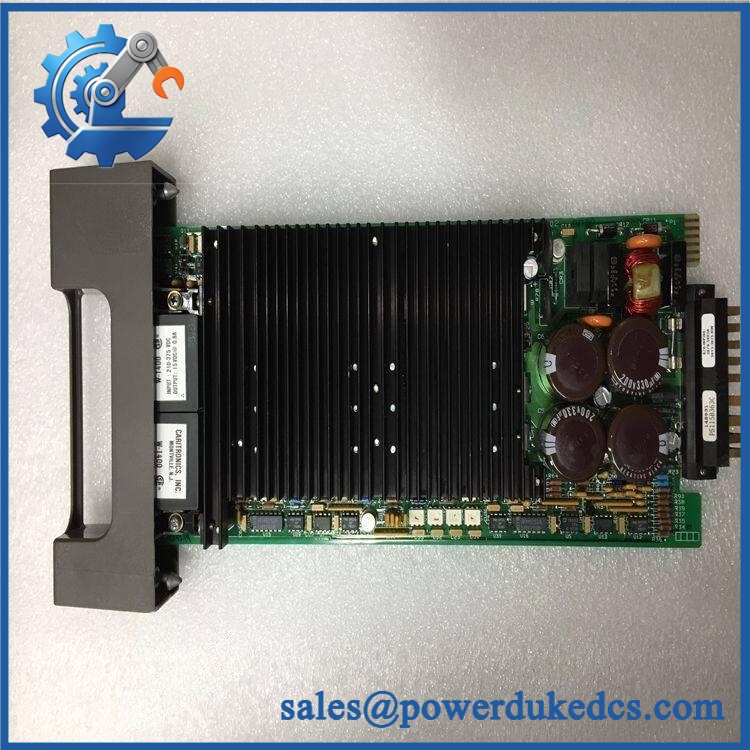
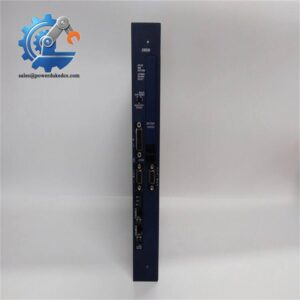
ABB IEPAS02
Module 5: Quality Assurance & Testing SOP
Power-supply testing needs tighter controls than a simple “LED turns on” inspection.
1. OEM Identification Inspection
- Verify ABB Bailey identification.
- Confirm IEPAS02 marking.
- Record serial number and hardware revision.
- Inspect terminals and connectors.
- Check for corrosion and oxidation.
- Inspect capacitors and visible components for damage.
- Look for overheating, discoloration, or repair traces.
- Photograph the identification label.
2. Power-On Self-Test
Using an approved compatible test setup:
- Apply the specified input power.
- Confirm correct startup behavior.
- Check status indicators.
- Measure applicable output voltages.
- Monitor input current.
- Check for abnormal noise or heating.
- Record initial measurements.
3. Load Testing
Where the correct test equipment is available:
- Connect a controlled load.
- Apply the specified operating load.
- Monitor output voltage.
- Record voltage stability.
- Monitor temperature rise.
- Check protection behavior where supported.
- Repeat the test after thermal stabilization.
Do not connect production equipment to an unverified surplus power supply.
4. Extended Functional Test
Record:
- Input voltage
- Output voltage
- Load current
- Temperature
- Status indicators
- Protection response
- Test duration
Retain the measurements against the unit’s serial number.
5. Final QC
- Part number verified
- Serial number recorded
- Hardware revision recorded
- Input test completed
- Output test completed
- Load test completed
- Temperature observation completed
- Test report archived
- ESD/protective packaging applied
- QC label attached
Module 6: Procurement-Driven FAQ
1. Is ABB physically in stock, and can it ship immediately?
Physical stock should be confirmed against the actual unit before a shipping commitment is made. For an outage-critical power-supply requirement, confirm quantity, condition, test status, and shipping cutoff before ordering.
2. How do you verify the condition of a surplus ?
The unit should undergo identification checks, visual PCB inspection, controlled power-up, voltage measurement, and load testing where the appropriate test equipment is available. Ask for the actual serial-number-specific test report.
3. Can I directly replace my existing ?
An exact replacement is the preferred approach, but verify the complete power architecture first. Check the input supply, output requirements, rack configuration, connected load, and power-distribution hardware.
4. What is the biggest installation risk with a replacement power module?
Electrical mismatch is the main concern. Do not rely on physical fit alone. Verify the required input and output specifications before energizing the module, and follow the site’s electrical isolation procedure.
5. Should I keep an as buffer stock?
If the power module supplies a production-critical INFI 90 rack, one tested spare is a sensible starting Min/Max level. The carrying cost is relatively easy to justify when the alternative is extended downtime caused by a difficult-to-source legacy power component.




 Start Chat


