

Description
Module 2: The 10-Second Procurement Snapshot
- Brand: ABB Bailey
- Full Model Number: IMFEC12
- Lifecycle Status: Legacy / Obsolete
- Core Function: Field extension control within Bailey INFI 90 systems
- Top 3 Technical Specs: INFI 90 architecture; field extension interface; modular rack installation
- Stock & Condition: New Surplus; tested inventory subject to physical stock confirmation; expedited dispatch available for confirmed stock
Module 3: Supply Chain & Technical Deep Dive
When an older INFI 90 installation loses a field-extension module, the technical problem is only half the issue. The sourcing delay can keep an otherwise serviceable control rack offline. The IMFEC12 is associated with the Bailey INFI 90 control architecture as a field extension controller module, making exact part-number verification important before a replacement is approved.
For plant maintenance, the TCO argument is simple: a verified spare can be considerably less expensive than extended downtime or an unnecessary control-system migration. The installed rack, associated field-extension hardware, communication path, and system revision should all be checked before installation. Exact electrical and timing specifications should be taken from the applicable ABB documentation rather than inferred from visually similar INFI 90 modules.
Module 4: Migration, Compatibility & Field Traps
Replacement Matrix
| Replacement Category | Assessment |
|---|---|
| Drop-in Replacement | Applicable for an exact IMFEC12 replacement after configuration verification |
| Software Compatible | Verify against the installed INFI 90 system revision |
| Hardware Modification | Normally not required for an exact replacement |
| Engineering Approval | Recommended before commissioning |
⚠️ Field Trap 1: Verify the Complete Field-Extension Path
Do not check the controller board in isolation.
Before removal, record:
- Rack position
- Adjacent modules
- Field-extension connections
- Cable routing
- Hardware revision
- System software revision
- Existing diagnostic status
A module that powers up is not necessarily communicating correctly with the rest of the control system.
⚠️ Field Trap 2: Configuration Records Matter
Legacy INFI 90 installations can contain site-specific configurations.
Photograph the existing module before removal.
Capture the front label, connectors, rack position, cable routing, and any visible switch or jumper settings. Keep those photographs with the maintenance record.
⚠️ Field Trap 3: ESD Protection
The IMFEC12 is a PCB-based electronic assembly.
Use an ESD wrist strap and grounded work surface. Keep the replacement inside its ESD bag until the cabinet is ready for installation.
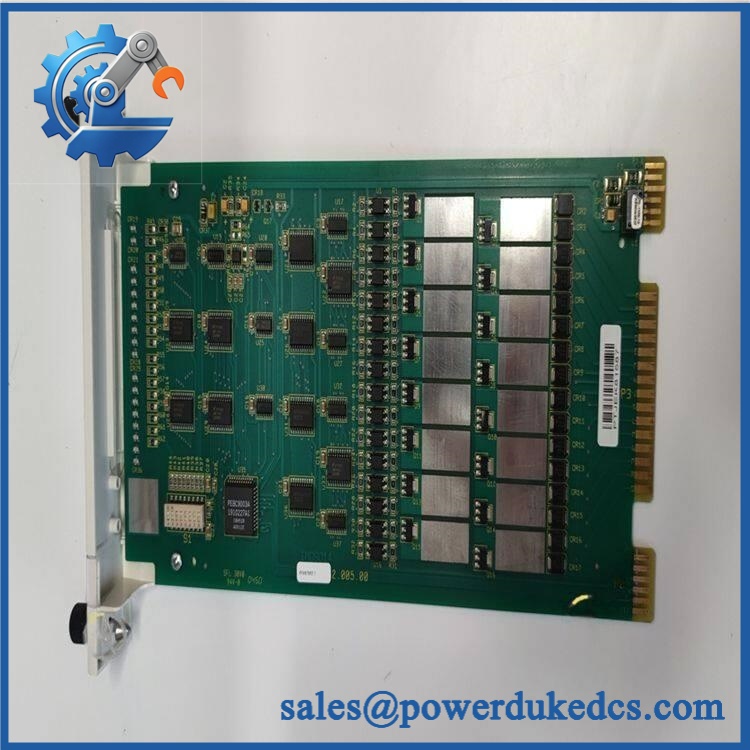
ABB IMFEC12
Module 5: Quality Assurance & Testing SOP
A field-extension controller should receive more than a visual inspection before shipment. The goal is to establish that the actual board is electrically and functionally suitable for the intended INFI 90 environment.
1. OEM Identification Check
- Verify ABB Bailey identification.
- Confirm IMFEC12 marking.
- Record serial number where available.
- Photograph the nameplate.
- Check labels for alteration.
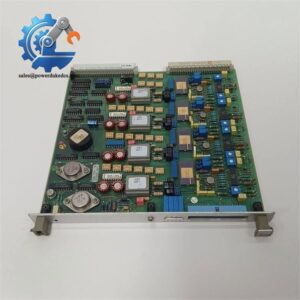
- Compare PCB layout with the expected module.
2. Physical Inspection
Inspect the assembly for:
- Corrosion
- Oxidation
- Burn marks
- Cracked components
- Bent pins
- Damaged connectors
- Missing components
- Solder rework
- Mechanical damage
- Storage contamination
Connector condition gets close attention.
3. Power-On Self-Test
Using an appropriate compatible INFI 90 test environment:
- Install the module in the correct rack position.
- Apply the specified system power.
- Observe startup behavior.
- Check status LEDs where fitted.
- Verify module recognition.
- Record diagnostic indications.
4. Field-Extension Function Test
Where the correct test environment is available:
- Verify module initialization.
- Confirm communication with associated control hardware.
- Check field-extension status.
- Monitor diagnostic information.
- Exercise available interface functions.
- Confirm stable operation during the test period.
A simple power-on test does not prove complete field functionality.
5. Configuration Verification
Record and photograph:
- Hardware revision
- Firmware information, where applicable
- Switch settings
- Jumper settings
- Rack position
- Connector arrangement
Compare these details with the customer’s original unit whenever the information is available.
6. Final QC
- Test Report completed
- Serial number recorded
- Power-on results documented
- Functional test results documented
- Configuration photographs archived
- QC approval completed
- ESD packaging applied
- Protective cushioning installed
- Shipping carton sealed
Test photographs and available Test Reports can be provided for procurement review.
Module 6: Procurement-Driven FAQ
1. Is the ABB IMFEC12 actually in stock, and when can it ship?
Physical inventory should be confirmed against the exact model before the PO is released.
For a shutdown-related requirement, confirm quantity, condition, warehouse availability, and carrier cutoff before committing to the delivery date.
2. How do you verify the condition of an obsolete ?
Each available unit should be checked for model identification, PCB condition, connectors, component damage, and evidence of previous repair.
For tested stock, ask for actual-unit photographs, serial-number information, and the Test Report. That gives procurement a documented basis for approval.
3. What warranty and return terms should procurement require?
The commercial quotation should define the warranty period, functional coverage, return authorization process, and inspection requirements.
For legacy electronics, retain the pre-shipment test documentation with the purchase record. It provides a useful condition baseline if a problem is reported after installation.
4. Are there compatibility issues when replacing an ?
Potentially. The replacement should be checked against the installed INFI 90 rack, field-extension architecture, hardware revision, and system configuration.
Do not approve a replacement based only on the same model number. Verify the complete installation context before commissioning.
5. What information should I send for an urgent replacement quote?
Provide:
- nameplate photograph
- PCB photograph
- Rack position
- Adjacent module information
- Cable and connector photographs
- Hardware revision
- System revision
- Quantity required
- Required delivery date
For a legacy INFI 90 spare, the rack and connector photographs are especially useful. They help confirm that the replacement belongs in the same hardware configuration before shipment.



 Start Chat


