

Description
- Brand: ABB
- Full Model Number: SB822 / 3BSE018172R1
- Lifecycle Status: Current ABB hardware-selector listing
- Core Function in System: External rechargeable battery backup for AC 800M controller memory
- Top 3 Hardcore Specs: 3.6 V rated output; 0.05 A maximum output current; 3.75 V 2.3 Ah rechargeable Li-Ion battery
- Mounting: DIN-rail
- Connection: 24 V DC connector + TK821V020 connection cable
- Dimensions: 85.8 × 58.5 × 136 mm
- Net Weight: 550 g
- Ambient Temperature: 0 to +55 °C
- Condition & Lead Time: New OEM stock or tested replacement; emergency dispatch subject to confirmed inventory
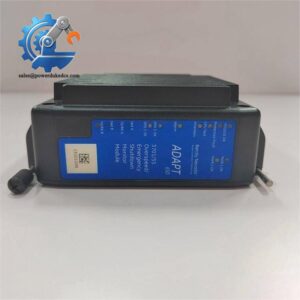
ABB’s current hardware selector identifies SB822 / 3BSE018172R1 as an external DIN-rail rechargeable battery unit for AC 800M controllers, with a 3.6 V rated output, 0.05 A maximum output current, and 0 to +55 °C maximum ambient range. The unit includes a lithium-ion battery, 24 V DC connector, and TK821V020 cable.
Module 3: Technical Intro & Downtime Impact
When an AC 800M controller loses its external memory-backup supply, the risk is not limited to a battery alarm. A depleted or failed SB822 can remove the extended backup capability used to retain controller memory during a prolonged loss of controller power. For a plant relying on AC 800M control logic, that can turn an otherwise recoverable power event into a longer restart and configuration-recovery exercise. ABB explicitly defines SB822 as an external power supply for extended memory backup of the AC 800M controller.
The replacement decision is measurable. ABB specifies a 3.6 V rated output with 0.05 A maximum output current, while the internal rechargeable pack is specified as 3.75 V, 2.3 Ah lithium-ion. The enclosure is a compact 85.8 × 58.5 × 136 mm DIN-rail unit, making cabinet space straightforward to verify before a maintenance window. The battery chemistry and charge condition still matter: ABB states that the Li-Ion pack should be charged regularly to prevent battery-related problems. (For an older cabinet, inspect the cable, connector, and DIN-rail mounting at the same time rather than replacing only the battery unit.)
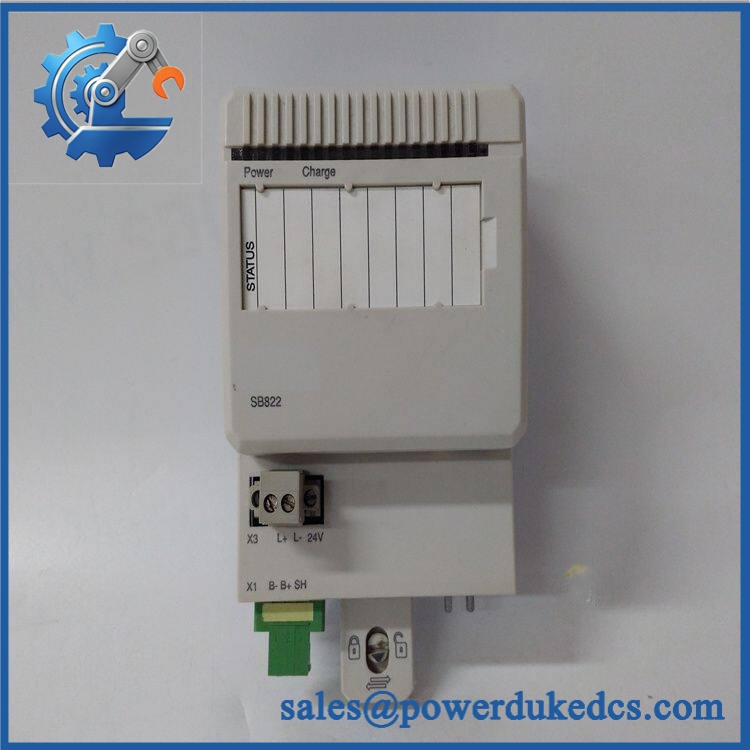
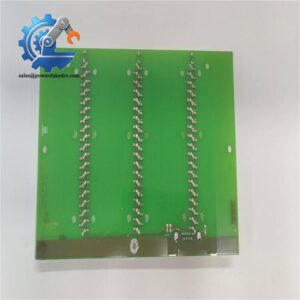
ABB SB822 3BSE018172R1
Module 4: Dynamic Emergency Swap & Configuration Guide
1. Pre-Swap Prep — Protect Controller Memory
Confirm the controller’s current memory-backup arrangement and identify SB822 / 3BSE018172R1 before removing anything. Verify that the replacement includes the correct TK821V020 connection cable where required. Record the existing Power/Charge/Status indications, then follow the site’s shutdown and backup procedure. Use a properly grounded ESD wrist strap, insulated tools, and a calibrated multimeter. ABB’s maintenance procedure specifically requires ESD protection when accessing the internal battery package.
2. Removal — Disconnect the Cable and 24 V Supply
The SB822 is an external DIN-rail-mounted unit rather than a rack-plugged controller card. ABB’s documented battery-service sequence starts by disconnecting the TK821V020 cable connector, followed by the 24 V supply cable connector, then releasing the SB822 from the DIN rail. Keep the original connector orientation documented before removal.
3. Installation & Configuration — Reconnect the Battery Backup Path
Mount the replacement SB822 on the same DIN rail and reconnect the 24 V supply and TK821V020 cable exactly as documented. Do not alter battery polarity or internal PCB connections during a normal unit exchange. If servicing the internal battery rather than replacing the complete SB822, ABB specifies that the Li-Ion battery connector is disconnected from the PCB only after the unit has been removed from the rail and ESD protection is in place.
4. Power-On Self-Test (POST) — Confirm Power and Charge Indications
Restore the 24 V supply and inspect the SB822’s front indicators. ABB’s hardware documentation identifies Power, Charge, and Status indication areas on the unit. Confirm that the controller recognizes the external backup supply and that the battery enters the expected charging state. Then verify the controller’s memory-backup status through the approved AC 800M diagnostic procedure. A lit front indicator is not enough; prove the backup path at the controller level before closing the maintenance task.
Module 5: Quality Assurance & Testing SOP
The SB822 / 3BSE018172R1 should be tested as a battery-backed controller-support device, with particular attention to output voltage, charging behavior, connector integrity, and battery condition.
- Identity verification: Record ABB designation, SB822, article number 3BSE018172R1, serial information, and visible revision markings.
- OEM anti-counterfeit visual inspection: Examine enclosure labels, PCB markings, connectors, cable construction, terminals, and manufacturing identifiers against known ABB references.
- Mechanical inspection: Verify DIN-rail mounting, enclosure condition, connector retention, cable integrity, and absence of corrosion, cracking, or heat damage.
- Power-on self-test (POST): Apply the specified 24 V DC supply and verify expected Power, Charge, and Status indications.
- Output-voltage verification: Measure the backup output under the approved test condition and confirm the nominal 3.6 V rating.
- Current-capability check: Verify operation within the specified 0.05 A maximum output current rather than applying an uncontrolled load.
- Battery verification: Confirm the installed rechargeable pack matches the documented 3.75 V, 2.3 Ah Li-Ion specification.
- Charging verification: Confirm normal charge behavior from the 24 V supply and investigate abnormal Charge or Status indications.
- Cable and connector test: Check the TK821V020 cable for continuity, connector retention, damaged insulation, and intermittent contact.
- Controller integration test: Connect the SB822 to a compatible AC 800M test setup and confirm that the controller reports the expected external memory-backup condition.
- Backup-retention test: Perform the approved controller memory-backup validation procedure rather than relying solely on open-circuit battery voltage.
- Extended runtime test: Monitor charging and status behavior over a controlled operating period for intermittent faults or abnormal temperature rise.
- Final QC record: Retain serial-number photographs, measured voltage, charging observations, controller test results, test date, technician sign-off, and final disposition.
ABB’s current data sheet also specifies IP20, CE marking, G2 corrosive-atmosphere classification, and RoHS/WEEE compliance for the SB822.
Module 6: Maintenance & Reliability FAQ
1. Is ABB SB822 a direct replacement, or does it require a firmware flash?
The SB822 / 3BSE018172R1 is an external rechargeable battery unit, not the AC 800M controller CPU. A firmware flash is therefore not normally associated with replacing the SB822 itself. The key checks are the exact article number, 24 V supply connection, TK821V020 cable, controller compatibility, and the backup system’s operating condition. ABB lists SB822 as an AC 800M controller accessory.
2. Is it safe to hot-swap the SB822 while the system is running?
Do not assume live replacement is permitted. ABB’s documented service procedure for SB822 begins with disconnecting the TK821V020 connector and the 24 V supply, followed by removal from the DIN rail. That procedure should be followed unless the exact installed architecture has an explicitly approved alternative.
3. Will replacing SB822 cause my AC 800M program to be lost?
SB822 is specifically intended to provide extended memory backup for the AC 800M controller, so battery condition directly affects retention during power loss. Replacing the battery unit should not be treated as replacing the controller application itself. Nevertheless, back up the controller configuration and application before maintenance whenever practical.
4. What should I verify after installing SB822?
Verify the 24 V supply, correct cable connection, normal Power/Charge/Status indications, controller recognition of the backup source, and the expected memory-backup condition. Also confirm that the replacement battery is adequately charged. ABB notes that regular charging is necessary to prevent problems with the Li-Ion battery package.
5. What are the warranty terms if the unit fails post-installation?
Warranty should follow the commercial terms for the exact supplied unit and condition. For a battery-backed controller accessory, retain the serial number, pre-shipment test results, installation date, measured output voltage, charging observations, and controller diagnostic records. Battery condition should also be documented because storage history and charge state can materially affect field performance.



 Start Chat


