

Description
- HONEYWELL 51309512-175C | Honeywell Process Control Hardware
2. At-A-Glance Executive Brief
- Model: 51309512-175C
- Brand: HONEYWELL
- Series/System: Honeywell Experion LS / Process Automation I/O Architecture
- Part Type: Ethernet Module / Field Termination Ethernet Board
- Core Function: Provides Ethernet communication capability between Honeywell Experion LS I/O equipment and higher-level control network infrastructure.
- Key Specs:
- Product identification: TK-FTEB01, 51309512-175
- Ethernet communication interface
- Compatible with Experion LS I/O systems
- 24 VDC industrial power environment
- Designed for Honeywell DCS cabinet installation
3. Product Introduction
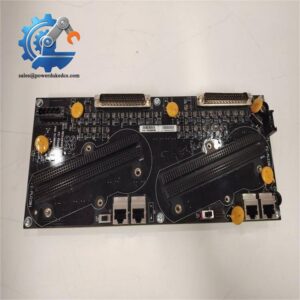
A distributed control system can lose remote I/O visibility when a communication interface module fails. The HONEYWELL 51309512-175C (TK-FTEB01) functions as an Ethernet communication module within Honeywell Experion LS I/O architectures, providing the network interface required for process data exchange between field-level hardware and the control system.
Installed inside a Honeywell control cabinet, this module handles communication rather than process logic execution. Replacement requires verification of chassis position, network configuration, firmware compatibility, and the installed Experion architecture (—especially in older plants where communication hardware revisions may differ between cabinets). The physical module may look identical while carrying different revision requirements.
4. Core Technical Specifications
| Parameter | Value |
|---|---|
| Manufacturer | HONEYWELL |
| Model | 51309512-175C |
| Alternate Model | TK-FTEB01 |
| Product Type | Ethernet Communication Module |
| System Compatibility | Honeywell Experion LS I/O |
| Network Interface | Ethernet |
| Ethernet Standard | IEEE 802.3 |
| Data Rate | Up to 100 Mbps |
| Supply Voltage | 18–30 VDC |
| Current Draw @ 24 VDC | Approx. 0.090 A |
| Current Draw @ 5 VDC | Approx. 1.000 A |
| Chassis Slots Used | 2 |
| Mounting Type | Honeywell I/O chassis installation |
| Operating Temperature | Approx. -40°C to +70°C |
| Storage Temperature | Approx. -40°C to +85°C |
| Weight | Approx. 0.28–0.45 kg |
| Application | Industrial DCS communication network |
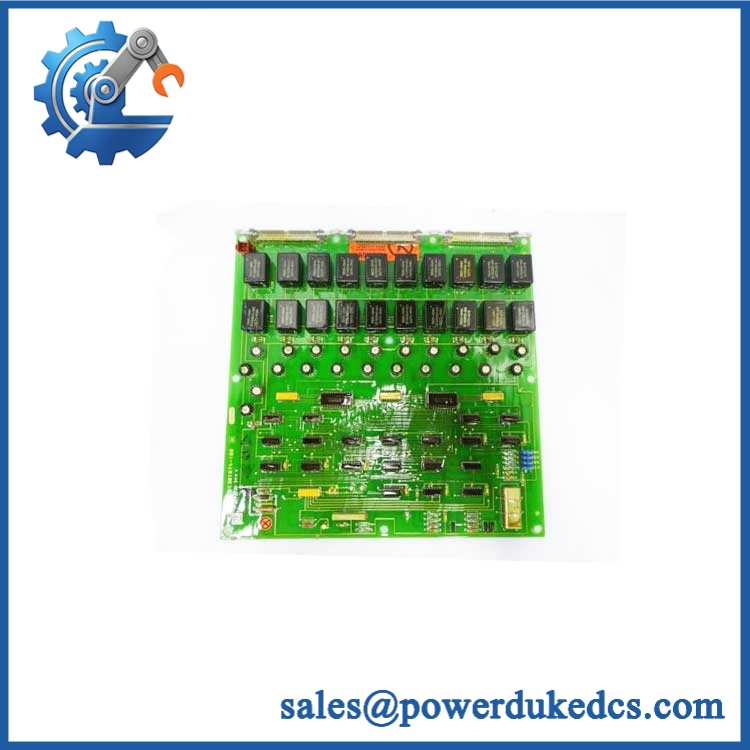
HONEYWELL 51309512-175C
5. Application Scenarios & Pain Points
Communication failures are often harder to diagnose than obvious hardware faults because the controller may remain active while field data disappears. The Honeywell 51309512-175C is maintained as a spare in Experion-based process automation systems where network availability is essential.
- Oil and gas facilities: Provides communication support for distributed process monitoring and control cabinets.
- Chemical plants: Maintains data exchange between I/O hardware and supervisory control systems.
- Power generation: Supports control system communication paths for auxiliary and process equipment.
- Water treatment facilities: Connects remote automation hardware into centralized monitoring systems.
- Industrial manufacturing: Used in legacy Honeywell DCS installations requiring replacement communication hardware.
For a large process unit containing hundreds of monitored signals, a failed Ethernet interface can delay troubleshooting even when the field instruments remain operational.
6. ? Common Error Codes & Diagnostic Symptoms
Symptom/Code: Ethernet Link LED OFF
→ Diagnosis: Possible network cable failure, port damage, incorrect switch configuration, or failed communication module.
→ Action: Verify network hardware first, then replace 51309512-175C if the interface remains inactive.
Symptom/Code: I/O Communication Timeout
→ Diagnosis: Possible module communication failure, chassis backplane issue, or incorrect system configuration.
→ Action: Check Experion configuration and replace the module if hardware diagnostics indicate failure.
Symptom/Code: Module Not Recognized by I/O System
→ Diagnosis: Possible incorrect slot assignment, firmware mismatch, or hardware revision incompatibility.
→ Action: Confirm system revision requirements before replacement.
7. Cross-Reference & Lifecycle Migration
- Related Identification:
- Honeywell 51309512-175
- TK-FTEB01
- Compatibility Notes:
- Confirm:
- Experion LS system version
- I/O chassis configuration
- Firmware revision
- Network settings
- Confirm:
- Firmware / Configuration Requirements:
- This module is a communication interface device rather than a standalone PLC CPU.
- Network parameters and system configuration may need verification after installation.
- Lifecycle Status:
- Status: Legacy / Availability Dependent
- Existing Honeywell Experion installations may require controlled spare management due to long operational lifecycles.
- Migration Strategy:
- Maintain current network drawings.
- Record module revision information.
- Keep a tested spare for critical control cabinets.
8. Field Engineer’s Tech Notes (Anti-Pitfall Guide)
- Do not replace the module before recording network settings.
Ethernet communication faults can appear identical to hardware failure. Capture IP configuration, chassis information, and system parameters first. - Inspect the backplane connection carefully.
A loose seating condition or contaminated connector can interrupt communication and create misleading diagnostic symptoms.
9. Strict QA & Testing SOP
A controlled inspection process for HONEYWELL 51309512-175C should include:
Step 1 — Incoming Inspection
- Verify Honeywell identification label.
- Confirm model and part number.
- Record serial number and hardware revision.
Step 2 — Physical Examination
Inspect:
- Ethernet port condition
- Backplane connector pins
- Housing damage
- Mounting clips
- Signs of overheating
Step 3 — Electrical Testing
- Apply rated DC supply.
- Verify startup behavior.
- Measure current consumption.
- Confirm status indicators.
Step 4 — Communication Testing
- Connect to compatible Honeywell test environment.
- Verify Ethernet link.
- Confirm module recognition.
- Check communication stability.
Step 5 — Packaging Control
- Use anti-static shielding.
- Protect Ethernet and backplane connectors.
- Apply shock protection for export shipment.
Test videos are available for selected inspected units.
10. Buyer’s FAQ (Dynamic Q&A)
Q: Can the Honeywell 51309512-175C be hot-swapped?
A: Do not assume live replacement capability. Communication modules inside DCS architectures should normally be replaced according to Honeywell maintenance procedures.
Q: How do I verify this is a genuine Honeywell 51309512-175C?
A: Confirm the Honeywell label, TK-FTEB01 identification, part number, revision marking, and supplier inspection documentation before installation.
Q: Does the 51309512-175C include firmware?
A: Firmware compatibility depends on the module revision and Experion LS system version. Confirm compatibility before commissioning.
Q: What warranty applies to this Ethernet module?
A: Warranty depends on product condition and supplier terms. Confirm whether the unit is new original, unused surplus, refurbished, or tested before purchase.





 Start Chat


