

Description
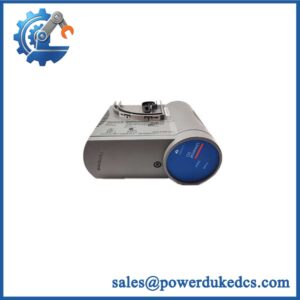
- HONEYWELL CC-PCNT02 | OEM Honeywell C300 Controller Replacement
2. At-A-Glance Executive Brief
- Model: HONEYWELL CC-PCNT02
- Series: Honeywell Experion PKS Series C
- Part Type: C300 Process Controller Module
- Core Function: Executes regulatory control, logic processing, and communication management within Honeywell Experion PKS distributed control systems.
- Key Specifications:
- Designed for Honeywell C300 controller architecture.
- Supports redundant controller configurations.
- Provides communication between Series C I/O modules and control network.
- Uses Honeywell Control Execution Environment (CEE).
- Intended for continuous process automation applications.
- Typical Procurement Category: DCS controller spare, Honeywell Experion PKS processor module, process automation replacement hardware.
3. Product Introduction
Within the Honeywell Experion PKS control cabinet, the CC-PCNT02 C300 Process Controller Module operates as the execution layer between the control strategy database and field I/O hardware. A controller failure can affect multiple process loops simultaneously, causing loss of automatic control, alarms, and operator visibility. In field deployments, engineers normally verify power supply status, network communication, redundancy health, and I/O subsystem condition before replacing the processor module (controller faults often involve surrounding infrastructure).
The CC-PCNT02 belongs to Honeywell’s Series C controller platform and is designed to execute configured control strategies through the CEE runtime environment. It communicates with Series C I/O modules and Experion PKS supervisory systems, making it a critical component in process plants where continuous operation is required.
4. Core Technical Specifications
| Parameter | Value |
|---|---|
| Manufacturer | Honeywell |
| Model Number | CC-PCNT02 |
| Product Type | C300 Process Controller Module |
| System Platform | Experion PKS Series C |
| Controller Type | Regulatory Process Controller |
| Execution Environment | Control Execution Environment (CEE) |
| Processor | Industrial embedded controller processor |
| Memory | Controller-specific onboard memory |
| Control Strategy Storage | Non-volatile memory |
| Communication Interface | FTE / Series C communication network |
| I/O Support | Honeywell Series C I/O modules |
| Redundancy Support | Supported with compatible hardware |
| Power Supply | 24 VDC system supply |
| Mounting Method | Series C chassis mounting |
| Cooling Method | Cabinet convection cooling |
| Operating Temperature | Approx. -40°C to +70°C |
| Storage Temperature | Approx. -40°C to +85°C |
| Installation Environment | Industrial control cabinet |
| Weight | Approx. 0.5 kg |
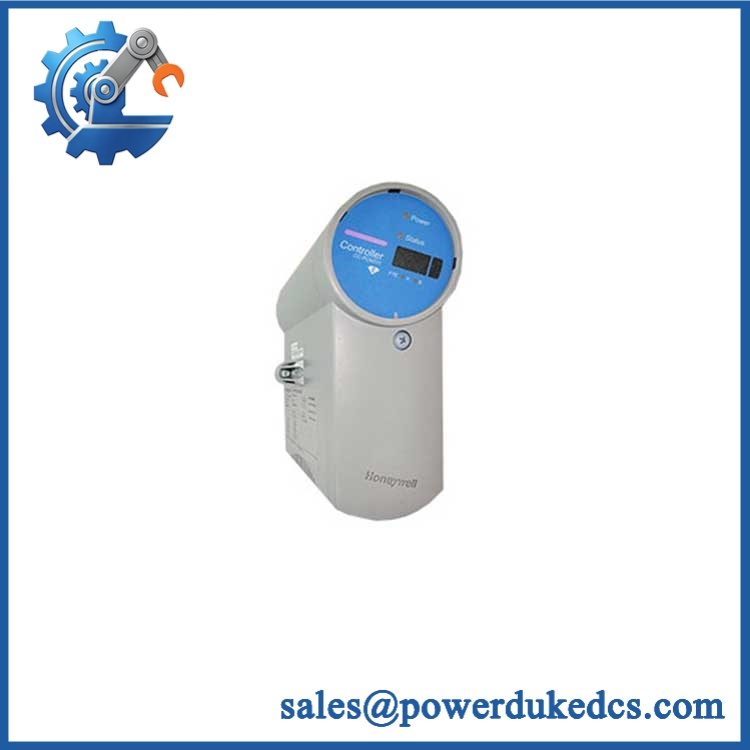
HONEYWELL CC-PCNT02
5. Application Scenarios & Pain Points
At refinery and petrochemical facilities, the CC-PCNT02 executes control strategies for continuous processes where controller availability directly affects production stability.
For chemical plants operating complex batch and continuous operations, controller processing reliability determines whether loops maintain correct pressure, temperature, and flow regulation.
During DCS lifecycle extension projects, maintaining spare C300 controllers allows plants to continue operating validated Experion PKS configurations.
Inside power generation control rooms, the module supports distributed control tasks requiring predictable execution and communication performance.
Without a functioning process controller, field I/O modules may remain active while automatic control functions stop responding.
6. Common Error Codes & Diagnostic Symptoms
Symptom/Code: Controller Fault LED Active / C300 Not Healthy
→ Diagnosis: Possible processor failure, corrupted controller database, communication loss, or hardware fault.
→ Action: Verify controller diagnostics and replace CC-PCNT02 if hardware failure is confirmed.
Symptom/Code: Loss of FTE Communication
→ Diagnosis: Possible network interface issue, incorrect configuration, or controller communication failure.
→ Action: Check network infrastructure and replace controller hardware if required.
Symptom/Code: Redundancy Synchronization Failure
→ Diagnosis: Possible mismatch between primary and backup controller firmware, configuration, or hardware status.
→ Action: Verify revision compatibility and replace the affected controller module.
7. Cross-Reference & Lifecycle Migration
- Compatible Platform:
- Honeywell Experion PKS Series C.
- Honeywell C300 controller architecture.
- Related Models:
- CC-PCNT01 C300 Controller Module.
- CC-PCNT02A / later C300 controller variants (availability depends on system revision).
- Replacement Considerations:
- Confirm controller firmware compatibility.
- Verify Experion PKS release version.
- Confirm redundancy configuration.
- Backup controller database before replacement.
- Verify FTE network settings.
- Firmware Requirement:
Replacement controllers may require firmware loading and database restoration before returning to service. The controller revision must match the installed Experion PKS system requirements. - Lifecycle Status: Legacy / Supported Depending on System Revision.
- Maintain tested spare controllers for critical process units.
- Preserve controller backups and revision history.
8. Field Engineer’s Tech Notes (Anti-Pitfall Guide)
- Do not install a controller with an unknown firmware revision.
A mismatched controller revision can prevent synchronization with the running Experion PKS system. - Record controller configuration before removal.
Network identity, redundancy settings, and database information must be restored correctly. - Protect the backplane contacts during handling.
Contaminated or oxidized contacts can create intermittent controller communication failures.
9. Strict QA & Testing SOP
Step 1 — Incoming Inspection
- Verify Honeywell label and CC-PCNT02 marking.
- Record serial number and hardware revision.
- Photograph housing and connectors.
Step 2 — Physical Examination
- Inspect chassis mounting points.
- Check communication connectors.
- Verify status indicators.
Step 3 — Electrical Testing
- Apply controlled 24VDC power.
- Verify startup sequence.
- Check current consumption.
- Confirm LED status.
Step 4 — Functional Testing
- Install in compatible Honeywell Series C test chassis.
- Load approved firmware.
- Verify controller recognition.
- Test communication with Experion environment.
- Confirm redundancy operation when applicable.
Step 5 — Packaging Control
- Use ESD shielding packaging.
- Protect connectors.
- Include inspection records.
Test videos are available for verification procedures when required.
10. Buyer’s FAQ (Dynamic Q&A)
Q: Can the Honeywell CC-PCNT02 be replaced while the controller is running?
A: Replacement procedures depend on the installed Experion PKS redundancy configuration and site maintenance rules. Follow Honeywell-approved procedures before removing controller hardware.
Q: How do I confirm a genuine Honeywell CC-PCNT02 module?
A: Check the Honeywell identification label, model number, hardware revision, serial information, connector condition, and functional test documentation.
Q: Does the CC-PCNT02 include the plant control database?
A: No. The controller hardware executes the configured strategy, but the application database must be restored from the Experion engineering environment.
Q: What should be confirmed before purchasing this controller spare?
A: Verify Experion PKS version, controller firmware compatibility, redundancy requirements, hardware revision, test status, and warranty terms.
Procurement Note: The Honeywell CC-PCNT02 should be managed as a critical DCS controller spare. Store the module with firmware records, controller backups, network information, and system documentation to reduce recovery time during unexpected controller failures.



 Start Chat


