

Description
- HONEYWELL MC-TAMT04 | Original Industrial Automation Hardware
2. At-A-Glance Executive Brief
- Model: HONEYWELL MC-TAMT04
- Brand: Honeywell
- Series: Honeywell TPS / Process Manager I/O Family
- Part Type: Analog Input Terminal Assembly / Analog Measurement Module
- Core Function: Provides analog signal acquisition capability for Honeywell process control systems, typically interfacing field measurement devices with the controller network.
- Primary Use: Process measurement loops, transmitter monitoring, and legacy Honeywell DCS installations.
- Key Specifications:
- 4-channel analog measurement interface
- Designed for Honeywell Modular Control hardware
- Supports industrial field signal acquisition
- Rack/chassis-mounted I/O hardware
- Used with Honeywell controller and terminal assemblies
3. Product Introduction
Within Honeywell legacy process control architectures, the MC-TAMT04 functions as part of the analog I/O signal path between field instruments and the control processor. The module handles measurement interface duties, allowing process variables such as temperature, pressure, flow, or level signals to be transferred into the DCS database.
In field deployments, analog interface modules are often replaced during planned maintenance because inaccurate measurements can create operational uncertainty even before a complete hardware failure occurs. Confirm the exact I/O family, terminal block arrangement, field wiring type, and controller compatibility before installation (similar Honeywell module names do not always indicate electrical interchangeability).
4. Core Technical Specifications
| Parameter | Value |
|---|---|
| Manufacturer | Honeywell |
| Model Number | MC-TAMT04 |
| Product Type | Analog Input Terminal Assembly / Measurement Module |
| System Family | Honeywell TPS / Process Manager |
| Number of Channels | 4 channels |
| Signal Type | Analog process signals |
| Input Configuration | System-dependent |
| Field Interface | Honeywell I/O terminal connection |
| Installation Method | Honeywell rack/chassis mounting |
| Power Supply | System backplane supplied |
| Configuration | Honeywell engineering database dependent |
| Diagnostics | Controller-based module diagnostics |
| Operating Environment | Industrial control cabinet |
| Application Class | Process automation DCS |
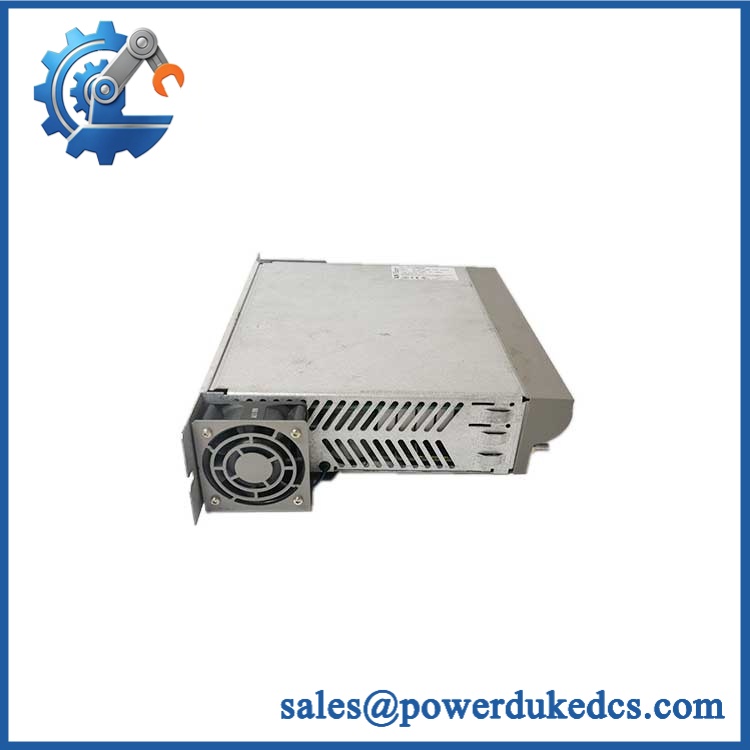
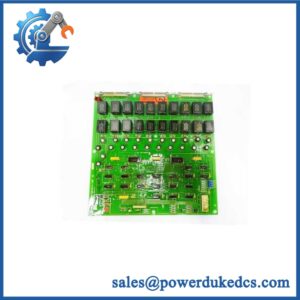
HONEYWELL MC-TAMT04
Note: Public documentation for the exact MC-TAMT04 variant is limited. Verify voltage ranges, current input capability, dimensions, and terminal assignments from the applicable Honeywell hardware manual before replacement.
5. Application Scenarios & Pain Points
Analog measurement hardware failures can remain hidden until operators compare field instruments with DCS values.
- Refinery process units: Used in measurement loops where pressure and flow feedback are required for stable operation.
- Chemical production systems: Supports transmitter signal collection for continuous monitoring applications.
- Power generation controls: Maintains process measurement paths for auxiliary and generation equipment.
- Water treatment facilities: Used in legacy Honeywell systems where analog field signals remain active after decades of operation.
- Brownfield modernization projects: Existing TPS installations often require exact replacement modules during phased upgrades.
6. Common Error Codes & Diagnostic Symptoms
Symptom/Code: Analog Channel Signal Frozen
→ Diagnosis: Possible failed input channel, field wiring issue, transmitter fault, or internal measurement circuit failure.
→ Action: Verify the field signal and replace the MC-TAMT04 if the channel hardware is defective.
Symptom/Code: I/O Module Communication Fault
→ Diagnosis: Possible rack connection issue, module electronics failure, or incorrect configuration.
→ Action: Check chassis communication and replace the module after confirming hardware failure.
Symptom/Code: Incorrect Process Value Scaling
→ Diagnosis: Configuration mismatch between transmitter range and DCS engineering database.
→ Action: Verify configuration parameters before replacing hardware.
7. Cross-Reference & Lifecycle Migration
- Related Honeywell Hardware Family:
- MC-Txxx Series I/O modules
- Honeywell TPS Process Manager analog input assemblies
- Compatibility Notes:
- Confirm the host controller model.
- Verify terminal assembly type.
- Match channel configuration.
- Check engineering database compatibility.
- Firmware Requirements:
The MC-TAMT04 is an I/O hardware component rather than a standalone controller. System software compatibility depends on the installed Honeywell TPS configuration. - Lifecycle Status: Legacy / Limited Availability
- Commonly found in installed Honeywell TPS systems.
- Recommended spare strategy: maintain tested replacement modules for critical measurement loops.
- Migration Strategy:
Replacement with newer Honeywell platforms may require cabinet modifications, wiring changes, database conversion, and commissioning verification.
8. Field Engineer’s Tech Notes (Anti-Pitfall Guide)
- Do not remove field wiring without documenting terminal positions.
Analog channels depend on correct point mapping. A misplaced wire can create a false transmitter failure. - Inspect the terminal connection before replacing electronics.
Oxidized contacts, loose screws, and degraded field cables frequently create symptoms that resemble an I/O module fault.
9. Strict QA & Testing SOP
Step 1 — Incoming Inspection
- Verify Honeywell MC-TAMT04 marking.
- Record serial number and hardware revision.
- Inspect connectors and terminal interfaces.
- Photograph received condition.
Step 2 — Physical Inspection
- Check PCB condition.
- Inspect terminals for corrosion or mechanical damage.
- Verify mounting hardware condition.
Step 3 — Electrical Inspection
- Confirm power interface condition.
- Check for abnormal resistance or visible component damage.
- Verify connector continuity.
Step 4 — Functional Test
- Install in compatible Honeywell test hardware.
- Verify module recognition.
- Apply simulated analog signals.
- Confirm channel response and stability.
Step 5 — Packaging Control
- Place module inside ESD protective packaging.
- Protect terminal contacts.
- Add shock protection for transport.
Test videos are available for verified inspection records.
10. Buyer’s FAQ (Dynamic Q&A)
Q: Can the Honeywell MC-TAMT04 be hot-swapped?
A: Do not assume live replacement is permitted. Follow the Honeywell TPS maintenance procedure and isolate the applicable cabinet section before removal.
Q: How do I verify an original MC-TAMT04?
A: Check the Honeywell label, complete model number, revision markings, terminal condition, and functional inspection records.
Q: Does the module include configuration data?
A: No. The module is hardware only. Channel assignments, scaling, and alarms are stored within the Honeywell control system configuration.
Q: What warranty details should be confirmed before purchase?
A: Confirm warranty period, analog channel testing scope, inspection documentation, and whether the unit is New Original, New Surplus, or refurbished. For legacy DCS I/O hardware, traceable testing is important before installation.




 Start Chat


