

Description
- Model: CC-IP0101 51410056-175
- Brand: HONEYWELL
- Series/System: Honeywell Experion PKS / C300 Controller Architecture
- Part Type: PROFIBUS DP Gateway Module
- Core Function: Provides communication between Honeywell control systems and PROFIBUS DP field networks, allowing external devices to exchange process data with the DCS environment.
- Key Specs:
- PROFIBUS DP gateway interface
- Ethernet communication support
- 24 VDC power supply
- Designed for Honeywell C300 controller environments
- Industrial cabinet installation
- Used for fieldbus protocol integration
Product Introduction
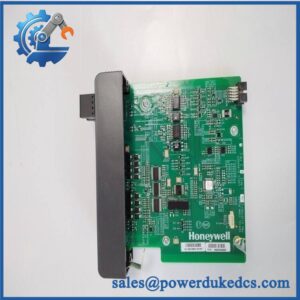
When a plant integrates third-party field devices into a Honeywell control environment, communication compatibility becomes a primary engineering concern. The HONEYWELL CC-IP0101 51410056-175 is a PROFIBUS DP Gateway Module designed to connect PROFIBUS networks with Honeywell process automation systems, enabling data exchange between field instruments, remote I/O equipment, and the supervisory control layer.
Installed as part of the Honeywell C300 controller communication architecture, this module handles protocol conversion and network interfacing rather than executing process control logic. Correct replacement requires verification of PROFIBUS configuration, network addressing, cable termination, and controller database settings (—a small communication mismatch can prevent field devices from appearing online even when the gateway powers correctly).
Core Technical Specifications
| Parameter | Value |
|---|---|
| Manufacturer | HONEYWELL |
| Model | CC-IP0101 |
| Part Number | 51410056-175 |
| Product Type | PROFIBUS DP Gateway Module |
| System Compatibility | Honeywell Experion PKS / C300 Controller |
| Communication Interface | PROFIBUS DP + Ethernet |
| PROFIBUS Data Rate | Up to 12 Mbps |
| Ethernet Interface | 10/100 Mbps |
| Power Supply | 24 VDC |
| Typical Power Consumption | Approx. 10 W |
| Mounting Type | Control cabinet installation |
| Communication Function | Protocol conversion / fieldbus integration |
| Operating Temperature | Approx. -25°C to +60°C |
| Protection Rating | IP65 (supplier listed) |
| Dimensions | Approx. 115 × 75 × 45 mm |
| Weight | Approx. 0.25–1 kg depending on packaging source |
| Application | Industrial DCS fieldbus communication |
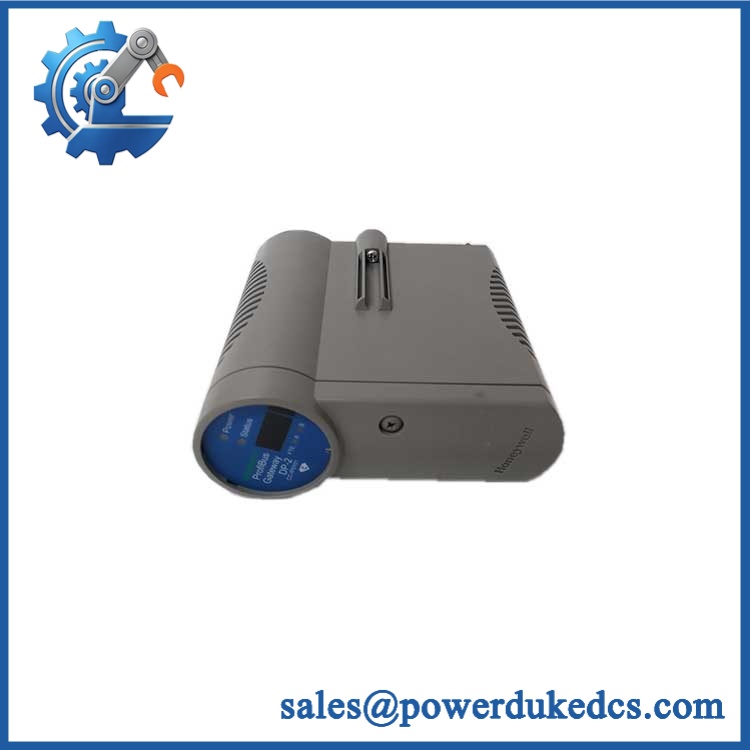
HONEYWELL CC-IP0101 51410056-175
Application Scenarios & Pain Points
A communication gateway failure can isolate an entire group of field devices without causing an immediate controller shutdown. The CC-IP0101 is typically maintained as a spare where PROFIBUS-connected equipment remains part of the operating control system.
- Oil and gas processing: Connects PROFIBUS instruments, analyzers, and remote devices into Honeywell DCS networks.
- Chemical production: Supports integration of third-party field equipment requiring PROFIBUS communication.
- Power generation: Maintains communication paths for auxiliary automation systems.
- Water treatment plants: Interfaces remote control devices with centralized Honeywell systems.
- Manufacturing facilities: Supports legacy fieldbus installations during lifecycle extension projects.
In a production line with hundreds of PROFIBUS nodes, a failed gateway can create a significant diagnostic workload because the field devices may remain healthy while communication is unavailable.
? Common Error Codes & Diagnostic Symptoms
Symptom/Code: PROFIBUS Device Offline / Bus Fault
→ Diagnosis: Possible incorrect baud rate, damaged PROFIBUS cable, termination failure, or gateway communication fault.
→ Action: Verify network parameters and replace CC-IP0101 if the gateway hardware fails.
Symptom/Code: Ethernet Communication Lost
→ Diagnosis: Possible network configuration issue, RJ45 port failure, or controller communication interruption.
→ Action: Check IP settings and physical network connection before module replacement.
Symptom/Code: Gateway Not Recognized by Controller
→ Diagnosis: Possible incorrect configuration database entry, firmware mismatch, or hardware revision incompatibility.
→ Action: Confirm system compatibility and replace module if hardware diagnostics fail.
Cross-Reference & Lifecycle Migration
- Related Identification:
- CC-
- 51410056-175
- Honeywell PROFIBUS Gateway Module
- Compatibility Requirements:
- Verify:
- Honeywell C300 controller revision
- Experion PKS version
- PROFIBUS master configuration
- Device GSD files
- Network addressing
- Verify:
- Firmware / Configuration Requirements:
- Gateway configuration may require matching software parameters.
- Confirm firmware revision compatibility before installation.
- Lifecycle Status:
- Status: Legacy / Availability Dependent
- Maintain tested spare inventory where PROFIBUS integration remains operationally important.
- Migration Strategy:
- Keep PROFIBUS network documentation updated.
- Archive GSD files and parameter settings.
- Record installed hardware revision before replacement.
Field Engineer’s Tech Notes (Anti-Pitfall Guide)
- Do not replace the gateway before checking PROFIBUS termination.
Incorrect termination resistance is a common cause of intermittent fieldbus faults and can make a healthy module appear defective. - Do not copy configuration blindly from another cabinet.
Network addresses, device mapping, and controller database assignments must match the actual installation.
Strict QA & Testing SOP
A professional inspection process for HONEYWELL CC- 51410056-175 should include:
Step 1 — Incoming Inspection
- Verify Honeywell label.
- Confirm complete part number.
- Record serial number and revision.
- Check packaging condition.
Step 2 — Physical Examination
Inspect:
- PROFIBUS connector
- Ethernet port
- Terminal connections
- Housing condition
- Mounting hardware
Step 3 — Electrical Testing
- Apply 24 VDC power.
- Verify startup sequence.
- Check current consumption.
- Confirm status indicators.
Step 4 — Communication Testing
- Connect to compatible Honeywell test environment.
- Verify PROFIBUS communication.
- Check Ethernet connectivity.
- Confirm controller recognition.
Step 5 — Packaging Control
- Use anti-static protection.
- Protect communication ports.
- Prevent connector impact during transport.
Test videos are available for selected inspected units.
Buyer’s FAQ (Dynamic Q&A)
Q: Can the Honeywell CC- 51410056-175 be hot-swapped?
A: Do not assume live replacement capability. Gateway modules are part of active communication networks and should normally be replaced during controlled maintenance.
Q: How do I verify this is a genuine Honeywell CC-?
A: Confirm the Honeywell identification label, part number 51410056-175, hardware revision, connector layout, and supplier inspection documentation.
Q: Does the CC- include firmware?
A: The module may contain internal firmware depending on revision. Verify firmware compatibility with the existing Honeywell system before commissioning.
Q: What warranty applies to this PROFIBUS gateway module?
A: Warranty depends on supplier terms and product condition. Confirm whether the unit is new original, unused surplus, refurbished, or tested before installation.




 Start Chat


