

Description
- Model: IS420UCSCH1A-F.V0.1-A
- Brand: GE General Electric / GE Vernova
- Series: Mark VIe
- Part Type: UCSC Universal Compact Controller
- Core Function: Executes Mark VIe control applications, manages I/O network communications, and provides the computing platform for turbine and industrial process control.
- Processor: Quad-core AMD G-Series processor at 1.2 GHz
- Memory: 4 GB DDR3-1333 SDRAM
- Storage: 40 GB pSLC SSD, with approximately 16 GB allocated/used in the published controller configuration
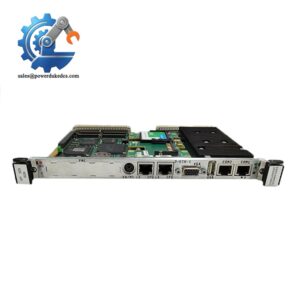
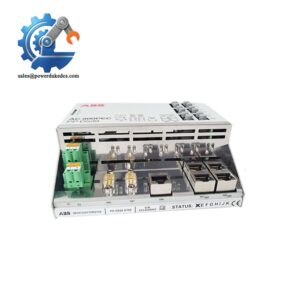
- Interfaces: 6 Ethernet ports, 2 USB 2.0 ports, COM service interface, DisplayPort, and a dedicated bottom Ethernet connection for supported infrastructure functions.
- Power: 18–30 VDC, maximum published consumption 31 W
- Cooling: Fanless convection cooling
- Reliability: Published MTBF of approximately 414,248 hours at 30°C for the H1 controller.
Product Introduction
A failed UCSC controller can take an otherwise healthy Mark VIe control architecture out of service quickly: I/O packs may remain powered, field transmitters may continue operating, yet application execution and network coordination stop at the controller layer. The GE IS420UCSCH1A-F.V0.1-A is the H1 UCSC controller used as the central computing element of the Mark VIe control platform. Its quad-core 1.2 GHz AMD G-Series processor, 4 GB DDR3-1333 memory, and QNX real-time operating environment provide the processing platform for control logic and I/O communications.
From an asset-management standpoint, the suffix is important. IS420UCSCH1A-F.V0.1-A should be recorded exactly as supplied because F.V0.1-A identifies a particular configured controller/software variant; do not reduce the purchase order to “IS420UCSCH1A” without confirming the required revision. The controller provides six Ethernet interfaces, two USB 2.0 ports, a service COM connection, and a DisplayPort interface, while its 18–30 VDC input and 31 W maximum power consumption need to be included in cabinet power and thermal calculations.
Core Technical Specifications
| Parameter | Value |
|---|---|
| Manufacturer | GE General Electric |
| Model | IS420UCSCH1A-F.V0.1-A |
| Base Controller | IS420UCSCH1A |
| Product Type | UCSC Universal Compact Controller |
| Control Platform | GE Mark VIe |
| Processor | Quad-core AMD G-Series |
| CPU Frequency | 1.2 GHz |
| L2 Cache | 2 MB |
| RAM | 4 GB DDR3-1333 SDRAM |
| Storage | 40 GB pSLC SSD |
| Published Used SSD Capacity | Approximately 16 GB |
| Operating System | QNX Neutrino, version 6.5 or 7.1 depending on system release |
| Ethernet Ports | 6 total |
| Front Ethernet | 5 ports |
| Bottom Ethernet | 1 port for designated infrastructure connectivity |
| USB | 2 × USB 2.0 |
| Service Port | RJ-45 COM, 115200 bit/s, 8N1 |
| Display Interface | DisplayPort; disabled after startup in the documented configuration |
| microSD | Present interface; not currently supported |
| Input Voltage | 18–30 VDC |
| Nominal Voltage | 24/28 VDC typical Mark VIe supply |
| Maximum Power Consumption | 31 W |
| Cooling | Natural convection |
| Mounting | Vertical cabinet installation with mounting hardware |
| Controller Dimensions | 168 × 150 × 55 mm H × D × W |
| Dimensions With Mounting | Approximately 204 × 152 × 55 mm H × D × W |
| Weight | Approximately 1,327 g |
| Operating Temperature | -40°C to +70°C |
| Storage Temperature | -40°C to +85°C |
| Humidity | Up to 95% RH, non-condensing |
| Altitude | Normal operation to 1,000 m; extended operation to 3,000 m with temperature derating |
| MTBF | Approximately 414,248 hours at 30°C |
| Engineering Software | ControlST V07.00.00C or later |
| Programming | Control block language with analog/discrete blocks and relay-ladder representation |
| NVRAM Capability | ControlST V07.05+ supports 6,139 nonvolatile program variables, 338 forces, 128 totalizers |
| Redundancy | Simplex, dual, and TMR configurations supported according to system architecture |
The 31 W maximum power figure is the number to use for conservative cabinet thermal-load planning, rather than the much lower nominal figures sometimes quoted by aftermarket listings. At 31 W, a single controller represents a meaningful heat source in a densely packed enclosure, particularly when ambient temperature approaches the upper operating limit. The GE controller documentation specifies convection cooling and requires the ambient-temperature measurement to be considered at approximately 25 mm from the controller surface.
The memory specification is unusually important for long-term inventory. The H1 version uses 4 GB DDR3-1333 SDRAM, while the H2 and S2 UCSC variants use different processor and memory configurations; those controllers should not be mixed into a purchase order simply because all carry a UCSC designation.
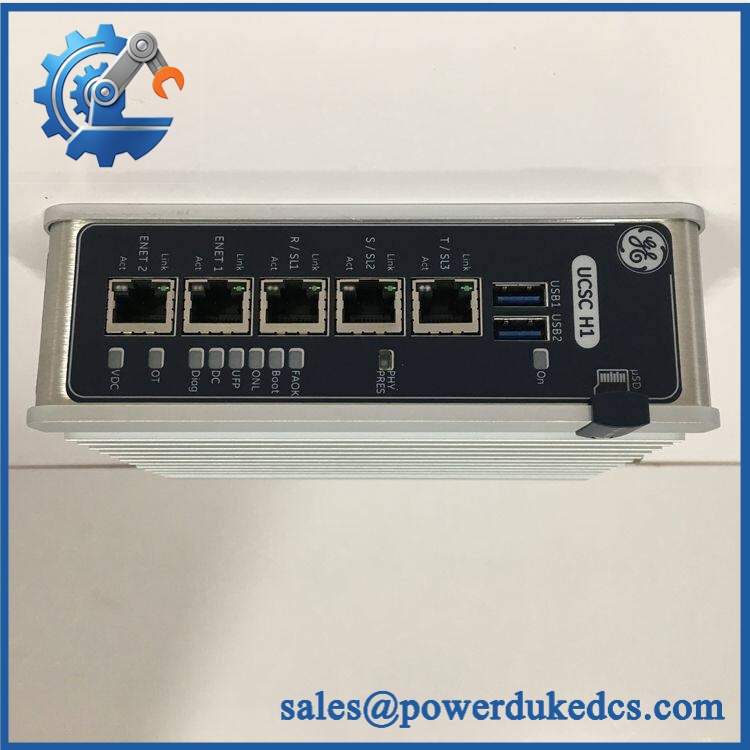
GE IS420UCSCH1A-F.V0.1-A
Application Scenarios & Pain Points
At a combined-cycle power plant, the UCSC executes the control application while communicating with distributed Mark VIe I/O packs. When cabinet ambient temperatures approach 60°C, the controller remains within its published temperature range, but the 31 W maximum dissipation must still be considered in the enclosure heat balance.
For gas-turbine control, rapid access to I/O data matters because the UCSC sits above distributed I/O rather than at the field-terminal level. A controller replacement therefore requires more than a power-up check; application loading, I/O assignments, network identity, and controller redundancy state must all be verified.
In compressor and oil-and-gas installations, the multiple Ethernet interfaces allow the controller to participate in separate control and network paths. A failed Ethernet port can therefore create a partial communication problem rather than a total CPU failure, so engineers should test every configured port before condemning the controller.
During legacy migration, the 4 GB H1 hardware configuration is materially different from the H2 and S2 UCSC variants. The processor, memory, software baseline, and application resource limits must be checked before changing controller generations.
For remote asset-monitoring deployments, certain H1 configurations can incorporate GE Field Agent functionality and a bottom network connection used for cloud/infrastructure communications. Verify the exact F.V0.1-A configuration before assuming that every H1A controller has identical Field Agent features.
🚨 Common Error Codes & Diagnostic Symptoms
Symptom/Code: DIAG or Fault condition during startup → Diagnosis: The controller may have detected a processor, memory, boot, storage, or system-configuration fault. → Action: Review controller diagnostics and boot status, verify supply voltage, then replace the UCSC when hardware failure is established.
Symptom/Code: Controller remains powered but application does not reach Online state → Diagnosis: Check the QNX boot sequence, application image, controller configuration, network identity, and storage device before declaring a hardware failure. → Action: Restore the approved application/software baseline or replace the controller if the hardware cannot complete a valid boot.
Symptom/Code: Multiple I/O networks become unavailable simultaneously → Diagnosis: Because the UCSC provides access to multiple I/O networks, a controller-side Ethernet or processing fault can appear as several independent I/O failures. → Action: Check controller diagnostics and all configured Ethernet links; replace the UCSC when the failure follows the controller.
The exact diagnostic text depends on the Mark VIe release and ControlST configuration. Do not invent a numerical fault code from a generic UCSC listing.
🚨 Cross-Reference & Lifecycle Migration
The IS420UCSCH1A is the quad-core H1 UCSC platform. GE documentation lists the H1 configuration at 1.2 GHz quad-core AMD G-Series with 4 GB DDR3-1333 SDRAM, while IS420UCSCH2A is a different dual-core configuration with different memory resources.
The related IS420UCSCS2 belongs to the safety-oriented UCSC family and should not be treated as an automatic substitute for an H1A general-purpose controller. The GE documentation specifically notes that the non-safety H1/H2/S2 NVRAM capability is not supported by Mark VIeS safety control, reinforcing the need to distinguish general-purpose and safety architectures.
Lifecycle status: Active / Current-family hardware. GE documentation continues to identify the H1A within the UCSC controller family. For critical installations, maintain at least one configuration-verified spare when controller replacement cannot be completed from another installed redundant unit.
The supplied F.V0.1-A designation should be treated as a specific firmware/configuration baseline. A firmware update or re-image may be required when migrating between system releases, but do not overwrite the existing software simply because a newer release exists; match the controller to the site’s approved ControlST and application baseline.
Field Engineer’s Tech Notes
First warning: do not confuse “same model family” with “same controller configuration.” The H1A, H2A, and S2 configurations have different processor and memory resources. Confirm the CPU generation, RAM capacity, storage configuration, and software release before accepting a cross-reference.
Second warning: protect the heatsink airflow path. This UCSC is convection cooled. Do not install it horizontally when the cabinet design requires vertical orientation, and do not bury the anodized heatsink behind dense cable bundles (restricted airflow increases thermal stress on the CPU and SSD).
One more check matters during replacement: verify the 18–30 VDC input directly at the controller. A cabinet supply can read correctly at the power distribution point while the voltage at the UCSC falls outside tolerance because of wiring resistance, terminal heating, or a degraded distribution connection.
Strict QA & Testing SOP
Step 1 — Inbound inspection. Confirm the complete IS420UCSCH1A-F.V0.1-A marking, serial number, revision, date code where available, heatsink condition, mounting hardware, Ethernet connectors, USB ports, COM port, and power connector. Photograph the identification label.
Step 2 — Mechanical examination. Inspect the anodized heatsink fins for deformation or contamination. Check the retaining clips, connector housings, and mounting bracket for mechanical damage.
Step 3 — Electrical verification. Apply controlled 18–30 VDC input within the approved test limits. Record startup current, power behavior, and any abnormal thermal rise. Do not use an uncontrolled laboratory supply.
Step 4 — Boot test. Allow the UCSC to complete its normal boot sequence. Record startup diagnostics, LED behavior, QNX status, and storage recognition.
Step 5 — Hardware interface test. Validate all configured Ethernet ports using known-good cables and network equipment. Test the two USB ports, service COM interface, and supported display interface as applicable.
Step 6 — Controller application test. Load an approved test application or authorized maintenance image. Verify ControlST recognition, controller identity, application execution, I/O network communications, and diagnostic reporting.
Step 7 — Memory and storage verification. Confirm approximately 4 GB system RAM and the expected pSLC storage configuration without writing unnecessary data to the SSD. Record storage health and available capacity as asset-history information.
Step 8 — Redundancy test. Where the site configuration supports redundancy, verify the intended simplex, dual, or TMR behavior using the approved commissioning procedure.
Step 9 — Final QC and packaging. Record serial number, firmware/software revision, test results, inspector, and test date. Place the controller in ESD-safe packaging and protect the heatsink and RJ-45 interfaces during shipment.
Test videos are available for documented startup, port testing, diagnostics, and application-recognition verification.
Buyer’s FAQ
Can I hot-swap the IS420UCSCH1A-F.V0.1-A?
Do not assume it can be removed under power simply because the Mark VIe architecture supports redundant controller configurations. The approved maintenance procedure, controller redundancy state, application behavior, and process risk must be checked first.
How can I tell whether a New Original unit is authentic?
Start with the GE nameplate and complete part number. Then compare the heatsink, housing, six-port Ethernet arrangement, serial information, PCB markings where accessible, and factory packaging; for a high-value spare, request pre-shipment photographs and documented functional-test results.
What warranty language should I require?
Specify the exact part number and the stated condition—New Original, New Surplus, or Refurbished. The purchase order should define the warranty period, functional coverage, DOA treatment, and return process rather than relying on an informal statement.
Does the controller arrive with the latest firmware pre-loaded?
Do not assume that it does. The F.V0.1-A suffix represents a specific configured software baseline, while Mark VIe applications depend on the approved ControlST release and site application image. Verify the installed firmware/software revision before commissioning and preserve the existing configuration before any re-image operation.




 Start Chat


