

Description
Unboxing & Physical Snapshot
- Model & Brand: Yokogawa Electric YS1500 — 1/4-DIN programmable indicating controller for industrial process applications.
- Physical Dimensions: Approximately 96 × 96 × 100 mm (W × H × D) for the standard housing; verify the complete suffix and installation drawing before panel modification.
- Estimated Shipping Weight: Approximately 0.7–1.0 kg gross, including protective packaging; physically weigh the packed unit for final freight calculation.
- Panel Cutout: Approximately 92 × 92 mm for the standard 1/4-DIN panel format; confirm against the applicable Yokogawa installation documentation.
- What’s in the Box: YS1500 controller, panel mounting hardware, terminal accessories where supplied, and OEM documentation when applicable. Communication cables and application-specific accessories are not assumed included.
- Receiving Inspection: Record the complete model code, serial number, power-supply rating, option codes, display condition, terminal condition, and firmware/configuration status.
Product Introduction
Architecture Hook
The YS1500 is designed to occupy a conventional 1/4-DIN instrument-panel position while providing programmable process-control functions. Unlike a simple process indicator, it contains control logic, parameter storage, configurable inputs/outputs, alarms, and communication functions that depend on the ordered configuration.
Physical interchangeability should therefore be checked at the complete model-code level. The front panel may look identical across several YS-series configurations while the rear terminal allocation and electrical options differ (a frequent source of incorrect spare substitutions in legacy instrument inventories).
Core Technical Specifications
| Parameter | Value |
|---|---|
| Manufacturer | Yokogawa Electric Corporation |
| Model | YS1500 |
| Product Type | Programmable indicating controller |
| Application | Industrial process control |
| Panel Format | 1/4-DIN |
| Front Dimensions | Approximately 96 × 96 mm |
| Panel Cutout | Approximately 92 × 92 mm |
| Depth | Approximately 100 mm, excluding rear wiring clearance |
| Display | Digital process-value and status display |
| Control Functions | Programmable PID/process control |
| Input Configuration | Option/model dependent |
| Output Configuration | Option/model dependent |
| Communication | Option dependent |
| Power Supply | Model-code dependent |
| Installation | Panel mount |
| Cooling | Natural convection |
| Weight | Approximately 0.7 kg class; verify exact configuration |
| Firmware | Revision dependent |
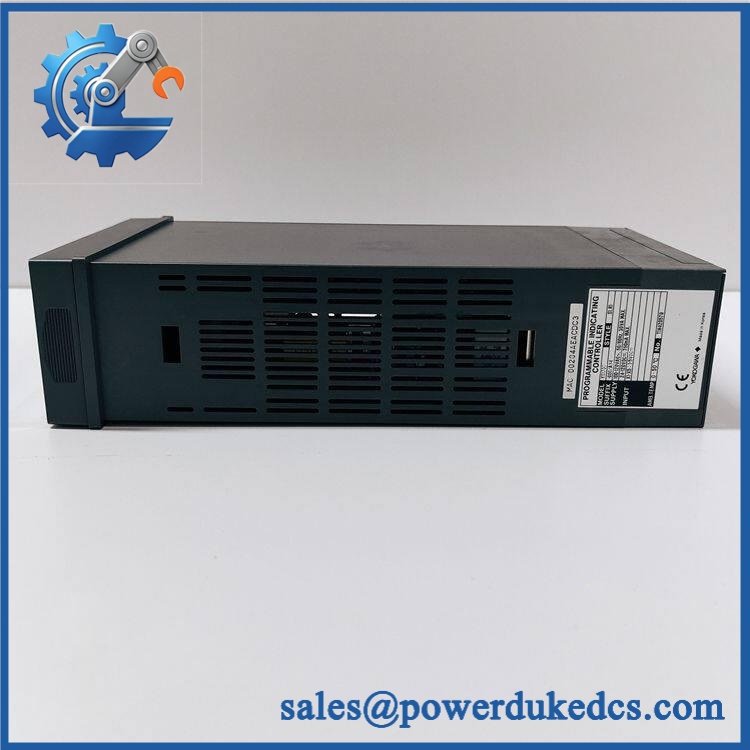
Yokogawa YS1500
Do not use the base model number as the complete material identity. Yokogawa’s YS-series controllers are available with different input, output, communication, and power-supply arrangements.
Power consumption and thermal dissipation should be calculated from the exact model and option code. A generic YS1500 value should not be copied into an engineering database when cabinet heat-load calculations or power-budget audits depend on the figure.
? Global Compliance & Industry Certifications
- CE Mark: Applicable YS1500 configurations may carry CE conformity for relevant European requirements. Verify the exact declaration for the installed hardware and option configuration.
- UL/cUL: Confirm UL/cUL status from the exact product documentation or certification record. Do not infer approval from the Yokogawa brand.
- ATEX/IECEx: Do not treat the standard as hazardous-area certified unless an exact certificate covers the specific configuration and installation.
- Marine Approvals: DNV, ABS, or Lloyd’s Register approval must be verified separately for marine/offshore applications.
- EMC: Correct cabinet grounding, signal shielding, cable segregation, and protective-earth arrangements remain part of compliant installation.
- Safety Relevance: Controller conformity does not make the complete process-control loop safety-rated. Emergency shutdown, process interlocks, and independent protective functions require separate validation.
- Audit Record: Retain the nameplate photograph, complete model code, serial number, hardware revision, declaration of conformity, and applicable certificates.
Verify specific lot certifications with OEM.
? Long-Term Storage & Asset Preservation Guide
- Retain the original ESD packaging. Store the in its antistatic shielding bag whenever it is outside the control panel. Protect the rear terminals from dust, moisture, and accidental mechanical impact.
- Control warehouse humidity. Maintain a clean, stable storage environment, preferably below 60% RH, with no condensation. Avoid moving the controller directly from cold storage into hot, humid conditions.
- Protect the display and terminal assembly. Keep the original packing inserts or protective film where available. Do not stack heavy components on top of the controller—the front display and mounting hardware can be damaged even when the electronics remain functional.
- Preserve the configuration separately. Record the complete model code, I/O options, control parameters, alarm settings, communication parameters, and firmware revision. For a process controller, configuration loss can be more consequential than physical component failure.
Physical Installation Prerequisites
- Mounting: Panel mount using the supplied/approved mounting hardware; verify the exact cutout from the applicable Yokogawa drawing before fabrication.
- Panel Cutout: Use approximately 92 × 92 mm only as a preliminary planning dimension; confirm the exact revision before cutting the panel.
- Rear Clearance: Provide sufficient space for terminal blocks, wiring bend radius, ventilation, and safe removal of the controller.
- Cooling: Allow natural convection around the instrument. Avoid placing heat-producing power supplies or drives immediately behind or below the controller.
- Grounding: Connect protective earth and signal shields according to the Yokogawa installation instructions and the plant EMC design.
- Signal Routing: Separate analog process wiring from motor, contactor, relay, and high-current switching conductors.
- Power: Verify the exact supply voltage and terminal polarity from the complete model code and nameplate before energizing.
- Commissioning: Validate input scaling, output action, PID parameters, alarm thresholds, control mode, communication settings, and programmed functions before returning the loop to operation.
Buyer’s FAQ
Q1. What HS tariff code should be used for the ?
The HS classification should not be assigned solely from the model number. The is an industrial process controller, but the final tariff classification depends on its precise technical function and the tariff schedule of the importing country.
Have the customs broker confirm the classification before issuing the commercial invoice. The invoice description should identify the item as an industrial programmable process controller rather than a generic electronic part.
Q2. Does Country of Origin affect this shipment?
Yes. COO can affect import duty, preferential tariff treatment, origin declarations, and trade-compliance screening.
Yokogawa is a Japanese manufacturer, but that does not automatically establish the manufacturing COO for every individual unit. Confirm COO from the physical nameplate, OEM documentation, or supplier Certificate of Origin.
Q3. Should shipping insurance be purchased?
For a critical process-control spare, insurance should be considered against the replacement value and potential production interruption. The controller is relatively lightweight, but impact damage to the display, rear terminals, or enclosure can make the unit unusable.
Photograph the model label, serial number, front display, rear terminals, and packaging before dispatch. Use ESD protection and rigid cushioning.
Q4. Does the include the latest firmware pre-loaded?
Do not assume it does. Firmware revision and application configuration should be treated as separate controlled attributes.
Before deployment, compare the replacement’s complete model code and hardware revision with the installed unit. Load the approved configuration, verify all process parameters and alarms, and document the final firmware/configuration state in the maintenance record.
Asset-control note: Maintain as the base identity, but capture the complete suffix and option code in the ERP record. Do not release a visually matching as a drop-in replacement until its electrical options and power configuration have been confirmed.



 Start Chat


